Novus Learn
Save topics to your local library in Novus Learn
Build a personal library of topics in Novus Learn without an account: save a source-grounded page to return to later, reopen it exactly as you left it, and remove it when you are done, all stored locally in your browser, with no tracking and nothing synced to a server.
Research is rarely one sitting. You find a topic worth coming back to, get pulled away, and want it waiting where you left it. Novus Learn handles this with a local library: a place to save the source-grounded topics you care about so a good page is one click away next time instead of a search you have to reconstruct from memory.
The important word is local. The library lives in your browser, tied to no account and synced to no server. Nothing about what you save is uploaded, tracked, or profiled: saving a topic is a note to yourself that stays on your device. This tutorial covers the full lifecycle: save, return, curate, and remove, plus exactly what "local-first" means for your data so there are no surprises later.
Contents
Two ways to finish
Save for later
Keep a source-grounded topic in your browser to return to it without re-searching.
Curate and clear
Review the topics you saved and remove the ones you no longer need.
- 1
1. Understand what the library actually is
The local library is a list of topics you have chosen to keep, stored in your own browser. It is not a cloud account, not a synced bookmark service, and not a profile someone else can see. When you save a topic, Novus Learn records enough to reopen that exact source-grounded page (its identity and where it lives in Wikipedia) in your browser's local storage on this device.
That design has a clear consequence worth internalizing up front: the library is as private and as portable as the browser it lives in. It costs nothing, asks for no sign-up, and shares nothing. It also does not follow you to another device or another browser, because there is no server holding a copy. Once you accept that trade, the library becomes exactly what it should be: a fast, private shelf for the reading you are actually doing.
- Stored in your browser, not an account or a server.
- No sign-up, no tracking, nothing uploaded.
- Tied to this browser on this device by design.
- 2
2. Save a topic while you are inspecting it
Saving happens from the topic itself. When you have searched, selected the exact page, and are inspecting it, save it to keep that source-grounded topic in your library. Because Novus Learn preserves the page's source identity, what you save is not a vague search term to run again later; it is the specific Wikipedia page you deliberately chose, waiting to reopen as the same article with the same references.
Save with intent rather than reflex. The library is most useful when it holds the handful of topics you genuinely mean to return to: a subject you are studying, a reference you keep needing, a page you want to finish reading. A tidy shelf of deliberate saves beats a wall of everything you glanced at, and it keeps the topics that matter easy to find.
- 3
3. Return to a saved topic later
Come back any time, open your library, and your saved topics are listed and ready. Reopening one takes you straight back to that source-grounded page (the same Wikipedia article you selected, with its source identity and claim-level citations intact) so you resume reading and verifying exactly where the topic left off, without repeating the search or the disambiguation.
This is where the local library earns its place in a real workflow. A study session, a piece of writing, or an ongoing question stops being a set of searches you re-run and becomes a small collection you return to directly. Because each saved topic reopens with its sources attached, picking a subject back up never means losing the provenance you established the first time through.
Saved topics reopen as the same source-grounded pages, and any of them can be removed in one step. - 4
4. Curate the shelf as you go
A library is only useful if you can find things in it, so treat it like a working shelf rather than an archive. Glance over your saved topics from time to time and keep the list to what is still relevant to what you are doing now. A short, current library surfaces the page you want immediately; a bloated one buries it under things you finished with weeks ago.
Curation is also how you keep the private, low-friction feel of the feature. Because nothing is synced or backed up, there is no "everything forever" archive quietly accumulating: the library is exactly what you decide to keep on this device, and pruning it is a normal part of using it well rather than a chore you are neglecting.
- 5
5. Remove a topic when you are done
Removing a topic is as direct as saving one: remove it from the library and it is gone from your browser's local storage. There is no trash to empty on a server and no lingering copy elsewhere, because there was never a server copy to begin with. When you remove a saved topic, you have genuinely removed it: the record simply ceases to exist on your device.
This makes cleanup honest and complete. Finished with a subject? Remove it and the shelf is clean. Because the original Wikipedia page still exists, removing a saved topic costs you nothing permanent; if you need it again, you can search, select, and save it once more in moments. The library is meant to be edited freely, not hoarded.
- Removing deletes the saved record from your browser, with no server copy left behind.
- The underlying Wikipedia page is untouched; you can always re-save it later.
- 6
6. Know the privacy model behind it
Everything about the local library follows from one principle: local-first, no tracking. Your saved topics are stored in your browser on your device, not in an account and not on a Novus Learn server, and they are not used to profile you. This is the same privacy stance the guide at https://learn.novusstreamsolutions.com/help/privacy-and-local-processing describes for the app as a whole: your reading is yours.
The practical flip side is that the library shares the fate of your browser storage. Clearing your browser data, or using a different browser or device, means the library is not there, because it was never anywhere but here. Projects are held as versioned IndexedDB snapshots that skip unchanged writes, so history survives an edit but not a cleared cache. If a set of saved projects matters, keep working in the same browser, and note the sources you most rely on separately as well. The library covers every input mode, not just Wikipedia (a URL you read, a site you indexed, a paper, a video, a textbook, or a file you uploaded through /upload) all kept entirely on your device.
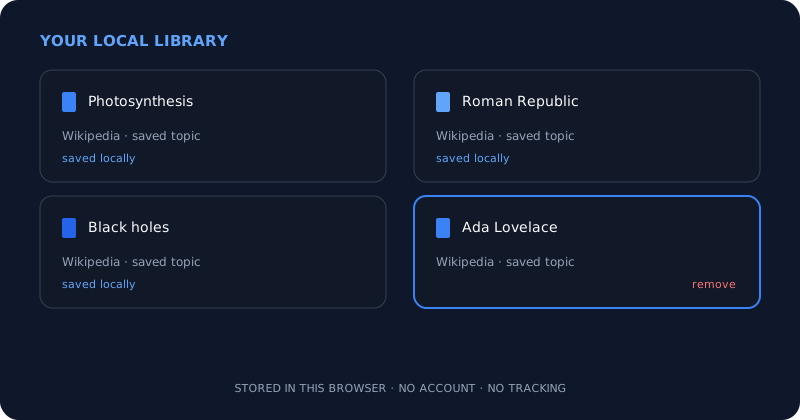
A private shelf, kept on your device
Use the local library as a small, deliberate shelf of the source-grounded topics you actually return to, not a dumping ground. Saving keeps the exact page and its citations; removing genuinely deletes the record from your browser; and nothing is ever synced, uploaded, or tracked. The trade for that privacy is that the library lives in this browser only, so curate it, and keep your important work where you can find it.
Frequently asked questions
Quick answers to common questions about this topic.
Where are my saved topics stored?
In your own browser, on the device you are using, via local storage. They are not kept in an account or on a Novus Learn server, which is why saving needs no sign-up and uploads nothing.
Will my library follow me to another device or browser?
No. Because the library is stored locally and never synced to a server, it stays in the browser where you created it. Switching devices or browsers, or clearing your browser data, means the saved topics are not carried over.
Does saving a topic track me or share my reading?
No. The local library involves no tracking and no profiling. Saving records enough to reopen the exact source-grounded page on your device, and nothing about what you save is uploaded or shared.
If I remove a topic, is it really gone?
Yes. Removing deletes the saved record from your browser's local storage, and there is no server copy to linger. The original Wikipedia page still exists, so you can search and save it again whenever you like.
Related workflow
From a source you can cite to a study pack you can hand out
Read from the source rather than a summary of it, then turn what you verified into a document someone else can use.
- Find the source and check the claim against itNovus Learn: The study material is extractive, not generative: what you get back is what the source says, which is the only kind you can safely cite.
- Assemble and finish the packNovus PDF Studio: Merge the pieces, add the fields a learner fills in, and sign it locally, so unpublished material stays unpublished.
Related troubleshooting
Was this page helpful?
Your answer stays in this browser, it is not sent anywhere and no account or cookie is involved.