2026 · Novus LearnAbout 15 min readNovus Stream Solutions
Novus Learn launch: follow the source, see the connections
Meet Novus Learn, a free browser-first reading tool built from official Wikipedia and Wikimedia sources. Search, choose the exact source you meant, then read with source identity and claim-level citations you can follow back: no account, no generated answers.
Contents
- 1.Overview
- 2.What "follow the source" means in practice
- 3.The search, select, and inspect flow
- 4.Source identity and claim-level citations
- 5.No paid model, and what that decision buys
- 6.The other half of the tagline: seeing the connections
- 7.Visual Studio, and reading structure as a picture
- 8.A local library, no account, and local-first by default
- 9.What was planned, and what shipped
- 10.Where Novus Learn sits in the portfolio
- 11.What happened next: nine ways in, not one
- 12.Upload shipped, and Visual Studio grew up
Overview
Today we are adding Novus Learn to the Novus Stream Solutions portfolio. It is a free, browser-first reading tool for anyone who wants to understand a subject and then trace every part of that understanding back to where it came from. The tagline is deliberately plain: follow the source, see the connections.
Learn is easiest to describe by what it declines to be. It is not an answer engine. It does not call a paid language model, it does not write prose on your behalf, and it does not fold several pages into one confident paragraph with no return address. When you look up a topic, you are reading material drawn from official Wikipedia and Wikimedia sources, shown with its identity intact and citations you can open. The tool exists to shorten the distance between a statement and its origin, not to stand in front of the source and speak for it.
What "follow the source" means in practice
A great deal of software in this category now works the same way. You ask a question, a model assembles a reply from training data and retrieved fragments, and you receive fluent text that reads as authoritative whether or not it happens to be correct. The convenience is real, and so is the catch: the words on screen have no dependable provenance. You often cannot tell which sentence came from a solid reference, which was inferred, and which was invented outright. Novus Learn takes the opposite stance. Nothing on the page is composed by a model. Every passage you read is content that already exists in a Wikimedia source, carried across with attribution rather than paraphrased into something new.
That single decision changes what the product is allowed to promise. Because Learn does not synthesize, it cannot invent a citation, misattribute a quote, or assert with confidence a fact that no source supports. The trade is honest and worth stating plainly. Learn will not answer a question the sources do not answer, and it will not paper over a gap with generated filler. What it offers instead is a grounded reading surface where the identity of the source travels with the text, so you always know whose account you are reading and can go and check it for yourself.
This is a tool for people who need to be right, not merely reassured. Students building a bibliography, editors checking a claim before they repeat it, researchers scanning an unfamiliar area, and curious readers who have simply been burned by a confident answer that turned out to be wrong all share the same need. They do not want to be told the answer; they want to be shown the material and pointed at exactly where each part of it comes from. Learn is built around that need rather than around the appearance of instant expertise.
The search, select, and inspect flow
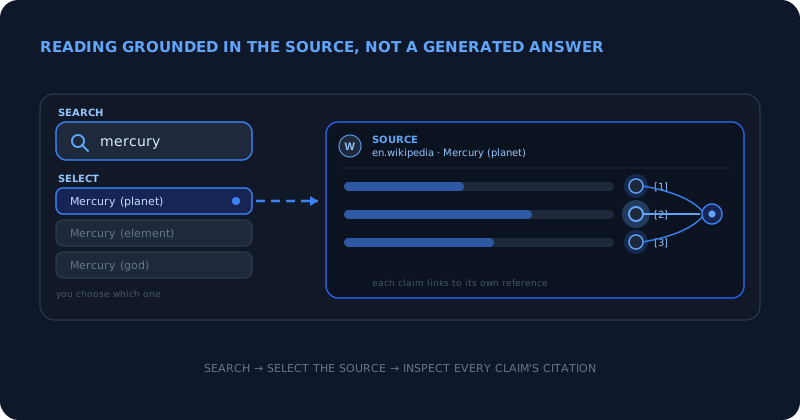
The core of Learn is three steps, and every one of them is visible rather than buried inside a black box. The first is search. You type a subject and Learn runs a live query against Wikimedia, returning real candidate topics as they exist in the encyclopedia right now, not a cached snapshot and not a model recalling what an article used to say.
The second step is select, and it is the step most answer engines quietly skip. Search results are frequently ambiguous. "Mercury" is a planet, a chemical element, a Roman god, a car brand, and a musician's stage name; one string can point to a dozen unrelated pages, and across languages it can point to different editions with very different depth. Rather than guessing which one you meant and committing to it without telling you, Learn asks you to choose the exact page and edition you intend to read. Disambiguation is treated as your decision, because the wrong starting pick is the root of most answers that are confident and completely beside the point.
The third step is inspect. Once you have chosen a page, Learn opens it as a reading surface that keeps the source's identity attached and exposes citations at the level of individual claims. You are not handed a summary to take on faith; you are handed the material itself with its supporting references within reach, so following a specific statement back to its footnote is a single motion rather than an investigation. Each step is a place where a generative tool makes a hidden choice on your behalf, and Learn turns each of those hidden choices back into something you can see and control.
Source identity and claim-level citations
The feature that most sets Learn apart from an answer engine is how it treats citations. In a generative tool, a citation is frequently decorative: a link appended after the fact to lend authority to text the model wrote on its own, sometimes pointing at a page that does not actually contain the claim it is attached to. In Learn, the citation is the entire point. Because the text is the source rather than a rewrite of it, the references belong to the passage they sit beside, and they resolve to the specific place a statement came from.
Claim-level citation means the granularity is the individual assertion, not the whole article. If a paragraph makes four factual claims, you are meant to be able to see the support behind each of them, rather than a single blanket reference at the bottom that may or may not cover the one sentence you actually doubt. This is already how careful people work. They do not trust a document because it feels authoritative; they trust a particular claim because they followed it to a source that held up. Learn is built to make that motion fast and ordinary instead of a chore reserved for the single fact that made you suspicious.
Source identity runs alongside the citations. Every topic carries where it comes from and, where it matters, which Wikimedia edition you are reading, so you are never left wondering whether you are looking at a mature, heavily edited article or a much thinner version from another language. Provenance is not an afterthought bolted onto the page; it is part of the frame around every page, present before you read the first sentence and still there when you leave. That is the difference we care about most: an answer engine asks you to trust the output, while Learn asks you to look at the source, and then makes looking easy.
There is a quieter benefit to reading this way. When you can see the reference behind every claim, you also begin to see where the sources themselves are thin: a statement leaning on a weak citation, a section that rests on a single reference, a topic that is simply short in one language and rich in another. An answer engine irons all of that out into one uniform tone of confidence. Learn leaves the texture visible, so you come away knowing not only the subject but how well the subject is actually documented, which is often the more useful thing to know before you repeat it.
No paid model, and what that decision buys
Learn does not run on a paid AI API, and that is a design choice with consequences that reach well beyond privacy. A tool built on a metered external model inherits that model's economics and its instability. Prices move, rate limits bite at the wrong moment, and the same request can return different text after a quiet version update, so the ground shifts under you between one visit and the next. Because Learn reads from sources rather than from a model, none of that applies. What you read reflects the Wikimedia material as it stands, not a vendor's latest fine-tune, and it does not drift because a model was retrained somewhere you cannot see or audit.
It also keeps the free promise honest and simple. There is no per-query model bill quietly accruing in the background, which means keeping Learn free is a straightforward commitment rather than a subsidy we might one day be forced to reclaim behind a paywall. We would rather build the tool so that being free is its natural state than launch generously and then walk the generosity back once the invoices start arriving. The absence of a paid model is not a missing feature here; it is the thing that lets the other promises hold.
The other half of the tagline: seeing the connections
Follow the source is the first half of what Learn promises; see the connections is the second, and the two are really one idea approached from opposite ends. When the material keeps its citations and its identity, the links between things stop being invisible. A claim connects to the reference that supports it. A reference connects to the source it lives in. A topic connects to the neighbouring topics it cites and is cited by. None of that has to be manufactured, because the connections already exist inside the sources; Learn simply keeps them intact rather than dissolving them into a single block of generated narrative.
The practical result is that the understanding you leave with is a map you assembled yourself, not a conclusion you were handed. You can see how you travelled from the first search to the specific claim you now trust, and every edge along that path is attributable. That is a slower way to learn than reading one confident paragraph, and it is slower on purpose. The connections are the part you keep, because they are the part you can defend later to a teacher, an editor, a colleague, or your own second-guessing.
Visual Studio, and reading structure as a picture
Learn also includes Visual Studio, reachable at /visuals. The idea is visuals that earn their shape from the source rather than decoration bolted on afterward. A diagram, a timeline, or a relationship view should reflect structure that is genuinely present in the underlying material, so that the picture becomes another way to read the source instead of a separate, unverifiable artifact drawn to look convincing.
Visual Studio is at limited availability today, and we would rather say that than imply a finished feature. It is live enough to try and to steer our direction, and it is not yet a complete surface that covers every topic or every kind of relationship you might want to see. Treat it as a real but early part of the tool. As it matures, the rule that governs the reading surface will govern the visuals as well: what you see should trace back to the source, and where it cannot, it should not pretend that it can. We are shipping it now because we would rather show the honest state of the work than hide an unfinished feature until it looks polished enough to oversell.
A local library, no account, and local-first by default
Learn has no accounts, and it does not track you. There is no sign-up wall, no profile to complete, and no server-side history of what you read. When you want to keep a topic, the local library saves it in your own browser, on your own device, so your reading list belongs to you rather than to us. Closing the tab does not file your interests away in a place you cannot see or delete.
This is the same local-first instinct that runs through the rest of the portfolio, applied to reading rather than to processing media. The searches themselves reach out to Wikimedia because that is where the sources live, but the record of what you saved and how you have configured the tool stays on your machine. There is nothing to breach on our side because there is nothing about your reading kept on our side to begin with. Privacy here is not a policy we ask you to trust; it is a consequence of where the data physically sits.
Appearance controls belong to the same idea of leaving decisions with you. You can set the theme, adjust motion, and tune accessibility options so the reading surface suits how you actually read, whether that means reduced motion for a calmer page, higher contrast for legibility, or a layout that is easier on your eyes across a long session. These are not preferences buried three menus deep as an afterthought; they are part of treating the reader as the person in charge of the experience rather than a metric to optimize.
None of this asks you to configure anything in order to be safe. The private default is the only default. You do not opt out of tracking, because there is no tracking to opt out of, and you do not manage a cloud sync, because there is no cloud copy of your library to manage in the first place. The tool deliberately does less on our servers, and that restraint is exactly what lets the reading, the saved topics, and the settings all stay yours.
What was planned, and what shipped
One capability is coming but is not here yet, and we want to represent it accurately rather than let a roadmap read like a feature list. Upload, at /upload, is intended to let you bring your own private documents into the same follow-the-source reading surface, so that the citation-first, provenance-first way of reading is not limited to public encyclopedia topics but can apply to material you already hold. It is planned. It is not live in this release, and nothing in the interface should suggest otherwise.
We are describing it now because it explains where Learn is heading, not because you can use it today. When private document import does ship, it will be held to the same standard as everything else here. Your documents remain yours, the reading surface keeps their identity and citations attached the way it does for public sources, and none of that flow quietly turns into a reason to build a profile of you. Until it is real and behaves that way in the product, it stays labeled as planned, and you will find it named as planned in the tool map rather than promised as available.
Where Novus Learn sits in the portfolio
Novus Learn is the fifth live app in the portfolio, joining the NSS Background Remover, Novus Visualizers, Novus PDF Studio, and Novus Convert. The through-line across all five is one conviction seen from different angles: do the work close to the person using it, and never ask for more trust than the tool has actually earned. The first four keep your files on your device while they remove a background, render a visualizer, fill a PDF, or convert a file. Learn extends the same discipline to reading by keeping the provenance of what you read in plain view, so that understanding a topic and knowing where that understanding came from are never two separate tasks.
You can open it at learn.novusstreamsolutions.com and start from /explore, where a search turns into a chosen source and then into a page you can read with its citations within reach. Browse /featured for a curated way in, try Visual Studio at /visuals with its current limits in mind, and use Help centre for getting started, searching topics, sources and citations, privacy and local processing, accessibility, and troubleshooting. For the exact current inventory of what is live versus planned, see Tool maps, and for a complete first pass through the tool, follow Getting started with Novus Learn: from search to source. As Visual Studio grows and private document upload becomes real, the live product, its documentation, and its tool map will move forward together, one honest step at a time.
What happened next: nine ways in, not one
This post described a tool that read Wikipedia. Within six weeks it read almost anything, and the change is large enough that the launch framing above now understates the product rather than describing it.
A project can now start from a URL at /read, a whole indexed site at /site, an open-access journal article at /paper via Europe PMC, a video at /video, a textbook at /textbook, an uploaded file at /upload, a coding path at /languages, or a JavaScript codebase at /code. All of that sits alongside the original Wikipedia search, which is still pinned to a specific revision so a project does not drift underneath you. Video is the one worth singling out: where captions exist they are used directly, and where they do not, transcription runs on your own device rather than travelling to a service.
What did not change is the contract, and that is the point. Every one of those inputs feeds the same extractive pipeline. The source is fixed, the claims are lifted from its own sentences, and when the source cannot answer a question the project says so instead of filling the gap. Widening the front door did not loosen the rule behind it.
- Search a topic: Wikipedia, pinned to a revision.
- Read a URL (/read) and index a site (/site).
- Study a paper (/paper) via Europe PMC.
- Break down a video (/video) or a textbook (/textbook).
- Upload PDF, EPUB, Word, text, or Markdown (/upload).
- Learn to code (/languages), x-ray a codebase (/code), and run JavaScript (/playground).
Upload shipped, and Visual Studio grew up
The section above describes private upload as planned rather than live, and says so deliberately because overstating a feature would contradict a tool built on honest sourcing. It shipped on 18 July 2026, and it accepts more than the plain text and Markdown originally sketched out: PDF, EPUB, and Word all work. Files are parsed in the browser and stored in versioned IndexedDB snapshots on the device; there is no upload in the usual sense and no server-side copy.
Visual Studio has likewise moved past the limited-availability framing it launched with. It now renders hierarchies, labeled systems, and scale comparisons alongside the original views, and has a full-screen presentation mode you can teach from directly. The grounding rule is unchanged: a visual should earn its shape from the source, and a bigger diagram is not a more authoritative one.
The Teacher Hub at /teachers is the piece that did not exist at launch at all. It turns any project (a textbook, a PDF, a slide deck, a Wikipedia topic) into a printable lesson with learning objectives, key points, a worksheet and answer key, review cards, and citations, printing or saving to PDF straight from the browser. Because it is assembled from the project's own sources, the handout says what the source says, which matters more than a nicer template when you are responsible for getting it right.
Frequently asked questions
Quick answers to common questions about this topic.
Is Novus Learn free?
Yes. Reading, live search, source selection, claim-level citations, and the local library are free to use, and there is no account to create.
Does Novus Learn use AI to write answers?
No. Learn does not call a paid AI model or generate prose. Everything you read comes from official Wikipedia and Wikimedia sources, shown with source identity and per-claim citations rather than synthesized text.
Where do the topics come from?
From official Wikipedia and Wikimedia sources, queried live. You choose the exact page and edition you meant, and each claim keeps a citation you can follow back to its origin.
Do I need an account, and is my reading tracked?
No account, and no tracking. Topics you save go into a local library in your own browser, and your appearance and accessibility settings stay on your device.
Related workflow
From a source you can cite to a study pack you can hand out
Read from the source rather than a summary of it, then turn what you verified into a document someone else can use.
- Find the source and check the claim against itNovus Learn: The study material is extractive, not generative: what you get back is what the source says, which is the only kind you can safely cite.
- Assemble and finish the packNovus PDF Studio: Merge the pieces, add the fields a learner fills in, and sign it locally, so unpublished material stays unpublished.
Related troubleshooting
Was this page helpful?
Your answer stays in this browser, it is not sent anywhere and no account or cookie is involved.