2026 · Sonic WeaverAbout 13 min readNovus Stream Solutions
Seamless visual loops for streaming platforms
A 24/7 radio stream does not play a video; it plays the same thirty seconds ten thousand times, and every viewer joins mid-loop. That changes the craft entirely: the loop point has to sit on the beat grid, every motion has to complete whole cycles, and one drifting particle will betray the seam by morning.
Contents
- 1.The loop is the unit of a 24/7 stream
- 2.Pick a length the beat grid and the frame clock both accept
- 3.Every motion must complete a whole number of cycles
- 4.Where seams actually come from
- 5.The crossfade is a bandage, not a fix
- 6.Export settings for a file that repeats forever
- 7.Bandwidth and the dark-gradient problem
- 8.Test the loop the way a viewer meets it
The loop is the unit of a 24/7 stream
Lo-fi radio channels, ambient study streams, twenty-four-hour genre stations: the visual side of all of them is usually one video file between thirty seconds and a few minutes long, repeated indefinitely by the streaming software. Nobody renders twenty-four hours of unique footage, and nobody needs to: a well-made loop is indistinguishable from an infinite scene. The economics follow from that. One afternoon of careful loop work produces the entire visual identity of a channel that runs for months, which makes the loop the highest-leverage render a streaming musician or channel operator ever makes.
But infinite repetition is a hostile environment for craft mistakes. A flaw a viewer would never notice in a music video (a particle that pops out of existence, a gradient that jumps a shade) becomes a metronome when it recurs every forty seconds for six hours. Worse, stream viewers do not start at frame zero; they join mid-loop, at every possible offset, so the loop has no privileged beginning to hide behind. Every frame is somebody’s first frame, and every frame is also frame ten thousand of somebody else’s session.
Those two facts (one file, infinite hostile repetition) generate everything in this guide. The loop length has to be chosen so the music and the frame clock both agree on it. Every moving element has to return to its exact starting state. The seams that survive have to be hunted deliberately, because they will not announce themselves in a single preview pass. And the export has to be encoded so that the ten-thousandth repetition looks like the first.
It is worth naming what the loop is competing with, because the bar is higher than it looks. The established lo-fi channels have trained audiences to expect a scene that feels alive at minute one and at hour six: believably continuous, never obviously repeating, never degrading. Viewers leave streams over visual irritation they could not describe if asked. The craft in this guide is invisible when it works, which is precisely the point: a loop’s success is measured by the absence of the moment where a viewer notices it is a loop.
Pick a length the beat grid and the frame clock both accept
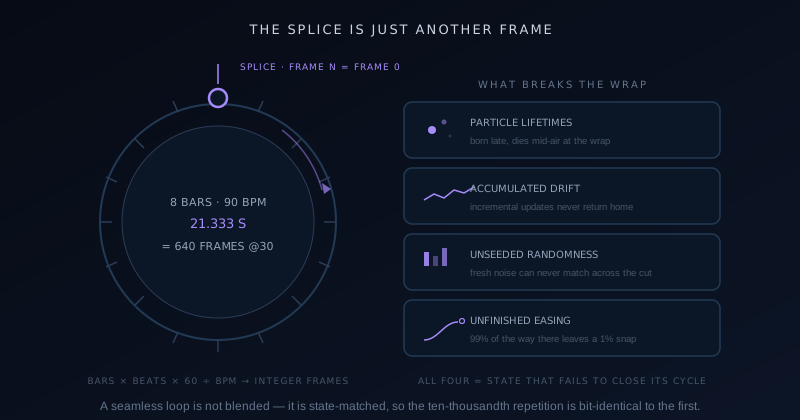
A loop that serves music has to end where a musical unit ends, or the audio and visual pulse drift apart at the splice. So the length is not a round number of seconds; it is a whole number of bars converted into time: bars × beats per bar × 60 ÷ BPM. Eight bars of 4/4 at 90 BPM is 21.333 seconds; sixteen bars at 140 BPM is 27.429 seconds. Choosing "30 seconds" because it sounds tidy guarantees the loop point lands mid-phrase, and even viewers with no musical training feel a bar of music being cut off at the knees.
The second clock that has to agree is the frame clock: the loop must contain an exact integer number of frames, or the encoder rounds the duration and the splice inherits a fractional-frame stutter. This is where BPM choice gets pleasantly nerdy. Those eight bars at 90 BPM are 21.333… seconds, which at 30 fps is exactly 640 frames, a perfect landing. At 29.97 fps it is not, which is one of several reasons I export loops at clean rates like 30 or 60 and never at broadcast-legacy rates. When the bars, the BPM, and the frame rate all divide evenly, the loop point becomes a mathematical certainty instead of a hope.
Length itself is a memory-versus-repetition trade. Short loops (fifteen to thirty seconds) are quick to perfect and cheap to render, but their landmarks recur so often that regulars memorize them. Longer loops (one to three minutes) hide their period much better at a linear cost in render time and QC effort. My default is 32 or 64 bars (somewhere between forty seconds and two minutes for most tempos), which is long enough that no single element becomes a metronome and short enough that a full three-repetition test viewing stays practical. The deterministic renderer described at Turning sound into motion: reading audio with the Web Audio API is what makes this precision possible at all: the same audio analysis produces the same frames, every render.
Every motion must complete a whole number of cycles
A loop is seamless when frame N is identical to frame zero (not similar, identical), and that constraint propagates into every animated property in the scene. Anything periodic must complete an integer count of cycles within the loop: an element orbiting with a twelve-second period fits a 48-second loop four times exactly, but a thirteen-second orbit arrives at the splice 0.31 of a cycle out of position, and the jump is visible from across the room. Before styling, I list every moving element and its period, and adjust periods to divisors of the loop length. It feels pedantic for about ten minutes, and then it feels like the only sane way to work.
The same integer rule applies to travel. A drifting fog layer must translate by exactly zero net distance (or by exactly one full wrap of a tiling texture) over the loop. A slow zoom is the classic trap: zoom in for the whole loop and the splice snaps scale back to the start, so continuous zooms are out. The loop-safe alternatives are oscillating zooms that breathe out and back over a divisor period, or wrap-around motion on seamlessly tiling imagery where the end position is the start position by construction.
Audio-reactive elements get their loop safety from a different source: determinism plus matching endpoints. Because the visualizer’s reactive properties are pure functions of the audio analysis, they repeat perfectly as long as the audio itself loops cleanly, which circles back to cutting the audio on the bar line with matched levels at both ends. A reactive spectrum over a bar-aligned audio loop is automatically seamless; the elements that break loops are almost always the decorative ones nobody thought of as animated, like a shimmer with a randomized phase or an easing curve that never quite returns to rest.
Where seams actually come from
After enough loop QC, the same four culprits keep appearing. Particles with lifetimes are the biggest: a mote born at second 38 of a 40-second loop wants to live five seconds, and at the splice it simply vanishes mid-air. Particle systems need either lifetimes and emission schedules that resolve fully within the loop, or a system whose state at frame zero was captured after warm-up so the population wraps consistently. The second culprit is accumulated drift: any property updated incrementally each frame (position plus noise, hue plus delta) rather than computed from the clock. Incremental updates accumulate floating-point wander that guarantees endpoint mismatch; loop-safe motion is always a function of time, never a running total.
Culprit three is unseeded randomness: a flicker or jitter drawn fresh each frame can never match across the splice; seeded randomness driven by loop time repeats identically and still reads as random to a human. Culprit four is the almost-finished transition: an easing curve that reaches 99.4% of its target by the loop’s end, leaving a half-percent snap at the wrap. All four share a signature: invisible in a normal preview, obvious on the second viewing of the splice. That is why the seam hunt is its own QC step and not something a styling pass catches incidentally.
The hunt itself is simple and non-negotiable: export a draft, put it on loop, and watch the splice at least three times at full attention, then once more while deliberately looking at the corners and background instead of the focal elements; seams love hiding in the layers nobody watches. Then scrub the exported file to the last ten frames and the first ten frames and step through them one by one. A frame-step comparison catches the single-frame pop that real-time viewing smooths over, and it takes ninety seconds.
The crossfade is a bandage, not a fix
Every loop tutorial eventually suggests the crossfade: overlap the last second of the render with the first second and dissolve between them, so mismatched endpoints blend instead of jumping. It works, in the sense that the hard cut disappears. It also smears everything it touches: for one second, every element in the scene exists twice at partial opacity, sharp shapes ghost, text doubles, and the image goes subtly soft in a way that reads as an encoding glitch. On a drifting haze it can pass; on anything with defined geometry it trades an honest seam for a recurring blur.
I reserve the crossfade for two situations. First, purely amorphous content (fog, bokeh, grain fields) where nothing has an edge to ghost, and even then a short fade of eight to twelve frames rather than a leisurely second. Second, rescue jobs: a render that took hours, a deadline tonight, a seam discovered too late to re-render. In the rescue case the crossfade is the correct professional bandage. What it should never be is the plan, because a state-matched loop needs no blending at all: its splice is bit-identical and therefore literally invisible, which no fade can match.
There is a structural cousin of the crossfade worth knowing: the designed transition. Instead of hiding the seam, some loops celebrate it: a light sweep that wipes the frame at the bar line, a beat-synced flash on the downbeat where the wrap occurs. Because the event is musical and intentional, viewers read it as a feature of the scene rather than a flaw. It suits energetic channels far better than ambient ones, and it has the pleasant side effect of making the loop point trivially easy to verify: the seam is exactly where the flash is.
Export settings for a file that repeats forever
The looping use case bends a few export decisions away from music-video defaults. Frame rate first: 30 fps is the right call for most stream loops; the motion in ambient and lo-fi scenes rarely benefits from 60, and the saved bitrate goes to spatial quality instead. Fast-motion genre loops with strobe elements are the exception where 60 earns its bytes. Resolution should match the stream’s canvas, which for nearly everyone means 1920×1080; rendering 4K for a stream that broadcasts 1080p spends encode time on pixels the platform will destroy anyway.
Codec and container are the settled part: H.264 in an MP4 wrapper is what streaming software ingests most reliably, hardware-decodes everywhere, and never surprises you; the fuller argument, including where WebM makes sense instead, is at MP4 vs WebM: which to export for a music video. Give the encoder enough bitrate that the file is visually transparent, because this master gets re-encoded by the streaming pipeline and any artifacts you bake in are permanent: 10–16 Mbps for 1080p30 is comfortable. The export walkthrough at Export settings and the companion tools covers the mechanics of getting exactly these settings out of the client-side encoder.
The loop-specific details live in the checklist below. None of them are exotic, but each one, missed, shows up as a stutter or a quality pulse at the splice, the two artifacts that infinite repetition amplifies from invisible to infuriating.
- Constant frame rate, always: variable frame rate makes the loop duration ambiguous and the splice stutter.
- Duration must be an exact integer frame count; verify the exported frame total against bars × BPM math.
- No fade-in or fade-out on the file: a mastering habit that instantly breaks every wrap.
- Bitrate high enough to be visually transparent (10–16 Mbps at 1080p30); the stream re-encodes whatever you feed it.
- Audio track cut on the bar line with matched loudness at both ends, or exported silent if the stream mixes audio separately.
- Keyframe (GOP) interval of two seconds or less, so the player’s wrap lands near a clean decode point.
Bandwidth and the dark-gradient problem
The stream itself has a bitrate budget (platform encoder guidelines put 1080p30 in the 3–6 Mbps range for live output), and your aesthetic choices decide how gracefully the loop lives inside it. Slow, dark, gradient-heavy scenes are simultaneously the genre standard for ambient channels and the worst case for encoders: smooth dark ramps quantize into visible bands at streaming bitrates, and the bands crawl as the scene drifts. Bright, textured, or fast scenes hide compression far better, but they are not what a study channel wants to look like. This tension is the central bandwidth trade-off of loop design.
The counterintuitive fix is adding noise. A film-grain layer at one or two percent opacity acts as dithering: it breaks the smooth ramps into texture the encoder distributes bits across, and banding visibly recedes. Grain also happens to be idiomatic for the lo-fi aesthetic, which makes it a rare free lunch: the stylistic choice and the engineering choice are the same choice. The same logic argues against huge areas of near-black; lifting the floor of the palette a few points gives the encoder something to hold onto and deepens apparent quality at identical bitrate.
Frame rate is the other bandwidth lever. Dropping a calm scene from 60 to 30 fps roughly halves the information the encoder must describe per second, and for drift-speed motion the smoothness difference is imperceptible while the per-frame quality gain is not. I run the comparison once per channel style (same scene, both rates, same stream bitrate, viewed on a TV from across the room), and the 30 fps render has won every ambient matchup I have staged. Spend the budget where the eye actually collects it.
Remember, too, that the loop file’s own bitrate and the stream’s bitrate are different budgets with different rules. The master should be generous, because it is encoded once and re-read forever; the stream is constrained, because it is encoded live and delivered over the viewer’s connection. Design decisions (grain, palette floor, motion speed) should be tested against the constrained side, since that is what every viewer actually receives. A loop that only looks good at master quality is a loop designed for the editor, not the audience.
Test the loop the way a viewer meets it
The final QC pass has to simulate the real viewing contract: arriving at a random moment and staying a while. I queue the exported file in the actual streaming software (not the editor preview, which can mask container-level issues) and watch three full repetitions from a random starting offset on the biggest screen in the house. Three is the minimum that catches both the splice and the recurrence effect, where an element that seemed charming once becomes a tic on its third appearance. The renderer’s determinism guarantees the frames; this pass judges the experience.
Then the phone test: the same file streamed to a phone on cellular, small and compressed, which is how a large share of a channel’s audience actually watches. Banding, seam flashes, and over-subtle motion all behave differently at six inches than at sixty. Five minutes of watching where the audience watches has changed my palette floor and my grain settings more than once, and it costs nothing. The capability reference at Sonic Weaver lists what the engines and exporter can produce; only this kind of viewing tells you what to make them produce.
One loop is a channel’s day one; a library is its identity. The practical endgame is a set of sibling loops (same palette, same typography, different scenes or times of day) that the streaming software rotates hourly. Rotation resets the recurrence clock so no single loop’s landmarks ever fully wear in, and it lets the channel breathe (a dusk scene, a night scene, a rain variant) while remaining unmistakably itself. Build the first loop with the discipline above, and every sibling after it inherits the template, the math, and most of the work.
Frequently asked questions
Quick answers to common questions about this topic.
How long should a visual loop be for a 24/7 stream?
Long enough that its landmarks do not become a metronome, short enough that you can genuinely QC it, and always a whole number of musical bars. My default is 32 to 64 bars, which lands between roughly forty seconds and two minutes at common tempos. Compute the exact time as bars × beats per bar × 60 ÷ BPM, then confirm the result is an integer frame count at your export frame rate. Very short loops (under twenty seconds) get memorized by regular viewers; very long ones multiply render time and make full-repetition testing impractical.
How do I make a visualizer loop without a visible seam?
Make frame N bit-identical to frame zero. That means every periodic motion completes an integer number of cycles within the loop, drifting layers return to their start position or wrap a tiling texture exactly, randomness is seeded from loop time rather than drawn fresh, and no easing curve is left partway to its target at the wrap. Avoid anything updated incrementally frame by frame, because accumulated drift never rejoins its starting value. Then verify: watch the splice three times, and frame-step the last and first ten frames of the exported file to catch single-frame pops.
What export settings should I use for a stream loop?
H.264 in MP4 at the stream’s actual canvas (1920×1080 for most channels) with constant frame rate at 30 fps (60 only for genuinely fast motion), bitrate around 10–16 Mbps so the master is visually transparent, a keyframe interval of two seconds or less, and absolutely no fade-in or fade-out. Verify the exported duration is the exact frame count your bars-and-BPM math predicts, because a rounded duration puts a stutter at every wrap. The streaming pipeline re-encodes whatever you feed it, so artifacts in the master become permanent while extra headroom costs only disk space.
Does the audio need to loop seamlessly too?
Yes, and it is half the illusion. Cut the audio on a bar boundary with matched loudness and spectral content at both ends: a phrase that resolves musically at the cut point, not a fade. Because the visualizer’s reactive elements are driven deterministically by the audio analysis, a cleanly looping audio bed automatically produces cleanly looping reactive visuals; conversely, an audio splice mid-phrase makes even perfect visuals feel broken, since viewers hear the seam they cannot see. If the stream mixes music separately from the visual file, export the loop silent and let the visual carry only ambient motion.
Is 30fps or 60fps better for streaming loop visuals?
For ambient, lo-fi, and study-stream content, 30 fps wins: drift-speed motion gains nothing perceptible from 60, and at a fixed stream bitrate the halved frame count means each frame gets roughly twice the bits, which directly fights the banding that plagues dark gradient scenes. Reserve 60 fps for loops with genuinely fast elements: strobe-style hits, rapid particles, spinning geometry, where the motion smoothness is visible. When unsure, render a short test both ways and watch them through the actual stream encoder on a large screen; the right answer is usually obvious within a minute.
Related troubleshooting
Was this page helpful?
Your answer stays in this browser, it is not sent anywhere and no account or cookie is involved.