2026 · Novus VisualizersAbout 13 min readNovus Stream Solutions
A release-day workflow: from track to platform-ready visualizer set
A new track needs more than one video: it needs a YouTube visualizer, vertical clips for TikTok and Reels, a Spotify Canvas, and square posts. Here is a repeatable release-day workflow that produces the whole set from one Novus Visualizers session, free and in the browser.
Contents
- 1.Overview
- 2.Set the look once
- 3.Harvest every aspect ratio from platform presets
- 4.Add the words where they help
- 5.Why one video is never enough anymore
- 6.The aspect-ratio matrix, platform by platform
- 7.Treat the master as the source, the rest as crops
- 8.Where captions earn their place, and where they do not
- 9.Sequencing the session to avoid rework
- 10.Saving the setup so next release is faster
- 11.Keeping the whole set visually coherent
- 12.A realistic time budget for the session
- 13.Adapting as platforms and formats shift
- 14.Do not forget the still assets
- 15.Make it repeatable
Overview
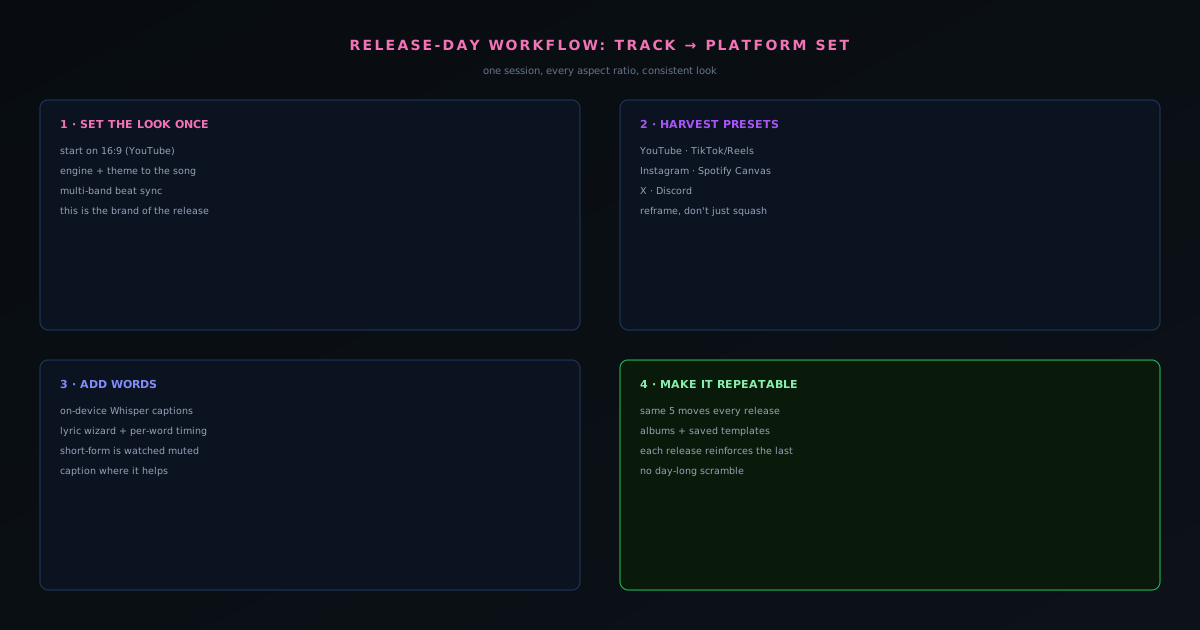
Releasing a track today is not a one-asset job. The same song needs a landscape visualizer for YouTube, vertical clips for TikTok and Reels, a looping Canvas for Spotify, and a square version for feed posts, and they all need to look like they belong to the same release. Done ad hoc, that is a day of fiddling in different tools and exporting at the wrong sizes. Done as a workflow in Novus Visualizers, it is one focused session. This playbook lays out that session, start to finish.
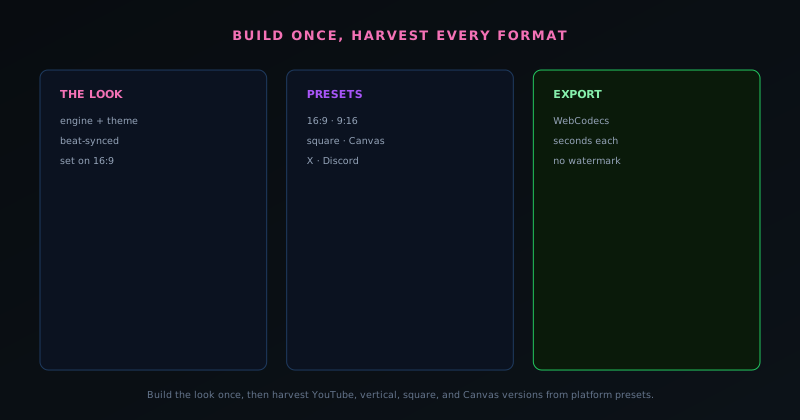
The thing that makes it fast is that the platform exports to every aspect ratio you need with built-in presets, all client-side, so you build the look once and harvest it in every format. You are not rebuilding the visual per platform; you are reframing one visual across platforms.
Set the look once
Start by uploading the track in the visualizers.novusstreamsolutions.com/editor and dialing in the core look on the format you care about most, usually the 16:9 YouTube visualizer, since it is the one people watch longest. Pick an engine and template that suits the song, apply a color theme that matches your cover art, and use multi-band beat sync to bind the motion to the music so the visual tracks the arrangement rather than twitching on every beat. Get this right before touching any other format, because everything else derives from it.
This is the high-leverage step. The look you establish here is the brand of the release across every platform, so spend your taste budget here and treat the rest of the session as reframing rather than redesigning.
Harvest every aspect ratio from platform presets
With the look set, work through the platform presets. Novus Visualizers ships presets for YouTube (16:9), TikTok and Reels (9:16), Instagram (square), Spotify Canvas, X, and Discord, so you select a target and export without hand-calculating dimensions. Export the landscape master for YouTube, then the vertical for short-form, then the looping Canvas, then the square for feed posts. Each export runs through WebCodecs on your device in seconds, with no server queue and no watermark.
For the vertical and square formats, take a moment to reframe rather than just squashing the landscape composition: make sure the focal motion sits well in a tall or square frame. A few seconds of recomposition per format is the difference between assets that look made-for-platform and assets that look cropped.
Add the words where they help
For the formats that benefit from text (short-form clips and lyric moments especially) add captions or lyrics. The on-device Whisper transcription turns the audio into timed text in the browser, and the lyric-video wizard plus per-word timing lets you land the words on the vocal. Short-form platforms reward captioned content because so much of it is watched muted, so a vertical clip with the hook's lyric on screen will outperform a silent visual.
Keep the captioning proportional to the format. The YouTube master may want none; the TikTok cut may want the hook spelled out. Same session, different emphasis per platform.
Why one video is never enough anymore
The premise of this whole workflow is that a modern release is a multi-format job, and it is worth sitting with why, because it changes how you should approach the work. A single track now needs a landscape visualizer for YouTube, vertical clips for TikTok and Reels, a looping Canvas for Spotify, and square versions for feed posts, not because anyone enjoys making four videos, but because each platform rewards content shaped for its own frame and punishes content that is obviously cropped from somewhere else. A landscape video letterboxed into a vertical slot reads as an afterthought; a purpose-framed vertical reads as native.
That reality is what makes a workflow, rather than improvisation, necessary. Made ad hoc, the multi-format demand becomes a day of fighting different tools and exporting at the wrong sizes; made as a process, it becomes a single focused session. The whole point of building the look once and harvesting every format from it is to meet the multi-asset reality without multiplying the work by the number of platforms. You are not making four videos from scratch: you are making one look and presenting it four ways, which is a fundamentally smaller job than it first appears.
The aspect-ratio matrix, platform by platform
It helps to hold the target formats clearly in mind, because each platform has a frame it expects. YouTube wants 16:9 landscape, the format people watch longest and the natural home for your hero visualizer. TikTok and Instagram Reels want 9:16 vertical, watched full-screen on a phone. Instagram feed posts favor a square. Spotify wants its vertical Canvas. And X and Discord have their own preferred shapes for shared video. The platform presets in the tool map directly onto these, so you select a target and export at the right dimensions without hand-calculating anything.
Knowing the matrix up front lets you plan the session rather than discovering each requirement as you go. The formats are not arbitrary (they cluster into landscape, vertical, and square) so a practical way to think about the work is in those three buckets plus the Canvas. Build a master in landscape, derive the verticals together, derive the square, and handle the Canvas as its own short loop. Seeing the targets as a small, known set rather than an open-ended list of platforms is what makes harvesting them feel like a checklist instead of a scramble.
Treat the master as the source, the rest as crops
The mental model that keeps this efficient is to treat one format as the canonical master and the others as derivations of it, rather than as independent projects. The 16:9 YouTube version is the natural master because it is where you will spend the most attention and where the look is established; everything else is that same look reframed for a different aspect ratio. Holding that hierarchy in your head prevents the trap of redesigning the visual for each platform, which is where the multi-format job balloons into a day of work.
Reframing is genuinely lighter than redesigning, but it is not nothing, and the small amount of care it takes is what separates native-looking assets from obvious crops. For each derived format, take a moment to make sure the focal motion sits well in the new frame: that the element you want seen is not pushed out of a tall crop or stranded in a wide one. A few seconds of recomposition per format, applied to a look you have already perfected, is the entire difference between a set that looks made-for-platform and one that looks mechanically resized.
Where captions earn their place, and where they do not
The captioning decision should vary by format rather than being applied uniformly, because the formats are watched differently. Short-form vertical clips are very often watched muted, scrolled past in a feed, so a caption (the hook's lyric on screen) does real work holding attention that would otherwise be lost to silence. The on-device transcription turns the audio into timed text in the browser, and for a vertical clip built around a memorable line, putting that line on screen measurably helps it land with a muted viewer.
The hero YouTube master, by contrast, often wants no captions at all, because it is watched with sound and the visual is meant to carry the moment uncluttered. Applying captions everywhere out of habit can crowd a format that did not need them; applying them only where muted viewing is the norm is the more considered choice. Same session, different emphasis per format (the verticals get the words, the landscape master stays clean) which is the kind of per-format judgment that distinguishes a thoughtful release set from a batch of identical exports at different sizes.
Sequencing the session to avoid rework
The order you do things in matters, because getting the sequence wrong means redoing work. The high-leverage rule is to finish establishing the look completely on the master before touching any other format (engine, theme, beat binding, and any effects all settled) so that every derived format inherits a finished design rather than a work in progress. If you start harvesting verticals before the look is locked, every later change to the look has to be re-applied across every format you already exported, which is exactly the multiplied work the whole approach exists to avoid.
A clean sequence is therefore: perfect the master, then derive each format from it in turn, then add captions to the formats that want them, then export everything. Each stage is done once and feeds the next, so there is no backtracking. This is the same discipline that makes any repeatable process efficient (get the upstream decision right before propagating it downstream) and on release day, when time is short and the temptation is to jump straight to exporting clips, the sequence is what keeps a focused session from turning into a frustrating loop of re-exports.
Saving the setup so next release is faster
The first time through this workflow takes real attention; the tenth time should not, and the way to make that true is to save your setup. The tool's templates and albums let you preserve a configured look so that your next release does not start from a blank canvas but from a known, tuned starting point you can adjust to the new track. A look you spent time perfecting becomes reusable infrastructure rather than a one-off, which is how a process compounds: each release is a little faster than the last because you are refining a template instead of rebuilding from scratch.
This is also where a release workflow turns into a brand. If your saved template carries a consistent visual language from release to release, your body of work starts to look like a coherent identity rather than a series of unrelated singles, and that recognizability is worth a great deal to a developing artist. The template is doing double duty (saving you time and building your visual brand) which is exactly the kind of leverage that makes setting one up worth the small upfront effort. Build the look once, save it, and let every future release inherit both the speed and the consistency.
Keeping the whole set visually coherent
A release set that is coherent across formats reads as professional in a way that is hard to fake, and achieving it is mostly a matter of deriving everything from the same source. Because the verticals, the square, and the Canvas all come from one established look, they naturally share a palette, an engine character, and a rhythm, so a viewer who encounters your TikTok clip and then your YouTube visualizer perceives them as the same release. That coherence is the payoff of the build-once-harvest-many approach beyond mere efficiency: it produces a set that feels designed as a unit.
The alternative, building each format independently, almost guarantees drift: slightly different colors here, a different engine there, a mismatched mood across the set, and the cumulative effect is a release that feels assembled from parts rather than conceived as a whole. Coherence is not an extra step you add at the end; it is a free consequence of the right workflow. Keeping one master as the source is simultaneously the efficient choice and the coherent one, which is why the workflow is structured around it rather than around treating each platform as its own little project.
A realistic time budget for the session
Setting honest expectations about how long this takes helps you actually do it rather than putting it off as a vague large task. The bulk of the time goes into the first stage (establishing the look on the master) because that is where the creative decisions live; once the look is locked, harvesting each additional format is fast, a matter of reframing and exporting rather than designing. So the session is front-loaded: most of the effort is in the first format, and each subsequent one is comparatively quick, which means the marginal cost of one more platform is low once the look exists.
That shape is encouraging, because it means the multi-format job is not four times the work of one video: it is one video's worth of design plus a series of quick derivations. A creator who has run the workflow before, with a saved template to start from, can produce a full platform set in a single focused sitting. Knowing that the time is concentrated in the look, not multiplied across the formats, reframes the whole task from an intimidating day of work into a manageable session, which is precisely the reframing that gets release-day visuals done consistently rather than skipped under deadline pressure.
Adapting as platforms and formats shift
Platforms change their preferred formats, add new surfaces, and shift which content they reward, so a release workflow has to be adaptable rather than locked to today's exact list. The good news is that the structure of this one survives those changes: whatever new aspect ratio or surface appears, the approach is the same: establish the look once on a master, then derive the new format from it. The platform presets cover the current targets, and the underlying method of reframing one look across many frames is what carries forward even as the specific frames evolve.
This durability is why it is worth internalizing the workflow as a method rather than memorizing a fixed checklist of platforms. The list of surfaces will keep moving; the principle (one source look, many derived crops, captions where muted viewing rules, a saved template for next time) does not. A creator who has the method can absorb a new platform requirement as just another derivation, while one who learned a rigid set of steps has to relearn the process each time the landscape shifts. Building the workflow around a reusable look and a repeatable sequence is what makes it resilient to a release environment that never stops changing.
Do not forget the still assets
A release set is not only motion. The same launch usually needs still images too (a cover, thumbnails for the YouTube versions, a clean product or artist shot for press and profiles) and folding those into the same session keeps the whole release visually unified. Pulling a strong frame from your visualizer as a thumbnail, or preparing a clean cover image alongside the videos, means the stills and the motion share a look rather than diverging. Treating the still assets as part of the release workflow, not a separate afterthought, is what makes everything a listener or viewer encounters feel like one coherent launch.
This is where the broader ecosystem connects: a clean cover or press image often wants its background removed or replaced, which is the Background Remover's job, while the motion comes from Visualizers, and using both in one session, against one palette and one identity, is how a solo creator produces a complete, consistent release kit. The point is to think in terms of the whole set a release needs (landscape video, verticals, square, Canvas, thumbnails, cover, press still) and produce it as one coordinated batch. A release that arrives with every surface covered and visually aligned looks far more established than one with a great video and mismatched or missing stills.
Make it repeatable
The real win is that this becomes a template you run every release rather than a one-off scramble. Once you have done it once, your next release is the same five moves: upload, set the look, harvest the presets, caption where it helps, export. Albums and saved templates let you carry a consistent identity across a body of work, so each release reinforces the last instead of looking unrelated.
Treating release-day visuals as a workflow rather than an improvisation is what lets a solo artist ship a full, coherent, platform-ready set every time without it eating a day. The Canvas guide drills into that one piece, the production-line post zooms out to the whole content system, and the visual-brand post covers keeping it all recognizably yours.
Frequently asked questions
Quick answers to common questions about this topic.
What visualizer assets do I need for a release?
A 16:9 version for YouTube, 9:16 cuts for TikTok and Reels, a square for feeds, and a short looping Spotify Canvas, all derivable from one track in a single session.
How do I make a whole visualizer set from one song?
Build the visualizer once, then export each platform aspect ratio using the presets. See the step-by-step at How to make a music visualizer video with Novus Visualizers and the Canvas guide at How to make a Spotify Canvas video (free, in-browser).
How long does a release-day visualizer set take?
Once the visualizer is designed, exporting the platform variants is quick: the presets cap each to the right size and length, so most of the time is the creative pass, not the rendering.
Related workflow
A track to a release-ready visualizer, per platform
Render the visual once, then produce the platform masters from it, instead of re-rendering the whole video for every aspect ratio.
- Render the beat-synced videoNovus Visualizers: Pick the engine and mode against your actual track; the analysis is done on your audio, not on a preset preview.
- Trim or upscale the exportNSS Background Remover: The video utilities handle the tidy-up pass so the render does not have to be repeated to fix ten seconds of it.
- Produce the per-platform mastersNovus Convert: Each destination wants a different container and bitrate; converting the finished render is far cheaper than re-rendering it.
Related troubleshooting
Was this page helpful?
Your answer stays in this browser, it is not sent anywhere and no account or cookie is involved.