2026 · Novus Stream SolutionsAbout 13 min readNovus Stream Solutions
Durable saves without a backend war: IndexedDB, account sync, and when you finally add login
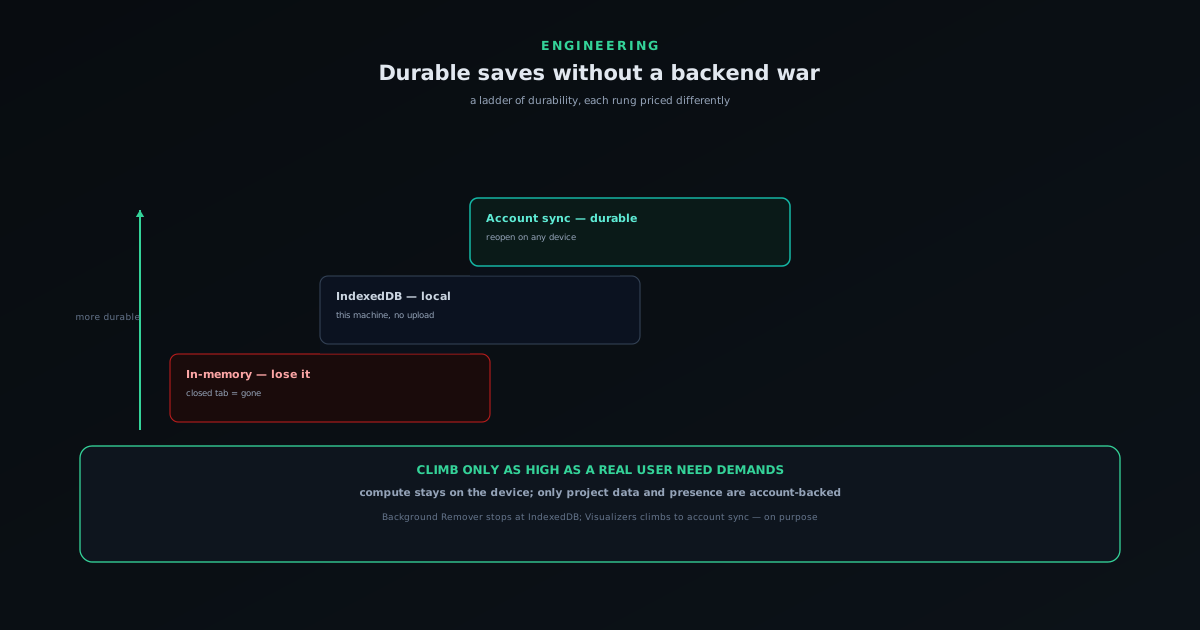
Saving user work in a browser app is harder than it looks. Here is the path from in-memory state to IndexedDB local saves to account-backed durability, and why two Novus apps deliberately stopped at different points.
Contents
- 1.Overview
- 2.The naive version: keep it in memory, and lose it
- 3.Local persistence: IndexedDB and what it does and does not give you
- 4.Two products, two saving models, on purpose
- 5.When local saving stops being enough
- 6.Adding accounts without a backend war
- 7.Durability is a feature you have to engineer, not assume
- 8.A checklist for choosing your persistence rung
- 9.The lesson: match the saving model to the product
Overview
Saving a user's work sounds like a solved problem until you try to do it well in a browser app that does not want a heavy backend. The naive version loses people's work; the local version keeps it on one machine; the account version keeps it everywhere but drags in a server, identity, and a whole category of cost and complexity. Each step up the ladder buys real durability and charges real overhead, and the engineering judgment is knowing which rung a given product should actually stand on. This is a field note on that ladder (from in-memory state to IndexedDB to account-backed sync) and on why two Novus apps deliberately stopped at different rungs.
The framing that helped most was to stop treating "saving" as one feature and start treating it as a spectrum of durability guarantees, each with a price. In-memory state is free and forgetful. Local persistence is cheap and machine-bound. Account-backed persistence is durable and portable but requires infrastructure you now have to run and secure. Picking a rung is not about which is most advanced; it is about what the product's users actually need to keep, weighed against the cost of keeping it. Get that match right and saving feels effortless; get it wrong and you have either lost people's work or built a backend you did not need. This note is about which rung to stand on; for the menu of client-side stores that sit underneath these rungs and how they differ, see Browser storage compared: localStorage, IndexedDB, OPFS, and cookies.
The naive version: keep it in memory, and lose it
The first version of almost any browser tool keeps the user's work in memory, in the app's runtime state, and that is genuinely fine for a tool meant for one-shot tasks. You open it, do the thing, export the result, and leave; there is nothing to save because there is nothing to come back to. For a single-purpose utility, this is not a deficiency, it is the correct, minimal design, and adding persistence to it would be over-engineering a problem the user does not have. The honest default for a tool you pass through is to keep nothing, because keeping nothing is the simplest thing that fully serves the use case.
The trouble starts when the tool grows past one-shot use and people begin investing real time in a single piece of work. The moment a user spends twenty minutes building something, in-memory state turns from "minimal" to "hostile," because a closed tab, a refresh, or a crash erases the investment. The signal that you have outgrown in-memory saving is not a technical metric; it is users telling you they lost work, or quietly never coming back to projects because they cannot. That is the cue to climb to the next rung, and notably, it is a cue about the product's use case, not about the technology being available.
Local persistence: IndexedDB and what it does and does not give you
The next rung is local persistence, and in the browser that mostly means IndexedDB: a real database living in the user's browser that can hold structured data and sizable blobs, which is what you need for project files that bundle originals, masks, layers, and settings. NSS Background Remover saves named projects this way: it auto-saves roughly every thirty seconds, keeps up to twenty projects per tool, and preserves the full editable state so a project reopens exactly as it was left. This buys durability across sessions without any server at all: the work survives closing the tab and coming back, entirely on the user's machine.
What local persistence does not give you is portability or guarantees beyond that one browser. The work lives in this browser, on this device, and only until that storage is cleared: by the user, by privacy settings, or by the browser reclaiming space under pressure. There is also no cross-device story: a project saved on the desktop is simply not on the laptop. For a tool whose whole promise is that nothing leaves your device, those limits are acceptable and even appropriate, because the alternative would mean uploading. IndexedDB is the right rung when the priority is keeping work on the machine and the user does not need it to follow them, which is exactly the case for an on-device, no-account editor.
Two products, two saving models, on purpose
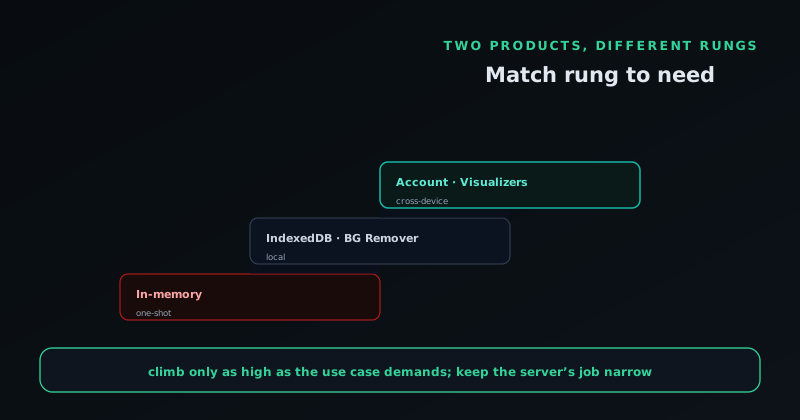
The two Novus software products stop at different rungs deliberately, and the contrast is the clearest lesson in the whole field note. NSS Background Remover at bgremover.novusstreamsolutions.com stops at local persistence: IndexedDB project files, no account, nothing uploaded. That is correct for it because its users handle sensitive files and value the guarantee that work never leaves the device, so climbing to account-backed sync would mean uploading project data and undercutting the product's core promise. The right engineering decision there was to make local saving excellent (reliable auto-save, full editable state, easy reopen) and to deliberately not build a backend for it.
Novus Visualizers at visualizers.novusstreamsolutions.com climbs the final rung to account-backed persistence, because its users need something different: to keep, revisit, and publish creative work across devices and over time. For that audience, local-only saving is the limitation, not the protection, so the work is saved to an account and reopens anywhere the user signs in. Crucially, the compute still stays on the device (analysis, rendering, and export remain local) and only the project data and presence are account-backed. Same engineering team, same on-device-compute principle, opposite saving model, each chosen by asking what the product's users actually need to keep rather than by following a single house pattern.
When local saving stops being enough
The trigger to add accounts is not "everyone has accounts"; it is a concrete set of user needs that local saving structurally cannot meet. The clearest is cross-device work: a user who starts on one machine and wants to continue on another cannot be served by browser-local storage, full stop. The second is durability against the browser itself: local storage can be cleared by the user, by privacy tooling, or by the browser under storage pressure, so work that genuinely must not be lost wants a copy that does not depend on one browser's storage surviving. The third is anything social (publishing, identity, a body of work seen by others) which cannot exist without an account at all.
When those needs are real for your audience, local persistence has reached its ceiling and accounts become the honest next step. But the discipline is to confirm the needs are real rather than assumed. Adding accounts to a tool whose users do one-shot tasks is pure overhead (a signup wall, a backend to run, a privacy surface to defend) for durability nobody asked for. The reason Visualizers added accounts and Background Remover did not is that Visualizers' users hit all three triggers and Background Remover's users hit none of them. The triggers, not the trend, are what should move you up the rung.
Adding accounts without a backend war
The fear that keeps small teams from adding accounts is that it means a sprawling backend, and it can, if you let it. The way to avoid the backend war is to keep the scope of what the server is responsible for as narrow as possible. The compute stays on the device, so the server is not a render farm or an inference host; it is a place to store and sync project data and identity, which is a far smaller and cheaper thing to run. The model that keeps this sane is local-first with sync: the app keeps working against local state for responsiveness, and the account layer is a durability and portability guarantee layered on top, not the thing every interaction has to round-trip through.
Keeping the server's job small also keeps the cost structure intact, which matters for a free-first operation that has to run cheaply at idle. A backend that only stores and syncs project metadata and handles auth costs far less than one that does the heavy lifting, and it scales with saved work rather than with every render. The durability work that landed in Visualizers (making saved albums, templates, and projects persist reliably rather than living in volatile state) is exactly this kind of narrow, high-value backend: it guarantees the work survives and travels, without taking on the compute that the device handles perfectly well. That narrowness is how you add accounts without the war.
Durability is a feature you have to engineer, not assume
One uncomfortable lesson is that "we save your work" is a claim you have to actually engineer to be true, at every rung. In-memory state silently loses work; local storage can be silently cleared; even account-backed saves can fail to persist if the write path is not reliable. The Visualizers reliability overhaul existed precisely because saved albums, templates, and projects needed to persist durably rather than best-effort, which means handling the unglamorous cases: a save that is interrupted, a session that ends mid-write, state that must not be left half-saved. Durability is the difference between a save button that usually works and one users can trust, and that difference is real engineering, not a default you get for free.
The practical posture is to treat every promised guarantee as something to verify rather than assume. If the app says a project reopens with all settings intact, that has to be tested against the messy real cases, not just the happy path. If the app says work survives a closed tab, someone has to have actually closed the tab mid-edit and confirmed it. Users forgive a tool that is honest about what it keeps; they do not forgive a tool that promised to save their work and did not. So the saving model is not just a choice of rung; it is a commitment to make that rung's guarantee actually hold, which is its own body of work.
A checklist for choosing your persistence rung
If you are building a tool and trying to decide where on the ladder to land, the decision is mostly a sequence of honest questions about your users rather than a question about technology. Start with the most basic one: do your users invest enough time in a single piece of work that losing it would hurt? If not, in-memory state is genuinely fine and anything more is over-engineering. If they do, you have outgrown memory and need at least local persistence. The trigger is never "everyone else saves," it is a concrete moment of user pain: people telling you they lost work, or quietly abandoning projects they cannot return to.
From there, the questions sharpen. Do users need their work on more than one device, or only on the machine where they made it? Does the work need to survive the browser clearing its storage, or is best-effort local saving acceptable? Is there anything social (publishing, identity, a shared library) that structurally requires knowing who the user is? Each yes pushes you up a rung, and each no lets you stop early and avoid the cost. The discipline is to climb only as high as a real user need demands, because every rung above what you need is overhead you pay for forever: a backend to run, a privacy surface to defend, a signup that taxes everyone.
Once you have chosen a rung, the last question is the one teams skip: are you actually willing to engineer the guarantee that rung implies? Local saving means handling interrupted writes and storage limits; account saving means handling sync, auth, and durable persistence that holds under the messy real cases. A saving model you advertise but do not engineer to actually hold is worse than a humbler one you deliver reliably. So the full checklist is: confirm the need is real, climb only as high as it requires, keep the server's job as narrow as possible, and then make the chosen guarantee genuinely true. Do that and you land on the right rung for your product instead of the fashionable one.
- Is a single piece of work valuable enough to lose? No → in-memory is fine.
- Same machine only, or across devices? Cross-device → you need accounts.
- Must it survive cleared browser storage? Yes → accounts, not just local.
- Anything social or identity-bound? Yes → accounts are unavoidable.
- Climb only as high as a real need demands; engineer the guarantee you promise.
The lesson: match the saving model to the product
The through-line is that there is no single correct way to save user work; there is a ladder of durability, each rung priced differently, and the engineering skill is matching the rung to what the product's users genuinely need to keep. A one-shot tool should keep nothing and not apologize for it. An on-device editor handling sensitive work should save locally and deliberately avoid a backend. A creative platform whose users build and publish over time should climb to account-backed durability while keeping the heavy compute local. Each of these is the right answer for its product and the wrong answer for the others, which is why copying another app's saving model is a mistake unless its users are yours.
It is worth saying plainly that this runs against a common instinct, which is to reach for accounts and a cloud database as the default starting point for anything that saves. That instinct treats the highest rung as the obvious one and works downward only under pressure, when the honest approach is the reverse: start as low as the use case allows and climb only when a real need forces it. Defaulting to a full backend is how small teams end up running, securing, and paying for infrastructure their users never actually required, while defaulting to local-first keeps the operation lean and the privacy strong until the moment durability genuinely demands more. The discipline of starting low and climbing deliberately is not just cheaper; it tends to produce tools that respect the user's data precisely because they were not casually uploading it from day one.
None of this means accounts are a destination to avoid; it means they are a rung to earn. When the user need is real, climbing is the right call, and a well-built account layer is a genuine gift to people who were losing work or stuck on one device. The point is simply that the climb should be a response to a need you can name, not a reflex, and that each rung carries an obligation to deliver its guarantee rather than merely advertise it. A team that understands the ladder this way ends up at the right height for its product (neither under-serving users who needed durability nor burdening users who did not), which is the whole goal, reached by judgment rather than by defaulting to whatever the last app you admired happened to do.
For Novus, that judgment produced two software tools that look like they should save work the same way and deliberately do not, and the difference makes both better. The general principle is portable beyond these apps: decide what your users must be able to keep and come back to, find the cheapest rung that genuinely delivers it, and engineer that rung's guarantee until it actually holds. Saving is not a feature you bolt on at one level for everyone; it is a spectrum you choose a point on, on purpose, for each product. Choose it by the use case, keep the server's job narrow, and verify the durability you promise, and you can give people dependable saves without starting a backend war.
Frequently asked questions
Quick answers to common questions about this topic.
Can a web app save work without a backend?
Yes. IndexedDB stores projects durably in the browser, which is enough for a single-device workflow with no server. The limitation is that the work lives in one browser until you add account sync.
When should a free tool add accounts and login?
When users need their work to follow them across devices or to participate in something shared. Until then, local persistence avoids the cost and privacy tradeoffs of a backend.
How does account sync change where data lives?
It moves project data to an account so it reopens on any device, while heavy compute can still run locally. See When to add accounts to a free tool (and when not to).
Related troubleshooting
Was this page helpful?
Your answer stays in this browser, it is not sent anywhere and no account or cookie is involved.