2026 · Novus Stream Solutions (hub)About 12 min readNovus Stream Solutions
Browser storage compared: localStorage, IndexedDB, OPFS, and cookies
Our apps store everything from a theme preference to multi-gigabyte video projects in the browser, so the four storage options are not academic here. This comparison covers what each is actually for (cookies, localStorage, IndexedDB, and OPFS) with real size limits, eviction behavior, performance characteristics, private-window surprises, and the per-use-case picks we run in production.
Contents
Overview
Our tools have an unusual storage profile for websites: because everything runs client-side, the browser is not a cache in front of our servers; it is the entire data layer. A theme preference, an in-progress visualizer project, a 400 MB machine-learning model, the frames of a video export: all of it lives in browser storage, because there is nowhere else for it to live. That constraint turned the four storage APIs from trivia into load-bearing infrastructure for us, and this comparison is the map I wish I had at the start.
The four contenders are cookies, localStorage, IndexedDB, and the Origin Private File System, and the first honest thing to say is that they are not four sizes of the same thing. They differ in capacity by six orders of magnitude, in persistence guarantees from per-request to install-like, in access patterns from synchronous string lookups to streaming file handles, and in who else gets to read them. Treating them as interchangeable (or defaulting everything to localStorage because its API is friendliest) is how browser apps lose user data and developers learn eviction rules the hard way.
The structure here is one section per store (what it is, what it costs, where it breaks) followed by the cross-cutting concerns that actually decide the choice: quotas and eviction, private-window behavior, and performance. The last section is the practical payoff: the exact assignments our apps use in production and the reasoning per use case, so the abstractions have something concrete to attach to.
localStorage: the sticky note on the fridge
localStorage is the API everyone learns first because it is the API a human would design in a hurry: setItem, getItem, strings in, strings out, persisted per origin, shared across tabs. For what it is actually good at (a handful of small, non-critical preferences) it is genuinely great. Our sites keep theme choice, dismissed-banner flags, and similar sticky notes there, and the entire code involved fits in a screen. The trouble starts when the sticky note gets treated as a filing cabinet.
The limits arrive fast. Capacity is about 5 MB per origin, and since the underlying encoding is UTF-16, effectively less for ASCII-heavy JSON. Values are strings only, so structured data pays serialize-and-parse costs on every touch. And the API is synchronous on the main thread: every read and write blocks rendering for its duration, which is imperceptible for a theme flag and disqualifying for anything chunky or frequent. A 3 MB JSON blob parsed out of localStorage during startup is a self-inflicted loading delay, and workers cannot even see localStorage to help.
The subtler trap is treating it as durable. localStorage survives normal browsing indefinitely, but it sits in the same best-effort storage bucket as everything else: cleared by storage-pressure eviction on some platforms, by "clear site data", and by privacy-mode teardown. It is also plaintext readable by any script running on the origin, which makes it the canonical wrong place for tokens and secrets. The mental model that keeps its use correct: anything in localStorage should be something the app can regenerate or shrug about losing.
IndexedDB: the actual database
IndexedDB is where browser storage becomes real infrastructure: a transactional, indexed, asynchronous object database with capacity measured in gigabytes. It stores structured JavaScript values natively (objects, arrays, typed arrays, and crucially Blobs) without stringification, supports multiple named object stores with secondary indexes, and wraps writes in transactions so a crash cannot leave half an update. Every serious browser application ends up here, usually after outgrowing localStorage in one painful weekend.
The API is famously unpleasant (event-driven request objects from a pre-Promise era, version-change ceremonies to alter schema) and the standard advice is correct: use a thin wrapper library and never touch the raw API in application code. But the architecture underneath the awkwardness is right. Async means a 50 MB project save does not freeze the interface; worker access means heavy reads and writes can happen off the main thread entirely; transactions mean the save either happened or it did not. Those are exactly the properties a data layer needs and exactly what localStorage lacks.
For us, IndexedDB is where user work lives. Visualizer projects (layered scenes with embedded audio references and rendered thumbnails) persist there as structured records, which is what lets someone close the tab mid-edit and find their project intact next week without ever creating an account. The full evolution of that system, including where IndexedDB stopped being enough and account sync began, is written up in Durable saves without a backend war: IndexedDB, account sync, and when you finally add login; the relevant conclusion here is that we have shipped multi-hundred-megabyte databases on it across every mainstream browser without capacity drama.
Its honest weaknesses: the schema-versioning ceremony makes migrations the least fun code in the codebase; cross-browser eviction behavior differs enough that persistence must be requested rather than assumed; and debugging opaque Blob-heavy stores in DevTools is squinting work. None of these has ever made me regret the choice; they are the ordinary costs of having an actual database where the alternative was strings.
OPFS: files the page owns
The Origin Private File System is the newest contender and the easiest to misunderstand from its name. It is not access to the user’s documents; that is a different API with permission prompts. OPFS is a private, origin-scoped file system invisible to the user’s file manager: real directories, real files, real byte-level random access, living inside the same quota bucket as IndexedDB. Think of it as the browser finally admitting that some web apps are just applications, and applications need files.
What OPFS adds over IndexedDB is the access pattern. IndexedDB reads and writes whole values; OPFS hands you file handles that support seeking, partial reads, and in-place writes, and in a worker, synchronous access handles that approach native file I/O speed. That distinction is irrelevant for saving a settings object and decisive for workloads shaped like files: a video encoder appending output as it renders, a SQLite database compiled to WebAssembly doing page-level reads, a multi-gigabyte model cached and memory-mapped in slices rather than loaded whole. Our video-export experiments moved scratch space from RAM to OPFS precisely to stop flirting with the tab’s memory ceiling, the pressure described in Browser memory management: not crashing the tab on a 4K export.
The costs are youth-shaped. The ergonomic synchronous handles exist only in workers, so the architecture must already be worker-first; browser support is mainstream-current but not archaeological; and tooling for inspecting OPFS contents is still primitive. The selection rule that falls out: if the data is naturally a record, IndexedDB; if it is naturally a file (big, binary, partially read, incrementally written), OPFS is the first API that treats it as one.
Side by side: capacity, persistence, and speed
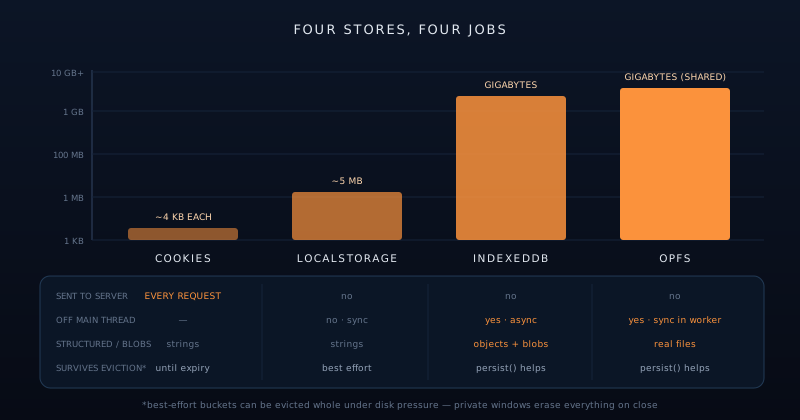
Capacity first, because the spread is comic: cookies hold kilobytes, localStorage holds about five megabytes, and IndexedDB and OPFS share an origin quota that modern browsers set as a function of disk size, commonly up to around 10% of free disk in Chromium, with Firefox and Safari applying their own generous-but-different formulas. In practice, an origin can assume gigabytes are available in the big stores and should assume nothing beyond a few kilobytes in the small ones. The navigator.storage.estimate() call reports usage and quota honestly and is the right thing to consult before a large write, rather than after a QuotaExceededError.
Persistence is the dimension people discover late. Everything except cookies-with-expiry defaults to "best effort": the data survives indefinitely under normal conditions, but the browser reserves the right to evict an origin’s entire storage bucket (IndexedDB, OPFS, localStorage together) under disk pressure, typically starting with origins least recently used. Safari famously adds a seven-day script-writable-storage horizon for sites the user does not interact with. The upgrade path is navigator.storage.persist(), which asks the browser to exempt the origin from automatic eviction; browsers grant it based on engagement signals like installation or frequent use. For an app holding someone’s projects, requesting persistence is not optional politeness; it is the difference between a save and a suggestion.
Speed sorts differently than size. localStorage is microsecond-fast per small read but synchronous, so its cost lands on the main thread where jank lives. IndexedDB has per-transaction overhead that makes it mediocre at thousands of tiny scattered writes but strong at batched structured work, all safely off-thread. OPFS synchronous handles in a worker are the raw-throughput champion for big sequential and random byte access. Cookies are not in the performance race at all; their cost is paid in network overhead on every request, which no local benchmark shows. The comparison collapses to a slogan: small-and-sync, structured-and-async, bytes-and-fast, and travels-with-requests.
- Cookies: ~4 KB each; sent on every request; the only store the server sees; expiry you set.
- localStorage: ~5 MB; synchronous strings on the main thread; best-effort persistence.
- IndexedDB: gigabytes; async, transactional, structured values and Blobs; worker-accessible.
- OPFS: gigabytes (shared quota); real file handles, fast sync access in workers.
- Best-effort eviction can clear the whole bucket at once, so request persist() for data that matters.
- Private windows: everything works during the session, then is destroyed on close.
Private windows and other vanishing acts
Private browsing is the edge case that finds every storage assumption. The modern behavior across Chrome, Firefox, and Safari is consistent in shape: all four stores appear to work normally inside the private session (reads, writes, even sizeable IndexedDB usage) and the entire bucket is destroyed when the last private window closes. The era of Safari throwing exceptions on localStorage writes in private mode is over, but its legacy survives as good practice: storage calls wrapped to fail soft, because a write can still fail for quota or policy reasons in any mode.
The design consequence is that private mode cannot be detected reliably and should not be special-cased; it should simply be survived. Our tools treat all local persistence as an enhancement layered on a functional core: in a private window, Sonic Weaver still renders, as the background remover we ran until September 2026 still removed backgrounds; what changes is that closing the window genuinely forgets you, which is precisely what the user asked for. An app that breaks in private mode is an app that mistook its cache for its foundation.
The same soft-failure posture covers the neighboring vanishing acts: "clear site data" wiping the bucket while the app has state in memory, an eviction landing between sessions, quota errors mid-write on a nearly full phone. The pattern that handles all of them is the same three moves: check estimate() before big writes, catch and degrade on failure, and treat anything not synced to a server or exported to a real file as potentially gone tomorrow. Storage that is honest about its own mortality produces apps that never lose work they promised to keep.
What we actually use where
Here is the full assignment map from our own apps, use case by use case. Session and authentication state for the visualizer accounts: cookies, HttpOnly, Secure, SameSite, because the server must see them and scripts must not. Theme, dismissed banners, small UI preferences on every site: localStorage, because they are tiny, non-critical, and wanted synchronously at first paint before any async store could answer. Nothing else lives there, by rule.
User work product (visualizer projects, editor documents, everything a person would be angry to lose): IndexedDB, behind a small wrapper, with navigator.storage.persist() requested once a project exists. Machine-learning models (the hundreds of megabytes behind on-device background removal) are cached via the Cache API and IndexedDB so they download once and load from disk on every later visit, which is also what lets those tools keep working with the network off, as covered in Do browser AI tools work offline?. Video-export scratch space, where frames stream to disk faster than RAM should hold them: OPFS from a worker, deleted on completion.
The negative space matters as much: no tokens in localStorage, no analytics cookies anywhere, no cross-site anything: commitments that this architecture makes cheap to keep, since data that never leaves the device needs no privacy policy longer than that sentence. When a choice is ambiguous, the tiebreakers run in order: does the server need it (cookies), is it trivially regenerable and tiny (localStorage), is it structured user data (IndexedDB), is it file-shaped and heavy (OPFS).
If you carry one thing out of this comparison, make it the framing rather than the numbers, which will drift with browser releases: these are four tools with four jobs, not four sizes of one tool. Cookies communicate, localStorage remembers trivia, IndexedDB keeps records, and OPFS holds files, and a browser app that assigns those jobs deliberately gets a data layer that survives eviction, respects private mode, and holds gigabytes of user trust without a server in sight.
Frequently asked questions
Quick answers to common questions about this topic.
Should I use localStorage or IndexedDB?
Size and importance decide. localStorage suits tiny, regenerable values (a theme flag, a dismissed banner) where its synchronous string API is a convenience and the ~5 MB cap is irrelevant. IndexedDB is for anything structured, sizeable, or precious: user documents, projects, cached binary data. It stores real objects and Blobs without stringification, works asynchronously so big writes cannot freeze the page, is reachable from workers, and scales to gigabytes. The practical rule from our apps: if losing it would annoy a user, it does not belong in localStorage.
How much can a website actually store in the browser?
Orders of magnitude more than most people assume. Cookies are limited to about 4 KB each and localStorage to roughly 5 MB per origin, but IndexedDB and OPFS share an origin quota that modern browsers derive from disk size: Chromium allows up to around 10% of free disk, and Firefox and Safari have their own multi-gigabyte formulas. Call navigator.storage.estimate() to get the real usage and quota numbers for your origin at runtime, and check before large writes instead of reacting to QuotaExceededError afterward.
Can the browser delete my IndexedDB or OPFS data?
Yes. By default all of it is "best effort." Under disk pressure a browser may evict an origin’s entire storage bucket, usually starting with least-recently-used sites, and Safari additionally caps script-writable storage at seven days for sites the user does not revisit. The mitigation is navigator.storage.persist(), which asks the browser to exempt your origin from automatic eviction and is typically granted on engagement signals. For anything users would grieve, request persistence, offer export to a real file, and treat sync to an account as the only true durability.
What is OPFS and when is it better than IndexedDB?
The Origin Private File System is a private, origin-scoped file system, invisible to the user’s file manager, offering real file handles with seeking, partial reads, and in-place writes, plus very fast synchronous access from workers. It shares the same quota as IndexedDB, so the difference is shape, not size: IndexedDB reads and writes whole structured values; OPFS excels when data behaves like a file: video-export scratch space, WASM SQLite databases, huge models read in slices. If you would reach for fs in a native app, OPFS is that.
What happens to browser storage in private or incognito mode?
In current Chrome, Firefox, and Safari, all four stores work normally inside the private session (writes succeed, IndexedDB functions, quotas exist) and the entire bucket is destroyed when the last private window closes. You cannot reliably detect private mode, and you should not try; instead, design storage as an enhancement over a functional core, wrap writes to fail gracefully, and accept that closing the window is supposed to forget everything. An app that still works in private mode, just without memory, is handling it correctly.
Related troubleshooting
Was this page helpful?
Your answer stays in this browser, it is not sent anywhere and no account or cookie is involved.