2026 · Novus VisualizersAbout 13 min readNovus Stream Solutions
Browser memory management: not crashing the tab on a 4K export
A browser tab does not have unlimited memory, and the heaviest in-browser tasks (rendering a 4K video, processing a stack of large photos) are exactly the ones that can exhaust it and crash the tab. Finishing those exports reliably is a memory-management problem, and it has a small number of durable solutions.
Contents
- 1.Overview
- 2.Where the memory actually goes
- 3.Peak memory is what kills you
- 4.Tiling and streaming: never hold the whole thing
- 5.Release what you are done with, explicitly
- 6.When the device just cannot, fail honestly
- 7.The payoff: exports that finish
- 8.Measure, so you are not guessing at the peak
- 9.The GPU has its own budget
- 10.Batches multiply everything, so run them in series
- 11.Test against the weakest device you support
Overview
There is a comforting fiction that the browser handles memory for you, and for most web pages it is true enough to ignore. Garbage collection reclaims what you stop using, and a typical page never gets near the limits, so you can write a whole career of web code without thinking about memory at all. That fiction breaks the moment you ask the browser to do something genuinely heavy: render a four-thousand-pixel-wide video frame by frame, process a batch of large photographs, hold a long audio buffer in memory while you analyse it. These tasks can demand hundreds of megabytes or more, and a browser tab has a budget. Exceed it and the tab does not slow down gracefully; it crashes, taking the user’s unsaved work with it.
For an app that exports 4K video in the browser, this is not an edge case, it is the main event. The most demanding thing the app does is also the thing most likely to run a device out of memory, and a crash at the end of a two-minute render is about the worst experience the app can deliver: the user waited, and got nothing. So finishing big exports reliably is squarely a memory-management problem, and the good news is that it has a small, durable set of solutions that do not require heroics. This article is about where the memory actually goes, why peak usage is the number that matters, and the handful of techniques that keep a heavy export under budget.
Where the memory actually goes
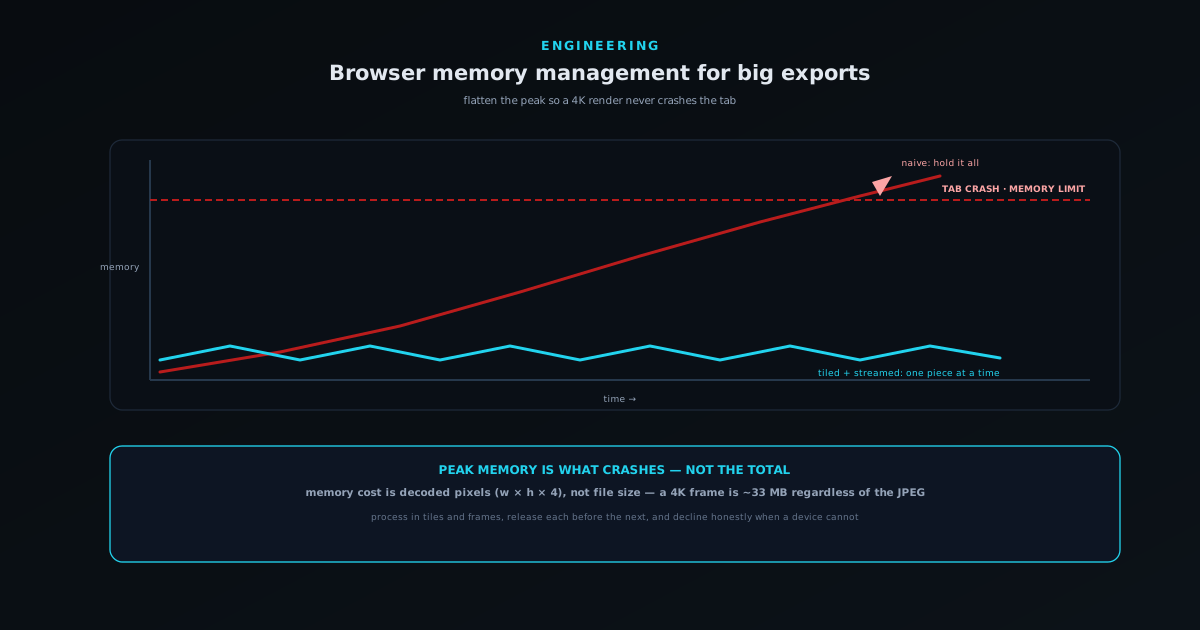
The first and most important correction is that an image’s memory cost has almost nothing to do with its file size. A compressed photo might be two megabytes on disk, but to do anything with its pixels the browser must decode it into raw form, and a raw image costs roughly its width times its height times four bytes, one each for red, green, blue, and alpha. A single 4K frame is about four thousand by two thousand pixels, which is around thirty-three megabytes decoded, regardless of how small the compressed file was. The compression that makes the file small on disk buys you nothing once the pixels are in memory, and reasoning about memory from file sizes is how people are blindsided by crashes.
This decoded-pixel reality is what makes heavy media work memory-intensive in ways that surprise people. A modest-looking batch of twenty large photos is not forty megabytes of work; decoded, it can be many hundreds. A video export does not just hold one frame; it may hold the frame being rendered, the previous frame, intermediate compositing buffers, and an output buffer accumulating encoded data, all at once. The mistake is to think in terms of the inputs you can see in the file system. The thing that determines whether the tab survives is how many decoded, uncompressed buffers you are holding in memory at the same instant.
Peak memory is what kills you
The number that decides whether a tab crashes is not total memory used over the life of the task; it is peak memory: the most you hold at any single moment. A render that touches two gigabytes of data over a minute is completely fine if it only ever holds fifty megabytes at a time and releases each piece before loading the next. The same render dies instantly if it loads all two gigabytes before starting to process. Total throughput is irrelevant to survival; the height of the single tallest spike is everything, and the entire craft of memory management for big tasks is about flattening that spike.
This reframing is liberating because it means you almost never need less data overall; you need to hold less of it at once. The techniques that follow are all variations on a single idea: process the work in pieces small enough that the peak stays under budget, and let go of each piece before picking up the next. You are not shrinking the job; you are reshaping its memory profile from one tall, fatal spike into a long series of small, survivable bumps. A device that could never hold the whole 4K render at once can finish it comfortably if it only ever has to hold one tile of one frame.
Tiling and streaming: never hold the whole thing
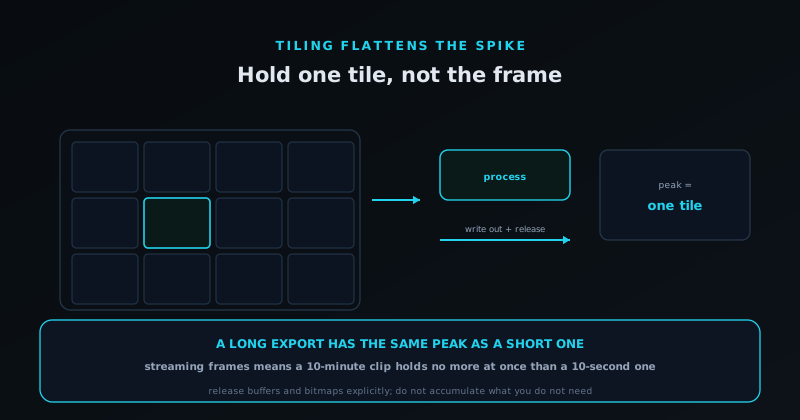
Tiling is the workhorse technique for images. Instead of loading an entire massive image into memory to process it, you process it in tiles (rectangular regions handled one at a time) so the peak memory is the size of one tile plus the output, not the size of the whole image. A photo too large to decode in full can be processed tile by tile on a device that could never have held it whole. The same idea applies to video as streaming: you process and encode frames one at a time, writing each finished frame to the output and discarding it before generating the next, so you never hold more than a frame or two regardless of how long the video is.
The general principle behind both is to turn a job that wants to hold everything into a pipeline that holds one piece at a time. This is exactly what the Streams approach is for (data flowing through in chunks rather than arriving all at once) and structuring an export as a stream of frames or tiles is what lets a ten-second 4K clip and a ten-minute one have nearly the same peak memory. The longer job simply runs the pipeline more times; it does not hold more at once. Designing the export as a pipeline from the start, rather than retrofitting tiling after the first crash report, is the difference between an export that scales with the device and one that scales with the file.
Release what you are done with, explicitly
Garbage collection reclaims memory you are no longer using, but with the emphasis on no longer using. The classic leak in a long task is holding a reference to something you are actually finished with: keeping every processed frame in an array “just in case”, or stashing intermediate results that are never read again, so the collector cannot reclaim them and your peak climbs frame by frame until the tab dies near the end. The fix is discipline about references: as soon as a buffer, a frame, or an intermediate result is no longer needed, drop every reference to it so the collector can do its job. In a loop over many items, that often means not accumulating results you do not need.
Some browser resources go further and want to be released explicitly rather than waited on. An ImageBitmap, for instance, can hold a significant chunk of decoded image memory, sometimes on the GPU, and it offers a close method precisely so you can free it the moment you are done rather than leaving it to non-deterministic collection. In a tight loop processing many images, calling that explicitly keeps the peak flat instead of letting decoded bitmaps pile up faster than the collector reclaims them. The habit to build is to treat large resources like something you check out and check back in (acquire it, use it, release it) rather than something you create and forget, because in a heavy loop “create and forget” is how the peak quietly grows until it crosses the line.
When the device just cannot, fail honestly
Even with perfect discipline, some devices cannot do some jobs. A phone with limited memory asked to export a long 4K video may simply not have the headroom no matter how carefully you tile and stream, and the worst possible response is to try anyway and crash the tab at the ninety-per-cent mark. A crash is the most expensive failure there is: the user spent the time and got nothing, with no explanation. Far better to detect the constraint before starting (estimate the peak the chosen settings will demand, compare it against what the device plausibly has) and tell the user honestly that this resolution is too much for this device, with a concrete alternative like a lower resolution or a shorter clip.
This is the same honest-failure philosophy that runs through the rest of the engineering work, applied to memory: it is better to decline a job you cannot finish than to fail it loudly halfway through. Offering a render at a resolution the device can actually sustain respects the user’s time in a way that an optimistic attempt followed by a crash never does. The full argument for designing around honest failure rather than hopeful success is in Reliability hardening: device lifecycle, model integrity, and honest failures, and a memory limit is one of the clearest places it applies: the device’s capacity is a fact, and pretending otherwise just converts a clear up-front “not on this device” into a frustrating late crash.
The payoff: exports that finish
Put together, these techniques turn the most fragile part of an in-browser app into something dependable. The user picks 4K, starts the render, and it completes, not because their device has unusual amounts of memory, but because the export was built to hold one frame at a time, release each buffer as it finished, and stay under budget the whole way through. The memory discipline is completely invisible when it works; what the user notices is simply that the export they asked for arrived, even from a fairly ordinary laptop, which is exactly the impression a serious creative tool needs to make.
That is the quiet goal of memory management for heavy tasks: make ambitious work survivable on ordinary hardware. The browser will not do it for you on tasks this size: the comforting fiction that memory is someone else’s problem ends precisely where the interesting work begins. But the solutions are not exotic. Think in decoded pixels rather than file sizes, flatten the peak instead of shrinking the total, process in pieces and release them promptly, and decline honestly when a device truly cannot. Do that, and a 4K export in a browser tab stops being a gamble and becomes a thing that simply works.
Measure, so you are not guessing at the peak
You cannot manage what you cannot see, and memory is invisible until it kills the tab, so the first practical move is to make the peak observable during development. Browsers expose enough to get a rough read on how much heap the page is using, and watching that number climb as an export runs tells you immediately whether your memory profile is a series of small bumps or one inexorable ramp toward the ceiling. A profile that grows steadily across a long render and never comes back down is the signature of a leak (a reference you are holding when you should have dropped it) and it is far better to catch that on your own machine than in a crash report from a user with less headroom than you have.
The discipline is to test memory the way you test correctness: deliberately, against the hard cases, on modest hardware. Run the largest export the app offers and watch the peak; run a long batch and confirm the footprint stays flat across items rather than climbing with each one; do it on a device with less memory than your development machine, because the whole point is to survive on ordinary hardware. The aim is not a precise number (browser memory reporting is approximate and varies) but a shape: flat-and-bumpy is healthy, monotonically-climbing is a leak you need to find before a user does. Measuring turns memory from a mystery that occasionally bites into a property you can see and defend.
The GPU has its own budget
It is easy to think of memory as a single pool, but heavy graphics and media work usually involve a second one: the memory the GPU uses for textures, framebuffers, and the surfaces a canvas draws into. That budget is separate from the JavaScript heap and is often smaller and less forgiving, and exhausting it produces its own failures: a context that is lost, a render that comes back blank, a tab that dies for reasons that do not show up in heap measurements at all. For an app compositing layers or rendering video frames, GPU memory can be the real constraint even when the JavaScript heap looks comfortable, which makes it a blind spot precisely because the obvious number looks fine.
The same principles apply, with the same emphasis on peak rather than total. A decoded image uploaded to the GPU as a bitmap holds GPU memory until you release it, so the discipline of acquiring, using, and explicitly releasing matters here too, arguably more, because the GPU budget is tighter and its failures are murkier. Releasing bitmaps and intermediate surfaces as soon as a frame is done, and not keeping a gallery of GPU textures alive across an export, keeps that second budget under control. The lesson is that “memory management” for a media app means watching two budgets, not one, and the GPU budget is the one people forget until a render mysteriously fails on a device whose heap was never close to full.
Batches multiply everything, so run them in series
Batch processing is where memory problems compound, because the obvious implementation is the dangerous one. Asked to process fifty images, the tempting approach is to kick them all off at once and let them run, which feels fast and is a reliable way to hold fifty decoded images plus fifty sets of intermediate buffers in memory simultaneously, a peak that no amount of per-image tiling can save you from, because the tiling helps within an image while the batch multiplies across them. The crash does not come from any single item being too big; it comes from holding too many modest items at the same instant, which is the same peak-memory failure wearing a different hat.
The fix is to process a batch as a queue, not a swarm: handle a small number of items at a time, often just one, finish each completely, release everything it used, and only then start the next. This is backpressure, the same idea as streaming applied to a list of jobs, and it keeps the peak at roughly the cost of one item regardless of whether the batch is five images or five hundred. The batch takes the same total time either way, since the device can only do so much work at once, but the serial version finishes while the parallel one crashes. Designing batch features to bound how much is in flight at any moment is what lets the Background Remover’s batch surface chew through a hundred images on an ordinary laptop without ever holding more than a couple of them at a time.
Test against the weakest device you support
Memory problems hide on good hardware, which is exactly the hardware developers use, and that is how a tool ships feeling solid and then crashes for a meaningful slice of real users. A development machine with abundant memory will sail through a 4K export that a mid-range phone cannot survive, so testing only on the machine you build on systematically blinds you to the failures that matter most. The corrective habit is to define the weakest device you intend to support and to test the heaviest tasks specifically there, because the floor, not the ceiling, is where memory failures live, and the floor is where a large share of your audience actually is.
Testing low also changes design decisions in healthy ways, because constraints you can feel are constraints you respect. When you have watched the largest export push a modest device to its limit, the value of tiling, streaming, and prompt release stops being abstract, and the case for an honest “this resolution is too much for this device” becomes obvious rather than grudging. A tool proven to finish its hardest task on the weakest hardware you support will be comfortable everywhere above that line, which is the right direction to generalise from. Building and testing against the floor is what turns memory management from a theory that holds on your fast laptop into a guarantee that holds for the people whose devices you will never personally own.
Frequently asked questions
Quick answers to common questions about this topic.
Why does a small image file use so much memory when I process it?
Because memory cost is about decoded pixels, not file size. To work with an image the browser decodes it to raw form costing roughly width × height × 4 bytes, so a 4K frame is about 33 MB in memory no matter how small the compressed file was. Compression saves disk space, not working memory, which is why reasoning about memory from file sizes leads to surprise crashes.
What actually causes a browser tab to crash during an export?
Exceeding the tab’s memory budget at a single moment: peak memory, not total. A task that touches gigabytes over time is fine if it only ever holds a small amount at once; it crashes if it loads everything before processing. The whole goal of memory management for big tasks is to flatten that peak by holding less at a time.
What is tiling and when should I use it?
Tiling means processing a large image in rectangular regions one at a time instead of loading the whole thing, so peak memory is one tile plus the output rather than the entire image. Use it whenever an image or frame is large enough that holding it whole risks the budget. The video equivalent is streaming frames one at a time, so a long export has nearly the same peak as a short one.
Do I need to free memory manually in JavaScript?
Usually the garbage collector handles it once you drop references, so the main discipline is not holding onto things you are done with, for example not accumulating every processed frame in an array. Some resources, like ImageBitmap, additionally offer an explicit close/release so you can free significant decoded memory immediately rather than waiting on collection, which matters in tight loops over many large items.
What should happen when a device cannot handle the requested export?
Detect it before starting and fail honestly. Estimate the peak memory the chosen settings will need, compare it to what the device plausibly has, and if it will not fit, tell the user clearly and offer a workable alternative: a lower resolution or shorter clip. That respects their time far more than attempting the job and crashing the tab near the end with no result and no explanation.
Related workflow
A track to a release-ready visualizer, per platform
Render the visual once, then produce the platform masters from it, instead of re-rendering the whole video for every aspect ratio.
- Render the beat-synced videoNovus Visualizers: Pick the engine and mode against your actual track; the analysis is done on your audio, not on a preset preview.
- Trim or upscale the exportNSS Background Remover: The video utilities handle the tidy-up pass so the render does not have to be repeated to fix ten seconds of it.
- Produce the per-platform mastersNovus Convert: Each destination wants a different container and bitrate; converting the finished render is far cheaper than re-rendering it.
Related troubleshooting
Was this page helpful?
Your answer stays in this browser, it is not sent anywhere and no account or cookie is involved.