2026 · Novus VisualizersAbout 12 min readNovus Stream Solutions
Novus Visualizers grows up: accounts, albums, and a community feed
Novus Visualizers added free accounts, a Creator Studio dashboard, durable saved projects and albums, and a public community feed. Here is what changed, what stayed entirely local, and how to start using it today.
Contents
- 1.Overview
- 2.What actually changed: from a renderer to a place you keep your work
- 3.Sign up is free, and it is the line between a session and a saved project
- 4.Drafts, projects, and albums: the three things the dashboard keeps
- 5.Durable saves mean you can come back, on any device
- 6.The community feed: browse free, sign in to take part
- 7.Creators: a young hub for building an audience
- 8.Companion tools turn one song into a release kit
- 9.What stayed exactly the same: the compute, the ownership, the price
- 10.How to start using the account era today
Overview
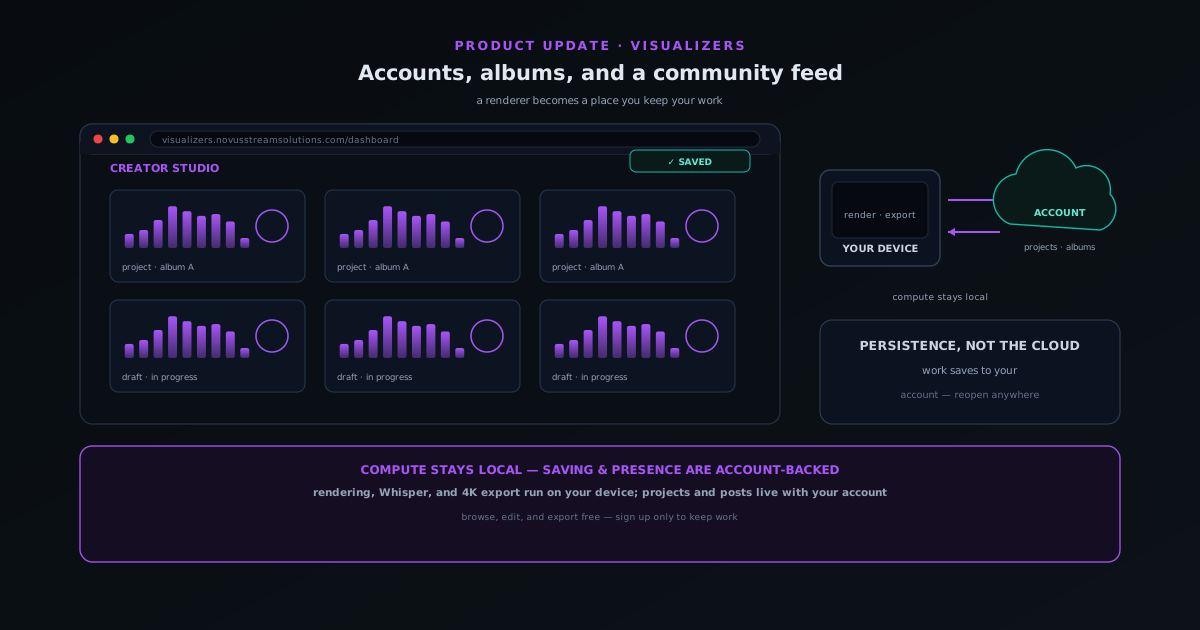
For most of its life, Novus Visualizers was a renderer. You opened visualizers.novusstreamsolutions.com, dropped in a track, picked an engine, tuned the look, and exported a video, and when you closed the tab, the session went with it. That was a deliberate, honest design for a tool that did its whole job in the browser, but it left one real gap: there was nowhere to keep your work, no way to come back to a release weeks later, and no place for the videos creators made to live in public. The account era closes that gap. Novus Visualizers now has free accounts, a Creator Studio dashboard, durably saved drafts, projects, and albums, a public community feed, and a Creators hub, without changing the part that always mattered most, which is that the heavy compute still happens on your own device.
This post is a tour of what changed and, just as importantly, what did not. The short version is that everything about making a visualizer (reading the audio, driving the motion, rendering the frames, encoding the export) still runs locally in your browser. What is new is persistence and presence: a way to save the things you make so they survive a closed tab and follow you to another device, and a way to publish them so other people can find, like, and save them. If you have used the app before and remember it as a one-shot generator, the mental model worth updating is that it is now a place you keep your work, not just a place you pass through.
What actually changed: from a renderer to a place you keep your work
The most concrete change is that there is now a clear difference between a session and a saved project. Before, those were the same thing: your edits existed only as long as the tab did. Now, signing in turns a session into something the product remembers. Saved albums, templates, and projects persist durably rather than living in volatile browser state that a refresh or a crash could erase, and a saved project reopens in the editor with all of its settings intact. That single guarantee (that you can leave and come back to exactly where you were) is what separates a tool you use once from a tool you build a workflow around.
The second change is presence. The app added a public Community feed and a Creators hub, which means the videos creators render are no longer only files they download and post elsewhere; they can be published inside Novus Visualizers itself, where they are browsable, likeable, and saveable by other people. Those two changes, persistence and presence, are really the whole story of the account era, and the rest of this post is just the detail of how each one works and where the lines are drawn. The reason to draw those lines carefully is that "the app saves your work now" and "the app uploads everything to a server now" are very different claims, and only the first one is true in the way most people assume.
Sign up is free, and it is the line between a session and a saved project
You do not need an account to use Novus Visualizers. Browsing the community, opening the editor, building a visualizer, and exporting a finished video are all available without signing in: the same instant-on experience the app always had. What an account adds is everything that has to outlast the current tab: saving drafts and projects, organizing albums, and taking part in the community. The two entry points are Sign Up Free and Sign In, and signing up is genuinely free, in keeping with the rest of the Novus approach of leading with a usable product rather than a wall.
The natural moment to create an account is the moment you make something you do not want to lose. A creator who is just trying the app does not need to commit to anything; a creator who has spent twenty minutes dialing in the look of a single and wants it back tomorrow has an obvious reason to sign in. That is the right place for an account prompt to live, at the point where it solves a problem you actually have, rather than as a gate you hit before you have seen what the tool can do. Once you are signed in, a new home base appears: Creator Studio at visualizers.novusstreamsolutions.com/creator-studio, described in the product as the place to manage your visualizers, templates, and community presence.
Drafts, projects, and albums: the three things the dashboard keeps
Creator Studio organizes saved work into a small, learnable set of concepts. A draft is a work in progress: something you are still editing and have set down to finish later. A project is a saved state you return to deliberately: the uploaded audio, the chosen engine and mode, the layer composition, and all of the editing settings, bundled together so reopening it drops you back into the editor exactly as you left it. An album groups related visualizers so they can be managed as a set, which maps cleanly onto how releases actually work: an EP, a single with several format cuts, or a campaign that needs a consistent look across multiple videos.
The value of keeping these three ideas distinct is that they answer the question every creative tool eventually raises: "if I change this, what does it affect?" In Novus Visualizers, a change affects the draft or project you have open, saving captures that state, and albums are just an organizational layer on top: they group projects, they do not silently rewrite them. My Albums and the dashboard at visualizers.novusstreamsolutions.com/dashboard are the two surfaces a returning user navigates first, and because the structure is shallow and named in plain language, there is very little to learn before it becomes second nature. The album concept also pairs with the companion Cover Art Studio, so the visual identity of a release and the videos in it can be managed in the same place.
Durable saves mean you can come back, on any device
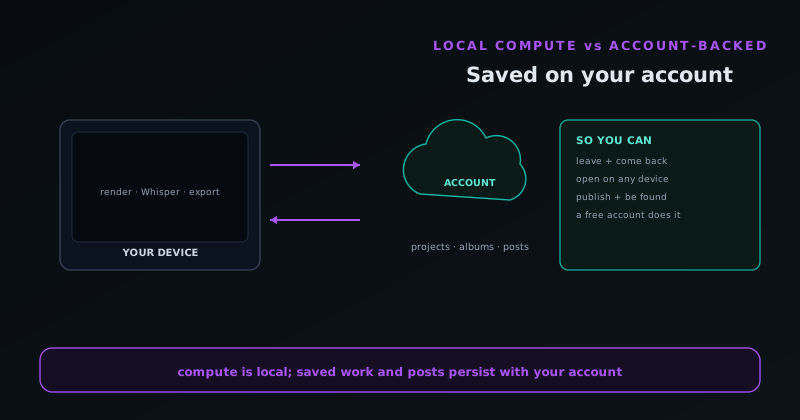
The word that matters in the saving model is durable. When the reliability work landed, saved albums, templates, and projects stopped being best-effort browser state and became something the product is responsible for keeping. Practically, that means two things. First, a save survives the ordinary accidents that used to cost people work: a closed tab, a refreshed page, a browser that decided to clear its storage, a laptop that went to sleep mid-edit. Second, because a saved project lives with your account rather than only inside one browser, you can sign in somewhere else and open it there: start a draft on a desktop, finish it on a laptop, pull up last month's release on a different machine entirely.
That portability is the real upgrade over the old model, and it is worth being precise about how it differs from purely local saving. A tool that saves to the browser keeps your work on one machine, in one browser, until that storage is cleared; a tool that saves to your account keeps the work with you. Novus Visualizers now does the second thing for the project data, which is exactly the capability creators were missing when they wanted to revisit a release rather than rebuild it. It is the difference between a sketchpad and a portfolio: both let you make things, but only one lets you keep them.
The community feed: browse free, sign in to take part
The Community page at visualizers.novusstreamsolutions.com/community turns Novus Visualizers into somewhere work can live in public. It is a feed of audio-reactive visualizers made by creators, with a main Feed plus Trending, Following, and Saved views, genre filters spanning Electronic, Hip-Hop, Ambient, Rock, Jazz, and Pop, sort options for Recent, Most Liked, and Most Viewed, and aspect-ratio toggles for 16:9, 9:16, and 1:1 so you can browse the format you actually care about. The design choice that keeps it open is simple: browsing is free and requires nothing, while the social actions (like, save, and post) are what an account unlocks. You can window-shop the whole feed before deciding to participate.
That split matters because it keeps the community discoverable without forcing a commitment. A musician who lands on the feed from a search can see what the app produces, in their genre, in their preferred orientation, before ever creating an account, and when they make something they are proud of, posting it is the natural next step rather than a hoop. The feed also surfaces Top Creators and Hot Templates, so strong work and reusable setups rise to the top instead of disappearing into a chronological stream. And the ownership stance underneath all of it is unchanged: every visualizer is copyright-free, and creators retain full ownership of their exports, so publishing to the community does not quietly sign away rights to the work.
Creators: a young hub for building an audience
Alongside the feed is a Creators hub, which is the audience-building side of the same system. Its stated purpose is to help people discover talented visualizer creators and to let a creator share their visualizers and build an audience. It is genuinely early (at the time of writing it can still greet you with "no creators yet" and an invitation to be the first to share a visualizer) and that is worth saying plainly rather than dressing it up as a thriving network. What exists today is the scaffolding: the ability to publish, to be discovered, to accumulate likes and saves, and to be featured among Top Creators.
For a creator deciding whether to invest in it, the honest calculus is that being early in a small community is a different bet than joining a large one. You will not find a massive built-in audience yet, but you also will not be one of millions, and the copyright-free model means anything you post stays fully yours to use everywhere else. The most pragmatic way to treat the Creators hub right now is as a place to keep a public body of work that grows alongside the platform, not as a traffic source you can lean on from day one. That framing keeps expectations accurate, which is the same discipline the rest of the Novus ecosystem tries to hold.
Companion tools turn one song into a release kit
The account also ties together a set of companion tools that share the same login and the same copyright-clean stance, so a single track can become more than one asset without leaving the ecosystem. The Cover Art Studio makes cover and square artwork and supports uploading existing art to adapt. The Audio Effects Generator is a sound-effects preset library (synth pads, bass, leads, and percussion) for when you need short audio elements rather than only visuals. The Lyric Video Creator is a guided wizard built on the app's on-device Whisper transcription, pairing per-word timing with caption styling. Stream Overlays offers a curated catalog of broadcast overlays for streamers, and the Audio Library provides tracks to build with when you do not have your own.
Documented together, these explain why the account era is more than a save button: it is the connective tissue for a release workflow. A creator can render the main visualizer, generate a matching cover in the Cover Art Studio, build a lyric video from the same audio, cut a vertical version for short-form, and pull an overlay for the stream where they premiere it, all under one account, all owned outright. The companion tools were always adjacent to the editor; the account is what makes them feel like parts of one kit rather than five separate utilities you happen to open in the same browser.
What stayed exactly the same: the compute, the ownership, the price
It is easy to read "the app added accounts and a community" as "the app moved to the cloud," so it is worth being exact about what did not change. The rendering pipeline is still local: a real-time 32-band FFT plus beat, onset, and loudness detection reads your track, the engines render through HTML5 Canvas and WebGL via Three.js, on-device Whisper handles captions, and the final encode runs client-side through WebCodecs to MP4 or WebM up to 4K. None of that moved to a server. Saving a project to your account is a separate, opt-in step from rendering, and it does not change where the heavy compute happens; it changes whether the result is remembered.
The ownership stance is also unchanged: visualizers are copyright-free and you keep full ownership of your exports, including the ones you post. And the price of entry is still zero: signing up is free. There is nothing to ration on exports either: editing, saving, exporting, and community participation are all free and unmetered, so you can cut a release into as many formats as you need in a single push without watching a counter or bumping a limit mid-deadline. Holding these constants in view is what keeps the upgrade legible: you gained persistence and presence, you did not give up the local, free, copyright-clean foundation.
How to start using the account era today
If you are new, the fastest path is to ignore the account at first: open the editor, upload a track, pick an engine, and export something so you know what the tool feels like. Then, the moment you make a look you would want back, choose Sign Up Free and save it as a project. From there, group your release into an album, and if you want it seen, post it to the community feed, and browsing the feed first for your genre and orientation is a good way to calibrate what reads well. The companion tools are worth a pass once you have a project saved, because that is when turning one song into a cover, a lyric video, and a vertical cut stops being busywork and starts being a workflow.
If you used Novus Visualizers months ago and remember it as a generator that forgot everything when you left, the one thing worth doing is signing in and saving your next piece, because that is the change that makes the rest of it cohere. The engine library, the multi-band beat sync, the 4K client-side export, and the companion tools were already strong; the account is what lets you keep the work those features produce and build on it over time. For the canonical reference on how all of this fits together, the Novus Visualizers documentation now covers accounts, the dashboard, the community, and the companion tools in one place, and the live product is the best way to see it, at visualizers.novusstreamsolutions.com.
Frequently asked questions
Quick answers to common questions about this topic.
Do I now need an account to use Novus Visualizers?
No. Browsing, editing, and exporting still work without signing in. A free account is optional and adds durable saved projects, albums, a Creator Studio dashboard, and the ability to post to the community feed.
What does a Visualizers account add?
Saved drafts and projects that reopen with all settings intact on any device, albums to group a release, a creator dashboard, and participation in the community feed, while rendering and export stay local to your device.
Is the community feed public, and can I keep my work private?
Browsing the feed is open, and liking/saving/posting require signing in. Saving a private draft and posting publicly are separate actions, so you control what is shared.
Related workflow
A track to a release-ready visualizer, per platform
Render the visual once, then produce the platform masters from it, instead of re-rendering the whole video for every aspect ratio.
- Render the beat-synced videoNovus Visualizers: Pick the engine and mode against your actual track; the analysis is done on your audio, not on a preset preview.
- Trim or upscale the exportNSS Background Remover: The video utilities handle the tidy-up pass so the render does not have to be repeated to fix ten seconds of it.
- Produce the per-platform mastersNovus Convert: Each destination wants a different container and bitrate; converting the finished render is far cheaper than re-rendering it.
Related troubleshooting
Was this page helpful?
Your answer stays in this browser, it is not sent anywhere and no account or cookie is involved.