2026 · Novus VisualizersAbout 12 min readNovus Stream Solutions
UX for tasks that take time: progress, cancel, and undo
Some tasks are slow and cannot be made fast: a model has to download, a 4K video has to render. When you cannot remove the wait, the design job is to make it bearable and reversible: honest progress so the user knows it is working, a real cancel so they are never trapped, and undo so a wrong result is not a dead end.
Contents
- 1.Overview
- 2.Perceived versus real performance
- 3.Show honest, determinate progress
- 4.A cancel that actually cancels
- 5.Undo makes the commitment safe
- 6.Be honest up front about the wait
- 7.Let users queue work instead of waiting on it
- 8.Stay honest while the tab is in the background
- 9.Design the failure, not just the success
- 10.Match the indicator to how long the task takes
Overview
A lot of performance advice is about making slow things feel fast: skeletons, optimistic updates, the careful illusion of speed. That advice is real and useful, but it has a hard limit: some tasks are genuinely slow and no amount of perceptual trickery will change it. A several-hundred-megabyte model has to download before a tool can run. A two-minute 4K video has to be rendered frame by frame. A batch of a hundred images has to be processed one at a time. For these, the honest position is that the wait exists and cannot be wished away, and the design question changes from “how do we hide the wait” to “how do we make the wait bearable and, crucially, reversible.”
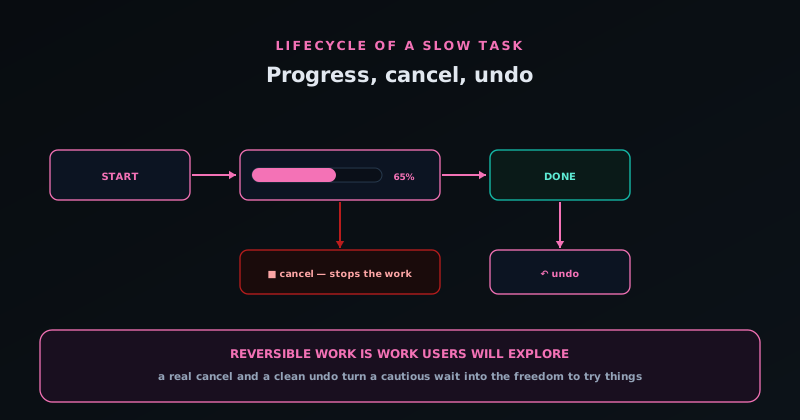
That second framing is the whole subject. When you cannot make a task instant, three things make the unavoidable wait acceptable rather than miserable: progress that honestly shows it is working and roughly how far along it is, a cancel that genuinely stops the work so the user is never trapped, and an undo that means committing to the slow operation was never a risky bet. Get those three right and a user will sit through a long render without anxiety; get them wrong and even a short wait feels like a hang. This article is about designing for the tasks you cannot speed up, which are often the most valuable things your tool does.
Perceived versus real performance
It is worth being clear about the two different problems, because they call for opposite techniques and confusing them produces bad design. Perceived performance is about operations that are actually fast but might feel slow without help: here you use skeletons, optimistic UI, and instant feedback to make the speed felt, and that is the subject of Perceived performance: skeletons, optimistic UI, and the feel of fast. Real performance is about operations that are actually slow and cannot be made fast: here the techniques are different, because you are not hiding a wait, you are dignifying one. Pretending a genuinely slow task is fast, with a spinner that implies it will be done any second, only sets up a broken promise.
The reason the distinction matters is that the wrong tool for each makes things worse. An optimistic UI that assumes success on a task that takes two minutes and sometimes fails is a lie that gets exposed; a bare spinner on a two-minute render gives the user no information and growing dread. Genuinely slow tasks need to be treated as the substantial operations they are: shown honestly, kept under the user’s control, and made safe to commit to. The goal is not to disguise the duration but to make the user comfortable spending it, which is a different and frankly more respectful design objective than faking instantaneity.
Show honest, determinate progress
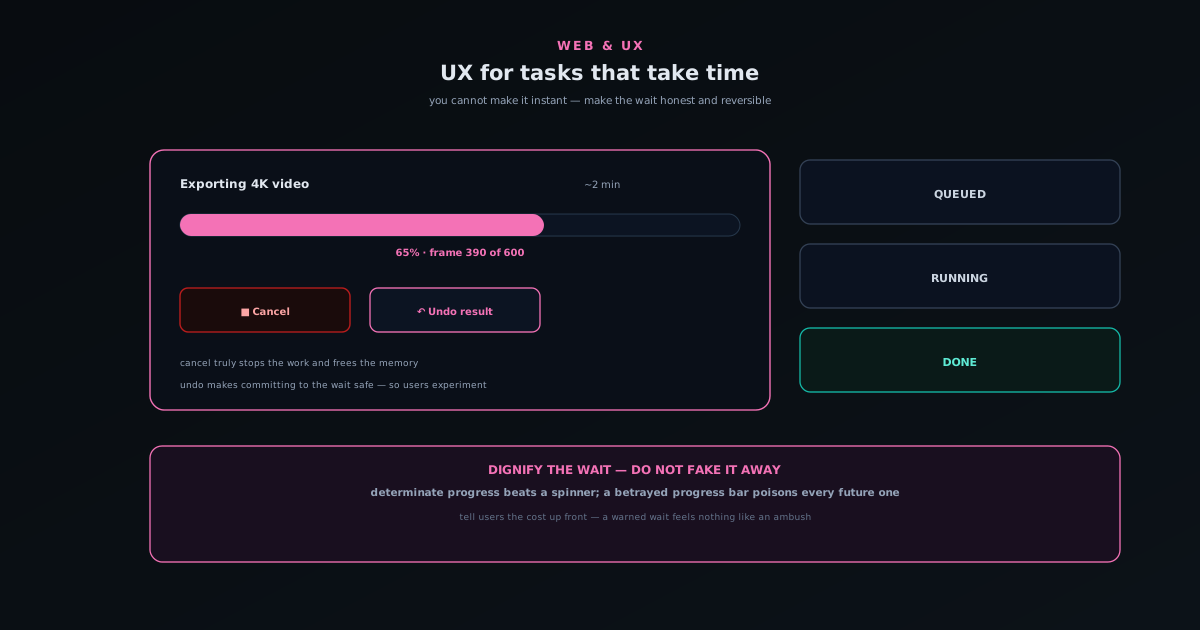
The single most important thing for a long task is to show real progress, and specifically determinate progress (a bar that fills, a percentage, a count of frames or items completed) rather than an indeterminate spinner that just turns forever. The difference is psychological and large. A spinner says only “something is happening, for an unknown amount of time”, which over a long wait curdles into “is this stuck?”. A progress bar that visibly advances says “it is working, you are this far, it will finish”, and a user who can see steady movement toward completion will wait with remarkable patience. Visible progress toward a goal is one of the most reliable ways to keep someone engaged through a wait.
Honesty is the constraint that makes progress trustworthy. A bar that races to ninety per cent and then sits there for a minute is worse than no bar, because it trains users to distrust your progress entirely, and a betrayed progress bar poisons every future one. Better a bar that moves unevenly but truthfully, reflecting actual work done even when that work is lumpy, than a smooth animation untethered from reality. Where a true percentage is genuinely impossible, a meaningful proxy like “frame 240 of 600” still beats a spinner, because it is real and it advances. The rule is simple: show real movement tied to real work, and never promise a finish line the work has not reached.
A cancel that actually cancels
Any task long enough to need a progress bar is long enough to need a cancel, because the user will sometimes realise mid-way that they chose the wrong settings, the wrong file, or simply changed their mind, and a tool that offers no way out of a two-minute operation makes them feel trapped, which is its own kind of failure. So a visible, available cancel button is not a nicety; it is what makes starting a long task feel safe, because the user knows they are not committing to the full duration the moment they click go. The presence of an escape hatch is half the value, even for users who never press it.
The hard part is that the cancel must genuinely stop the work, not just hide the progress bar while the task grinds on in the background consuming resources. A fake cancel that abandons the UI but keeps the computation running is arguably worse than none, because it lies and wastes the device’s effort. Building a real cancel means the long-running work has to be interruptible (checking for a cancellation signal between chunks of work and actually stopping) which is exactly the kind of thing made tractable by running the work off the main thread, as in Web Workers and OffscreenCanvas: keeping the UI smooth during heavy AI work, where the cancel signal can reach the worker promptly. A cancel that stops the work and frees the resources is the one that earns the user’s trust to try again.
Undo makes the commitment safe
The third pillar is the one most often forgotten: undo. A long task ends in a result, and sometimes that result is not what the user wanted: the export came out wrong, the batch processed with the wrong setting, the effect was not what they pictured. If the only way to fix it is to notice the problem, manually reverse it, and run the whole slow operation again from scratch, then every commitment to a slow task carries real risk, and users respond to risk by hesitating. An undo that cleanly reverses the result removes that risk, and in doing so it makes users far more willing to try the slow thing in the first place, because a wrong outcome is now a single click to recover rather than another two-minute round trip.
This is the counter-intuitive payoff: undo for slow operations is not mainly about fixing mistakes, it is about encouraging experimentation. When a user knows a result is reversible, they will try things (a bolder setting, a different option, a higher resolution) that they would never risk if a wrong guess meant starting over. The reversibility turns a slow tool from something you approach cautiously into something you explore freely, and exploration is how users discover what a tool can really do. Pairing a slow operation with a reliable undo is one of the highest-leverage things you can do for a powerful tool, because it converts the fear of commitment into the freedom to play.
Be honest up front about the wait
A final, simple principle ties the rest together: when something will take a while, say so before it starts, not after the user is already committed and wondering. If choosing 4K means a longer render than 1080p, letting the user know that at the moment of choosing (a rough sense of the duration, an honest “this will take a couple of minutes”) respects them and sets an expectation the experience can then meet. A wait you were warned about feels completely different from an identical wait that ambushed you, because the first is a known cost you accepted and the second is an unpleasant surprise. Setting the expectation is cheap and it converts frustration into patience.
This honesty extends to the whole shape of the slow-task experience. Tell the user roughly how long, show them honest progress as it runs, give them a real way out if they change their mind, and make the result safe to undo if it is wrong. None of that makes the task any faster, and that is precisely the point: you have stopped trying to fool the user about the duration and started treating the wait as a real part of the experience worth designing well. A genuinely slow task wrapped in honesty, control, and reversibility is one users will happily use; the same task wrapped in a lying spinner and no escape is one they will dread. The duration is the same; the respect is not, and the respect is what they remember.
Let users queue work instead of waiting on it
A subtle upgrade for a tool with slow tasks is to stop treating each operation as a blocking event the user must watch, and start treating slow work as a queue they can feed. If rendering one video takes two minutes, a user with five videos should not have to sit through render, save, start the next, sit through render, five times in series with their full attention captive. Letting them line up all five and walk away (with a clear view of what is queued, what is running, and what is done) turns five captive waits into one unattended batch, which is a dramatically better use of their time and a more honest acknowledgement that the work simply takes a while.
A visible queue also reframes the wait psychologically, because the user is no longer staring at a single bar willing it to finish; they are looking at a list making steady progress, free to do something else. The states need to be legible (queued items clearly distinct from the one in progress and from the finished ones) and the queue should keep its promises, completing items in order and surfacing any that failed rather than silently dropping them. For genuinely slow work, a queue is often the single highest-value addition you can make, because it converts the tool from something that holds the user hostage for the duration of each task into something they can delegate a pile of work to and collect later. The work is still slow; the user’s time no longer is.
Stay honest while the tab is in the background
Here is a reality of slow tasks that single-bar thinking ignores: the moment something takes more than a few seconds, a meaningful fraction of users will switch to another tab and do something else, which is entirely sensible behaviour you should design for rather than against. The implication is that your carefully-built progress bar is often not being watched at all, so the experience has to communicate through channels that reach a user who has looked away. The simplest and most effective is the tab title: updating it to show progress or a “done” state means a user with your tab in the background can glance at their tab strip and see where things stand without switching back, which respects exactly the multitasking the slow task invited.
Going a step further, a finished long task is a natural moment for an unobtrusive notification, so a user who wandered off entirely is drawn back when their result is actually ready rather than having to keep checking. The bar for this is taste: a quiet, dismissible signal, not a demanding interruption, and only for tasks long enough that the user plausibly left. The principle is that a slow task’s UX does not end at the edge of the visible tab; it has to account for the very likely case that the user is elsewhere, and reach them where they are. A tool that updates its title and announces completion treats the user’s decision to multitask as legitimate, which a tool that only animates a bar nobody is watching does not.
Design the failure, not just the success
Long tasks fail sometimes: the device runs out of memory near the end of a 4K render, a model fails to finish, something goes wrong two minutes into work the user was counting on, and how the tool handles that failure matters more than how it handles success, because failure after a long wait is the most expensive disappointment the tool can produce. The unforgivable version is the silent one: the progress bar vanishes, or freezes, and the user is left unsure whether the task succeeded, failed, or is still going. A slow task that can fail needs an explicit, honest failure state that says clearly what happened and, where possible, why and what to try instead: a lower resolution, a shorter clip, a smaller batch.
Better still, where the work allows it, is to preserve whatever was accomplished rather than discarding everything on failure. A batch that processed ninety of a hundred images before hitting a problem should hand the user the ninety, not zero, because making them redo the whole thing to recover work that was already done is a gratuitous insult on top of the failure. The same goes for resumability where it is feasible: letting a user pick up from where a long task stopped, rather than restarting from scratch, turns a costly failure into a recoverable hiccup. This is the honest-failure philosophy from Reliability hardening: device lifecycle, model integrity, and honest failures applied to the time dimension: the longer the task, the more the failure case deserves real design, because the user has already spent the one thing you cannot give back, which is the wait.
Match the indicator to how long the task takes
Not every operation deserves the full progress-cancel-undo treatment, and applying it indiscriminately is its own mistake, because a heavyweight indicator on a near-instant action is noise that makes the tool feel busier and slower than it is. The useful rule is to scale the feedback to the duration. Something that finishes in well under a second needs no indicator at all: by the time a spinner rendered, the work would be done, and flashing one just adds visual flicker. An operation in the low-seconds range can warrant a simple in-progress indication to confirm the click registered, without the ceremony of a determinate bar it would finish before filling.
It is the genuinely long operations (the ones measured in tens of seconds or minutes, the model downloads and the 4K renders) that earn the whole apparatus: the honest determinate progress, the working cancel, the undo on the far side, and the up-front warning about the wait. Matching the indicator to the task length keeps each interaction proportionate, so the tool neither leaves the user wondering whether a slow thing is working nor patronises them with a loading bar on something that was instant. The judgement is the same one that runs through all of this: spend the design effort where the wait is real, and stay out of the way where it is not, because a tool that treats a fast action and a slow one identically gets both wrong.
Frequently asked questions
Quick answers to common questions about this topic.
What is the difference between perceived and real performance?
Perceived performance is about operations that are actually fast but might feel slow: you use skeletons, optimistic UI, and instant feedback to make the speed felt. Real performance is about operations that are genuinely slow and cannot be made fast (a model download, a 4K render) where you do not hide the wait but dignify it with honest progress, a working cancel, and undo. Using the perceived-performance toolkit on a truly slow task just creates a broken promise.
Why is a determinate progress bar better than a spinner?
A spinner only says “something is happening for an unknown time”, which over a long wait curdles into “is this stuck?”. A determinate bar or a count like “frame 240 of 600” shows real, advancing progress toward a finish line, and visible movement toward a goal keeps people patient. The one rule is honesty: a bar that jumps to 90% and stalls is worse than none, because it trains users to distrust all your progress indicators.
What makes a cancel button actually good?
That it genuinely stops the work and frees the resources, rather than just hiding the progress bar while the computation grinds on in the background. A real cancel requires the long task to be interruptible (checking for a cancellation signal between chunks and truly stopping) which is much easier when the work runs off the main thread. Its mere presence also makes starting a long task feel safe, even for users who never press it.
Why does undo matter for slow operations specifically?
Because without it, every commitment to a slow task is risky: a wrong result means noticing, reversing, and re-running the whole thing. A clean undo removes that risk, and its real payoff is encouraging experimentation: when users know a result is reversible, they will try bolder settings and options they would never risk if a wrong guess meant starting over. Reversibility turns a slow tool from something approached cautiously into something explored freely.
Should I tell users how long something will take?
Yes, before it starts rather than after they are committed. A rough, honest estimate (“this will take a couple of minutes”) sets an expectation the experience can meet, and a wait you were warned about feels completely different from one that ambushed you. Setting the expectation is cheap and converts likely frustration into accepted, patient waiting.
Related workflow
A track to a release-ready visualizer, per platform
Render the visual once, then produce the platform masters from it, instead of re-rendering the whole video for every aspect ratio.
- Render the beat-synced videoNovus Visualizers: Pick the engine and mode against your actual track; the analysis is done on your audio, not on a preset preview.
- Trim or upscale the exportNSS Background Remover: The video utilities handle the tidy-up pass so the render does not have to be repeated to fix ten seconds of it.
- Produce the per-platform mastersNovus Convert: Each destination wants a different container and bitrate; converting the finished render is far cheaper than re-rendering it.
Related troubleshooting
Was this page helpful?
Your answer stays in this browser, it is not sent anywhere and no account or cookie is involved.