2026 · Novus Stream Solutions (hub)About 12 min readNovus Stream Solutions
Empty states that do real work: designing the screen users hit first
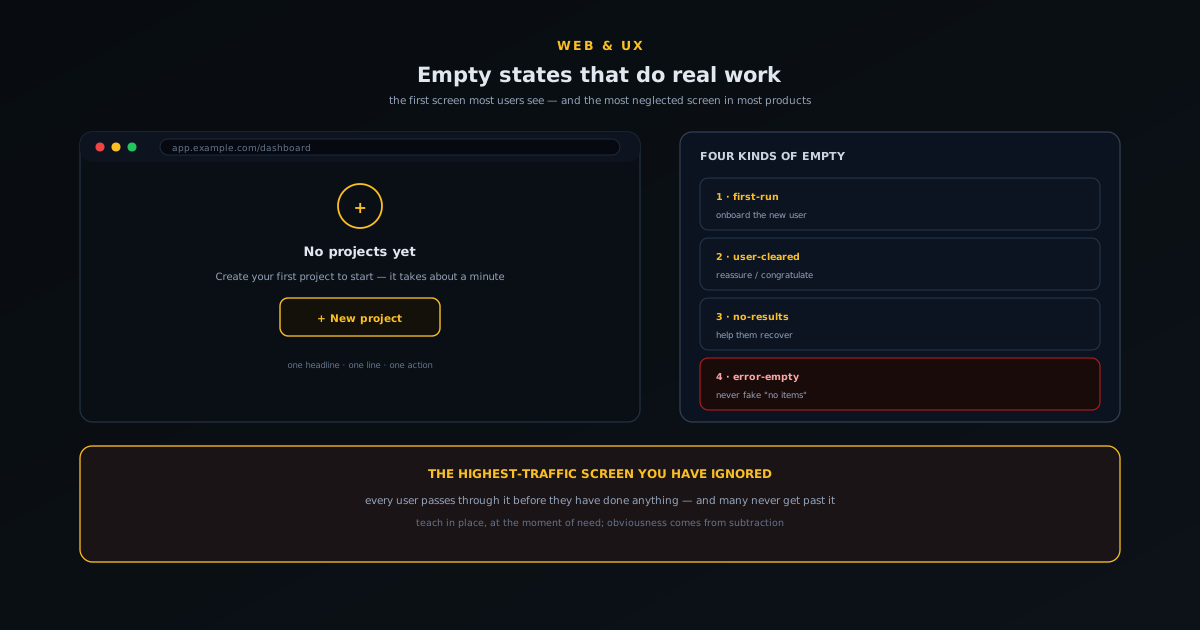
The empty state (the blank dashboard, the no-results search, the freshly cleared list) is the first screen most users actually see and the most neglected screen in most products. This is a practical guide to turning empty states from dead ends into the moments that onboard, guide, and convert.
Contents
- 1.Overview
- 2.The four kinds of empty
- 3.The anatomy of an empty state that works
- 4.Copy is most of the work
- 5.The first-run empty in depth
- 6.No-results: turn a dead end into a path
- 7.The user-cleared empty: reward, do not nag
- 8.Error-empty: never lie about why it is blank
- 9.Knowing whether your empty state works
- 10.Empty states are a sign of respect
- 11.Empty states as honest, ongoing onboarding
Overview
Open almost any new product for the first time and the screen you land on is empty. No data yet, no projects, no history: just a blank table, a vacant dashboard, or a search box with nothing behind it. This empty state is, paradoxically, the highest-traffic screen in the entire product, because every single user passes through it before they have done anything, and many users never get past it. And yet in most products it is the most neglected screen of all: an afterthought, a literal blank space, sometimes a sad little "no items" with no indication of what to do next. The gap between how important the empty state is and how little attention it usually gets is one of the best-value opportunities in product design.
A good empty state does real work. It tells a confused first-time user what this screen is for and how to fill it. It turns a fruitless search into a helpful redirect rather than a dead end. It reassures someone who just cleared their list that nothing is broken. It is, in the best cases, the most effective piece of onboarding you have, because it appears at the exact moment the user needs it, in the exact place they need it, rather than in a tour they clicked through and forgot. This guide breaks down the kinds of empty state, what each one owes the user, the anatomy of one that works, and the specific choices that turn a blank screen into momentum.
The four kinds of empty
Not all empty states are the same, and the most common mistake is using one generic "nothing here" treatment for situations that mean completely different things to the user. The first kind is the first-run empty: the user has just arrived and there is nothing because they have not done anything yet. This is an onboarding opportunity, and it is the most important of the four, because it is where you either convert a curious visitor into an active user or lose them to confusion. The second kind is the user-cleared empty: the list is empty because the user emptied it, completed all their tasks, archived everything, deleted the last item. This one calls for reassurance and often congratulation, not instruction.
The third kind is the no-results empty: the user searched or filtered and nothing matched. This is the most actively frustrating empty, because the user wanted something specific and got nothing, so it needs to help them recover: broaden the search, fix a typo, clear a filter, or find what they actually wanted a different way. The fourth kind is the error-empty: the screen is blank because something failed to load, which is not really empty at all and must never be dressed up as if it were, because telling a user "no items" when the truth is "we could not load your items" is a lie that erodes trust. Each of these wants different copy, a different tone, and a different action, and recognising which one you are designing is the whole first step.
The anatomy of an empty state that works
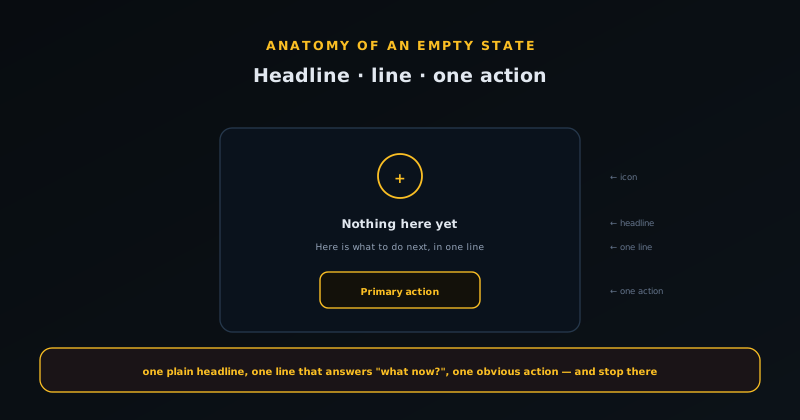
A working empty state has a small, consistent structure, and the discipline is to include what helps without cluttering a screen whose whole virtue is clarity. At the top is a clear, human headline that names the situation in plain language, not "No data" but something that tells the user where they are and why it is empty. Below it, one short line of explanation that answers the question the user is actually asking, which is almost always either "what is this?" or "what do I do now?" Then, and this is the load-bearing element, a single obvious primary action: the one thing you want the user to do next, as a button they cannot miss.
The thing to resist is the temptation to do too much. An empty state with five suggested actions, a video, a help-doc link, and three illustrations is not more helpful than one with a headline, a sentence, and a button; it is less helpful, because it returns the user to the paralysis of choice that the empty state should be cutting through. The whole point of the screen is to make the next step obvious, and obviousness comes from subtraction. A tasteful illustration or icon can add warmth and make the blank feel intentional rather than broken, but it should serve the clarity, not compete with it. One headline, one explanation, one action, optionally one image: that is the shape.
Copy is most of the work
More than almost any other screen, the empty state is carried by its words, because there is so little else on it. The difference between a dead end and a doorway is usually a sentence. "No projects" is a dead end; "Create your first project to start tracking work. It takes about a minute" is a doorway, because it names the action, sets an expectation of effort, and gives a reason. The copy should speak to the user in the second person about what they can do, not describe the system state in the third person. The user does not care that the database returned zero rows; they care what they should do about it.
Tone matters too, and it should match the kind of empty. A first-run empty can be warm and inviting because the user is at the start of something. A user-cleared empty can be genuinely celebratory: "Inbox zero, nicely done" is a small delight that costs nothing and earns goodwill. A no-results empty should be gently helpful and never blame the user; "We could not find anything for that" lands better than "Your search returned no results", and offering a concrete next step ("try a broader term, or browse all items") turns the frustration into a path forward. Getting the words right is cheaper than almost any other product improvement and disproportionately affects whether people stick, which is why it is worth the same care you would give a landing page, a case made in Landing pages that convert without dark patterns.
The first-run empty in depth
Of the four kinds, the first-run empty deserves the most attention because it is where users decide whether to continue, and it carries a different job than the others: it has to convey what the product is for, not just what to do. A returning user with an empty list knows the context; a first-time user staring at a blank screen does not, so the first-run empty must do a small amount of teaching alongside the call to action. The trick is to teach through the action rather than around it: the headline and one line establish what this is, and the primary button gets them doing the thing that will make the rest obvious.
The most effective first-run empties get the user to a first real success as fast as possible, because nothing explains a product like having used it once. That means lowering the effort of the first action as much as you can: pre-fill what you can, ask for the minimum, and consider offering a one-click way to create a starter item the user can then edit. The goal is to collapse the distance between landing and the first moment of value, since every step of friction before that moment is a chance to lose someone who has not yet seen the point of the product at all. When that first action is a form (as it so often is), the same minimize-the-friction rules apply, and I collect them in Forms that don't frustrate: field-tested rules.
No-results: turn a dead end into a path
The no-results empty is the most actively frustrating of the four, because unlike the others the user wanted something specific and got nothing, so it must work hard to convert disappointment into a next step. The cardinal rule is never to blame the user or simply state the absence; reframe it as the system not finding a match rather than the user failing, and immediately offer a way forward. Concrete recovery options beat a shrug: suggest broadening the search, clearing a filter, fixing an obvious typo, or browsing a relevant category instead of the exact query.
A strong no-results state also anticipates why the search failed and addresses the likely cause. If filters are active, say so and offer to clear them, because an over-filtered view is a common cause of empty results that the user may not realise they created. If the query looks misspelled, gently suggest the correction. And if there is genuinely nothing, point to the nearest useful thing rather than leaving the user at a wall. The difference between a good and a bad no-results state is whether the user leaves the screen with somewhere to go or simply leaves.
The user-cleared empty: reward, do not nag
When a list is empty because the user emptied it (every task done, every message archived, the inbox at zero), the moment calls for a completely different tone from the first-run case. This is a small victory, and acknowledging it costs nothing while earning real goodwill: a brief, genuine note of completion lands far better than a generic no-items message or, worse, an immediate prod to do more. The user has reached a satisfying state, and the empty screen should reflect that rather than treating the absence as a problem to be fixed.
The temptation to fill a cleared empty with upsells or suggestions should be resisted, because it converts a moment of accomplishment into a moment of being sold to. There is a place for a gentle, optional pointer to what they might do next, but it should sit quietly beneath the acknowledgement, not replace it. Respecting the cleared state (letting the user enjoy the empty inbox rather than immediately repopulating their list) is the kind of small, considerate touch that makes a product feel like it is on the user side rather than constantly extracting from them.
Error-empty: never lie about why it is blank
The fourth kind is not really empty at all: the screen is blank because something failed to load, and the single most important rule is never to dress this up as a genuine empty state. Telling a user no items when the truth is we could not load your items is a lie, and a costly one, because it sends them looking for a problem on their end (wondering if they deleted something) when the fault was a failed request. The error-empty must be honest that something went wrong and, ideally, give a way to recover, such as a retry.
Distinguishing the error-empty from the genuine empty is partly an engineering responsibility: the interface has to know the difference between we loaded successfully and there is nothing and we failed to load. Conflating them is a common bug that produces exactly the misleading message above, so it is worth handling the error and the truly-empty cases as distinct states from the start. This honesty is the same principle the ecosystem applies to failure generally (surface what actually happened rather than papering over it), and an empty state is one of the most common places that principle is quietly violated.
Knowing whether your empty state works
Because the first-run empty sits directly on the path to becoming an active user, it is one of the most measurable screens in the product, and treating it as something to improve rather than set-and-forget pays off. The metric that matters is how many people who land on the empty state take the primary action (create the first thing, complete the first step) within their first session. If that number is low, the empty state is failing at its main job, and the copy, the action, or the friction before it are the levers to test.
Small changes to an empty state often move that number more than larger changes elsewhere, precisely because every user passes through it. Rewording the headline to be clearer about value, reducing the first action to a single click, or removing a competing option can each meaningfully shift activation. The point is to treat the empty state as a real part of the funnel (the first and most universal step) rather than as decoration for a screen that happens to have no content yet. Measured and iterated, the most neglected screen becomes one of the highest-leverage ones you have.
Empty states are a sign of respect
Stepping back, the reason empty states reward attention out of proportion to their size is that they are one of the clearest signals of whether a product was built with care. A thoughtful empty state tells the user that someone anticipated this exact moment (the blank screen, the failed search, the cleared list) and prepared for it, which is precisely the kind of small consideration that adds up to a product feeling trustworthy. A neglected one tells the opposite story: that the team built the happy path and stopped.
Users rarely articulate this consciously, but they feel it, and it shapes whether they stick. The empty state is often the very first real interaction, before any data exists, so it sets the tone for everything after. Getting it right is cheap relative to its impact and entirely within your control, which is a rare combination. Treating the most neglected screen as one worth the same craft as the busiest one is, in the end, just treating the user as someone whose first impression matters, which it does.
Empty states as honest, ongoing onboarding
The deepest reason to invest in empty states is that they are onboarding that actually works, in contrast to the onboarding most products bolt on. The standard approach (a tour of tooltips on first launch, a checklist of setup steps, a modal explaining features) fights the user, because it interrupts them before they have any context for what they are being told, and they click through it to get to the thing they came for. Empty states do the opposite: they teach in place, at the moment of need, only about the thing in front of the user, and they disappear the instant the user has done the thing. That is the natural shape of learning, and it is why a product with thoughtful empty states often needs far less explicit onboarding.
There is an honesty dimension too. An empty state that pretends to be full (fake sample data, a "demo" project the user did not make) creates a moment of confusion and a small betrayal when they realise it is not real. A better pattern is a genuinely empty state that clearly invites the user to make the first real thing, optionally with a one-click "add a sample" they choose rather than one foisted on them. This respect for the user is the same principle the broader ecosystem applies everywhere from free tiers to feature gating: be straight with people, and let them act from a clear understanding rather than a manufactured one. Designed this way, the most neglected screen in your product quietly becomes one of the most effective.
Frequently asked questions
Quick answers to common questions about this topic.
What is an empty state?
An empty state is any screen that has no content to show yet: a blank dashboard, a list with no items, a search with no results, a freshly cleared inbox. It is the highest-traffic screen in most products because every user passes through it before they have done anything, yet it is usually the most neglected.
What should an empty state include?
A clear, human headline that names the situation; one short line of explanation answering "what is this?" or "what do I do now?"; and a single obvious primary action. Optionally a tasteful illustration. Resist adding many actions, videos, and links; the value of the screen is clarity, which comes from subtraction.
Are all empty states the same?
No. There are four kinds: first-run (onboarding opportunity), user-cleared (reassure or congratulate), no-results (help them recover from a fruitless search), and error-empty (something failed to load; never dress this up as genuinely empty). Each wants different copy, tone, and action.
Why does the copy matter so much on an empty state?
Because there is so little else on the screen, the words carry it. "No projects" is a dead end; "Create your first project. It takes about a minute" is a doorway. Speak to the user in the second person about what they can do, match the tone to the kind of empty, and never blame the user for a no-results state.
Can empty states replace a product tour?
Often, largely. Empty states teach in place, at the moment of need, about only the thing in front of the user, and disappear once the user acts, which is how learning naturally works. Many products with thoughtful empty states need far less explicit onboarding than a front-loaded tour, which users tend to click through and forget.
Should I show fake sample data in an empty state?
It is better not to fake fullness. Fake sample data creates a small betrayal when the user realises it is not real. Prefer a genuinely empty state that invites the first real action, optionally with a clearly-labelled one-click "add a sample" the user chooses rather than one foisted on them.
Related troubleshooting
Was this page helpful?
Your answer stays in this browser, it is not sent anywhere and no account or cookie is involved.