2026 · Novus Stream Solutions (hub)About 12 min readNovus Stream Solutions
Perceived performance: skeletons, optimistic UI, and the feel of fast
How fast a product feels and how fast it actually is are two different numbers, and the felt one is the one that decides whether people enjoy using your tool. This is a practical guide to perceived performance (skeletons, optimistic UI, instant feedback, and loading order) for making a tool feel fast even when the work takes real time.
Contents
- 1.Overview
- 2.Why felt speed and real speed diverge
- 3.Skeleton screens versus spinners
- 4.Optimistic UI: act first, confirm later
- 5.The psychology of waiting
- 6.Progress that tells the truth
- 7.Instant input feedback and the responsiveness threshold
- 8.Reserve the space: avoid the content jump
- 9.Make the next move instant by predicting it
- 10.Measure the felt experience, not just the numbers
- 11.Loading order and the honesty line
Overview
Two products can take exactly the same number of milliseconds to do a thing and feel completely different doing it (one snappy and alive, the other sluggish and frustrating), and the difference is entirely in how they handle the waiting. This is the central, slightly counterintuitive fact of perceived performance: how fast a product feels is a separate quantity from how fast it measurably is, and the felt one is the one users actually experience and remember. You can have a genuinely fast product that feels slow because it gives no feedback, and a product doing real heavy work that feels responsive because it manages the wait gracefully. Optimising the felt number is often cheaper and higher-impact than optimising the measured one.
This matters most for the kind of work that genuinely takes time and cannot simply be made instant: loading data over a network, processing an image, running a model, generating a result. You cannot always make those faster, but you can almost always make them feel faster, and doing so is a craft with a well-understood toolkit. This guide covers that toolkit (instant acknowledgement, skeleton screens, optimistic UI, and smart loading order) along with the equally important question of when each technique helps and when it backfires, and the line you must not cross, which is using perceived-performance tricks to hide that something is actually broken. It pairs with the architectural side of speed in Making a browser tool feel instant: the performance budget we hold.
Why felt speed and real speed diverge
Human perception of waiting is not a stopwatch; it is shaped by attention, expectation, and feedback. A wait you were warned about feels shorter than an identical wait that surprised you. A wait where you can see progress feels shorter than one where nothing changes. A wait that begins the instant you act feels shorter than one that pauses before acknowledging you at all. And a wait filled with something to look at (even just the shape of the thing that is coming) feels shorter than a wait staring at a blank void. None of these change the actual duration by a single millisecond, but all of them change the experienced duration substantially.
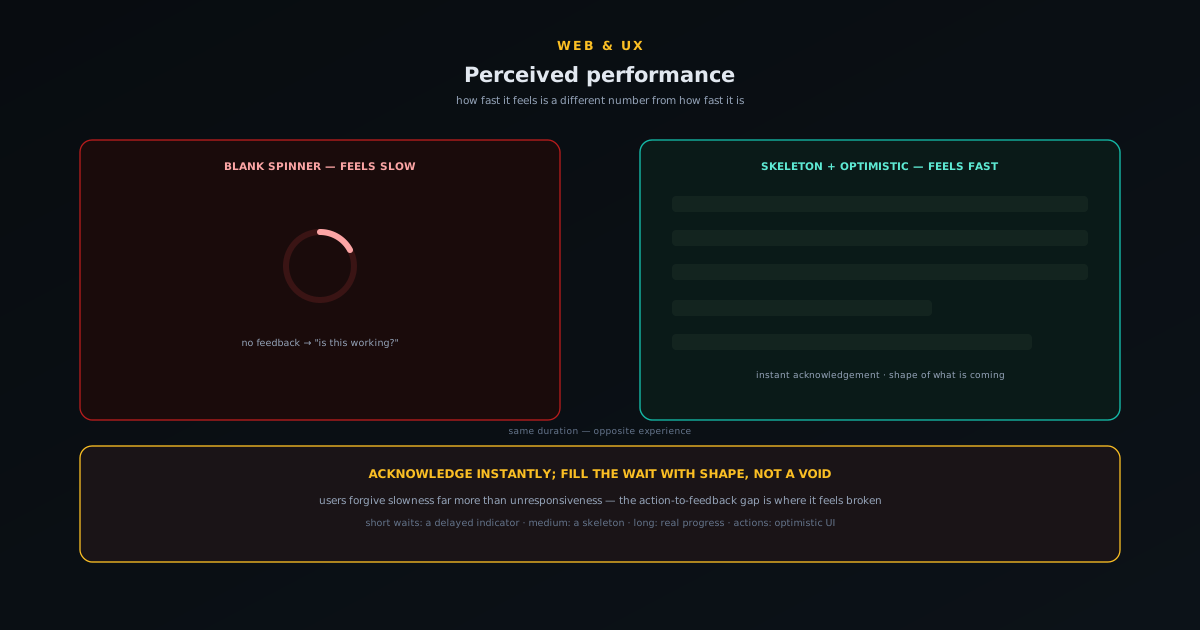
The most important of these is the very first moment. The single biggest perceived-performance lever is acknowledging the user instant (the button depresses, a spinner appears, the row greys out) the moment they act, because the gap between action and any response is where a product feels broken. A two-second operation that responds immediately with a loading state feels fast; a half-second operation that sits frozen for that half-second before anything happens feels broken, even though it is four times quicker. Users forgive slowness far more readily than they forgive unresponsiveness, because unresponsiveness reads as "is this working?" and that uncertainty is what actually hurts.
Skeleton screens versus spinners
When content is loading, the question is what to show in the meantime, and the choice between a spinner and a skeleton screen is more consequential than it looks. A spinner says "something is happening" but nothing else: it is contentless, it gives no sense of progress or shape, and a spinner that lingers actually amplifies the feeling of slowness because it is the visual equivalent of a held breath. A skeleton screen, by contrast, shows the shape of the content that is coming: grey placeholder blocks where the text, image, and controls will be. This does something subtle and powerful: it lets the user start orienting to the layout before the data arrives, so when the real content lands it feels like it is filling in a space the user already understood rather than appearing from nothing.
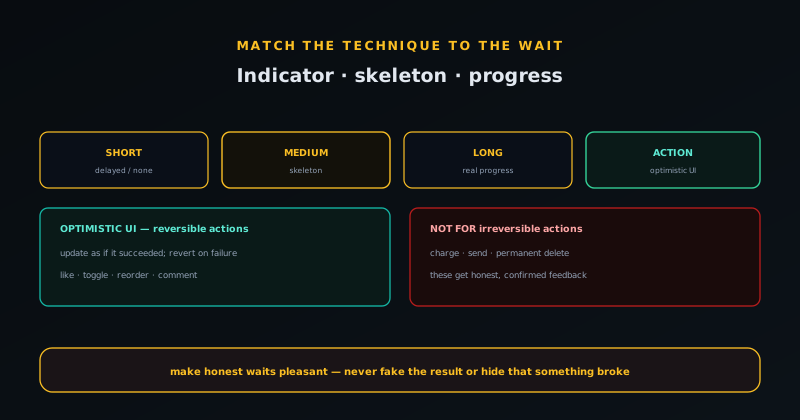
Skeletons are not always the right answer, though, and using them reflexively can backfire. For very short waits, any loading indicator at all can be worse than none, because a flash of skeleton-then-content is more jarring than just showing the content a beat later, which is why a small delay before showing a loading state often feels better than showing it instantly. For genuinely long, indeterminate operations, a skeleton that never resolves is worse than honest progress information. And skeletons work best when the eventual layout is predictable; if you do not know the shape of what is coming, a skeleton that guesses wrong and then rearranges is disorienting. The rule of thumb: skeletons for predictable content loading in the medium range, a delayed indicator for short waits, and real progress for long ones.
Optimistic UI: act first, confirm later
The most powerful perceived-performance technique is optimistic UI, which means updating the interface as if an action succeeded the instant the user takes it, rather than waiting for the server to confirm. When you like a post, the heart fills immediately; the request to record the like happens in the background, and you never see the wait. This works because the overwhelming majority of such actions do succeed, so showing success immediately is almost always telling the truth a little early, and the rare failure can be handled by quietly reverting and informing the user. The effect is a product that feels instantaneous even over a slow connection, because the perceived latency of the common case drops to zero.
Optimistic UI has a strict precondition, though: the action must be one you can gracefully undo if it turns out to have failed, because you are showing success before you know it happened. Liking, toggling, reordering, adding a comment: these are safe, because reverting them is cheap and low-stakes. Charging a card, sending an email, deleting something permanently: these are not, because there is no graceful "actually that did not happen" for an action with real consequences. So optimistic UI belongs on the reversible, low-stakes interactions, which happily are also the most frequent ones, while the irreversible ones get honest, confirmed feedback. Used with that discipline, it is the single biggest improvement you can make to how fast an interactive product feels.
The psychology of waiting
Perceived performance rests on a handful of well-studied facts about how people experience waiting, and knowing them turns the techniques from tricks into applications of principle. Uncertain waits feel longer than known ones, which is why an estimate or a progress indication helps even when it does not speed anything up. Unoccupied time feels longer than occupied time, which is why a wait filled with something to look at (even the skeleton of what is coming) feels shorter than an identical wait staring at nothing. And anxious waits, where the user is unsure anything is happening at all, feel longest of the three.
These principles explain why the same duration can feel fast or slow depending entirely on framing. A spinner with no end in sight triggers the uncertain, unoccupied, anxious trifecta; a skeleton with an implied shape and an optimistic update turns the same milliseconds into occupied, expected, reassured time. None of this is manipulation in the bad sense; it is meeting a real perceptual reality where it lives. The duration is a fact you often cannot change; the experience of it is a design surface you almost always can, and the psychology of waiting is the map of how to shape it.
Progress that tells the truth
For genuinely long operations, the right tool is honest progress, and the emphasis is on honest. A determinate progress bar that reflects real advancement is reassuring precisely because it is accurate: the user can see the work moving and estimate the end. The cardinal sin is the fake progress bar that animates on a timer unrelated to the actual work, because the moment it reaches the end and the operation is not done, or it stalls visibly out of step with reality, the user learns the indicator is lying and trusts nothing afterwards. A fake progress bar is worse than none.
When you genuinely cannot measure progress (the operation is indeterminate), it is more honest to say so than to fake a percentage. An indeterminate indicator paired with a truthful note about what is happening (preparing your file, encoding video) reassures without claiming a precision you do not have. The principle is the same one that governs the whole topic: perceived performance is about making honest waits feel better, never about misrepresenting what is happening. A progress indicator that tells the truth, even an imprecise truth, keeps the trust that a dishonest one spends.
Instant input feedback and the responsiveness threshold
Beneath the loading-state techniques sits an even more basic requirement: the interface must respond to input essentially instantly, on the order of a tenth of a second, or it feels broken regardless of how the longer waits are handled. This is the threshold below which a response feels immediate and above which the user starts to notice lag between their action and the system reaction. A button that visibly depresses on tap, a field that echoes the keystroke without delay, a toggle that flips at once: these microscopic responses are the foundation that the bigger techniques build on.
The reason this matters so much is that input lag is felt as the product not listening, which is a more fundamental failure than a slow load. A page can take two seconds to load and feel acceptable if it acknowledges the click immediately; an interface that hesitates before registering a tap feels unresponsive even if everything else is fast. Guarding the responsiveness threshold (making sure the interface always reacts to input at once, even if the result of that input takes longer) is the first thing to get right, because no amount of skeleton screens compensates for an interface that feels like it is ignoring you.
Reserve the space: avoid the content jump
A specific and common perceived-performance failure is layout shift: content loads in and shoves everything around, so the user loses their place or taps the wrong thing as a button jumps under their finger. This is not just annoying; it actively undermines the feeling of speed, because a page that rearranges itself as it loads feels chaotic and unfinished even if it loaded quickly. The fix is to reserve space for content before it arrives (size image and media slots, hold room for the elements that are coming) so the layout is stable from the first paint onward.
This is where perceived performance and measured performance meet, because layout stability is one of the things search engines explicitly score as part of Core Web Vitals, covered in Page speed and Core Web Vitals for a small site. Reserving space is the same discipline behind a good skeleton screen: the skeleton already occupies the shape the content will take, so when the real content lands it fills the reserved space rather than displacing anything. A stable layout that fills in feels far faster and more solid than one that loads in pieces and jumps, even when the bytes arrive at exactly the same time.
Make the next move instant by predicting it
The most advanced perceived-performance move is to do the work before the user asks, by predicting their next action and preparing for it. When it is reasonably certain what someone will do next (open the item they are hovering, advance to the next step of a flow, load the page their cursor is heading toward), you can fetch or prepare that result in the background so it appears instantly when they actually act. Done well, this makes a product feel almost prescient, because the wait happens before the user is even aware of waiting.
Prediction has to be used judiciously, since preparing for actions that never happen wastes resources, so it works best where the next step is highly likely: the obvious continuation of a flow, the link clearly being approached. But where the prediction is sound, it collapses the perceived latency of the predicted action to zero, which is the ceiling of what perceived performance can achieve: not a faster wait, but no wait at all. Combined with instant input feedback, honest progress, skeletons, and optimistic updates, prediction completes a toolkit that lets a product feel fast across the full range of waits it actually has.
Measure the felt experience, not just the numbers
Because perceived performance and measured performance are different quantities, it follows that you have to evaluate them differently: the stopwatch and the lab score tell you about the measured number, but only watching real people use the product tells you about the felt one. A page can pass every performance metric and still feel sluggish because of an unacknowledged tap or a jarring content jump, and conversely a page doing heavy work can feel responsive because it manages the wait with care. The numbers are necessary but not sufficient.
The practical implication is to spend some of your performance attention on the experience rather than only the metrics: to actually use the product on a slow connection and a modest device and notice where it feels like it is hesitating, lying, or jumping. Those felt frictions are often invisible in the measured scores and obvious the moment you pay attention to the experience. Optimising the felt number is frequently cheaper and more impactful than chasing the last few points of the measured one, and it is the number the user actually lives in.
A small but revealing habit is to watch someone else use the product without helping them, and to notice every moment they hesitate, squint, or wonder aloud whether something is working. Those moments are the felt frictions made visible, and they rarely line up neatly with what the metrics flag. A few minutes of that kind of observation often surfaces more actionable perceived-performance work than an afternoon staring at scores, precisely because it measures the thing that actually matters (the experience) rather than a proxy for it.
Loading order and the honesty line
A final lever is the order in which things load, because you control which parts of a screen appear first and that ordering shapes the entire felt experience. Loading the structure and the most important content first (the headline, the primary action, the thing the user came for) lets them start engaging while secondary content (sidebars, recommendations, comments) streams in after. A page that shows its core instantly and fills in the periphery feels dramatically faster than one that waits for everything to be ready before showing anything, even when the total load time is identical. Prioritising the visible and the important is free perceived speed.
All of these techniques share one boundary that must not be crossed: perceived performance is for making honest waits pleasant, never for hiding that something is broken or misleading the user about what happened. Optimistic UI that shows success for an action that actually failed and never tells the user is not a performance technique; it is a lie that will surface as confusion later. A skeleton screen that spins forever because the load genuinely failed should become an honest error, not an eternal placeholder. The discipline is the same one the ecosystem applies to reliability generally: be honest about failure rather than papering over it, as in Reliability hardening: device lifecycle, model integrity, and honest failures. Make the real waits feel fast; never fake the result. The measured side of all this, and how search engines score it, is covered in Page speed and Core Web Vitals for a small site.
Frequently asked questions
Quick answers to common questions about this topic.
What is perceived performance?
Perceived performance is how fast a product feels, as opposed to how fast it measurably is. The two are different numbers: a fast product can feel slow if it gives no feedback, and a product doing genuinely heavy work can feel responsive if it manages the wait well. The felt number is the one users actually experience.
What is the single biggest perceived-performance improvement?
Acknowledging the user the instant they act (the button depresses, a loading state appears, the row greys out) rather than pausing before any response. The gap between action and any feedback is where a product feels broken; users forgive slowness far more than unresponsiveness.
Are skeleton screens always better than spinners?
No. Skeletons help for predictable content loading in the medium range, because they let users orient to the layout before data arrives. But for very short waits a delayed indicator (or nothing) is better than a jarring flash, for long indeterminate operations real progress beats a skeleton, and a skeleton that guesses the wrong layout and rearranges is disorienting.
What is optimistic UI and when should I use it?
Optimistic UI updates the interface as if an action succeeded the instant the user takes it, handling the rare failure by reverting. Use it for reversible, low-stakes, frequent actions (like, toggle, reorder, comment), where showing success early is almost always true. Do not use it for irreversible actions like charging a card or sending an email.
Does loading order really affect how fast a page feels?
Yes, substantially. Loading the structure and most important content first lets users engage while secondary content streams in, so a page feels much faster than one that waits for everything before showing anything, even at identical total load time. Prioritising the visible and important is essentially free perceived speed.
Is making slow things feel fast dishonest?
Not when done right. Perceived performance is for making honest waits pleasant, never for hiding that something is broken. The line: optimistic UI must revert and inform on real failure, a skeleton must become an honest error if the load fails, and you must never mislead the user about what actually happened.
Related troubleshooting
Was this page helpful?
Your answer stays in this browser, it is not sent anywhere and no account or cookie is involved.