2026 · Novus VisualizersAbout 13 min readNovus Stream Solutions
A release-day visual asset checklist
Everything visual you need when you put a track, product, or project out, and how to make all of it for free, in the browser, in an afternoon.
Contents
- 1.Overview
- 2.The core list
- 3.Make the video assets in Novus Visualizers
- 4.Make the image assets in NSS Background Remover
- 5.Do it in one sitting
- 6.Why a written checklist beats memory
- 7.The cover image carries the most weight
- 8.The main video as the anchor of the set
- 9.Vertical cuts for the short-form feeds
- 10.The looping Canvas piece
- 11.Captioned and lyric versions
- 12.Product releases need their own asset set
- 13.Sequencing the afternoon to avoid rework
- 14.Knowing where each asset is headed
- 15.A final pass before you launch
- 16.Turning the checklist into a saved routine
Overview
Putting something out (a single, a product, a project) takes more than the thing itself. It takes a set of visual assets sized for the places people will see it. Miss one and the launch feels half-finished; spend money on each and it gets expensive fast. This checklist covers what you actually need and how to make all of it free, in the browser.
The core list
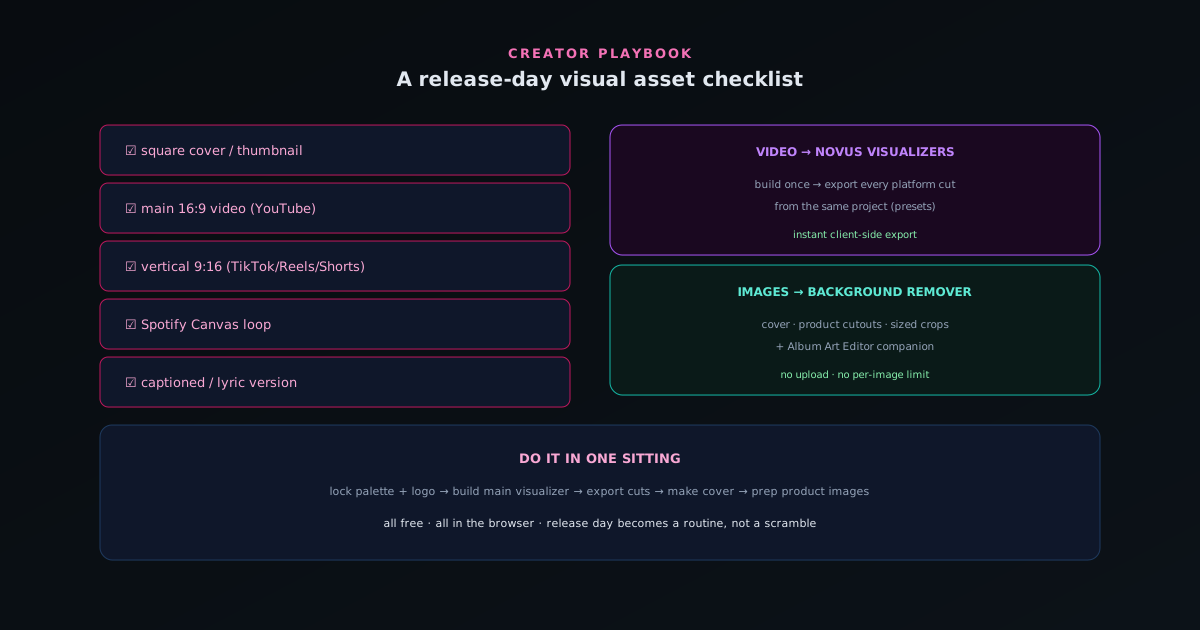
For a music release, the recurring set is: a square cover image, a main visualizer video for YouTube, a vertical cut for TikTok/Reels/Shorts, a short looping Spotify Canvas, and (often) a captioned or lyric version. For a product, it is: a clean cutout on white for listings, a lifestyle shot, and sized crops for each marketplace and ad placement.
The exact list varies, but the pattern is the same: one core asset and a handful of platform-specific cuts. Knowing the full set up front stops you from scrambling on launch day.
- Square cover / thumbnail.
- Main 16:9 video (YouTube).
- Vertical 9:16 cut (TikTok/Reels/Shorts).
- Short looping Canvas (Spotify).
- Captioned / lyric version.
Make the video assets in Novus Visualizers
Build the main visualizer once in visualizers.novusstreamsolutions.com/editor, then export the platform cuts from the same project using the platform presets: YouTube, TikTok/Reels, Instagram, Spotify Canvas. Because export is client-side and instant, producing four sizes is minutes, not a re-render each time. Add captions with the on-device AI captions for the muted-viewing cuts.
Reusing one project for all the cuts is what keeps the set cohesive and the work fast.
Make the image assets in NSS Background Remover
For the cover and any product imagery, cut out your subject in bgremover.novusstreamsolutions.com/background-remover, place it on the background each asset needs (white for listings, a scene for lifestyle), and export sized crops. The Cover Art Studio companion in Visualizers handles cover artwork that matches your video.
Both tools are free, run in the browser, and never upload your files, so a full asset set costs nothing but an afternoon.
Do it in one sitting
The efficient order: lock your palette and logo first, build the main visualizer, export the platform cuts, make the cover to match, then prep any product images. Working from one identity (covered in the brand-kit guide at The brand kit: a consistent look across releases) means everything comes out looking like the same release without extra effort.
Run this checklist the same way every time and release day stops being a scramble; it becomes a routine you can finish in an afternoon, for free.
Why a written checklist beats memory
The first value of a checklist is simply that it externalizes the full set of assets so you are not trying to remember them under the pressure of a launch. Releases fail to feel complete not because a creator could not have made an asset but because, in the rush of putting something out, they forgot one: the vertical cut that never got made, the cover that stayed a placeholder, the captioned version that would have carried the muted feed. A written list converts "what am I forgetting?" into "what is left to check off," which is a far calmer and more reliable way to ship a complete set.
This matters more than it sounds because the cost of a missing asset is asymmetric: the asset itself takes minutes, but its absence can undercut the whole launch, leaving a gap exactly where attention was supposed to land. A checklist makes the omission visible before launch rather than after, when it is too late to fix gracefully. For a solo creator with no one else to catch the gap, the list is the safety net, and the small discipline of working from it rather than from memory is what separates a launch that feels finished from one that feels like it ran out of time.
The cover image carries the most weight
Among all the assets, the cover or thumbnail deserves disproportionate care because it is the one most people see and often the only one they see before deciding whether to engage. It appears in feeds, on streaming services, as the video thumbnail, and in shares, doing the work of a first impression across every surface, so a weak cover caps the reach of everything behind it, no matter how good the content is. Treating the cover as the flagship of the asset set, rather than an afterthought knocked out last, reflects its outsized role in whether anyone presses play.
A strong cover is usually clean, legible at small sizes, and unmistakably tied to the rest of the release through color and identity. Because it will be seen tiny in a crowded feed, clarity beats complexity: a busy cover that looks impressive at full size can become an illegible smudge as a thumbnail. Producing it well often means cutting out a subject cleanly and placing it against a brand-consistent background, which the image tools handle for free, and checking it at the small size it will actually appear. The cover is the asset where a little extra attention pays back the most, because it is the gateway to all the others.
The main video as the anchor of the set
The main landscape video (the full visualizer for the large-screen platform) functions as the anchor from which the rest of the set derives, which is why it is built first and built carefully. It is where the look of the release is established and where viewers spend the most time, so the creative decisions made here propagate to every cut that follows. Getting the engine, the palette, the beat-synced motion, and the text right on the anchor means the derived assets inherit a finished design rather than each being figured out separately.
Treating the main video as the source rather than as one deliverable among equals changes the workflow for the better. Instead of making five independent videos, you make one definitive version and then reframe it for the other surfaces, which is both faster and more cohesive. The anchor carries the identity of the release, and everything else is a presentation of that identity sized for a different context. Building it first and well is the single most leveraged step in the whole checklist, because the quality and coherence of the entire asset set flow from how good the anchor is.
Vertical cuts for the short-form feeds
The vertical cut is no longer optional, because short-form vertical feeds are where an enormous amount of discovery now happens, and a landscape video awkwardly fit into a tall slot signals that the creator did not bother. Producing a purpose-framed vertical version (derived from the anchor but recomposed so the focal motion sits well in a tall frame) is what makes the release feel native to the platforms where new audiences are most likely to find it. The vertical is often the asset that does the most discovery work, so it earns real attention rather than a hasty crop.
The key with the vertical is recomposition, not just resizing. A landscape composition squashed into vertical leaves the subject stranded or cropped badly, while a few seconds spent re-centering the focal element for the tall frame produces something that looks made for it. Because the look is already set on the anchor, this is reframing rather than redesigning, which keeps it fast. Adding a caption (the hook's lyric or a key line) further suits the vertical to muted feed-viewing, where so much short-form is watched. The vertical cut is where the release reaches for new viewers, which is reason enough to make it properly.
The looping Canvas piece
For a music release, the short looping vertical video that plays behind the track on streaming is a high-value asset precisely because it plays automatically to people already choosing to listen. It is a small piece (a few seconds, looping), but it appears in a prime position with guaranteed views among an engaged audience, which makes it worth the modest effort it takes. Many creators skip it, which is exactly why making one is a cheap way to look more finished than the releases around yours.
The Canvas has its own design logic: it is vertical, it loops, and it plays in near-silence since the listener hears the track itself, so it should be a calm, seamless, ambient loop rather than a busy attention-grabber. Building it from the same look as the rest of the release keeps it cohesive, while keeping it restrained keeps it watchable on repeat. As one item on the checklist, it is easy to produce once you have the release's visual identity established, and its presence quietly signals a level of care that a bare static cover does not. It is a small asset with an outsized position.
Captioned and lyric versions
Captioned or lyric versions of your video assets serve the muted-viewing reality of modern feeds and, for music, can become a centerpiece in their own right. A large share of short-form video is watched without sound, so a version with the words on screen reaches viewers a silent video would lose, and for a song, an on-screen lyric is often what makes a clip resonate and get shared. Including a captioned cut on the checklist ensures the release is legible to the muted majority rather than depending on viewers turning sound on.
Producing these is fast when the transcription is automatic and runs on your device, turning what used to be tedious manual captioning into a quick refinement of a generated draft. For a lyric-forward release you might go further into a dedicated lyric video where the words drive the visual, while for a talking-head or product video a simple caption track suffices. Either way, the captioned version is the asset that meets viewers where they actually watch (sound off, scrolling), which is why it belongs on the checklist rather than being treated as an extra only made when there is time.
Product releases need their own asset set
If what you are releasing is a product rather than a track, the checklist shifts but the principle holds: there is a core asset and a set of platform-specific derivations. The core is usually a clean cutout of the product on a white background for marketplace listings, derived into a lifestyle shot showing the product in context, sized crops for each marketplace and ad placement, and consistent imagery across every channel you sell on. The same discipline of knowing the full set up front prevents the product launch from going live with a gap.
The work here is image-led rather than video-led, but the tooling is the same free, on-device suite: cut the product out cleanly, place it on the backgrounds each asset needs, and export the sized variants. Consistency across the product's images is itself a trust signal to buyers, just as consistency across a music release's videos is, so running the whole product set through the same treatment matters. Whether the release is a song or a product, the checklist mindset (enumerate the assets, derive them from a clean core, keep them consistent) is what turns a launch from a scramble into a complete, professional set produced in one focused session.
Sequencing the afternoon to avoid rework
The order in which you produce the assets determines whether the afternoon is smooth or full of backtracking, and the rule is to settle the shared decisions before producing anything that depends on them. Lock the palette, the logo, and the overall look first, because every asset inherits them; build the anchor video next; then derive the platform cuts; then make the cover to match; then prep any product images. Doing the foundational decisions first means a later change does not force you to redo assets you already exported.
The failure mode this avoids is the cascade, where a change to the look made halfway through forces every already-made asset to be remade. By front-loading the decisions that everything else rests on, each subsequent step builds on settled ground and is done once. This is the same logic that makes any production efficient (get the upstream choices right before propagating them downstream) applied to a release's asset set. Following the sequence is what lets the whole set come together in a single sitting rather than spiraling into a loop of revisions, and it is the difference between an afternoon and a lost day.
Knowing where each asset is headed
Part of producing the right set is knowing the destination of each asset, because the destination determines the format, the aspect ratio, and the treatment. The landscape video heads to the large-screen platform where it is watched at length; the vertical cuts go to the short-form feeds where discovery happens; the Canvas goes to streaming; the cover travels everywhere as the thumbnail and feed image; the captioned versions serve the muted contexts. Mapping each asset to where it will live ensures you make it correctly for that home rather than producing a generic file that fits nowhere well.
This destination-mapping also prevents the common error of making one version and forcing it into places it was not shaped for. A landscape video posted as a vertical, a full-resolution image used where a fast-loading one was needed, a soundless context given a video that depends on audio: these mismatches come from not thinking about where each asset goes. Pairing every item on the checklist with its destination, and producing it to suit, is what makes the set feel deliberately made for each platform rather than mechanically duplicated. The checklist is not just what to make but where each piece is going, and the second half is what makes the first half land.
A final pass before you launch
Before the release goes live, a short final pass over the completed set catches the issues that are easy to miss in the making. Confirm every asset on the list exists and is the right size for its destination, check the cover at the small size it will actually appear, watch any looping asset for a clean seam, verify the captions are accurate and well-timed, and confirm the whole set reads as one coherent release rather than a collection of slightly different looks. This pass takes a few minutes and is the difference between a launch that feels finished and one with a visible gap.
The value of a deliberate final check is that it surfaces problems while they are still cheap to fix (before the release is public) rather than after, when a missing or flawed asset is awkward to correct. Because the tools are free and export is instant, fixing anything the pass catches is quick: re-export the wrong size, recolor the off-brand asset, retime the caption. The final pass is the last application of the checklist mindset, confirming that what you set out to make is all present, correct, and coherent. Running it consistently is what lets you hit publish with confidence that the visual side of the release is genuinely complete.
Turning the checklist into a saved routine
The final move is to stop treating the checklist as something you reconstruct each release and start treating it as a fixed routine you run, which is where the real time savings live. Once you have produced one complete asset set, the list, the sequence, and the look become reusable: saved templates carry the visual identity, the asset list stays the same, and each new release becomes a matter of swapping in new content rather than rebuilding the process. The first release is the one that takes thought; the tenth should be close to mechanical.
This is the bridge from a checklist to a production line. A checklist tells you what to make; a routine, built on saved templates and a fixed sequence, makes producing it fast and repeatable. The payoff compounds: every release reinforces the same recognizable identity while taking less effort than the last, because you are refining a system rather than starting over. Treating release-day assets as a repeatable routine rather than a per-launch project is what lets a solo creator ship a complete, consistent, professional set every time without it consuming the energy that should go into the content itself.
Frequently asked questions
Quick answers to common questions about this topic.
What visual assets do I need for a release day?
At minimum: a square cover, platform-sized thumbnails and social crops (9:16, 1:1, 16:9), transparent cutouts of your subject or product, and any teaser clip. Prepping them in advance means launch day is publishing, not scrambling.
How do I make all these assets without a designer?
Use the free Novus tools (the Background Remover for cutouts and product images, and Novus Visualizers for video and social clips), so you can produce a consistent set yourself in one session.
What sizes should social images be?
Export 1:1 for feed posts, 9:16 for Stories/Reels/TikTok, and 16:9 for YouTube. Keeping a single source and exporting each crop keeps the set visually consistent across platforms.
Related workflow
A track to a release-ready visualizer, per platform
Render the visual once, then produce the platform masters from it, instead of re-rendering the whole video for every aspect ratio.
- Render the beat-synced videoNovus Visualizers: Pick the engine and mode against your actual track; the analysis is done on your audio, not on a preset preview.
- Trim or upscale the exportNSS Background Remover: The video utilities handle the tidy-up pass so the render does not have to be repeated to fix ten seconds of it.
- Produce the per-platform mastersNovus Convert: Each destination wants a different container and bitrate; converting the finished render is far cheaper than re-rendering it.
Related troubleshooting
Was this page helpful?
Your answer stays in this browser, it is not sent anywhere and no account or cookie is involved.