2026 · Novus AI StatsAbout 2 min readNovus Stream Solutions
Novus AI Stats launch: local-first AI history dashboard
Novus AI Stats is a privacy-first PWA that imports ChatGPT, Claude, Gemini, Claude Code, Codex CLI/Desktop, Gemini CLI, and Cursor history. Track sessions, tokens, and milestones with honest metric quality labels, and share cards without exposing transcripts.
Reviewed and updated August 1, 2026. Re-checked against the Novus AI Stats provider matrix on August 1, 2026. Cursor is now a supported import source, bringing the total to seven, and the “private beta / owner account” framing has been replaced: the product is free and account-based, with sign-up availability set by the deployment rather than by a beta programme.
Contents
Overview
Today we are adding Novus AI Stats to the Novus Stream Solutions portfolio. It is a privacy-first PWA at aistats.novusstreamsolutions.com: import ChatGPT, Claude, Gemini, Claude Code, Codex CLI/Desktop, Gemini CLI, and Cursor history from user-approved exports and files, then track time, sessions, agents, tokens, projects, and streaks in one place.
Calling this live and in progress is deliberate. The site is public, the PWA is usable, and imports, metrics, and share cards continue to expand. We would rather ship an honest local-first dashboard people can try than wait for a mythical finished analytics suite that never meets real export formats.
Transparent imports, not silent scanning
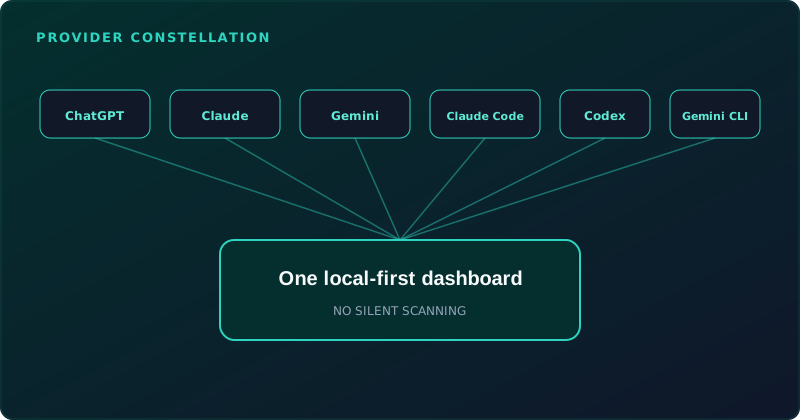
AI Stats focuses on transparent imports rather than ambient monitoring. The first release works from user-approved exports, folders, and telemetry files. Exports and logs are parsed in the browser; raw prompts, responses, code, attachments, and full transcripts stay local by default.
The PWA cannot watch local folders in the background. Every import begins with an explicit file or folder selection, so you always know when history enters the dashboard.
- ChatGPT: official account export zip or conversations.json.
- Claude: official Claude export with JSON shape detection.
- Gemini: Google Takeout export, including Gemini Apps and My Activity records.
- Claude Code: user-selected local JSONL transcripts or documented telemetry.
- Codex CLI/Desktop: persisted rollout JSONL, with the product surface recorded separately from the vendor.
- Gemini CLI: local OpenTelemetry output; disable prompt logging before capture.
- Cursor: exported Markdown, or a recognized local SQLite snapshot whose signature the parser explicitly knows.
Metric quality labels as the honesty layer
Each metric is marked exact, source reported, derived, estimated, or unavailable so estimates never masquerade as facts. That labeling is the product’s contract with anyone reading streaks, time spent, or project totals.
Most usage dashboards collapse provenance into a single confident digit. We kept the provenance visible because a derived session count and an exact token total from the source should never share the same visual weight by accident.
Free, account-based, no payment information
The live site is free to use and asks for no payment information. Advertising stays off authenticated analytics pages. Explore the demo with demonstration data first; keeping imports and viewing your own history across sessions needs an account, so open the sign-up page to see whether it is currently accepting new members and use the contact form if it is not.
Hub coverage already includes documentation at Novus AI Stats, a tool map at Tool maps, and tutorials from Getting started with Novus AI Stats: demo to dashboard through imports, metric labels, and share cards. As the product grows those surfaces will grow with it, without rewriting history to pretend the early build was finished.
Frequently asked questions
Quick answers to common questions about this topic.
Is Novus AI Stats finished?
It is live and still in progress. You can explore the demo without an account, and (where sign-up is open on the deployment you are using) create one to keep imports while features continue to ship.
Which AI tools can it import from?
Seven sources are supported: ChatGPT, Claude, Gemini, Claude Code, Codex CLI/Desktop, Gemini CLI, and Cursor. Others appear on the roadmap only and are marked as such; a roadmap entry is not an ingestion claim.
Does it upload my chats on import?
Imports are local-first by default. Raw prompts, responses, code, attachments, and full transcripts stay on your device unless you explicitly choose share-card fields you control.
Can it scan folders silently?
No. The PWA cannot watch local folders in the background. Every import starts with an explicit file or folder selection.
Is it free?
Yes. No payment information is required at any point, and advertising stays off authenticated analytics pages.
Related workflow
Turn your AI work into a report you can actually show someone
Measure what you built with AI assistants over a period, then package the numbers into a document with the caveats attached.
- Import your history and read the quality labelsNovus AI Stats: Token and session figures differ in how reliably each provider reports them; the labels say which numbers can carry an argument and which cannot.
- Assemble and protect the reportNovus PDF Studio: Merge the exported pages into one document and apply a password before it leaves your device.
Related troubleshooting
Was this page helpful?
Your answer stays in this browser, it is not sent anywhere and no account or cookie is involved.