2026 · NSS Background RemoverAbout 13 min readNovus Stream Solutions
PNG vs WebP vs AVIF for transparency: which should you export?
PNG, WebP, and AVIF all support an alpha channel, so the real question is file size versus quality versus where the image needs to work. Here is how the three compare and how to choose.
Contents
- 1.Overview
- 2.Do they all really support transparency? Yes
- 3.File size: AVIF < WebP < PNG (usually)
- 4.Quality: lossless vs lossy, and when it matters
- 5.Compatibility: PNG everywhere, AVIF not quite
- 6.A practical recommendation by use case
- 7.Transparency that still composites badly: the alpha trap
- 8.How to export each format for free
- 9.How browser fallbacks let you serve AVIF safely
- 10.Animated transparency: the same choice, more frames
- 11.Auditing your existing images for format wins
- 12.The bottom line
Overview
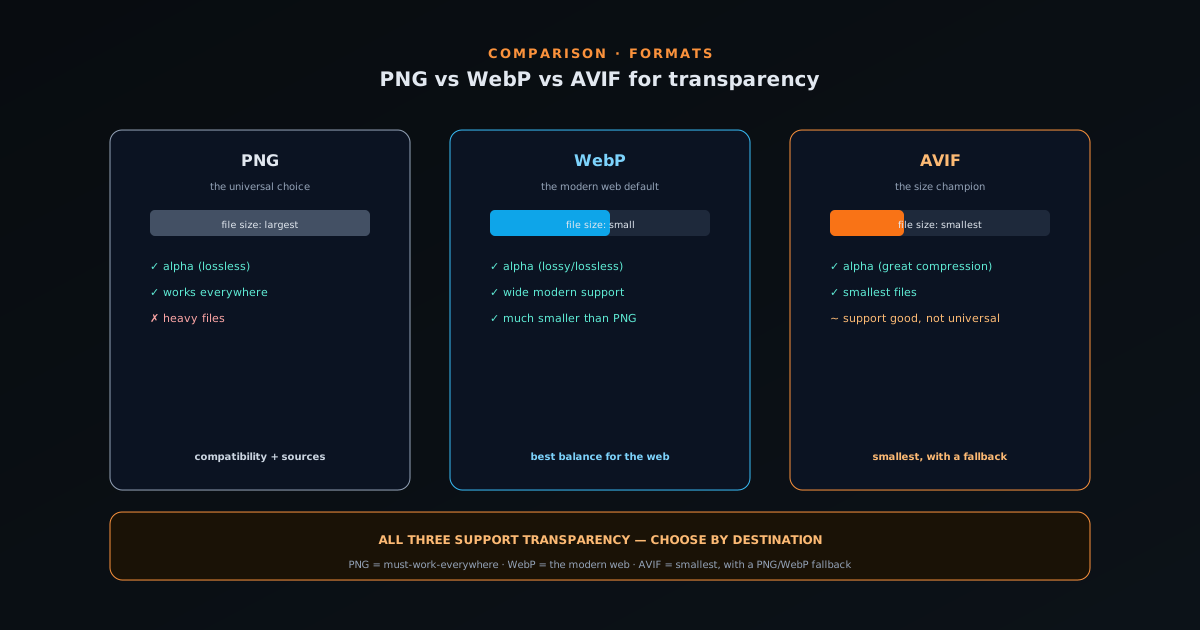
PNG, WebP, and AVIF all support transparency through an alpha channel, which means the question of "which transparent format should I use" is not about whether transparency works (it works in all three) but about the tradeoffs between file size, image quality, and where the image needs to function. PNG is the long-established universal choice that works literally everywhere. WebP is the modern format that produces meaningfully smaller files at similar quality. AVIF is the newest, capable of the smallest files of all, with support that is good and improving but not yet truly universal. Choosing well means matching the format to the destination rather than picking a single favourite for everything.
The reason this matters more than it used to is that image weight is now a real cost: for page load speed, for SEO, for storage, and for the experience of anyone on a slow connection. A transparent PNG of a detailed cutout can be several times larger than the same image as WebP or AVIF, and across a catalogue or a content site that difference compounds into seconds of load time and meaningful bandwidth. At the same time, compatibility still matters: a format that produces a tiny file is useless if the place you need to use it cannot display it. This guide walks the three formats on the axes that actually decide the choice.
Do they all really support transparency? Yes
The first thing to settle, because it is a common point of confusion, is that all three formats genuinely support transparency. PNG has supported a full alpha channel for decades and is practically synonymous with transparent images. WebP supports both lossless and lossy compression with an alpha channel, so you can have transparency and small files together. AVIF, built on modern video-codec technology, also supports an alpha channel with excellent compression. So "WebP doesn't do transparency" and "AVIF can't be transparent" are both myths: all three carry alpha.
What differs is how each stores the colour data alongside that alpha. PNG is lossless, so it preserves every pixel exactly at the cost of larger files. WebP and AVIF can be either lossless or lossy; in lossy mode they discard some imperceptible detail to shrink the file dramatically while keeping the transparency intact. This means the real decision is not "does it support transparency" but "how small can it get while still looking right, and will the destination display it." Once you internalize that all three carry alpha, the comparison becomes a clean tradeoff between size, quality, and support rather than a question of capability.
File size: AVIF < WebP < PNG (usually)
On file size, the general ordering for a typical transparent image is AVIF smallest, WebP in the middle, and PNG largest, often by a wide margin. A detailed transparent cutout that is, say, several hundred kilobytes as a PNG can frequently drop to a fraction of that as WebP and smaller still as AVIF, with no visible difference for most images. This is the headline reason the newer formats exist: they deliver the same visual result at a fraction of the bytes, which matters everywhere image weight is a cost (web pages, apps, storage, and bandwidth).
The size advantage is largest for photographic content with lots of colour and detail, where lossy WebP and AVIF can compress aggressively while staying visually faithful. For simple graphics with few colours (a flat logo, a basic icon) lossless PNG is already small and the gap narrows, sometimes to the point where PNG is competitive or even smaller. So the size win from WebP and AVIF is most dramatic on complex, detailed transparent images and least dramatic on simple flat ones. Knowing which kind of image you have tells you how much you stand to gain from switching formats, which is part of choosing well rather than defaulting.
Quality: lossless vs lossy, and when it matters
PNG is always lossless: it reproduces the original pixels exactly, which is why it has been the trusted format for graphics, screenshots, and anything where precision matters. WebP and AVIF offer lossless modes too, but their dramatic size savings come from lossy compression, which discards detail the eye is unlikely to notice. For most images, well-tuned lossy WebP or AVIF is visually indistinguishable from the lossless original at a fraction of the size, which is why they are the right default for the web. The quality question is really about how aggressively you compress, not the format itself.
Where lossless still matters is the cases where exactness is required: crisp text and sharp edges in graphics, images that will be edited and re-saved repeatedly (each lossy save degrades a little more), and any workflow where the image is a source asset rather than a final display file. For those, PNG or the lossless modes of WebP/AVIF preserve the original perfectly. For final display images on the web (product cutouts, hero images, content graphics) lossy WebP or AVIF at a sensible quality setting gives you the size win with no meaningful quality cost. Matching lossless-vs-lossy to whether the image is a working source or a final display file is the quality half of the decision.
Compatibility: PNG everywhere, AVIF not quite
Compatibility is where PNG keeps its crown: it works in every browser, every design tool, every operating system, every platform, with no exceptions worth worrying about. If you need an image that will display correctly absolutely everywhere (an email, an old system, a tool you do not control) PNG is the safe answer. WebP now has excellent support across modern browsers and most current design and platform tools, so for the web and contemporary software it is a safe modern default. AVIF support is good in current browsers and improving steadily, but it is the youngest format and you may still encounter a tool or context that does not handle it.
The practical implication is to weigh how much control you have over where the image will be displayed. On your own modern website, WebP (or AVIF with a PNG fallback) is a confident choice and the size savings are worth it. For an image you are handing to someone else, uploading to a platform with unknown format support, or using in a context you do not control, PNG removes the risk entirely. The newest format with the smallest files is not automatically the best choice; the best choice is the smallest format that the destination will reliably display, which is why compatibility has to be weighed alongside size rather than ignored in favour of it.
A practical recommendation by use case
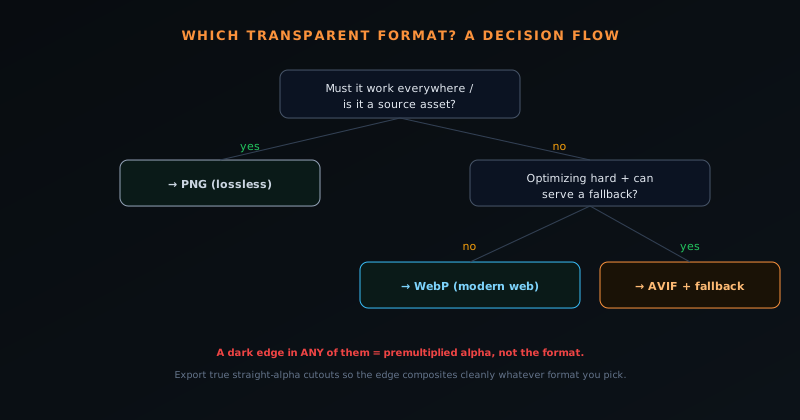
For the web, the modern default is WebP: it has wide support, meaningfully smaller files than PNG, and full transparency, which makes it the right choice for most transparent images on a site you control. If you want the absolute smallest files and your delivery pipeline can serve AVIF with a PNG or WebP fallback for the minority of contexts that need it, AVIF is the size champion. For maximum compatibility (emails, handoffs, platforms with unknown support, or images that must work everywhere) stick with PNG. And for source assets you will edit repeatedly, use a lossless format (PNG or lossless WebP/AVIF) so re-saving does not degrade them.
A simple way to hold the decision: PNG for "must work everywhere" and source files, WebP for "the modern web," AVIF for "smallest possible, with a fallback." Most people are well served by defaulting to WebP for web display and keeping PNG for compatibility-critical cases, which captures most of the size benefit with almost none of the risk. The exception is anyone optimizing aggressively for performance at scale, for whom AVIF with fallbacks is worth the extra pipeline complexity. Choosing by destination rather than by which format is newest is the whole discipline, since the right answer genuinely changes with where the image is going.
Transparency that still composites badly: the alpha trap
A point worth making, because it surprises people, is that choosing the right format does not guarantee a clean transparent image: a transparent PNG, WebP, or AVIF can still show a dark halo when composited if the alpha was stored incorrectly. The format determines whether transparency is supported and how the file is compressed; it does not determine whether the edge pixels carry the right colour. If a tool exports premultiplied alpha into any of these formats, the edges can fringe dark when placed on a new background, regardless of whether you chose PNG, WebP, or AVIF.
This is why the format comparison is only half the story of a clean transparent image. The other half is how the alpha itself is produced: specifically, whether it is true straight (non-premultiplied) alpha that keeps the edge-pixel colour intact. The NSS Background Remover writes true straight-alpha cutouts, which is why its exports composite cleanly in any of these formats, but a cutout from a tool that gets the alpha wrong will fringe no matter how good the format choice. The companion explainer at Straight alpha vs premultiplied alpha: the export detail that breaks other tools covers exactly why this happens and how to test for it, which is essential reading alongside the format decision.
How to export each format for free
Producing a transparent image in any of these formats starts the same way: a clean cutout with the background removed, exported in the format you have chosen. The NSS Background Remover at bgremover.novusstreamsolutions.com removes the background and exports to PNG, WebP, or AVIF directly, all on-device and free, so you can pick the format that fits the destination without a separate conversion step. Because the cutout is true straight-alpha, the transparency composites cleanly in whichever format you export, which is the foundation the format choice sits on.
If you already have a transparent PNG and want a smaller WebP or AVIF, a format conversion produces the smaller file without redoing the cutout, useful for shrinking existing assets for the web. The key is to convert from a lossless source rather than re-compressing an already-lossy file, since each lossy pass degrades quality. Doing the cutout once at high quality and then exporting or converting to the format each destination needs is the efficient workflow: one clean source, many format outputs tuned to where each one is going. That keeps your archive lossless while letting each published image be as small as its destination allows.
How browser fallbacks let you serve AVIF safely
The main reason people hesitate to use AVIF despite its size advantage is the compatibility gap, but modern web delivery solves this with fallbacks, which let you serve AVIF to the browsers that support it and a safe format to those that do not. The HTML picture element lets you list several sources in order of preference (AVIF first, then WebP, then PNG), and the browser automatically picks the first one it can display. This means a visitor on a current browser gets the tiny AVIF, while a visitor on something older transparently gets the WebP or PNG, with no broken images and no manual detection. The size win is captured where possible without risking the experience where it is not.
This fallback pattern is what makes AVIF practical at scale rather than a gamble, because it removes the all-or-nothing choice between smallest files and universal support. The cost is a little extra complexity in the delivery pipeline (generating each image in multiple formats and wiring up the picture element or a server that negotiates format) which is justified for a high-traffic site optimizing hard for performance and overkill for a small one. For most people, serving WebP with a PNG fallback captures the bulk of the benefit with minimal complexity, while the AVIF-with-fallbacks approach is the next step for those who want the maximum size savings. Either way, the principle is that fallbacks let you adopt a newer, smaller format without betting on universal support, which is what turns the compatibility concern from a blocker into a manageable detail.
Animated transparency: the same choice, more frames
The PNG-versus-WebP-versus-AVIF decision has an animated parallel that is worth knowing, because animated transparent images face the same tradeoffs amplified by frame count. The animated GIF is the old universal choice, but it only supports on-off transparency with no partial opacity, so soft edges look hard, and it produces large files. Animated WebP supports a full alpha channel, so soft edges stay soft, and it is dramatically smaller than GIF, which makes it the modern choice for animated stickers and transparent loops. This mirrors the still-image story exactly: the old format is universal but limited, and the modern one is smaller and better but slightly less universally supported.
The practical guidance for animated transparency follows the same destination-driven logic: use animated WebP where it is supported for clean soft edges and small files, and fall back to GIF only where a platform requires it specifically, accepting GIF's hard-edged transparency and larger size as the cost of universal support. For animated content that does not need transparency, a short video is usually far smaller and higher quality than a GIF, which is its own consideration. The key insight is that the format choice for animated images is not a separate skill but the same size-quality-compatibility tradeoff applied across many frames, which is why understanding it for still images carries directly over to animated work.
Auditing your existing images for format wins
If you have an existing library of transparent PNGs (a catalogue of product cutouts, a site full of graphics) there is often a quick performance win available by converting the heaviest ones to WebP or AVIF, since the largest PNGs are usually the ones with the most to gain. The audit is straightforward: find the largest transparent images, check whether they are display images (good candidates for lossy WebP/AVIF) or source assets that need to stay lossless, and convert the display ones. A handful of multi-megabyte hero PNGs converted to WebP can shave meaningful weight off a page, improving load time and the performance signals that affect both user experience and search ranking.
The discipline in an audit is to convert from the lossless original rather than re-compressing an already-lossy file, and to keep the lossless source archived even after publishing a smaller version, so you never degrade the master. The goal is a workflow where each image has a lossless source and a published display version in the smallest format the destination supports, which is the same one-source-many-outputs pattern that governs new images. For a small site the audit might be a one-time afternoon; for a large catalogue it is worth building into the export pipeline so every new image is automatically delivered in an efficient format. Either way, treating format as a lever you can pull on existing images, not just new ones, is how the size savings compound across a whole library rather than only applying going forward.
The bottom line
The honest summary is that there is no single best transparent format, only the best format for a given job, because the three trade off along axes that genuinely matter differently in different contexts. PNG wins on compatibility and losslessness; WebP wins as the balanced modern web default; AVIF wins on raw file size where you can manage fallbacks. All three do transparency properly, so the decision is never about capability and always about the size-quality-support tradeoff for where the image is going. Internalizing that the right answer changes with the destination is what turns this from a confusing choice into a quick one.
For most people most of the time, a sensible policy is: keep a lossless PNG (or lossless WebP/AVIF) as your source, publish WebP for the web, fall back to PNG wherever compatibility is uncertain, and reach for AVIF when you are optimizing hard and can provide fallbacks. That policy captures nearly all of the available benefit with almost none of the risk, and it scales from a single image to a whole catalogue. The formats will keep evolving (AVIF support will keep improving, and newer formats will eventually arrive), but the underlying discipline of choosing by destination rather than by novelty will keep giving the right answer regardless of which formats are in play.
Frequently asked questions
Quick answers to common questions about this topic.
Does WebP support transparency?
Yes. WebP supports a full alpha channel in both lossless and lossy modes, so you can have transparency and small files at the same time. The myth that WebP cannot do transparency is simply wrong.
Which transparent format has the smallest file size?
AVIF is usually the smallest, then WebP, then PNG, often by a wide margin for detailed images. The size advantage is largest for complex, photographic cutouts and smallest for simple flat graphics.
Should I use PNG, WebP, or AVIF?
Use PNG for maximum compatibility and source files, WebP as the balanced default for the modern web, and AVIF for the smallest files where you can provide a fallback. Choose by where the image needs to work, not by which format is newest.
Why does my transparent image still have a dark edge in WebP or AVIF?
The format is not the cause; the alpha was likely stored as premultiplied. Export true straight-alpha cutouts (as the NSS Background Remover does) so the edge composites cleanly in any format. See Straight alpha vs premultiplied alpha: the export detail that breaks other tools.
Related workflow
Product photo to a transparent image every channel accepts
One photograph, cut out once, then re-encoded for a storefront, a marketplace listing and a social post without redoing the cutout each time.
- Cut the background out and check the edgesNSS Background Remover: Hair, glass and drop shadows are where automatic cutouts fail. Fix them once, on the master, before anything downstream copies the mistake.
- Re-encode and resize per destinationNovus Convert: Transparency survives PNG and WebP and dies in JPEG. Convert validates the file it hands back, so a listing never rejects a silently broken upload.
Related troubleshooting
Was this page helpful?
Your answer stays in this browser, it is not sent anywhere and no account or cookie is involved.