2026 · NSS Background RemoverAbout 13 min readNovus Stream Solutions
JPG vs PNG: when to use which
JPG vs PNG is one of the most common image questions, and it has a clear answer once you know the two rules. Here is exactly when to use each, why, and where the modern formats fit.
Contents
- 1.Overview
- 2.The core difference in one paragraph
- 3.When JPG wins: photographs
- 4.When PNG wins: graphics, text, and transparency
- 5.Transparency is the dividing line
- 6.File size: the other consideration
- 7.The modern alternatives: WebP and AVIF
- 8.A simple rule for choosing every time
- 9.What about GIF and the animated case?
- 10.A quick reference you can hold in your head
- 11.Converting between formats
Overview
JPG versus PNG is one of the most common image questions, and unlike many format debates, it has a genuinely clear answer once you understand the two rules that decide it. The short version: use JPG for photographs and PNG for graphics and anything that needs transparency. That covers the large majority of cases correctly. But understanding why those rules hold (what each format is actually built for and where it breaks down) lets you make the right call in the cases that are not obvious, and avoid the common mistakes of using a JPG where transparency is needed or a PNG where it bloats a photograph to several times its necessary size. This guide explains the core difference, when each format wins, why transparency is the dividing line, and a simple rule to choose every time.
The reason getting this right matters is that the wrong format choice has real costs: a photograph saved as PNG can be several times larger than it needs to be, slowing pages and wasting storage, while a graphic with transparency saved as JPG loses its transparency entirely and gains compression artifacts around its sharp edges. These are not subtle problems: they are visible and they are common, because the rules are simple but widely unknown. Once you understand the two formats' strengths, the choice becomes automatic, and you stop producing the oversized photos and broken-transparency graphics that come from picking a format by habit rather than by fit.
The core difference in one paragraph
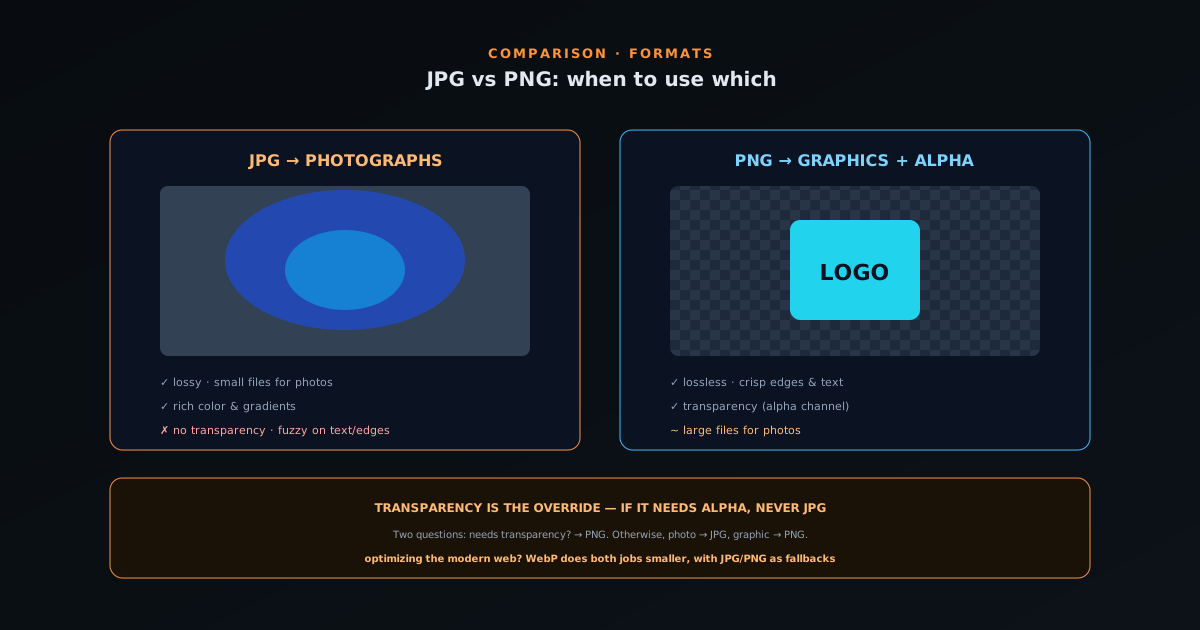
JPG (also written JPEG) is a lossy format built for photographs: it compresses by discarding detail the eye is unlikely to notice, achieving small file sizes for complex, colorful images like photos, at the cost of not being perfectly exact and of struggling with sharp edges and text. PNG is a lossless format built for graphics: it preserves every pixel exactly, handles sharp edges and text cleanly, and, crucially, supports transparency through an alpha channel, at the cost of larger files for photographic content. That is the entire difference: JPG trades exactness for small photo files; PNG trades file size for exactness and transparency.
Everything else about when to use each follows from this core difference. JPG's lossy compression makes it efficient for photos and bad for graphics with sharp edges; PNG's losslessness makes it perfect for graphics and inefficient for photos; and PNG's transparency support makes it the only choice of the two when you need a transparent background. Hold this core difference in mind and the rules below are just its consequences. The two formats are not competitors trying to be the best at the same job: they are built for different kinds of images, which is why the right choice depends entirely on what kind of image you have.
When JPG wins: photographs
JPG is the right choice for photographs and photographic content: anything with continuous tones, gradients, lots of colors, and no need for transparency. A photo of a person, a landscape, a product, a scene: these compress efficiently as JPG because the lossy compression exploits the eye's tolerance for tiny variations in complex imagery, producing a small file that looks essentially identical to the original. The same photo as PNG would be several times larger for no visible benefit, because PNG's lossless compression cannot squeeze a photograph nearly as small without the detail-discarding that JPG does.
The reason JPG works so well for photos specifically is that photographs are exactly the kind of content lossy compression handles best: complex, busy imagery where small data reductions are imperceptible. There is no sharp text to fringe, no flat color to band, no transparency needed, just a rich image that JPG can compress aggressively while looking pristine. This is why the default for any photograph destined for the web, email, or general sharing is JPG: it gives you a small file with no visible quality loss, which is precisely what you want for a photo. The only photographs where JPG is the wrong call are those that need transparency or that will be edited repeatedly, which are the cases PNG (or a modern format) handles better.
When PNG wins: graphics, text, and transparency
PNG is the right choice for graphics (logos, icons, illustrations, screenshots, diagrams, anything with flat colors, sharp edges, or text) and for any image that needs a transparent background. These are exactly the cases where JPG fails: its lossy compression produces visible artifacts around the sharp edges of text and graphics (a fuzzy halo where there should be a crisp line), and it cannot store transparency at all. PNG's lossless compression keeps sharp edges perfectly crisp, handles flat colors and text cleanly, and is efficient for this kind of content because graphics have lots of redundant data that lossless compression squeezes well.
Transparency is the most clear-cut case for PNG between these two formats: if you need a transparent background (a logo to place on different colors, a cutout to composite, an icon that sits on any background), JPG simply cannot do it, because it has no alpha channel, so PNG is the choice. This is the single most common reason to reach for PNG over JPG, and it is non-negotiable: a transparent image saved as JPG loses its transparency and gains a solid background. For graphics in general, PNG keeps the crispness JPG would degrade; for transparency specifically, PNG is the only option of the two. The companion guide at How to make a transparent PNG (free, no upload) covers producing transparent PNGs, which is the workflow this rule points to.
Transparency is the dividing line
If there is one rule to remember above all, it is that transparency is the hard dividing line between these two formats: the moment an image needs a transparent background, JPG is off the table and PNG (or a modern format that supports alpha) is the answer. This is because JPG has no alpha channel (it physically cannot represent transparency) so a transparent image saved as JPG gets a solid background, usually white or black, replacing the transparency entirely. There is no setting or workaround within JPG; the format does not support it. This makes transparency the one criterion that overrides everything else in the JPG-versus-PNG choice.
The practical importance of this is that it catches the most common and most frustrating format mistake: making a clean transparent cutout and then saving it as JPG, only to find the transparency gone and replaced with a background. The fix is simply to save as PNG, but the mistake recurs because people reach for JPG out of habit. So the rule to internalize is: any time the image has or needs transparency, it is PNG (or WebP/AVIF), never JPG. For everything else, the photograph-versus-graphic distinction decides, but transparency is the absolute line. Remembering that JPG cannot do transparency at all prevents the single most common format error, which is worth more than any subtler optimization.
File size: the other consideration
Beyond the photograph-versus-graphic and transparency rules, file size is the consideration that confirms the choice, since the formats differ dramatically in size depending on content. For a photograph, JPG produces a much smaller file than PNG (often several times smaller) because lossy compression handles photographic content so efficiently, which is why using PNG for a photo is wasteful. For a graphic with flat colors and few distinct tones, PNG is efficient and can be smaller than a JPG of the same graphic, while also avoiding the artifacts JPG would introduce. So file size generally reinforces the content-based rule: JPG is smaller for photos, PNG is competitive or better for graphics.
The file-size lens is useful as a sanity check: if you have chosen PNG for something and the file is surprisingly large, ask whether the content is actually a photograph that should be JPG; if you have chosen JPG and the edges look fuzzy, ask whether it is actually a graphic that should be PNG. The size and the visual quality together confirm whether the format fits the content, and the compare-formats helper at bgremover.novusstreamsolutions.com/tools/compare-formats lets you see the same image side by side across formats to settle the call. This is also where the modern formats enter, since WebP and AVIF can beat both JPG and PNG on size for their respective content types, which is the next consideration for anyone optimizing seriously. But within the JPG-versus-PNG choice, file size simply reinforces matching the format to the content type.
The modern alternatives: WebP and AVIF
The JPG-versus-PNG choice is the classic one, but it is worth knowing that modern formats (WebP and AVIF) can do the job of both better, compressing smaller than JPG for photos and smaller than PNG for graphics, while also supporting transparency. WebP, in particular, is a strong modern default for the web: it handles photographic content with smaller files than JPG, graphics with smaller files than PNG, and transparency like PNG, all in one format with wide support. AVIF goes smaller still. So for the modern web, the JPG-versus-PNG choice is increasingly "WebP for most things, with JPG and PNG as the universal fallbacks."
The reason JPG and PNG remain the right answer in many cases despite the better modern formats is compatibility: JPG and PNG work absolutely everywhere, while WebP and AVIF, though widely supported, are not quite universal. So the choice depends on control over the destination: on your own modern website, WebP captures the size benefits; for an image handed to someone else, uploaded to a platform with unknown support, or needing to work everywhere, JPG (for photos) and PNG (for graphics and transparency) remain the safe choices. The classic JPG-versus-PNG rules still hold for the universal-compatibility cases, while the modern formats are the upgrade for the controlled-destination cases, covered in depth at PNG vs WebP vs AVIF for transparency: which should you export?.
A simple rule for choosing every time
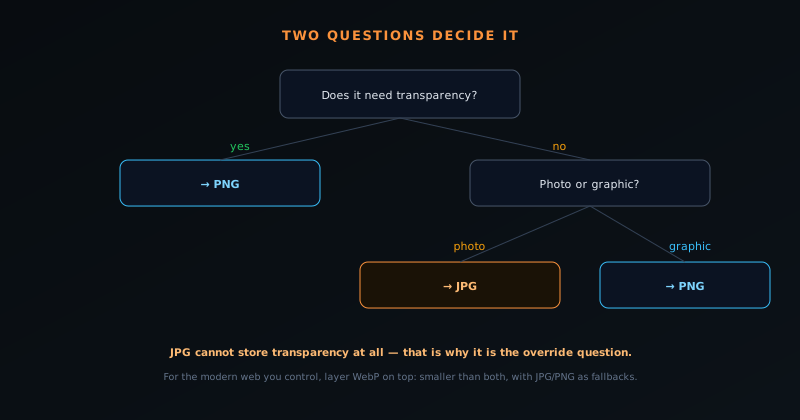
The whole decision collapses into a simple two-question rule that handles essentially every case correctly. First question: does the image need transparency? If yes, it is PNG (or a modern format with alpha), never JPG: transparency settles it immediately. Second question, if no transparency is needed: is it a photograph or a graphic? If it is a photograph, use JPG for the small file size; if it is a graphic with flat colors, sharp edges, or text, use PNG for the crisp, artifact-free result. Those two questions, in that order, give the right format for the overwhelming majority of images.
This rule works because it captures the two real dividing lines (transparency and content type) in the order of their priority, with transparency as the overriding criterion and content type as the tiebreaker for opaque images. Memorizing it eliminates the guesswork and the habit-driven mistakes: you stop saving photos as bloated PNGs and transparent graphics as broken JPGs, because the rule tells you the right answer immediately. For anyone optimizing for the modern web, layer the WebP-or-AVIF upgrade on top where the destination supports it, but the underlying logic (transparency first, then photograph versus graphic) remains the foundation. A simple, reliable rule applied every time beats deliberating case by case, which is exactly what makes the JPG-versus-PNG question one with a genuinely clear answer. The same match-the-format-to-the-destination logic scales to every conversion you make in a tool like Novus Convert, which Choosing the right output format in Novus Convert lays out format by format.
What about GIF and the animated case?
The JPG-versus-PNG question is about still images, but it is worth noting where the third classic format, GIF, fits, since people sometimes wonder about it alongside the other two. GIF is an old format with two defining traits: it supports animation, and it supports only a very limited form of transparency (on or off, with no partial opacity) and a restricted color palette. This makes GIF the wrong choice for both photographs (its limited colors butcher photographic content) and high-quality graphics (its on-off transparency cannot do soft edges), so within the still-image choice, GIF loses to both JPG and PNG. Its one remaining niche is simple animation, and even there modern formats often beat it.
For a still graphic with transparency, PNG is strictly better than GIF (full alpha transparency and a full color range versus GIF's crude on-off transparency and limited palette), so there is essentially never a reason to choose GIF over PNG for a static image. For animation, GIF works but is large and limited, and modern animated formats (animated WebP, or short videos) usually look better and weigh less. So GIF does not really compete in the JPG-versus-PNG decision: for stills, it is worse than both, and for animation, it is a legacy choice modern formats improve on. Knowing this prevents the occasional mistake of reaching for GIF when PNG (for a transparent graphic) or a modern animated format (for animation) is the better tool, keeping the still-image choice cleanly between JPG and PNG.
A quick reference you can hold in your head
Compressing the whole guide into a memorable reference: photographs without transparency are JPG, because lossy compression makes them small with no visible loss; graphics, text, screenshots, and anything needing transparency are PNG, because lossless compression keeps edges crisp and PNG carries an alpha channel; and transparency is the override: if the image needs it, never JPG. For the modern web where you control the destination, WebP is the upgrade that does both jobs smaller, with JPG and PNG as the universal fallbacks. That is the entire decision in a few lines, and it handles essentially every image you will encounter.
The value of holding this as a compact reference is that the format choice happens constantly (every time you save or export an image) and a quick mental rule prevents the habitual mistakes that compound across a site or a catalogue. The person who internalizes "photo → JPG, graphic or transparent → PNG, transparency wins, WebP to optimize" stops producing the bloated PNGs and broken-transparency JPGs that come from picking by habit. It is a small piece of knowledge with an outsized effect on file sizes, page speed, and image quality across everything you publish, which is why the JPG-versus-PNG question, despite seeming basic, is genuinely worth settling once and for all. A reliable rule applied automatically beats reconsidering the choice every time, and this one is simple enough to never need looking up again.
Converting between formats
Sometimes you have an image in the wrong format and need to convert it, and understanding conversion prevents the quality losses that careless conversion causes. Converting a PNG photograph to JPG is usually a good move (it shrinks an over-large file with no visible loss for a photographic image), and converting a graphic from JPG to PNG can fix the artifacts JPG introduced, though it cannot restore detail JPG already discarded. The key principle is that converting from a lossless source (PNG) preserves quality, while converting from an already-lossy source (JPG) carries forward whatever was already lost, since you cannot recover discarded data by changing format.
The practical guidance is to convert from the highest-quality source available and to avoid repeated lossy conversions, since each save through a lossy format like JPG degrades the image a little more. If you have a lossless original, keep it as your source and convert to JPG or PNG as needed for each use; if you only have a JPG, converting it to PNG will not improve it (the lost detail stays lost) but will stop further degradation if you plan to edit it. The NSS Background Remover's format converter at bgremover.novusstreamsolutions.com/tools/format-converter handles these conversions on-device for free, so you can move between JPG, PNG, and the modern formats without uploading your images. Converting thoughtfully (from a good source, avoiding repeated lossy passes) is what keeps quality intact through a format change, completing the picture of using each format well.
Frequently asked questions
Quick answers to common questions about this topic.
Should I use JPG or PNG?
Use JPG for photographs (small files, no transparency needed) and PNG for graphics, text, and anything that needs a transparent background. Transparency is the deciding factor: if the image needs it, use PNG, because JPG cannot store transparency at all.
Why does my transparent image have a background when saved as JPG?
JPG has no alpha channel, so it cannot store transparency: it replaces the transparent areas with a solid background. Save transparent images as PNG (or a modern format like WebP) to keep the transparency intact.
Is PNG or JPG better quality?
PNG is lossless (perfectly exact) and JPG is lossy (slightly compressed), so PNG is technically higher fidelity. But for photographs, well-compressed JPG looks identical at a fraction of the size, which is why JPG is the right choice for photos despite being lossy.
Should I use WebP instead of JPG or PNG?
For the modern web, often yes: WebP compresses smaller than both for their respective content and supports transparency. Keep JPG and PNG for maximum compatibility (emails, handoffs, platforms with unknown support). See PNG vs WebP vs AVIF for transparency: which should you export?.
Related workflow
Product photo to a transparent image every channel accepts
One photograph, cut out once, then re-encoded for a storefront, a marketplace listing and a social post without redoing the cutout each time.
- Cut the background out and check the edgesNSS Background Remover: Hair, glass and drop shadows are where automatic cutouts fail. Fix them once, on the master, before anything downstream copies the mistake.
- Re-encode and resize per destinationNovus Convert: Transparency survives PNG and WebP and dies in JPEG. Convert validates the file it hands back, so a listing never rejects a silently broken upload.
Related troubleshooting
Was this page helpful?
Your answer stays in this browser, it is not sent anywhere and no account or cookie is involved.