2026 · NSS Background RemoverAbout 12 min readNovus Stream Solutions
In-browser vs cloud background removal: which is better?
Cloud removers upload your image to a server; in-browser tools run the AI on your device. Here is how they actually differ on privacy, speed, cost, and quality.
Contents
- 1.Overview
- 2.Privacy: the clearest difference
- 3.Cost and limits
- 4.Speed and quality
- 5.What "runs on your device" actually means
- 6.The latency you do not see in a single image
- 7.Where batch processing changes the calculus
- 8.What happens to your image after it is processed
- 9.Who controls the model, and updates
- 10.The hardware question, answered honestly
- 11.Quality is about the model, not the location
- 12.The offline capability that falls out for free
- 13.Trust and the small, unknown provider
- 14.Where this is all heading
- 15.When each makes sense
Overview
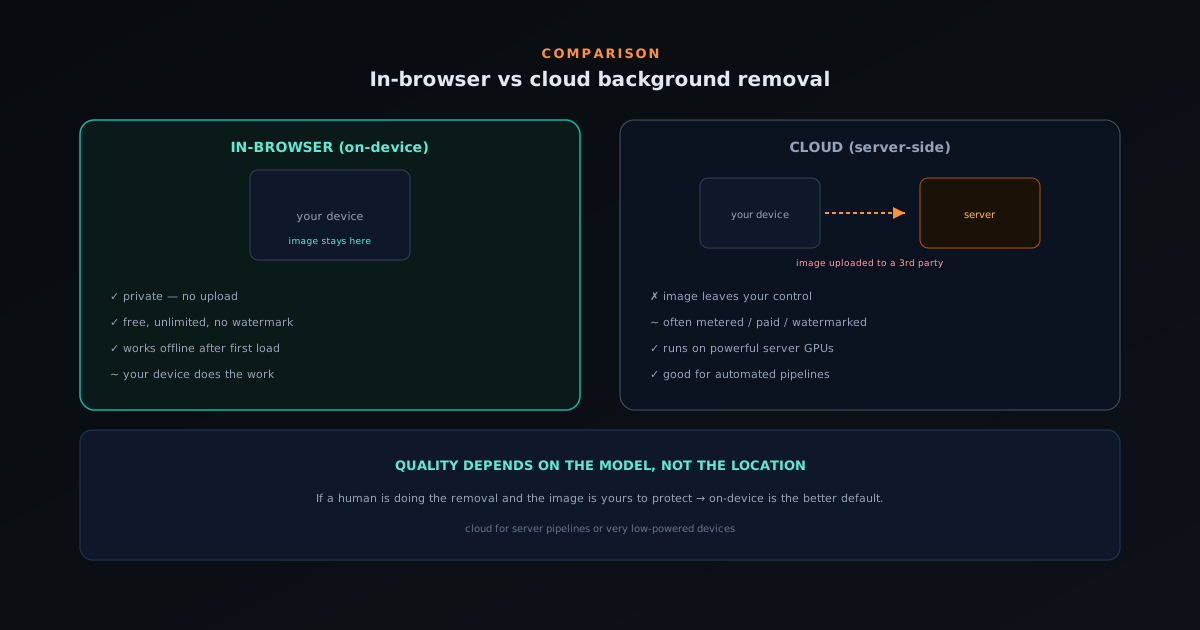
Background removal tools split into two architectures. Cloud (server-side) tools upload your image to a remote server, run the AI there, and send the result back. In-browser (on-device) tools download the model once and run it locally, so the image never leaves your machine. The architecture choice drives almost every practical difference between them.
NSS Background Remover is in-browser: you can open bgremover.novusstreamsolutions.com/background-remover and watch the browser Network tab to confirm nothing uploads. This comparison lays out the real tradeoffs so you can judge which fits your work. It is not a sales pitch, but the honest picture.
Privacy: the clearest difference
With a cloud tool, your image is uploaded to a third party. For casual photos that is fine; for client deliverables, unpublished product photography, confidential documents, or anything sensitive, it is a trust decision you may prefer not to make. Even with a good privacy policy, the image left your control.
In-browser removal sidesteps that entirely: there is no upload, no server log, and no third party with visibility into what you are cutting out. The privacy property is structural, not policy-based: the image physically cannot leave because nothing sends it.
Cost and limits
Cloud removal costs the provider money on every image (servers, GPUs, bandwidth), which is why most cloud tools meter usage, charge per image, or gate quality behind a subscription. The economics push toward limits.
On-device removal costs the provider almost nothing per image (your device does the work), so it can be free with no per-image limit and no watermark. That is exactly how NSS Background Remover operates: free, unlimited, ad-supported.
Speed and quality
Cloud tools run on powerful server GPUs, so raw inference can be fast, but you pay a round-trip: upload, queue, process, download. In-browser tools skip the network entirely; on a machine with WebGPU, removal is quick, and even WebAssembly fallback is workable. For a single image the experience is comparable; for a batch, staying local avoids uploading every file.
Quality depends on the model, not the location. NSS Background Remover runs strong models (RMBG-1.4, RMBG-2.0/BiRefNet) locally and exports true straight-alpha, so on-device does not mean lower quality.
What "runs on your device" actually means
The phrase "the AI runs on your device" can sound like marketing, so it is worth being concrete about the mechanism, because it is the foundation of every difference that follows. When you first open an in-browser remover, it downloads the neural-network model (a file of learned weights) into your browser's storage, and that download is the only meaningful transfer the tool makes. From then on, when you remove a background, the browser feeds your image through that locally-stored model and produces the result, all within the page. There is no moment where the picture is packaged up and sent to a remote machine, because the machine that does the work is the one in front of you.
This is the inverse of the cloud model in a precise sense: instead of your image traveling to the model, the model travels to your image, once, and then stays. That single architectural fact is why the privacy, cost, and offline properties all line up the way they do: they are not separate features but consequences of where the computation happens. Understanding that the model is a downloaded file running locally, rather than a service being called remotely, demystifies the whole comparison: everything good and bad about on-device removal flows from the work being done on your hardware with a model that lives in your browser.
The latency you do not see in a single image
Raw inference speed is only part of how fast a tool feels, and the cloud model carries a hidden tax that a single benchmark misses: the round-trip. Using a cloud remover means your image has to be uploaded, wait in whatever queue the server has, get processed, and then be downloaded back, and the upload and download legs depend on your connection, not the server's GPU. For a large image on a modest connection, that transfer time can dwarf the actual processing, so a cloud tool that is fast on paper can feel slow in practice because most of the wait is network, not computation.
In-browser removal has no network leg at all once the model is loaded, so the only time is the local processing. On a machine with modern GPU acceleration that processing is quick, and even the slower fallback path is workable, but the key point is that there is no upload-and-download surrounding it. For a single image the two architectures can feel comparable, but the cloud tool's advantage in raw GPU speed is partly eaten by the round-trip it cannot avoid, while the on-device tool spends its entire time budget on the actual work. The absence of a network leg is a quiet but real part of why local removal feels responsive.
Where batch processing changes the calculus
The single-image comparison is close, but volume tilts the balance, and it does so in favor of staying local for a reason that has nothing to do with model quality. A cloud tool processing a hundred images means a hundred uploads and a hundred downloads, every file crossing the network twice, which is both slow and a hundred separate moments of your images leaving your control. The transfer overhead that is tolerable for one image becomes a significant, repeated cost across a batch, and the privacy exposure multiplies by the number of files.
On-device batch processing avoids all of that: the images are processed one after another locally, with nothing uploaded, so the only limit is your hardware's pace rather than your connection's, which is exactly how on-device removal handles a whole catalog. For anyone doing volume work (a product catalog, a gallery of headshots, a set of assets), this is where the architectural difference stops being a wash and becomes decisive. The cloud tool's per-image network cost and per-image exposure both scale with the batch, while the local tool's do not, which is why volume work is one of the clearest cases for keeping removal on the device.
What happens to your image after it is processed
A question worth asking of any cloud tool is what becomes of your image once the result has been returned, and the honest answer is that you cannot fully know. A reputable provider may state that uploads are deleted after processing, but that is a policy you are trusting rather than a fact you can verify: there is a copy of your file on a machine you do not control, subject to a retention practice you cannot audit, exposed to whatever happens to that infrastructure. Even with the best intentions, the image existed on a third party's servers, however briefly, and you are relying on their word about the rest.
On-device removal removes the question entirely, because there is no server-side copy to retain, delete, leak, or be compelled to hand over. The image was processed in your browser and never existed anywhere else, so there is nothing for a retention policy to govern. This is the difference between privacy as a promise and privacy as a structural fact: the cloud tool asks you to trust that the copy is handled well, while the on-device tool ensures no copy was ever made. For images you are obligated to protect, that distinction is not pedantic; it is the entire basis on which you can use the tool at all.
Who controls the model, and updates
There is a subtler difference in who holds the reins of the actual capability. With a cloud tool, the provider can change the model, adjust quality, alter limits, raise prices, or shut the service down, and your access depends entirely on their continued operation and decisions: the capability lives on their infrastructure and can change or vanish without your consent. You are renting access to something you do not possess, which is fine until the terms change or the service ends.
With an on-device tool, the model has been downloaded to your browser and runs there, which gives you a more durable relationship with the capability. Updates come when you load the latest version of the page, but the fundamental ability to run the model is on your machine rather than gated behind a service that could disappear. This is a quieter benefit than privacy or cost, but for anyone who has been burned by a cloud tool changing its terms or shutting down, the fact that on-device processing does not depend on a provider's ongoing goodwill is a real form of resilience. The capability is yours to use, not a subscription to be revoked.
The hardware question, answered honestly
The fairest point in the cloud tool's favor is hardware: a server runs on a fixed, powerful GPU, while an on-device tool runs on whatever machine the user happens to have, which ranges from a high-end workstation to a budget phone. This means cloud removal delivers consistent timing to everyone, whereas on-device timing varies with the device: fast where there is GPU acceleration, slower on weak hardware. It would be dishonest to pretend this difference does not exist; for a very low-powered device, the cloud's fixed horsepower is a genuine advantage.
But the practical impact is smaller than it sounds, because in-browser tools are built to degrade gracefully rather than fail on weak hardware. Where modern GPU acceleration is available, removal is quick; where it is not, the tool falls back to a slower but functional path, so the result is still produced, just with more patience. The honest framing is that on-device removal is fast on capable hardware and merely slower, not broken, on weak hardware, while delivering privacy and freedom from limits that the cloud cannot match. For the large majority of users on reasonably modern devices, the hardware difference is a non-issue, and the trade strongly favors local.
Quality is about the model, not the location
A persistent misconception is that running on-device must mean lower quality, as though the browser were a compromised environment that produces worse cutouts. This is simply not how it works: the quality of a background removal depends on the model doing the segmentation and the care taken in the export, neither of which is inherently better or worse for running locally versus remotely. A strong model produces a strong cutout whether it executes on a server or in a browser, because it is the same computation either way; the location does not degrade the result.
In practice, an on-device tool running capable models and handling the export correctly (preserving soft edges, decontaminating color spill, writing true straight alpha) produces professional-quality output that holds up against any cloud competitor. The cutout does not know or care where it was computed. So the choice between architectures is genuinely about privacy, cost, limits, and convenience rather than about quality, because quality is determined upstream of the location decision by the model and the pipeline. Anyone who assumes local means lesser is importing an outdated intuition; modern on-device removal matches cloud quality because quality was never a function of the server.
The offline capability that falls out for free
A consequence of on-device processing that surprises people is that once the model is cached, the tool keeps working without an internet connection at all. Because there is no server to call, the removal does not depend on being online: the model is already on your device, so you can cut out images on a plane, in a dead zone, or with the connection deliberately off, and it simply works. A cloud tool cannot do this by definition, because its entire function is a server call; no connection means no capability.
This offline ability is not a headline feature so much as a tell about the architecture, and it doubles as the simplest possible proof of the privacy claim. If a tool keeps removing backgrounds with your internet switched off, then it is self-evidently not sending your images anywhere, because it could not. The offline capability is therefore both a genuine convenience for working anywhere and a demonstration, in the plainest terms, that the computation is truly local. It is the kind of property that only an on-device tool can have, and it follows automatically from the same design that delivers the privacy and the freedom from limits.
Trust and the small, unknown provider
There is a trust dimension that especially favors on-device tools when the provider is small or unfamiliar. With a cloud remover, using it safely requires extending trust to the company behind it (trust that they handle your uploads responsibly, that their security is sound, that their stated policies are real), and for a large, established provider you might extend that trust readily. For a small or unknown operation, though, that trust is harder to give, and uploading sensitive images to an unfamiliar server is a real leap of faith.
An on-device tool sidesteps the trust question entirely, which is paradoxically what lets a small provider be trustworthy. Because your image never leaves your machine, you do not have to trust the company's data handling at all: there is nothing for them to mishandle, since they never receive the image. A first-time visitor can confirm the no-upload behavior themselves and start using the tool safely without extending any trust to the operator. For a small, relatively unknown tool, that architecture is worth more than any reassurance copy, because it lets the product earn adoption on a verifiable property rather than on a reputation it has not yet built.
Where this is all heading
The reason on-device removal is even a serious contender today is that the underlying technology recently crossed a threshold, and the trajectory matters for the choice. Not long ago, running a real segmentation model in a browser would have been impractical; the maturation of browser machine-learning runtimes and GPU access changed that, which is what made fast, local, professional-quality removal possible at all. The architecture that was once obviously inferior for serious work is now genuinely competitive, and the gap continues to close as browsers and hardware improve.
This direction of travel is worth weighing because it suggests on-device is not a stopgap but an increasingly capable default. The forces that make cloud necessary (heavy models, weak client hardware) are weakening as devices get faster and models get more efficient, while the advantages of local processing (privacy, cost, no limits, offline use) are permanent properties of the architecture rather than temporary perks. Choosing an on-device tool is not betting against the cloud for every use case, but it is aligning with where everyday creative tooling is clearly heading: toward capable computation that happens on your own machine, with your data staying there.
When each makes sense
Cloud removal can make sense when you need it inside an automated server pipeline, or on a very low-powered device that cannot run the model. For almost everything else (a person at a computer cutting out images, especially sensitive ones), in-browser wins on privacy, cost, and the absence of limits, at comparable quality.
The short version: if a human is doing the removal and the image is yours to protect, on-device is the better default. That is the bet NSS Background Remover is built on.
- Privacy: in-browser (no upload).
- Cost/limits: in-browser (free, unlimited).
- Server pipeline / weak device: cloud.
Frequently asked questions
Quick answers to common questions about this topic.
Is in-browser or cloud background removal better?
In-browser wins on privacy and cost: your image never leaves the device and there is no per-image server bill, which is why the tool can be free and unlimited. Cloud tools can offload heavy work to fixed hardware, but at the cost of uploading your file and depending on server load.
Is in-browser background removal as accurate as cloud tools?
Yes. The NSS tool runs the same class of segmentation models locally, with a high-quality model for fine hair and edges. Output quality is determined by the model, not by whether it runs on your device or a server.
Does in-browser processing keep my images private?
Yes. With no upload and no server-side copy, there is nothing to retain, leak, or subpoena. That is a structural guarantee you can verify in the browser Network tab, not just a policy promise.
Related workflow
Product photo to a transparent image every channel accepts
One photograph, cut out once, then re-encoded for a storefront, a marketplace listing and a social post without redoing the cutout each time.
- Cut the background out and check the edgesNSS Background Remover: Hair, glass and drop shadows are where automatic cutouts fail. Fix them once, on the master, before anything downstream copies the mistake.
- Re-encode and resize per destinationNovus Convert: Transparency survives PNG and WebP and dies in JPEG. Convert validates the file it hands back, so a listing never rejects a silently broken upload.
Related troubleshooting
Was this page helpful?
Your answer stays in this browser, it is not sent anywhere and no account or cookie is involved.