2026 · Novus Stream Solutions (hub)About 13 min readNovus Stream Solutions
Image SEO: alt text, file names, and getting images indexed
Images are a search channel most sites ignore. Practical image SEO (alt text, file names, sitemaps, and speed) gets your images indexed, ranking in Image Search, and helping your pages rank too.
Contents
- 1.Overview
- 2.Why images are their own search channel
- 3.Alt text done right
- 4.File names that describe the image
- 5.Getting images indexed: sitemaps and crawlability
- 6.Image weight is a ranking factor
- 7.Context: the content around the image
- 8.Structured data and image rich results
- 9.Lazy loading and modern delivery
- 10.Auditing your existing images
- 11.Image SEO and accessibility are the same work
Overview
Images are a search channel most sites quietly ignore. Beyond making a page look good, images can rank in their own right in Google Image Search, bring traffic, and contribute to how well the page they sit on ranks, but only if they are optimized so search engines can understand, index, and serve them. Image SEO is the practical set of habits that make this happen: descriptive alt text, sensible file names, inclusion in your sitemap, page-speed discipline, and the surrounding context that tells search engines what an image is about. None of it is complicated, but it is widely neglected, which means a small amount of deliberate image SEO is often a real, uncontested opportunity. This guide covers the practices that actually move the needle, from the alt text every image should have to the technical steps that get images indexed.
The reason image SEO is worth the modest effort is that it pays off on two fronts at once. First, optimized images can rank in Image Search and drive traffic that the page would not otherwise get, which is pure incremental visibility. Second, image optimization (proper alt text, fast-loading images, descriptive context) improves the page's overall SEO and user experience, since search engines reward pages that are accessible, fast, and clearly about their topic. Image SEO is therefore one of those rare optimizations that helps the images, the page, and the user simultaneously, which is exactly the kind of high-leverage, low-downside work that compounds across a content library.
Why images are their own search channel
Google Image Search is a substantial search surface in its own right, where people look for products, ideas, references, and visual answers, and an image that ranks there can bring traffic to the page it lives on. For visual categories especially (products, recipes, design, how-to, anything where people search by image) Image Search is a meaningful traffic source that a site with unoptimized images simply misses out on. The image is a doorway to the page, and an optimized image is a doorway that search engines can find and open, while an unoptimized one is effectively invisible to image search.
Beyond the direct traffic from Image Search, images contribute to the ranking of the pages they sit on, because search engines use images as one signal of what a page is about and how good the user experience is. A page with relevant, well-described, fast-loading images is a better page in search's eyes than one with generic, undescribed, heavy images, which affects how the page ranks in regular web search too. So image SEO is not a niche concern separate from page SEO; it is part of page SEO, with the bonus of the separate Image Search channel on top. Treating images as a search asset rather than mere decoration is the mindset shift that makes the practices below worth adopting.
Alt text done right
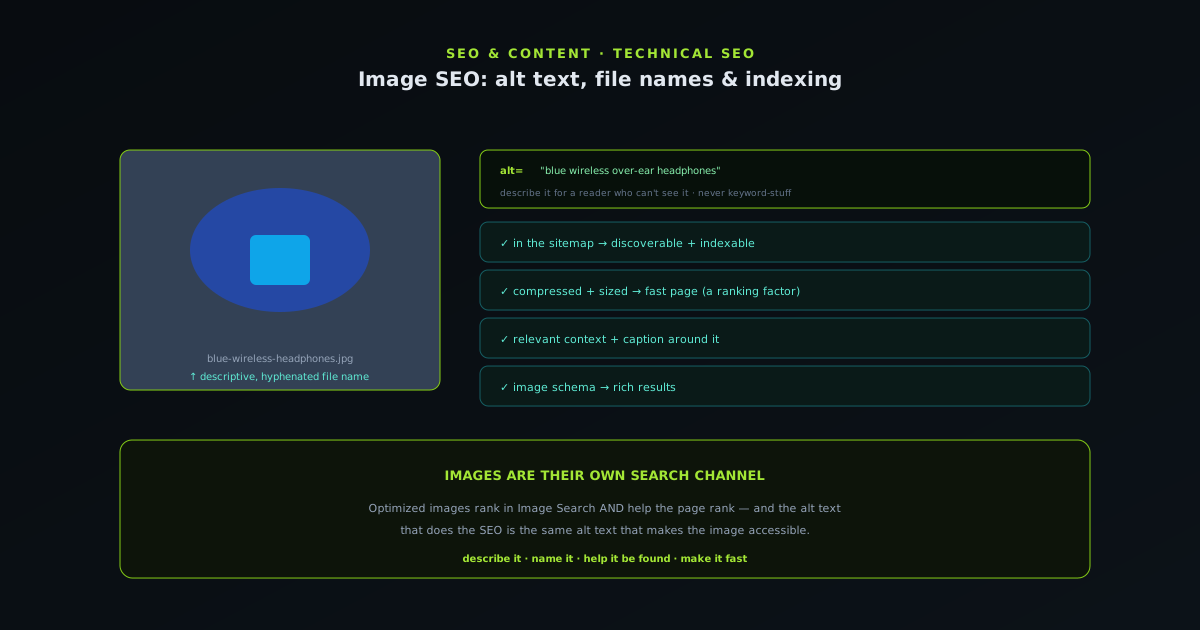
Alt text (the text alternative that describes an image) is the single most important piece of image SEO, because it tells search engines (and screen readers) what the image actually shows. Good alt text is a concise, accurate, natural description of the image's content: a sentence that someone who could not see the image would find genuinely useful. For a product, that means describing the product clearly; for a diagram, describing what it illustrates; for a photo, describing the scene. The alt text should describe the image, not stuff keywords, because search engines and accessibility both reward genuine description and penalize manipulation.
The common alt-text mistakes are leaving it empty (the image is then undescribed and invisible to image search and screen readers), stuffing it with keywords (which reads as spam and helps neither SEO nor users), and writing something generic like the file name or "image." If writing dozens of descriptions by hand is the bottleneck, an on-device draft generator can give you an accurate starting point you can refine. The discipline is to write alt text as if describing the image to someone who cannot see it, naturally including the relevant terms because they genuinely describe the content. Where a keyword fits the description honestly, it belongs; where it would only be there to game search, it does not. Good alt text is the foundation of image SEO and image accessibility at once, which is why getting it right on every meaningful image is the first and highest-return image SEO habit.
File names that describe the image
A surprisingly overlooked image SEO factor is the file name, because a descriptive file name is another signal to search engines about what the image contains, while the default camera or export file name (something like IMG_4827.jpg) tells them nothing. Renaming an image file to a short, descriptive, human-readable name (describing what the image shows, with words separated by hyphens) before uploading it gives search engines a useful clue and is a free, easy optimization. A product image named for the product, a diagram named for what it illustrates: these descriptive names reinforce the alt text and the surrounding context in telling search what the image is about.
The practice is simply to rename images descriptively as part of preparing them for the web, using lowercase words separated by hyphens (the web-friendly convention) and keeping the name concise and accurate. This costs almost nothing (a quick rename before upload) and adds a small but real signal that, across many images, contributes to how well they are understood and indexed. Like alt text, the file name should genuinely describe the image rather than stuff keywords, since a string of keywords as a file name reads as manipulation. Descriptive file names are one of the easiest image SEO wins precisely because they are so often neglected, leaving most sites' images with meaningless default names that waste a free optimization.
Getting images indexed: sitemaps and crawlability
For images to rank in Image Search, they have to be indexed, which means search engines have to be able to find and crawl them, and the same discovery principles that apply to pages apply to images. Images embedded normally in pages that are themselves crawled and indexed will generally be found, but you can help by including image information in your sitemap, which explicitly tells search engines about the images on your pages. An image sitemap (or image entries in a regular sitemap) lists the images you want indexed, aiding their discovery just as a page sitemap aids page discovery, which is especially helpful for images that might otherwise be hard to find.
Crawlability also matters: images loaded in ways search engines cannot see (purely via certain scripts, or blocked by robots rules) may not be indexed, just as pages with technical blockers are not. Ensuring images are embedded in standard, crawlable ways, are not accidentally blocked, and are referenced in the sitemap removes the discovery obstacles to indexing. The companion guide at Getting indexed faster in Google Search Console covers indexing in depth, and the image case follows the same logic: images get indexed when they are discoverable (linked, in the sitemap), crawlable (not blocked, embedded normally), and worth indexing (relevant, well-described). Getting the discovery and crawlability basics right is what makes the alt text and file names actually pay off in Image Search.
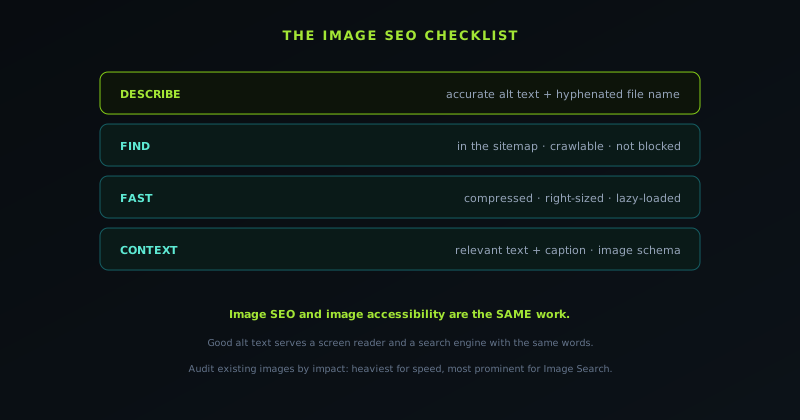
Image weight is a ranking factor
Image SEO is not only about description and discovery; it is also about speed, because heavy images slow pages down, and page speed is a genuine ranking factor that affects both search rankings and user experience. Large, uncompressed images are one of the most common causes of slow pages, and a slow page ranks worse and converts worse than a fast one, which means compressing and properly sizing images is part of image SEO, not a separate concern. An image that is beautifully described but several megabytes heavy is dragging down the very page it sits on, working against the SEO the alt text is trying to help.
The fix is the image-compression discipline covered in the companion guide: resize images to their display dimensions with bgremover.novusstreamsolutions.com/tools/image-resizer, use efficient modern formats, and compress to the quality sweet spot at bgremover.novusstreamsolutions.com/tools/image-compressor, so each image is as light as it can be without visible quality loss. Across a page with several images, this can be the difference between a fast page and a sluggish one, which Google's page-experience signals reward or penalize accordingly. So image SEO has a performance dimension that is easy to overlook when focusing on alt text and file names: the images also have to be light. Treating image weight as part of image SEO (optimizing for speed alongside description) is what ensures images help rather than hurt the page's ranking. See How to compress an image without losing quality for the compression side.
Context: the content around the image
Search engines understand an image partly through the content surrounding it on the page, so the text near an image (the heading, the caption, the paragraph it illustrates) is part of how the image is interpreted and ranked. An image placed in a clearly relevant context, with descriptive text around it and a caption where appropriate, is better understood than the same image dropped into unrelated content. This means image SEO is not just about the image's own attributes (alt text, file name) but about placing the image in genuinely relevant context that reinforces what it is about, which happens naturally when images are used to illustrate the content they actually relate to.
Captions, where used, are particularly valuable because they are read by users and provide a clear, visible description that search engines also see, reinforcing the image's subject. Not every image needs a caption, but for images where a caption adds value to the reader, it also adds an SEO signal. The broader principle is that images should be used purposefully (to illustrate the content they sit beside) rather than as decorative filler, because a relevant image in relevant context is both more useful to readers and better understood by search. This aligns image SEO with good content practice: use images that genuinely relate to the surrounding text, describe them accurately, and the context does much of the SEO work for free, since the image and the content reinforce each other.
Structured data and image rich results
Structured data can enhance how images appear in search, because certain schema types (for products, recipes, articles, and more) include image fields that can make images eligible for rich results and enhanced presentation. When a page uses structured data that references its images (a product schema with the product image, a recipe schema with the dish image), search engines can use those images in richer search features, giving them more prominence than a plain image would get. This ties image SEO to the broader structured-data practice: marking up your content with schema that includes images helps those images appear in enhanced ways.
The practical step is to ensure that where you use structured data, it references the relevant images, so the images are part of the rich result rather than absent from it. A product page with product schema should include the product image in that schema; an article should include its main image. This does not replace the foundational image SEO (alt text, file names, indexing, speed) but it adds a layer that can give well-optimized images enhanced presentation in search. The companion guide at Structured data for small sites: the schema that earns rich results (and the schema that does nothing) covers structured data in depth, and the image angle is one more reason to implement it: schema that includes images extends the image SEO into rich results, which is where optimized images get the most prominent search presentation.
Lazy loading and modern delivery
How images are loaded affects both performance and, indirectly, SEO, and a few modern delivery practices help images contribute to a fast page rather than dragging it down. Lazy loading (deferring the loading of images until they are about to scroll into view) means a page does not load every image upfront, so the initial load is faster and bandwidth is saved for images the user actually reaches. For a page with many images, lazy loading the below-the-fold ones is a meaningful speed improvement, and since page speed is a ranking factor, it indirectly supports SEO while improving the user experience.
Other modern delivery practices reinforce this: serving appropriately-sized images for the device (so a phone does not download a desktop-sized image), using efficient formats, and specifying image dimensions so the browser can lay out the page without shifting as images load (which avoids the layout-shift that hurts both experience and page-experience signals). These practices are part of the technical side of image SEO, not about describing images, but about delivering them efficiently so they help rather than hinder the page. The combination of lazy loading, right-sized delivery, efficient formats, and specified dimensions is what lets a page use images richly without paying a speed penalty, which is the delivery half of making images an asset to the page's performance and ranking rather than a liability.
Auditing your existing images
Most sites have a backlog of images that were added without image SEO in mind (missing alt text, default file names, uncompressed and heavy, not in the sitemap) and auditing them is a chance to capture a lot of neglected value at once. The audit is a checklist applied across the site's images: do they have descriptive alt text, sensible file names, reasonable file sizes, and inclusion in the sitemap? The images that fail (the undescribed, the oversized, the default-named) are the ones with the most to gain from a quick fix, and addressing them improves both the Image Search potential and the page speed across the site.
Prioritizing the audit by impact makes it manageable: the heaviest images offer the biggest speed wins from compression, the most prominent and relevant images offer the biggest Image Search potential from good alt text, and the most important pages are where image SEO matters most. Rather than trying to fix every image at once, working through the highest-impact ones first captures most of the benefit quickly. For an ongoing site, the better long-term fix is to build image SEO into the publishing workflow (so every new image gets alt text, a good file name, and compression as a matter of course) which prevents the backlog from rebuilding. Auditing the existing images captures the neglected value, and building the practices into the workflow keeps the images optimized going forward, which together turn image SEO from a one-time cleanup into a sustained habit.
Image SEO and accessibility are the same work
A reassuring truth about image SEO is that much of it overlaps exactly with image accessibility, so doing one largely does the other, and you get two benefits from one effort. Alt text is the clearest example: it is the primary tool for both image SEO (telling search engines what the image shows) and image accessibility (telling screen-reader users what the image shows), so writing good alt text serves blind and low-vision users and search engines with the same words. Descriptive, accurate alt text is what both need, which means the SEO best practice and the accessibility best practice are identical.
This overlap extends beyond alt text: fast-loading images help users on slow connections and assistive contexts as well as search rankings, and images used purposefully in relevant context serve all users' understanding as well as search's. The alignment means image SEO is not a cynical search-gaming exercise but largely a matter of making images genuinely accessible and useful, which search rewards because that is what it is trying to surface. Framing image optimization as "make images genuinely accessible and useful, and describe them accurately" produces both the accessibility and the SEO benefits at once, which is the most sustainable way to approach it. The companion guide at Accessibility that pays for itself: a practical pass for small sites covers the accessibility side, and image alt text sits squarely in the overlap where doing right by users and doing right by SEO are the same action.
Frequently asked questions
Quick answers to common questions about this topic.
What makes good alt text for SEO?
A concise, accurate, natural description of what the image shows, useful to someone who cannot see it. Include relevant terms only where they genuinely describe the image; do not stuff keywords or leave it empty. Good alt text serves both SEO and accessibility at once.
Do image file names matter for SEO?
Yes. A descriptive, hyphenated file name (not IMG_4827.jpg) is a small but real signal about the image's content. Rename images descriptively before uploading; it is a free, often-neglected optimization that reinforces the alt text.
How do I get my images indexed by Google?
Embed them in crawlable pages, include them in your sitemap (an image sitemap or image entries), and make sure nothing blocks the crawler. Images follow the same discovery logic as pages: findable, crawlable, and worth indexing.
Does image size affect SEO?
Yes: heavy images slow pages, and page speed is a ranking and user-experience factor. Compress and properly size images so they are as light as possible without visible quality loss. See How to compress an image without losing quality.
Related troubleshooting
Was this page helpful?
Your answer stays in this browser, it is not sent anywhere and no account or cookie is involved.