2026 · Novus Stream Solutions (hub)About 13 min readNovus Stream Solutions
Getting indexed faster in Google Search Console
A page that is not indexed cannot rank, and new pages can sit in limbo for weeks. Here is how indexing works, the levers you actually control in Search Console, and how to fix the common exclusions.
Contents
- 1.Overview
- 2.How crawling and indexing actually work
- 3.Submit a sitemap: the foundation
- 4.Use URL Inspection to request indexing
- 5.Fixing "Discovered – currently not indexed"
- 6.Fixing "Crawled – currently not indexed"
- 7.Technical blockers to rule out
- 8.Realistic timelines and what not to expect
- 9.Internal linking as your strongest indexing lever
- 10.Monitoring indexing health over time
- 11.Building a site that indexes well by default
Overview
A page that is not indexed might as well not exist, because indexing is the prerequisite for ranking: if Google has not added your page to its index, it cannot appear in search results no matter how good the content is. And indexing is not instant: a brand-new page can be crawled and indexed within hours on a well-established site, or sit undiscovered for weeks on a new one, and some pages get crawled but deliberately not indexed. Understanding how the crawl-and-index pipeline actually works, and which levers you genuinely control in Google Search Console, is what turns indexing from a mysterious wait into a process you can nudge along. This guide covers how indexing works, the practical steps to get pages indexed faster, how to diagnose the common "not indexed" states, and the timelines that are realistic to expect.
The honest framing up front is that you cannot force Google to index a page (indexing is Google's decision, based on whether the page is discoverable, crawlable, and worth including) but you can remove the obstacles and send the right signals. Most slow or failed indexing traces to a small set of fixable causes: the page is not linked to, the sitemap does not include it, the content is thin or duplicative, or technical settings are blocking the crawler. Working through these systematically resolves the large majority of indexing problems, and Search Console is the tool that shows you which one you have.
How crawling and indexing actually work
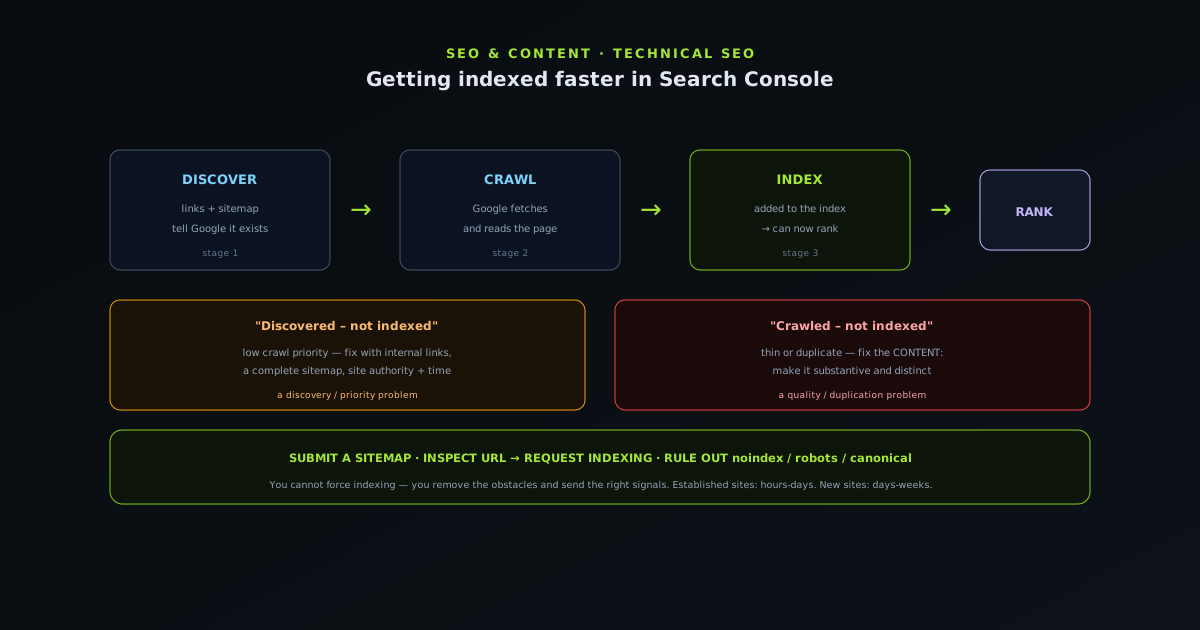
Search works in three stages that are worth separating, because problems happen at different ones. First, discovery: Google has to find that your page exists, which happens through links (internal and external) and through your sitemap. Second, crawling: Google's crawler fetches the page to read its content, which it does on a schedule influenced by how important and how frequently-updated it judges the site to be. Third, indexing: Google decides whether to add the crawled page to its index, based on whether the content is valuable, unique, and worth including. A page can be discovered but not yet crawled, or crawled but not indexed, and each state has different causes and fixes.
This three-stage model is the key to diagnosing indexing problems, because Search Console reports which stage a page is stuck at. "Discovered – currently not indexed" means Google knows the page exists but has not prioritized crawling it. "Crawled – currently not indexed" means it was fetched but Google chose not to index it, usually a content-quality or duplication signal. Understanding which stage a page is at tells you what to fix: a discovery problem is solved with links and sitemaps, a crawl-priority problem with site authority and internal linking, and an indexing-decision problem with better, more distinct content. Treating "not indexed" as a single problem leads to flailing; treating it as one of several distinct states leads to the right fix.
Submit a sitemap: the foundation
A sitemap is a file listing the URLs on your site that you want indexed, and submitting it in Search Console is the foundational step for discovery, because it tells Google directly which pages exist rather than relying solely on it finding them through links. A good sitemap is complete (it includes all your indexable pages), current (it updates as you add pages), and clean (it excludes pages you do not want indexed). On a well-built site the sitemap is generated automatically so it always reflects the current set of pages, which removes the risk of new pages being left out of discovery.
Submitting the sitemap is a one-time action in Search Console, after which Google reads it periodically to discover new and updated pages. The sitemap does not force indexing (it aids discovery) but it is the single most important thing you can do to make sure Google knows about all your pages, especially the newer or more deeply-nested ones that internal links alone might be slow to surface. A missing or stale sitemap is a common, easily-fixed cause of pages sitting undiscovered, so confirming that your sitemap is submitted, complete, and current is the first thing to check when indexing is slow. It is the difference between hoping Google finds your pages and telling it where they are.
Use URL Inspection to request indexing
For an individual page you want indexed promptly (a new important article, a page you just fixed), Search Console's URL Inspection tool lets you check its status and request indexing directly. Paste the URL, and the tool reports whether the page is indexed, when it was last crawled, and whether there are any issues; if it is not indexed, you can request indexing, which adds the page to a priority crawl queue. This is the most direct lever you have for a specific page, useful for getting a single important new page seen faster than waiting for the normal crawl schedule.
Request indexing is for individual important pages, not for bulk submission: it is rate-limited and meant for nudging specific URLs, not for pushing a hundred pages at once, which the sitemap handles. It also does not guarantee indexing; it requests a crawl, and Google still decides whether to index based on the page's quality and uniqueness. The right use is targeted: after publishing a key page or fixing a previously-excluded one, inspect the URL and request indexing to accelerate that specific page. For the broad set of pages, the sitemap plus good internal linking does the work, and URL Inspection is the precision tool for the few pages where speed matters most.
Fixing "Discovered – currently not indexed"
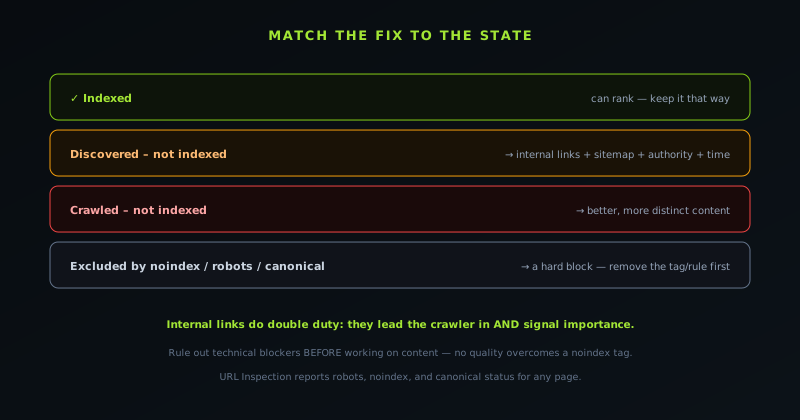
The most common frustrating state is "Discovered – currently not indexed," which means Google knows the page exists but has not prioritized crawling it yet, often because it judges the site or the page as low-priority for its crawl budget. This is most common on newer sites with little authority, or for pages that are deeply buried with few internal links pointing to them. The fixes target crawl priority: strengthen the internal linking so the page is well-connected and clearly important, improve the overall site's authority and content quality over time, and ensure the page itself is worth crawling.
Internal linking is the most actionable lever here, because a page that many other relevant pages link to signals importance and gives the crawler clear paths to it, while an orphaned page with few inbound links is easy for Google to deprioritize. Adding contextual links from related, already-indexed pages to a stuck page often nudges it from discovered to crawled to indexed. Patience also matters: on a newer site, "Discovered – not indexed" frequently resolves on its own as the site accumulates authority and Google crawls it more readily. The combination of better internal linking and a stronger overall site, plus time, resolves the large majority of these cases, which is why internal linking is worth treating as an indexing tool and not just a navigation one. See Internal linking that actually moves the needle.
Fixing "Crawled – currently not indexed"
A different and more pointed state is "Crawled – currently not indexed," which means Google fetched the page, read it, and decided not to index it, a content-quality or duplication signal rather than a discovery problem. This usually means Google judged the page as thin, too similar to other pages (yours or others'), or not adding enough unique value to be worth indexing. The fix is on the content side: make the page genuinely substantive and distinct, so it earns inclusion rather than being judged as redundant or low-value.
Diagnosing this honestly means asking whether the page deserves to be indexed: does it offer something a searcher would find useful that is not already better covered elsewhere? Pages that are thin, near-duplicates of other pages, or auto-generated without real value are the ones Google declines, and the answer is to consolidate, improve, or remove them rather than to fight for the indexing of pages that do not earn it. For a page that should be indexed but is being judged as too similar to another, differentiating the content or consolidating the two into one stronger page resolves the duplication signal. "Crawled – not indexed" is Google telling you the page did not clear the quality bar, so the productive response is to raise the page above the bar rather than to push harder on a page that has not earned it.
Technical blockers to rule out
Before chasing content and authority fixes, it is worth ruling out the technical settings that can silently block indexing entirely, because a page with a noindex tag or a robots.txt block will never index no matter how good it is. Check that the page does not carry a noindex meta tag or header (a common accident when a page is moved from staging to production), that robots.txt is not disallowing the crawler from fetching it, and that the canonical tag points to the page itself rather than to a different URL (a wrong canonical tells Google to index the other page instead). These are binary blockers: present, they prevent indexing; absent, they let the normal process proceed.
URL Inspection reports most of these directly (it shows whether a page is blocked by robots.txt, marked noindex, or canonicalized elsewhere), which makes it the first diagnostic to run when a page stubbornly will not index. Technical blockers are both the easiest cause to overlook and the easiest to fix once found, since they are usually a single tag or rule. Ruling them out first prevents the wasted effort of improving content and links on a page that a stray noindex tag was going to exclude regardless. The order of diagnosis matters: confirm the page is technically allowed to be indexed before working on the softer signals, because no amount of content quality overcomes a hard block.
Realistic timelines and what not to expect
Setting honest expectations about timelines prevents both panic and wasted effort. On an established site with authority and regular crawling, a new well-linked page can be indexed within hours to a few days. On a newer site, the same page might take days to weeks, because Google crawls less-established sites less frequently and prioritizes their pages lower. Requesting indexing via URL Inspection can speed a specific page, but even then it is a request, not a switch, and indexing follows on Google's schedule. There is no method that reliably indexes a page in minutes, and services or tricks promising instant indexing should be treated with suspicion.
What you should not expect is to force indexing of pages that do not earn it, or to dramatically accelerate a new site's crawl rate through any single action: site authority and crawl frequency build over time through quality content and links, not through a shortcut. The productive mindset is to remove the obstacles (technical blockers, missing sitemap, poor internal linking), send the right signals (a complete sitemap, strong internal links, request indexing for key pages), ensure the content earns inclusion, and then let Google's process run on its timeline. Most indexing problems resolve within a reasonable window once the obstacles are cleared; the ones that do not usually indicate a content-quality issue that the fix is to address rather than to circumvent.
Internal linking as your strongest indexing lever
Of all the levers you control, internal linking is the most underrated for indexing, because it does double duty: it helps Google discover pages (by giving the crawler paths to follow) and it signals importance (a page many relevant pages link to looks more important than an orphan). A new page linked from several established, already-indexed pages is far more likely to be crawled and indexed promptly than the same page sitting with no inbound links, because the links both lead the crawler to it and tell Google it matters. This is why a strong internal-linking habit resolves so many "Discovered – not indexed" cases that would otherwise linger.
The practical move when a page is slow to index is to add contextual links to it from related pages that are already indexed and well-crawled, which gives Google fresh paths and importance signals pointing at the stuck page. Orphan pages (those with no internal links pointing to them) are the most common victims of indexing neglect, because Google has little reason to prioritize a page nothing links to. Building internal linking into how you publish, so every new page is connected to the existing web of content from day one, prevents most indexing-discovery problems before they start. Internal links are usually thought of as a navigation and ranking tool, but they are equally an indexing tool, which is why the companion guide at Internal linking that actually moves the needle is as relevant to getting indexed as to ranking.
Monitoring indexing health over time
Indexing is not a one-time event but an ongoing state that Search Console lets you monitor, and treating it as something to watch rather than to set-and-forget catches problems early. The Pages (or Coverage) report shows how many of your pages are indexed versus excluded, and grouped by reason, which lets you see at a glance whether a category of pages is failing to index and why. A sudden rise in excluded pages, or a drop in indexed ones, is a signal that something changed (a technical regression, a content issue, a sitemap problem) that is worth investigating before it affects more of the site.
Regular monitoring also reveals patterns that page-by-page checking misses: if a whole section of the site is sitting in "Discovered – not indexed," that points to a structural issue with how that section is linked or its content quality, rather than a problem with any single page. Watching the indexed-page count trend over time tells you whether your indexing is healthy and growing as you publish, or whether pages are being published but not making it into the index. Building a periodic glance at the indexing report into your routine (monthly, or after any significant change) turns indexing from something you only think about when a page mysteriously fails to rank into something you actively manage, which is how you catch and fix indexing problems while they are small.
Building a site that indexes well by default
The most effective indexing strategy is not a set of remedial actions but a site built so that pages index well by default, which removes most indexing problems before they occur. A site with a clean, current, auto-generated sitemap; strong internal linking so every page is well-connected; fast, crawlable pages without technical blockers; and genuinely useful, distinct content gives Google everything it needs to discover, crawl, and index pages promptly. The indexing problems that send people scrambling to Search Console are usually symptoms of one of these foundations being weak, which is why building them well upfront is more effective than fixing indexing page by page.
This is the same theme that runs through doing SEO well: the durable approach is to build the site so that the right things happen automatically, rather than to chase individual fixes. A complete sitemap that updates itself, an internal-linking habit that connects new pages to the existing web of content, technical hygiene that avoids accidental blockers, and a content standard that ensures pages earn indexing: these make indexing a non-issue for the large majority of pages. Search Console then becomes a monitoring tool for the exceptions rather than a constant firefighting station. Investing in the foundations that make a site index well by default is what turns indexing from a recurring worry into a background process that mostly takes care of itself, freeing attention for the content and the links that actually drive the rankings indexing makes possible.
Frequently asked questions
Quick answers to common questions about this topic.
How long does it take Google to index a new page?
On an established, well-linked site, hours to a few days; on a newer site, days to weeks. Requesting indexing in Search Console's URL Inspection can speed a specific page, but indexing still happens on Google's schedule; there is no reliable way to index in minutes.
What does "Discovered – currently not indexed" mean?
Google knows the page exists but has not prioritized crawling it, often due to low site authority or weak internal linking. Strengthen the internal links pointing to the page, improve overall site quality, and give it time; it usually resolves as the site matures.
How do I get a page indexed faster?
Submit a complete sitemap, link to the page from related indexed pages, rule out technical blockers (noindex, robots.txt, wrong canonical), and use URL Inspection to request indexing for that specific page. Make sure the content is substantive enough to earn inclusion.
Why was my page crawled but not indexed?
"Crawled – currently not indexed" usually means Google judged the page as thin, duplicative, or not valuable enough. The fix is content-side: make the page substantive and distinct, or consolidate near-duplicate pages into one stronger page.
Related troubleshooting
Was this page helpful?
Your answer stays in this browser, it is not sent anywhere and no account or cookie is involved.