2026 · Novus VisualizersAbout 10 min readNovus Stream Solutions
From a podcast to clips and visualizers
One recorded episode is enough raw material for a week of posts. Here is the workflow that turns a single conversation into short clips, audiograms, and captioned vertical videos. Free, in the browser.
Contents
- 1.Overview
- 2.Start from one recording, not one task
- 3.Pull the audio into the editor
- 4.Transcribe and caption, on your device
- 5.Choose what each clip becomes
- 6.Build the audiogram
- 7.Export every aspect ratio from one project
- 8.Reuse one recording across every platform
- 9.Why audio needs a visual surface to travel
- 10.Choosing the moments that stand alone
- 11.Turning the workflow into a weekly routine
Overview
A podcast episode is an hour of good material trapped in a format almost no one discovers you through. Audio does not autoplay in a feed, does not show up in search the way video does, and does not give a scrolling viewer anything to stop on. The episode is the substance; what it lacks is surfaces. This playbook is about taking one recorded conversation and turning it into the clips, audiograms, and captioned vertical videos that actually travel. All free, in the browser, from a single recording.
The mindset shift is to stop treating the episode as the deliverable and start treating it as the source. One recording is a week of posts if you mine it deliberately, and the work of mining it is fast once you have a workflow that goes from audio to captions to visual to export without leaving the page.
Start from one recording, not one task
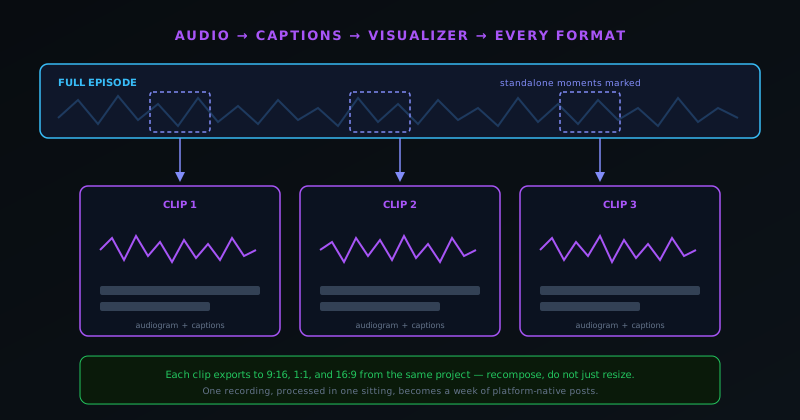
The efficient version of this is not "make a clip" but "process an episode." You sit down once with the full recording and pull everything out of it in a single session, rather than coming back to the same file five separate times. Working from one source in one sitting is what keeps the output cohesive and the effort low, because every clip inherits the same look, the same captions style, and the same intro and outro.
Before touching any tool, listen to the episode once with a notepad and mark the timestamps where something self-contained happens: a clean answer, a surprising fact, a story that lands, a tidy explanation of one idea. Those marks are your clip list. Everything that follows is mechanical; the judgement happens here, in deciding which moments stand on their own.
- Listen once, mark the timestamps of self-contained moments.
- Treat the episode as a source to mine, not a single post.
- Process the whole episode in one sitting for a cohesive set.
Pull the audio into the editor
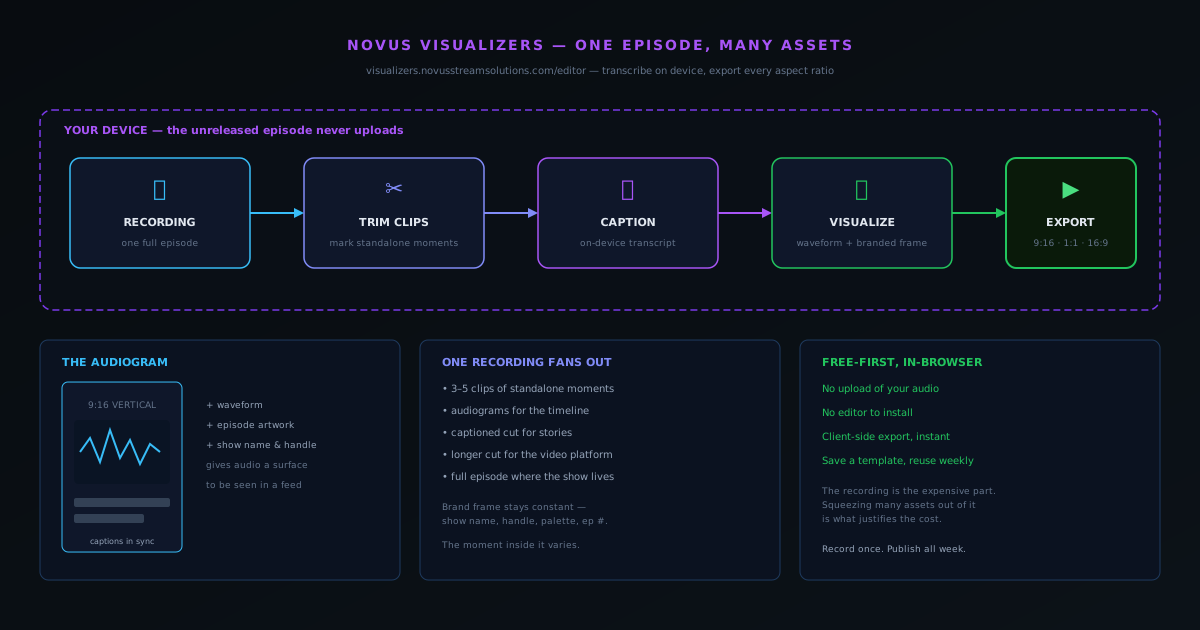
Open the editor at visualizers.novusstreamsolutions.com/editor and bring in the recording. Because the tool runs in the browser and processes on your device, the audio does not get uploaded to a server, which matters for an unreleased episode you have not published yet. The full file loads, the waveform appears, and you have the whole conversation in front of you to trim from.
From here you are working against the timestamps you marked. Each marked moment becomes a trim: set the in and out points around the segment so it starts cleanly and ends on a beat rather than mid-sentence. A clip that starts a half-second before the first word and ends right after the last one feels deliberate; a clip that clips a word in half feels careless. The trim is small work that makes a large difference in how finished each piece feels.
It also pays to be ruthless about length while you trim. The temptation is to keep a moment running because the surrounding talk was good in the room, but a feed clip earns attention by the second, and every extra few seconds of preamble is a chance for the viewer to scroll on. Trim to the shortest version that still lands: start as close to the point as the moment allows, cut the throat-clearing, and end the instant the payoff arrives. A tight clip that respects the viewer’s time travels further than a loose one that makes them wait for the part worth hearing.
Transcribe and caption, on your device
A podcast clip lives or dies on captions, because most of the feed watches with the sound off. The transcription runs on your device and produces a draft of the words, which you then correct by fixing names, adding punctuation, and breaking the lines so they read well on screen. Correcting a generated draft is a fraction of the work of typing captions from scratch, which is what makes captioning every clip realistic rather than aspirational.
The captions are not just an accessibility afterthought; for a talking clip they are the visual. A silent audiogram with the speaker’s words appearing in sync is legible and watchable muted, where the same clip without captions is just a waveform no one can follow. Spending the extra minute to get the captions clean is the single highest-leverage step in turning a podcast moment into something that performs in a feed. The Lyric Video Creator at visualizers.novusstreamsolutions.com/lyric-videos handles the auto-sync if you want a more caption-forward, animated treatment.
Choose what each clip becomes
Not every moment wants the same treatment. A punchy one-liner suits a tight, caption-heavy audiogram with a bold waveform; a thoughtful explanation suits a calmer frame that lets the words carry it; a back-and-forth exchange might want two speaker labels. Deciding the form per clip, rather than running every segment through one identical template, is what makes the set feel considered instead of mass-produced.
That said, the variation should sit inside a consistent frame. The show’s name, your handle, the episode number, and the color palette stay the same across every clip so the set reads as one show; the treatment of the individual moment is what varies. This is the same principle that governs any cohesive content set: keep the brand frame constant, let the content inside it change.
Build the audiogram
The audiogram is the workhorse asset for a podcast, because it solves the core problem directly: it gives audio something to be seen as. A typical audiogram pairs a snippet of the conversation with a moving waveform, the captions in sync, and a simple branded frame: the episode artwork, the show name, the handle. It is calm by design; the audio is the content, and the visual exists to make the audio playable and identifiable in a feed.
Build the first audiogram carefully and then reuse it. Once the frame, the waveform style, the caption treatment, and the branding are set, every subsequent clip from the episode is just dropping in a new segment. Saving that as a project at visualizers.novusstreamsolutions.com/editor means the second episode starts where the first finished, and the look stays consistent across weeks without you redesigning it each time.
Export every aspect ratio from one project
A single clip needs to exist in several shapes: 9:16 for Reels, TikTok, and Shorts; 1:1 for the feed; and often 16:9 for YouTube or a website embed. Rather than rebuilding the clip three times, export the cuts from the same project. Because the export is client-side and fast, producing three aspect ratios is a matter of minutes, not a re-render each time, and all three carry the same captions and branding.
The discipline here is to recompose, not just resize. A landscape audiogram squashed into a vertical frame leaves the waveform and captions stranded; spending a few seconds re-centering the elements for the tall frame makes the vertical look made for the platform. Since the look is already settled, this is reframing rather than redesigning, which keeps it quick. The goal is a clip that feels native everywhere it lands.
- 9:16 vertical for Reels, TikTok, and Shorts.
- 1:1 square for the main feed.
- 16:9 landscape for YouTube and embeds.
Reuse one recording across every platform
The payoff of all this is leverage: one recording becomes a clip for the vertical feeds, an audiogram for the timeline, a captioned highlight for the stories, and a longer cut for the video platform, plus the full episode wherever the show normally lives. You recorded once and you are publishing across the week, with each platform getting the format it rewards rather than the same file forced into the wrong shape.
This is what makes a podcast sustainable for a solo creator. The recording is the expensive part (the time, the guest, the conversation), and squeezing many assets out of it is what justifies that cost. A show that publishes only the full episode reaches the people already subscribed; a show that fans each episode into clips and visualizers reaches the people who have never heard of it, which is where growth actually comes from.
There is a compounding effect worth naming, too. Each clip is not only a post but a small advertisement for the full episode and the show behind it, so a viewer who stops on a vertical clip in a feed they were never going to leave can become a subscriber to a podcast they would never otherwise have found. The clips do the discovery; the episode does the retention. Treating the two as one system (the recording as the deep value, the clips as the doorways into it) is what turns a single conversation into both reach and depth rather than forcing a choice between them.
Why audio needs a visual surface to travel
It is worth being explicit about the underlying reason this whole workflow exists, because it explains why the visual step is not optional. The platforms where discovery happens are visual and built around autoplay: a feed scrolls, videos start themselves, and a viewer decides in a second whether to stay. Pure audio has no place in that environment: it does not autoplay as something watchable, it does not give the eye anything to catch, and so it simply does not surface to people who have not already chosen to listen. The episode can be excellent and still be invisible, not because of its quality but because of its format.
Giving the audio a visual surface (a waveform, captions, a branded frame) is what lets it enter the environment where new listeners are found. The visual does not change the content; it changes whether the content can be encountered at all. This reframes the clip-and-visualizer work from a nice-to-have into the actual bridge between a recording and an audience. The conversation is the value; the visual is the delivery mechanism that gets that value in front of someone scrolling. Skipping it does not save effort so much as it leaves the episode stranded in a format the discovery feeds cannot show.
Choosing the moments that stand alone
The judgement that determines whether a clip works is made before any tool is opened, in the selection of which moments to pull. A good clip is self-contained: it makes sense to someone who has not heard the rest of the episode, it has a small arc (a setup and a payoff), and it lands cleanly within its short runtime. The moments that satisfy this are usually a strong answer to a sharp question, a surprising fact stated plainly, a short story with a point, or a tidy explanation of one idea. The test is whether a stranger scrolling past would understand and care without context.
The common mistake is pulling a moment that was great in the room but depends on everything that came before it, so out of context it is confusing or flat. A clip that requires the listener to already know the setup is not a clip; it is a fragment. Spending the listening pass identifying genuinely standalone moments, and being willing to leave great-in-context material in the full episode where it belongs, is what raises the hit rate of the clips you do make. Fewer, better-selected clips beat more clips that need the episode to make sense, because each clip has to earn attention on its own in a feed that owes it nothing.
Turning the workflow into a weekly routine
The last move is to stop treating each episode’s assets as a fresh project and start treating the whole thing as a routine you run on a fixed cadence. Once you have processed one episode end to end, the steps, the templates, and the export presets become reusable: the listening-and-marking pass, the trim-transcribe-caption sequence, the saved audiogram frame, and the three aspect-ratio exports stay the same, and each new episode is a matter of running new audio through a settled pipeline. The first episode takes thought; the tenth should be close to mechanical.
This is the bridge from a one-off effort to a sustainable show. A repeatable routine, built on saved templates and a fixed sequence, is what lets a solo creator publish a full week of platform-native assets from one recording without it consuming the energy that should go into the conversation itself. The payoff compounds: every episode reinforces the same recognizable look while taking less effort than the last, because you are refining a system rather than starting over each week. A podcast that runs this routine turns its single most valuable asset, the recording, into the maximum possible reach, every week, for free.
Frequently asked questions
Quick answers to common questions about this topic.
How do I turn a podcast episode into short clips?
Start from the full recording, find the two or three moments that stand on their own, and trim each into a short segment. Then turn each segment into a visual (an audiogram or captioned video) so it can be watched in a feed without headphones. One episode usually yields several clips this way.
What is an audiogram and why use one for a podcast?
An audiogram is a short video that plays a snippet of audio over a static or lightly animated frame, usually with a waveform and captions. Audio alone does not autoplay or hold attention in a social feed, so an audiogram gives the sound something to be seen as, which is what makes a podcast shareable on visual platforms.
Do I need video editing software to repurpose a podcast?
No. Novus Visualizers runs in the browser, transcribes on your device, and exports the clips and visualizers directly, so you can go from a recorded episode to finished social assets without installing an editor or uploading your audio anywhere.
How many clips can I get from one episode?
It depends on the episode, but most conversations contain a handful of self-contained moments: a strong answer, a surprising fact, a clean explanation. Three to five clips from one recording is a realistic and sustainable target, and each can be exported in vertical, square, and landscape so it suits every platform.
Will captions be accurate for a podcast clip?
The on-device transcription produces a solid draft that you then correct, which is far faster than typing captions from scratch. For a clip that will be watched muted, a quick pass to fix names and punctuation is worth it, because the captions are what carry the clip in a silent feed.
Related workflow
A track to a release-ready visualizer, per platform
Render the visual once, then produce the platform masters from it, instead of re-rendering the whole video for every aspect ratio.
- Render the beat-synced videoNovus Visualizers: Pick the engine and mode against your actual track; the analysis is done on your audio, not on a preset preview.
- Trim or upscale the exportNSS Background Remover: The video utilities handle the tidy-up pass so the render does not have to be repeated to fix ten seconds of it.
- Produce the per-platform mastersNovus Convert: Each destination wants a different container and bitrate; converting the finished render is far cheaper than re-rendering it.
Related troubleshooting
Was this page helpful?
Your answer stays in this browser, it is not sent anywhere and no account or cookie is involved.