2026 · TestarooAbout 15 min readNovus Stream Solutions
The test files that break your app, on purpose
Zero-byte, corrupt, wrong-extension, and oversized files are how you find out whether a converter, background remover, or upload flow degrades gracefully instead of falling over. Here is how Testaroo generates hostile fixtures to spec so your failure tests stay reproducible.
Contents
- 1.Overview
- 2.The four hostile files, and what each one breaks
- 3.Why generated, not collected, is the whole point
- 4.The spec sheet turns a failure into a diagnosis
- 5.Paired fixtures test the transformation, not the file
- 6.A gauntlet of gates, not a single check
- 7.Hardening an upload flow
- 8.Hardening a converter
- 9.Hardening a background remover
- 10.The seventeen categories are a coverage map
- 11.Reproducibility: rerun the same batch forever
- 12.Beyond download: Editor, Template Studio, Search, and Live Test Targets
- 13.A hostile-input plan you will actually keep
Overview
Almost every tool passes the demo. You show it the clean JPG, the tidy spreadsheet, the well-formed PDF, and it does exactly what you promised it would. The trouble is that users do not send you the demo file. They send the photo that was interrupted mid-upload, the export that a different program wrote incorrectly, the document someone renamed by hand until the extension no longer matched the bytes inside, and the enormous scan that quietly blows past your memory budget. Software rarely breaks on the input it was built for; it breaks on the input nobody thought to try. Testaroo keeps a shelf of exactly those inputs on purpose, so you can meet them in testing rather than in a support ticket.
This post is about the hostile end of that shelf. Alongside the ordinary samples spread across seventeen categories, Testaroo generates files that are deliberately wrong: empty files with valid names, malformed files whose contents are damaged, files whose extension lies about what they contain, and files far larger than any sane limit. Paired with the breadth of the catalog, these adversarial fixtures let you harden the surfaces that actually take user input (a converter, a background remover, an upload form) against the cases that decide whether your product degrades politely or falls over. And because every file is generated rather than collected, the whole exercise stays reproducible in a way scrounged samples never are.
The four hostile files, and what each one breaks
Four fixtures do most of the work when you are testing failure, and it is worth being precise about what each one attacks. A zero-byte file is an empty file with a valid name and extension and nothing inside. It targets the assumption, buried in more code than anyone would like to admit, that a file which exists must have contents. A corrupt or malformed file has bytes that are damaged or do not match the format they claim; it targets the decoder, forcing the question of whether your parser validates what it reads or trusts the header and marches on until it chokes halfway through.
The other two attack identity and scale. A wrong-extension file is a PNG renamed to .jpg, or a text file renamed to .pdf: the label and the contents disagree. It targets any code that decides what a file is by looking at its name instead of its bytes, which is both a correctness bug and a security one. An oversized file (an image at eight thousand pixels a side, an archive far past your cap) targets limits and memory. It reveals whether your upload path enforces a ceiling, whether your processor allocates without bound, and whether the whole thing degrades gracefully or takes the tab down with it. Each fixture probes a different lie your code might be telling itself.
- Zero-byte: a valid name with empty contents, attacking the assumption that an existing file has data.
- Corrupt or malformed: damaged bytes that betray the declared format, attacking the decoder.
- Wrong-extension: a name that disagrees with the bytes, attacking name-based type detection.
- Oversized: far past any sane cap, attacking limits, timeouts, and memory allocation.
Why generated, not collected, is the whole point
The single most important fact about these files is that they are generated, not collected. Every sample is produced deterministically to an exact specification rather than pulled from some corner of the web with unknown provenance. That has an immediate legal consequence: the catalog is copyright-free by construction, so there is no borrowed photo or stray document with a licence to worry about when a fixture ends up committed to a repository. But the deeper consequence is about trust. A file made to be a sample is a known quantity; a file scraped from a search result is a guess wearing a familiar extension.
Reproducibility depends on that distinction. If your regression suite is built on files you found, the suite is only as stable as your ability to find the same files again, which in practice means it is not stable at all. Links rot, exports drift as the exporting tool updates, and the corrupt file you improvised last quarter is subtly different from the one you would improvise today. Deterministic generation removes that drift. The zero-byte file is always exactly zero bytes; the oversized image is always the same dimensions; the malformed archive is broken in the same way every time. When the input is fixed, a change in the output is a signal about your code rather than noise from a sample that quietly changed underneath you.
The spec sheet turns a failure into a diagnosis
Because the files are made to spec, each one arrives with a spec or property sheet describing precisely what it is. For an image that means the noise levels baked in, the colour space, the exact dimensions; for a document, the timestamps and encodings; for an audio clip, the sample rate and channel layout. You are never left guessing what is inside a test file, which is the chronic failing of a scrounged sample and the reason so many bug reports open with an argument about the input rather than a look at the code.
That property sheet is what turns a mysterious failure into a diagnosis. When a tool misbehaves on an input, the usual first hour goes to reconstructing what the input actually was: was the image really CMYK, did the file truly carry that encoding, was the archive genuinely truncated or merely large. With a spec sheet, that hour disappears. You already know the exact properties of the fixture, so the odd behaviour reads cleanly as a fact about the tool. The sample stops being a variable in the experiment and becomes a constant, which is the only footing on which a debugging session can move quickly.
Paired fixtures test the transformation, not the file
Many samples come not as single files but as paired fixtures: two files meant to be used together, representing two known states. A clean version next to a deliberately messy one. A colour image next to its greyscale twin. A pristine source document next to a scanned copy of the same thing. The pair matters because a great deal of software is not really about a file at all; it is about a transformation from one version of a file into another, and you cannot judge a transformation honestly with only one end of it in hand.
This is exactly the shape of an OCR test, a colourization test, a visual-diff test, or any regression that turns a source into a result. Feed the scanned copy to your OCR and you can measure the output against the clean source the scan was made from, because you hold both. Run a filter that is supposed to recover colour and you have the greyscale input and the colour ground truth side by side. Without the pair you are reduced to eyeballing a single output and hoping; with it you have a reference to check against, which is the whole difference between a demo and a test.
A gauntlet of gates, not a single check
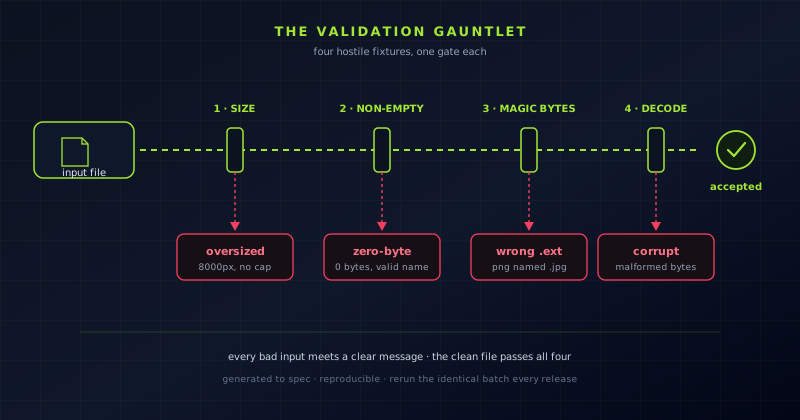
It helps to picture input validation not as one check but as a gauntlet of gates, each of which a hostile fixture is built to rush. The first gate is size: does anything reject the oversized file before it is ever read into memory. The second is presence: does the empty file get caught as having nothing to process, rather than being waved through as a successful upload of nothing. The third is identity: does the code look at the actual bytes (the magic number at the head of the file), or does it believe the extension the wrong-extension file is lying with. The fourth is integrity: does the decoder validate the corrupt file and fail cleanly, or trust it and crash partway.
Laid out this way, the four hostile fixtures map neatly onto the four gates, and the point of a test is to confirm that each gate holds. A robust tool turns every one of those bad inputs into a clear, specific message and keeps running; a fragile one lets a bad file slip past the wrong gate and pays for it downstream, where the failure is far harder to trace. The value of having the fixtures ready to download is that you can walk a real file up to each gate on purpose, rather than discovering months later that one of the gates was never actually there.
Hardening an upload flow
An upload form is the most exposed surface most applications have, and it is where the hostile fixtures earn their keep first. The honest test is not whether the form accepts a normal photo (of course it does) but how it behaves at every edge at once. Push the oversized image at it and watch whether the client-side limit and the server-side limit agree, because a check that lives only in the browser is not a check at all. Send the zero-byte file and confirm the form reports an empty upload instead of storing a placeholder that some later step will trip over.
Then attack its idea of file type. Upload the wrong-extension fixture and see whether the validation trusts the .jpg in the name or actually inspects the bytes; a form that believes the extension is one rename away from accepting something it should have refused. Work through the seventeen categories for the formats you claim to support, and just as deliberately a few you do not, to confirm the rejections are as clean as the acceptances. The goal is a form that says yes precisely when it should and no with a useful message every other time, and the only way to know it does is to feed it the noes on purpose.
- Oversized: confirm the client and server limits agree, not just the browser one.
- Zero-byte: an empty upload is reported, not silently stored as a placeholder.
- Wrong-extension: validation reads the bytes, not the name in the file.
- Unsupported formats: rejections are as clean and clearly worded as acceptances.
Hardening a converter
A converter fails in a quieter, more insidious way than an upload form: it can accept your file, run without a single error, and hand back an output that is subtly wrong. So the hostile inputs here are aimed less at crashes and more at silent damage. Feed a transparent PNG into a conversion toward JPG, a format with no alpha channel, and check that the transparent regions are filled predictably rather than turning into black boxes or a ragged fringe. Push a CMYK image through and confirm the print-oriented colour space is recognised instead of being mangled into something shifted and wrong.
Then bring the outright broken fixtures. Hand the converter a corrupt file and a zero-byte file and verify it refuses them with a clear message rather than emitting a plausible-looking but empty result that a downstream step will treat as real. Run a truncated archive through anything that has to unpack a container before it works. Because converters process across so many format pairs, the surface area for quiet mistakes is large, and the only defence is to feed known inputs in and inspect what comes out (transparency preserved, colour faithful, structure intact) rather than trusting that a completed conversion is a correct one.
Hardening a background remover
Background removal is unusually sensitive to the image you hand it, and the images that expose its limits are exactly the ones nobody keeps around. The productive test set is not one photo but a spread: a clean subject on a solid backdrop as a baseline, a subject against a cluttered scene to test separation, and above all a hair-detail portrait, because reproducing the soft, intricate boundary between flyaway strands and the background behind them is the single hardest part of the whole problem. A remover that keeps individual strands while cleanly dropping the background between them will handle almost anything else you give it.
The hostile fixtures matter here too, in a way that is easy to overlook. Feed a transparent PNG to check that existing alpha survives rather than being flattened against a solid fill. Feed a grayscale sample to strip away the colour cue a remover quietly leans on, and see whether it can still separate on structure alone. Then feed it a corrupt image to confirm the error path exists at all, since a tool that produces a beautiful cutout on good input can still hang or crash on a malformed one. The paired and variant fixtures let you judge an edge honestly and stress the failure modes in a single, repeatable pass.
The seventeen categories are a coverage map
It is tempting to think of the catalog as a grab bag, but for hardening work it functions as a coverage map. Every category corresponds to a class of parser, decoder, or intake path somewhere in a real application, and the categories you skip are the ones you are quietly declining to test. Data files exercise your CSV and JSON and XML parsers; documents exercise your PDF and Office and OCR pipelines; archives exercise anything that has to unpack a container first; security fixtures exercise your handling of certificates, tokens, and headers. Breadth is not decoration here: it is the difference between testing the paths you happened to remember and testing all of them.
The specialty edge cases run through the whole thing rather than sitting in a corner. Any category can be represented by a zero-byte member, a corrupt member, a wrong-extension member, or an oversized member, so the same failure modes you check on images you can check on archives, on data, on audio, on documents. That is what makes the catalog a systematic tool rather than a pile of samples: you can walk each intake path your product exposes and confirm it survives both the ordinary file and the four deliberate insults, without ever having to manufacture the insults yourself.
- Data (CSV, JSON, XML, YAML): your parsers, importers, and schema or OpenAPI validators.
- Documents (PDF, DOCX, XLSX, PPTX): converters, viewers, and OCR pipelines.
- Archives (ZIP, TAR, GZ, RAR, 7z): anything that unpacks a container before it can work.
- Security (PKI, JWT, OAuth, CORS/CSP, SSH): authentication and hardening paths.
- Images, audio, video, source code, and the rest: each is a decoder worth exercising.
Reproducibility: rerun the same batch forever
The quiet superpower of a generated, spec-backed catalog is that a test built on it stays built. Assemble a batch once (a transparent PNG, a CMYK image, an oversized scan, a zero-byte file, a corrupt archive, a wrong-extension document) and that batch is a fixed artifact you can commit alongside your code and rerun indefinitely. Nothing about it drifts. The next engineer who checks out the repository gets the identical inputs, the continuous-integration run six months from now feeds the identical bytes, and a difference in the result points at the code that changed, not at a sample that wandered off spec.
This is what separates a one-off manual check from a real regression suite. A converter that handled a transparent PNG correctly last release can be rerun against the exact same PNG this release to prove it still does; a background remover can face the same hair-detail portrait every time so you can watch quality hold or slip on equal terms; an upload form can meet the same oversized file after every refactor. Fair comparison (between releases, between tools, between an old approach and a new one) requires a fixed input, and a library that generates its files to spec is how you get one that never moves.
Beyond download: Editor, Template Studio, Search, and Live Test Targets
Downloading a static file is the core, but a few surfaces exist for the moments when a plain download is not quite the shape of what you need. Search jumps straight to a fixture by name or property instead of clicking through categories, and purpose-based browsing lets you navigate by the job rather than the format: OCR testing, CSV parsing, form testing, colourization, ASR, visual diff and regression, schema and OpenAPI validation, JWT and JWKS handling, video codec testing, streaming manifests, caption encodings, media accessibility. You pick the task and the library surfaces the fixtures built for it, which is often faster than knowing in advance which format the right sample happens to be in.
Two surfaces go past handing you a file at all. An in-browser Editor lets you adjust a sample before you download it (and now open a .docx, .epub or .tar.gz as a member list you can edit and rebuild, or author a file from one of 51 format starters), and a Visual Template Studio lets you create artwork and documents locally from a library of 480 templates rather than only taking what is on the shelf, both kept client-side like everything else. There are also Live Test Targets: real fixtures you can point a tool at rather than files you download, which is what you want when the thing under test needs something to hit rather than something to open. Between these, the catalog behaves less like a shelf of samples and more like a workbench for test inputs.
A hostile-input plan you will actually keep
The reason error handling goes untested is not that engineers do not value it; it is that the inputs which trigger it are tedious to produce and easy to forget. Making those inputs a single download removes the excuse. A plan that survives contact with a deadline is a small, concrete one: for each intake path your product exposes, write down the four hostile fixtures and the exact behaviour you expect from each (rejected with this message, degraded to that fallback, capped at this size), then wire those cases into the same suite that runs on every change. Robustness is not a feature you bolt on at the end; it is a set of expectations you confirm case by case.
None of this asks much of you. Testaroo is free, needs no account, and downloads straight in the browser, so building a hostile-input test set costs a few minutes rather than a procurement cycle. Start from the documentation at Testaroo to see how the catalog is organised, use the tool map at Tool maps to find the exact fixtures, and let the sibling tutorials put them to work. The next time your work is blocked on the want of a genuinely broken file, the file is already here: generated to spec, described on a property sheet, and identical every single time you reach for it.
Frequently asked questions
Quick answers to common questions about this topic.
What are hostile test files?
They are fixtures built to fail on purpose: a zero-byte file with a valid name and no contents, a corrupt or malformed file, a wrong-extension file whose name disagrees with its bytes, and an oversized file far past any sane limit. Each one probes a specific weakness in how a tool validates input, so you can confirm it fails safely instead of crashing or half-accepting bad data.
Why does it matter that the files are generated, not collected?
Generated files are produced deterministically to an exact specification, which makes them copyright-free and, more importantly, reproducible. A zero-byte file is always exactly zero bytes and an oversized image is always the same dimensions, so a batch of fixtures never drifts. When the input is fixed, a change in your output is a signal about your code rather than noise from a sample that quietly changed.
How do these fixtures help harden an upload flow?
They exercise the edges an ordinary file never touches. The oversized file checks whether the client and server limits agree; the zero-byte file checks that an empty upload is reported rather than stored; the wrong-extension file checks that validation reads the bytes instead of trusting the name. Working through the categories confirms your rejections are as clean as your acceptances.
What is a paired fixture?
Two files meant to be used together, representing two known states: a clean version and a deliberately messy one, a colour image and its greyscale twin, a source document and a scanned copy. Pairs let you test a transformation such as OCR, colourization, or visual diffing against a known reference, rather than eyeballing a single output and hoping.
Related troubleshooting
Was this page helpful?
Your answer stays in this browser, it is not sent anywhere and no account or cookie is involved.