2026 · Novus ConvertAbout 12 min readNovus Stream Solutions
Mixed-batch conversion: one queue, a different output per file
Real folders arrive messy: photos, data exports, and archives all in one place. Novus Convert lets a single queue carry all of them, with a different output chosen per file. Here is how I run mixed batches: ordering, naming, per-row outputs, verifying results locally before download, and the moments when splitting the batch is smarter.
Contents
- 1.Real folders are never uniform
- 2.How the mixed queue actually behaves
- 3.Choosing per-file outputs without second-guessing
- 4.Ordering and naming: the unglamorous half of batch work
- 5.Local processing: what the privacy angle means for a batch
- 6.Verifying results before anything ships
- 7.Allowances and ceilings are part of the plan
- 8.When one batch should be two
Real folders are never uniform
Look at the last folder someone actually sent you. Mine, from a client wrapping up a project, held eleven HEIC photos, two JSON exports from their booking system, a spreadsheet saved as CSV, and a ZIP of documents their previous vendor had assembled. That is what work looks like when it arrives: a pile sorted by circumstance, not by extension. Yet most conversion tools are built as if files travel in matched sets (an image converter here, a data converter there, an archive utility somewhere else), and the pile has to be dealt out across three tools like a card game.
The mixed queue in Novus Convert exists because I got tired of playing that game. One queue accepts the whole pile (images, structured data, and archives together), and each row carries its own output decision. The HEIC photos head to JPG, the JSON exports to CSV, the archive gets repackaged as TAR.GZ, all in a single run, all processed locally. The batch mirrors the folder instead of forcing the folder to mirror the tool, which sounds like a small courtesy and compounds into serious saved time across a working week.
I laid out the design reasoning in Novus Convert launch: private file conversion with verified outputs when the app shipped; this post is the practical sequel. It covers how the per-row model actually behaves, how I choose outputs across a mixed queue without second-guessing, the ordering and naming habits that keep twenty results identifiable, what local processing means for a batch privacy-wise, how verification fits in, and the judgment call of when one batch should really be two.
How the mixed queue actually behaves
Drop a handful of mismatched files into the queue and the first thing that happens is identification: by signature, not by filename. The app reads what each file actually is before offering anything, which means a mislabeled file gets caught at the door rather than after processing. Based on that identification, each row presents only the outputs it can genuinely reach: a raster image (JPG, PNG, WebP, AVIF, HEIC, HEIF, BMP, or TIFF/TIF) or an SVG source offers the broad image output set (JPG, PNG, WebP, GIF, APNG, BMP, TIFF, TGA, and ICO), JSON offers the tabular and text routes, and archives offer the container swaps. There is no menu position for a conversion the release cannot verify, and the full matrix of active pairs is published at /conversions.
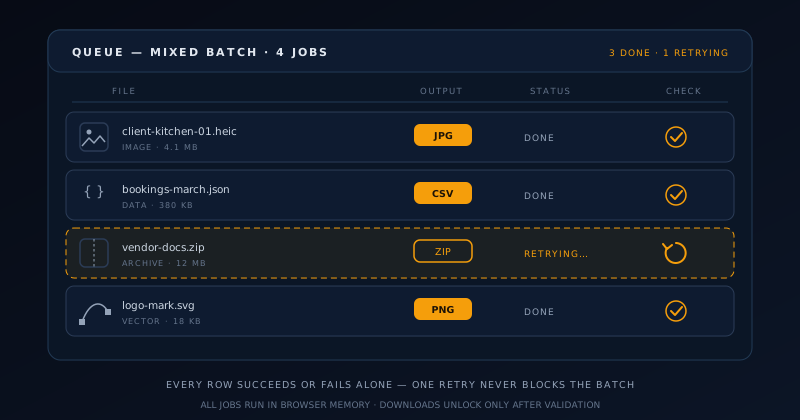
The property that makes the whole model trustworthy is row independence. Each file processes on its own terms, and each outcome belongs to that row alone. When the fourteenth file in a sixteen-file batch turns out to be an encrypted archive that legitimately cannot be repackaged, thirteen finished results stay exactly where they are, downloadable, while that one row reports its failure. Retry it, remove it, or shrug at it: nothing you decide about the failure disturbs the successes. Batch tools that treat the queue as one atomic transaction turn every flaky file into a hostage-taker, and I consider that model a design bug.
Independence also shapes how I sequence my attention during a run. While later rows are still processing, earlier results are already final, so review can start immediately instead of waiting for the slowest archive to finish. On a large mixed batch the practical rhythm becomes a pipeline: files identify, rows complete, I spot-check completed results, and by the time the last row lands, most of the verification is already done. The first-run walkthrough at How to convert and compress files privately with Novus Convert shows this rhythm end to end.
The queue does have edges, published rather than discovered: images up to 100 MB and 80 megapixels each, text and structured data to 25 MB, archives to 200 MB compressed with entry and expansion caps behind them. Rows that would breach a limit fail cleanly with the reason stated. I would rather see a stated ceiling than the alternative every heavy user eventually meets elsewhere: the silent tab crash halfway through an oversized job, with no indication of which file pulled the pin.
Choosing per-file outputs without second-guessing
A mixed queue asks for several format decisions at once, and the way to keep that from becoming decision fatigue is to make the choices by destination rather than by file. Before touching any picker, I ask where each cluster of files is going: photos headed to a shared album have one right answer, the same photos headed into a website build have another, the JSON going to an analyst wants CSV, the JSON going into version control wants to stay JSON and probably should not be in the queue at all. Destination first collapses most rows into obvious calls.
The interface supports both grains of decision: set one output across all compatible rows when a cluster shares a fate, or pick row by row when it does not. My habit on a genuinely mixed batch is clusters first, exceptions second: sweep all the photos to JPG in one gesture, then walk the handful of rows that need something different. It is the same motion as formatting a spreadsheet: apply the column style, then fix the two special cells, rather than styling forty cells individually.
For the decision rules themselves (when a photo wants JPG versus WebP, why transparency forces the lossless formats, how data round-trips shed whatever the target cannot hold, ZIP versus TAR.GZ by audience), I keep a whole separate write-up, and this post deliberately leans on it rather than repeating it. The batch-specific skill is thinner than people expect: know your destinations, cluster your rows, and the per-file pickers become a two-minute pass instead of a twenty-minute deliberation.
Ordering and naming: the unglamorous half of batch work
Nothing about a converter forces you to name files sensibly, and nothing punishes you for skipping it, until the moment twenty results land in your downloads folder and IMG_4471.jpg is indistinguishable from IMG_4477.jpg without opening both. My rule is that renaming happens before the queue, not after the download. Source names flow through conversion into the results, so a minute spent renaming inputs to names that will make sense at the destination (client-kitchen-01, bookings-march, vendor-docs) is a minute that pays out at every later step.
For batches where sequence matters, I encode it in the name with zero-padded numeric prefixes: 01-, 02-, 10-. Zero-padding matters because plain numbers alphabetize as 1, 10, 11, 2, which has ambushed every person who ever sorted a folder. The prefix convention survives conversion, survives the recipient’s file browser, and survives being unzipped on a machine I have never seen, which is more than can be said for any ordering that lives only in my head or in the queue’s visual arrangement.
I also add files to the queue in the order I intend to review the results, grouped by destination cluster: all the photos, then the data files, then the archives. The queue itself would tolerate any order, but arriving organized means my verification pass later walks straight down the list instead of hopping between contexts. Small operational choreography like this is invisible when it works and obvious when it is missing.
The last accounting habit is a simple count. Sixteen files went in; when the run settles, the results plus the failures must total sixteen, and each failure should be one I have consciously dispositioned: retried, replaced, or deliberately dropped. On a mixed batch feeding a deliverable, that ten-second reconciliation is the difference between “sent the client everything” and discovering the missing bookings file in next week’s awkward email.
Local processing: what the privacy angle means for a batch
Every conversion the interface offers runs in browser memory on your machine. That single architectural fact does more privacy work than any policy paragraph could: the client photos, the booking exports full of customer names, the vendor archive whose contents you have not even inspected yet; none of it is transmitted to a conversion server, because there is no conversion server. Even the HEIC decoding, the step most tools outsource, happens in a WebAssembly worker that loads on demand and runs beside the page.
For batch work specifically, local processing removes a risk that scales with the queue. Uploading one file to a converter site is one act of trust; uploading a sixteen-file mixed batch is sixteen, including files you may not have fully audited, that inherited ZIP again. Running locally means the trust decision never arises, and it also means the batch is not bottlenecked by an upload pipe: processing speed tracks your hardware, not your ISP, which on photo-heavy batches is a very noticeable difference. I wrote about why this architecture is a commitment rather than a feature flag in the no-signup, no-upload essay; the batch queue is that essay running in production.
Results live behind temporary object URLs scoped to the session: remove a job or close the tab and they are gone, which is the correct default for a tool that regularly touches other people’s data. The flip side of ephemerality is on you: download what you need before closing, because nothing is parked on a server waiting to be re-fetched. There is no account, no history page, and no “your files” dashboard, and every one of those absences is the privacy model working as designed, as the safeguards section of Novus Convert spells out.
Verifying results before anything ships
The app’s own gate comes first: no download button lights up until the result passes validation for the format it claims. That means signature and decodability for images, container integrity for archives, parseability for data. That gate is the floor, not the ceiling. It guarantees each file is structurally sound; it cannot know whether the content matches your intent, whether the right column survived, or whether the photo that mattered most is the one that failed. Structural truth is the machine’s job; semantic truth stays mine.
So my verification pass is layered on top, sized to the stakes and organized by the clusters I queued in. For images: open two or three at the destination’s viewing size, including at least one that had transparency, and look at edges and corners. For data: open the head of each converted file and confirm the columns carry the names and shapes the recipient expects; the top ten rows expose most conversion surprises. For archives: list the contents after download and match the entry count against the source. None of this exceeds five minutes on a serious batch.
The discipline that makes verification cheap is doing it before the batch scatters. Once results are attached to an email, pushed to a shared drive, or handed to a build process, a bad file costs a round of communication to recall; while everything still sits in the downloads folder, it costs one retry. Batch conversion compresses hours of file drudgery into minutes: the five verification minutes are the insurance premium on that compression, and I have never once regretted paying it.
Allowances and ceilings are part of the plan
Novus Convert is free, and I keep that word honest by publishing its boundaries instead of hiding them behind an asterisk. Downloads are tracked per input format in your browser and reset each local calendar day: currently 15 for HEIC and HEIF, 20 for AVIF, 10 for archive formats, 50 for structured text, and 25 for the other active formats. Each batch item counts once, and the interface shows the remaining allowance right where you download, so the number is a dashboard reading rather than a surprise rejection.
For batch planning, the allowances reward a moment of arithmetic before a big run. A hundred-photo HEIC shoot does not fit inside one day’s image allowance, and pretending otherwise wastes a session; the honest plan is to spread the job across days, or to triage: convert today the subset the deliverable actually needs, which in my experience is usually the real number anyway. Forced prioritization has a way of revealing that “convert everything” was never the requirement.
The size ceilings play a different role in planning: they are per-row gates, not daily budgets, and a mixed batch should be assembled with them in mind. The 200 MB compressed cap on archives, with its 5,000-entry and 512 MB expansion guards, is generous for document sets and deliberately hostile to decompression bombs. The image and data limits comfortably cover working files. When something genuinely exceeds a ceiling (the monster archive, the panoramic scan), that is not a batch problem to route around; it is a signal the file needs a different plan entirely.
When one batch should be two
Mixed queues are the right default, but there are days I deliberately split a job, and the triggers are consistent enough to write down. The clearest is heterogeneous weight: one 180 MB archive sharing a queue with thirty quick photos means the photos are done in moments while the archive grinds, and my review rhythm fragments around the laggard. Running the archive as its own single-row batch keeps both jobs psychologically clean: the photos get their sweep, the archive gets its undivided attention.
Settings boundaries are the second trigger. The compression surface at /compress is its own workflow with its own quality dial, and images that need size tuning deserve a dedicated pass there rather than being mentally lumped into a format-conversion run. Likewise, when two clusters in a queue are bound for different deliverables (client photos versus my own site assets), separate batches produce separate download moments, which keeps files from cross-contaminating destinations during the shuffle.
The third trigger is stakes. When one file in the pile is the file (the signed contract in the vendor archive, the dataset feeding tomorrow’s report), it gets a private batch, converted and verified with full attention, before the routine bulk gets processed on autopilot. Batching exists to spend less attention per file; the corollary is knowing which files should not have their attention discounted. Splitting on these three triggers costs a few seconds of extra clicking and buys a run where nothing important shares a queue with anything careless.
- Split when one heavy archive would dominate a queue of quick files and stall your review rhythm.
- Split when images need the /compress quality dial rather than a format change.
- Split when clusters are bound for different deliverables and must not intermingle at download.
- Split when a single high-stakes file deserves undivided conversion and verification attention.
- Split when a format’s remaining daily allowance will not cover the whole cluster anyway.
Frequently asked questions
Quick answers to common questions about this topic.
Can I really mix images, data files, and archives in one batch?
Yes. That is the queue’s core design. Each file is identified by its signature at intake, each row then offers only the outputs that file can genuinely reach, and each row carries its own choice: an HEIC to JPG beside a JSON to CSV beside a ZIP to TAR.GZ, all in one run. You can also apply one output across all compatible rows when a cluster of files shares a destination, then adjust the exceptions individually, which keeps a large mixed queue fast to configure.
What happens when one file in the batch fails?
Only that row is affected. Rows process independently, so every successful result stays downloadable while the failed row reports what went wrong: an encrypted archive, an unsupported codec variant, a file over a size ceiling, or an output that failed validation. You can retry or remove the failure without disturbing anything else, and retrying never reprocesses the finished rows. Before shipping a batch onward, reconcile the count: results plus consciously handled failures should equal the number of files you queued.
Are my batch files uploaded anywhere during conversion?
No. Every conversion the interface exposes runs in browser memory on your device (including HEIC decoding, which uses a locally loaded WebAssembly worker), so a mixed batch of client photos, data exports, and uninspected archives never transits a conversion server. Results live behind temporary object URLs that disappear when a job is removed or the tab closes, and there is no account or server-side history. Download what you need before closing the page, because nothing is retained anywhere to re-fetch.
How should I name and order files for a big mixed batch?
Rename before queueing, not after downloading: source names carry through to results, so give inputs destination-ready names while context is fresh. Encode any meaningful sequence with zero-padded prefixes like 01- and 02-, which sort correctly in every file browser and survive archiving. Add files grouped by destination cluster in the order you plan to review them, and your verification pass afterwards walks straight down the results instead of hopping between photos, data, and archives at random.
Why are there daily download allowances if the app is free?
Because free should be a true statement rather than a teaser. The app tracks downloads per input format in your browser, resetting each local calendar day (currently 15 for HEIC/HEIF, 20 for AVIF, 10 for archives, 50 for structured text, and 25 for other active formats), and shows the remaining count where you download. Publishing the ceiling lets you plan a large job honestly, spreading a hundred-file shoot across days or converting the subset the deliverable actually needs today.
Related workflow
Product photo to a transparent image every channel accepts
One photograph, cut out once, then re-encoded for a storefront, a marketplace listing and a social post without redoing the cutout each time.
- Cut the background out and check the edgesNSS Background Remover: Hair, glass and drop shadows are where automatic cutouts fail. Fix them once, on the master, before anything downstream copies the mistake.
- Re-encode and resize per destinationNovus Convert: Transparency survives PNG and WebP and dies in JPEG. Convert validates the file it hands back, so a listing never rejects a silently broken upload.
Related troubleshooting
Was this page helpful?
Your answer stays in this browser, it is not sent anywhere and no account or cookie is involved.