2026 · Novus Stream Solutions (hub)About 12 min readNovus Stream Solutions
The solo creator’s free toolkit
You can make almost every visual asset a release needs without paying for software. A practical map of free, browser-based tools and what each one is for.
Contents
- 1.Overview
- 2.For images: NSS Background Remover
- 3.For video: Novus Visualizers
- 4.What this toolkit covers
- 5.Why free and on-device is the right base
- 6.The subscription tax this avoids
- 7.Privacy as a default, not an upgrade
- 8.Where the free toolkit reaches its limits
- 9.How the pieces fit into one workflow
- 10.Starting instantly, on any machine
- 11.Why two focused apps beat one sprawling suite
- 12.Mapping the toolkit to a real workflow
- 13.Getting started with the toolkit today
- 14.A foundation you can build a practice on
Overview
A solo creator does not need a stack of paid subscriptions to make professional visual content. The browser now runs real tools (AI cutouts, video creation, upscaling, captions) for free, on your own device. This is a practical map of a free toolkit and what each piece is for, so you can cover a whole release without a software budget.
For images: NSS Background Remover
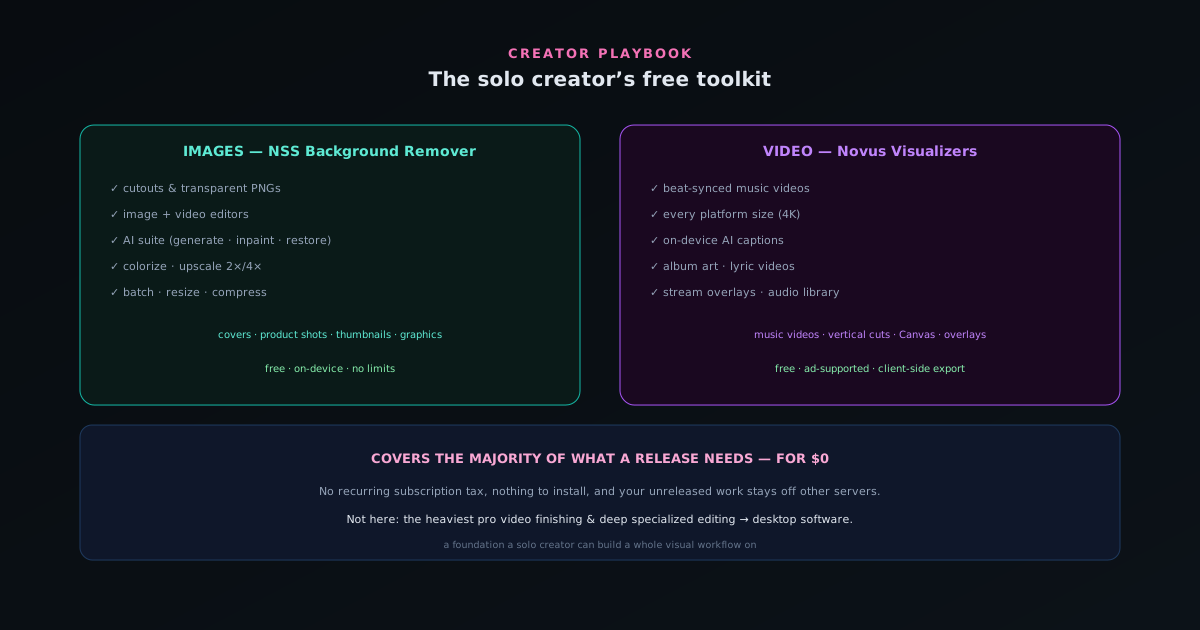
Background removal is the backbone of most visual work, and NSS Background Remover does it free, in the browser, with no upload. But it is more than cutouts: bgremover.novusstreamsolutions.com/tools adds upscaling, the image and video editors, batch processing, and utility tools like resize and compress. For covers, product shots, thumbnails, and graphics, it covers the image side.
Everything runs on your device, so your work stays private and there are no per-image limits.
For video: Novus Visualizers
Novus Visualizers turns a track into a beat-synced video and exports release-ready MP4/WebM up to 4K with platform presets, all client-side. Its companion tools add album art, lyric videos, stream overlays, and a royalty-free audio library at visualizers.novusstreamsolutions.com/audio-library. For music videos, vertical cuts, Canvas loops, and live overlays, it covers the video side.
Like the background remover, it is free and ad-supported, and the processing (including AI captions) happens on your device.
What this toolkit covers
Between the two apps, a solo creator can produce: transparent cutouts and product images, restored and upscaled photos, generated backgrounds, beat-synced music videos in every platform size, captions and lyric videos, cover art, and stream overlays. That is the large majority of the visual assets a release or a content channel needs.
What is not here: the heaviest professional video finishing and deep specialized editing, which still belong in desktop software. For everyday creator work, the free toolkit is enough.
- Cutouts, product images, restore/upscale, generated backgrounds → Background Remover.
- Music videos, platform cuts, captions, album art, overlays → Visualizers.
- Free, browser-based, on-device (private).
Why free and on-device is the right base
For someone funding their own creative work, a toolkit that is free and runs locally is more than a cost saving: it removes the recurring subscription tax and keeps your unreleased work off other people’s servers. You can start instantly, on any computer, with nothing to install.
The Novus apps are built on exactly that premise: capable, free, ad-supported tools that run on your device. They are a foundation a solo creator can build a whole visual workflow on without a budget.
The subscription tax this avoids
A defining frustration of building a creative toolkit the conventional way is the accumulation of subscriptions: a cutout tool here, a video tool there, a captioning service, an upscaler, each with its own monthly fee that recurs whether you use it that month or not. For a solo creator funding their own work, these recurring costs add up to a real standing expense before a single dollar of revenue, and they create pressure to monetize quickly just to cover the tooling. A free toolkit removes that tax entirely, so the cost of having capable tools is not a monthly drain but zero.
This matters beyond the raw savings because it changes the risk profile of creating. When your tools cost nothing, you can experiment, abandon projects, take breaks, and pursue ideas that may not pay off, without the meter running on subscriptions the whole time. The recurring-cost model penalizes inactivity and pressures output; the free model removes that pressure, letting you create on your own timeline. For a creator whose income is irregular (which describes most independent creators), eliminating the fixed monthly tooling cost is not a minor saving but a structural relief that makes the whole endeavor more sustainable through the inevitable quiet periods.
Privacy as a default, not an upgrade
A toolkit that runs on your device keeps your work private by default, which matters more for a creator than it might first appear. Unreleased tracks, unannounced products, work-in-progress, client material under wraps: a creator routinely handles content that should not be public before its moment, and a cloud toolkit means uploading all of it to servers ahead of release. An on-device toolkit keeps every piece of in-progress work on your own machine, so there is no window in which your unreleased material sits on someone else's infrastructure waiting to leak.
This default privacy is not a premium feature you pay extra for but a consequence of the tools running locally, which is the opposite of the usual arrangement where privacy is the upsell. For a creator, it means you do not have to think about which tool you can trust with sensitive work, because none of them receives it; the work never leaves your device regardless of what you are making. That freedom from having to vet each tool's data handling, and from worrying about pre-release leaks, is a quiet but real benefit of building on an on-device foundation. The privacy comes free with the architecture, which lets a creator focus on the work rather than on protecting it.
Where the free toolkit reaches its limits
Honesty requires marking the boundary of what a free, browser-based toolkit covers, because overselling it would set creators up for disappointment. The two apps together handle the vast majority of everyday creator visual work (cutouts, product images, restoration and upscaling, generated backgrounds, beat-synced music videos in every platform size, captions, lyric videos, cover art, and overlays), which is genuinely most of what a release or a content channel needs. But it does not replace the heaviest professional video finishing, deep specialized editing, or the most demanding production pipelines, which still belong in mature desktop software.
Knowing this boundary is useful rather than discouraging, because it tells you when the free toolkit is the right answer and when to reach for something heavier. For the everyday creator producing regular content (the large majority of real creative work), the free toolkit is not a compromise but a complete solution. For the minority of cases at the demanding professional fringe, it is a starting point or a complement rather than the whole answer. Setting that expectation accurately means a creator uses the toolkit where it excels and supplements it only where genuinely necessary, rather than either dismissing it for not doing everything or expecting it to handle work it was never meant for. The toolkit covers the common case fully and the extreme case partially, which is exactly the honest framing.
How the pieces fit into one workflow
The value of the toolkit is not just that each tool is capable individually but that they fit together into a coherent workflow, with the output of one feeding naturally into the next. A cutout from the background remover becomes the product image, the cover art subject, or an element composited into a video; a track processed in the visualizer becomes the music video, the vertical cuts, the Canvas, and the captioned versions; the companion tools add the album art and overlays that match. The pieces are designed to hand off to each other, so a creator moves through a release without leaving the toolkit or breaking the visual consistency.
This integration is what distinguishes a toolkit from a random collection of free tools. A pile of unrelated free apps, each handling one task, forces constant context-switching and risks visual inconsistency as each is used independently; a coherent toolkit where the tools share an approach and feed into one another keeps the whole workflow unified. For a solo creator, that coherence reduces friction and produces a more consistent result, because the entire release flows through tools that work together rather than through a patchwork. Mapping how the pieces connect (image tools feeding image needs, video tools feeding video needs, both sharing one identity) is what turns the free toolkit from a list of capabilities into an actual production workflow a single person can run end to end.
Starting instantly, on any machine
A practical advantage of a browser-based toolkit that is easy to undervalue is that there is nothing to install, so you can start instantly on any computer you happen to be using. There is no download, no installation, no license to activate, no system requirements to check: you open the tools and work, whether on your own machine, a borrowed one, or a new device you just set up. For a creator who works across multiple machines or who wants to start a project the moment inspiration strikes, the absence of any setup is a real lowering of the barrier to creating.
This instant-start property also means the toolkit is always available and always current. There is no version to keep updated, because the latest version is simply the page you open, and there is no machine-specific installation to maintain, because the tools run wherever there is a browser. A creator setting up a new computer does not have to reinstall and reconfigure a stack of software; the toolkit is just there, at its web addresses, ready. That frictionlessness compounds over time into a meaningful convenience, especially for someone who values being able to create whenever and wherever the urge arises rather than only at a single configured workstation. The toolkit goes where you go, requiring nothing but a browser to pick up exactly where you left off.
Why two focused apps beat one sprawling suite
It is worth addressing why a free toolkit built from two focused apps (one for images, one for video) can serve a creator as well as, or better than, a single sprawling all-in-one suite. A focused app does one domain deeply: the image app covers cutouts, editing, restoration, upscaling, generation, and utilities thoroughly, while the video app covers visualizers, captions, and release video thoroughly. Each is deep in its area rather than shallow across everything, so a creator gets genuine capability in both domains rather than a thin do-everything tool that does nothing especially well.
There is also an approachability benefit to focused tools. A single suite trying to do everything can overwhelm with breadth, presenting a wall of capabilities most users never touch, whereas a focused app presents the capabilities relevant to its domain, which is easier to navigate. For a creator whose needs split naturally into image work and video work, two focused tools map cleanly onto those needs, and moving between them is moving between purposes rather than hunting within one cluttered interface. The two apps share an approach (free, on-device, consistent in philosophy), so using both feels coherent rather than like juggling unrelated software. Focused depth, mapped to how creative work actually divides, is a sound alternative to the everything-suite model, especially when the focused tools are free.
Mapping the toolkit to a real workflow
To make the toolkit concrete, it helps to map its pieces onto the actual sequence of a creator's work rather than listing capabilities in the abstract. When you need any still image (a cover, a product shot, a thumbnail, a graphic, a restored or upscaled photo, a generated background), that is the image app's domain, and it handles the whole image side of a release. When you need any moving asset (a music video, platform cuts, a captioned clip, a lyric video), that is the video app's domain, with its companion tools adding album art and overlays. Knowing which tool owns which need turns the toolkit from a set of options into a clear routing of tasks.
This mapping is what makes the toolkit usable as a system rather than a grab-bag. A creator facing a release does not wonder which of many tools to use; they route image needs to the image app and video needs to the video app, and the companions fill the gaps around the edges. Because the tools hand off cleanly (a cutout feeding a video, a palette carrying across both), the workflow flows through them in a natural order. The clarity of the mapping is part of the toolkit's value: two focused tools with clear domains are easier to reason about than a single suite where every capability competes for the same space, which is why the simple division of image-tool and video-tool is a feature, not a limitation.
Getting started with the toolkit today
The lowest-friction way to adopt the toolkit is simply to use it on your next real task rather than studying it in advance, because there is nothing to install and no setup to complete before you begin. The next time you need a cutout, a product image, or a graphic, open the image app and do it there; the next time you need a music video or a clip, open the video app. By routing real tasks to the toolkit as they come up, you learn it in the course of doing work you needed to do anyway, which is far more effective than trying to master it abstractly before you have a use for it.
This use-it-as-you-need-it approach suits the toolkit's frictionless nature: since there is no cost, no install, and no account, there is no barrier to just starting, and no commitment required to try it. A creator can adopt it incrementally, using the image app for an image task today and the video app for a video task next week, building familiarity naturally. There is no need to switch your whole workflow at once or to invest before seeing the value; you simply reach for the relevant free tool when a relevant need arises, and over time it becomes your default because it was there, capable, and free each time you needed it. Starting is as simple as opening a page for the next task in front of you.
A foundation you can build a practice on
The deepest value of a free, capable, on-device toolkit is that it is a foundation a creative practice can be built on without a budget gating the start. The barrier that stops many people from pursuing creative work seriously is not talent but the upfront and recurring cost of professional tools, which demands a financial commitment before any return. A toolkit that is free removes that barrier, letting someone begin and sustain a creative practice on the strength of their ideas and effort rather than their budget, which is exactly the access that lets more people create at all.
This is the premise the whole approach is built on: capable tools, free and on-device, as the base layer a solo creator builds a complete visual workflow on. From that foundation, a creator can produce professional-quality assets, maintain a consistent brand, run a repeatable production line, and ship complete releases, all without the recurring software cost that would otherwise be the price of admission. The toolkit is not the creative work (the ideas and the execution are still yours to supply), but it is the enabling base that makes pursuing the work financially feasible. For anyone funding their own creativity, a foundation that costs nothing and keeps their work private is exactly the right place to start, which is why free and on-device is not just a nice feature but the right base for a solo creative practice.
Frequently asked questions
Quick answers to common questions about this topic.
What free tools does a solo creator actually need?
A short stack covers most work: a background remover for images and cutouts, a music-visualizer/video tool for clips, and a basic editor. The Novus apps cover image and video work free, with no signup and no watermark.
Can free tools really replace a paid subscription stack?
For most creator tasks, yes. Modern browser tools run real AI locally, so the gap with paid software has narrowed sharply for cutouts, upscaling, captions, and visualizers, without a monthly bill.
Are free tools private and watermark-free?
The Novus tools are: they process on your device (no uploads) and export with no watermark. Always check a free tool's privacy model before uploading sensitive work.
Related troubleshooting
Was this page helpful?
Your answer stays in this browser, it is not sent anywhere and no account or cookie is involved.