2026 · NSS Background RemoverAbout 11 min readNovus Stream Solutions
The real cost of product photography, and how a browser tool replaces most of a studio
Product photos are a cost line every seller pays, whether they notice or not: in studio fees, in hours, or in conversions lost to bad images. Here is the actual math, and the workflow that collapses most of it into a free browser tab.
Contents
Overview
Every physical product sold online pays a photography tax, and most sellers never compute it. Some pay it in invoices: studio sessions, freelancer day rates, retouching fees. Some pay it in time: weekends lost to lightbox experiments and tutorial rabbit holes. And the sellers who think they are paying nothing pay the most, in the silent currency of conversion: listings with dim, cluttered, inconsistent photos sell measurably worse than identical products photographed well, which means bad images are a permanent percentage levy on every future sale. The question is never whether you pay for product photography. It is which currency you pay in, and at what rate.
This article does the unglamorous accounting: what professional product imagery actually costs through each route, why the bar keeps rising across marketplaces and social storefronts, and where the costs have genuinely collapsed. The collapse is real: a workflow built from a modern phone camera plus a free in-browser editor now covers most of what a small catalog needs, at a marginal cost per image of roughly zero. We build tools in exactly this space, including the NSS Background Remover this article references, so consider that bias disclosed; the cost math, though, stands on its own regardless of whose tool you use.
The metric that matters: cost per finished image
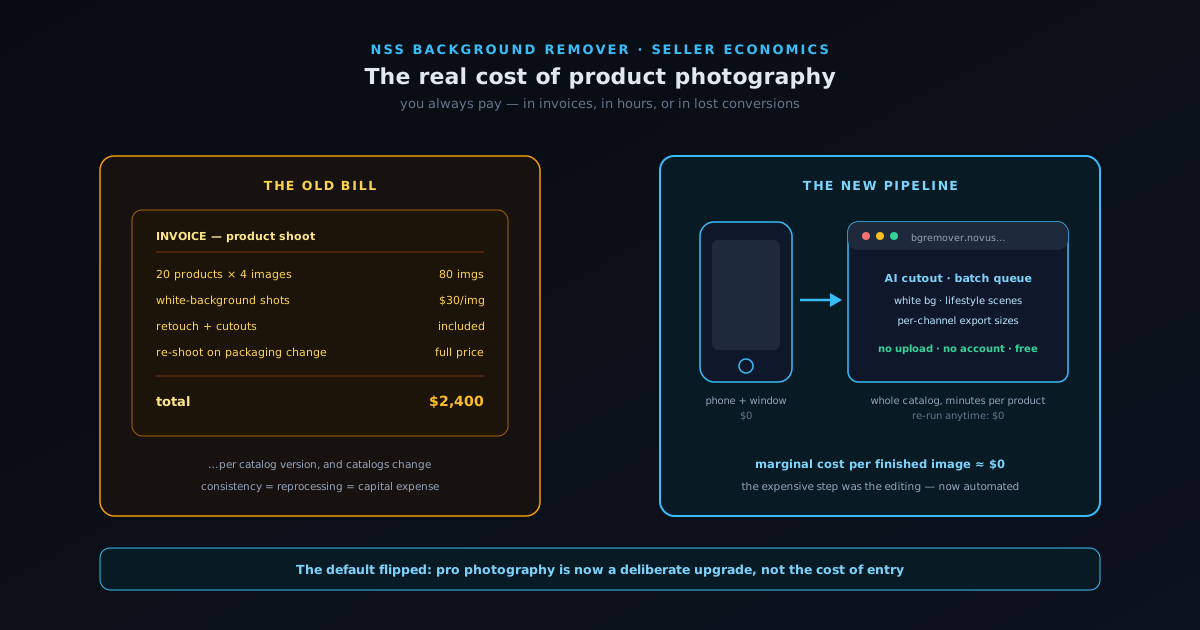
Photography costs only become comparable when you reduce every option to the same unit: cost per finished, listing-ready image (shot, cut out, color-corrected, sized for its channel). Studios quote per product or per image, and for small-batch work the range is wide but rarely kind: commodity white-background shots might run ten to forty dollars per image at the low end, while styled or lifestyle shots from a mid-tier studio commonly land between fifty and several hundred each once retouching is in. A modest catalog of twenty products, four images each, at even thirty dollars per finished image, is twenty-four hundred dollars, and that is a one-time snapshot of a catalog that will change, because products iterate, packaging refreshes, and seasonal variants arrive expecting the same treatment.
The DIY route swaps invoices for hours, and hours have a price too. A seller who shoots their own products and edits them in a desktop suite spends real time per image: shooting is fast, but cutouts, background cleanup, color matching, and resizing for each marketplace's requirements historically consumed fifteen to forty minutes per finished image for a non-specialist. At any honest valuation of an owner's hour, a forty-image catalog edited this way costs more than it appears, and the cost recurs with every new product. The strategic insight hiding in the unit math: the shooting was never the expensive part. The editing was. The cutout, the cleanup, the consistency pass: that is precisely the part that has been automated out of the bill.
Why the visual bar keeps rising
It is tempting to treat image quality as a vanity concern, but the channels have made it structural. Major marketplaces enforce technical image requirements (pure white main-image backgrounds, minimum resolutions, fill ratios), and listings that miss them get suppressed or rejected outright. Beyond the hard rules sit the soft ones: search results and category pages are image grids, and the thumbnail is your only argument for the click. Sellers consistently report that upgrading main images moves click-through rates by meaningful percentages, and click-through compounds into ranking on most platforms, which means image quality feeds the algorithm as well as the human. On social storefronts the bar is stranger but no lower: products need to look native to a feed, which means lifestyle contexts, clean compositions, and visual consistency across a grid.
Consistency is the requirement small sellers underestimate most. A catalog where every product floats on the same clean background, at the same scale, with the same lighting temperature, reads as a brand; a catalog of mismatched photos reads as a flea market stall, whatever the product quality. This is exactly why the per-image economics matter: consistency is achieved by reprocessing everything whenever anything changes, and at studio prices, reprocessing a catalog is a capital expense. At near-zero marginal cost per image, it is a Tuesday afternoon. The falling cost does not just save money; it changes which standards of presentation a one-person operation can hold itself to.
The phone-plus-browser workflow
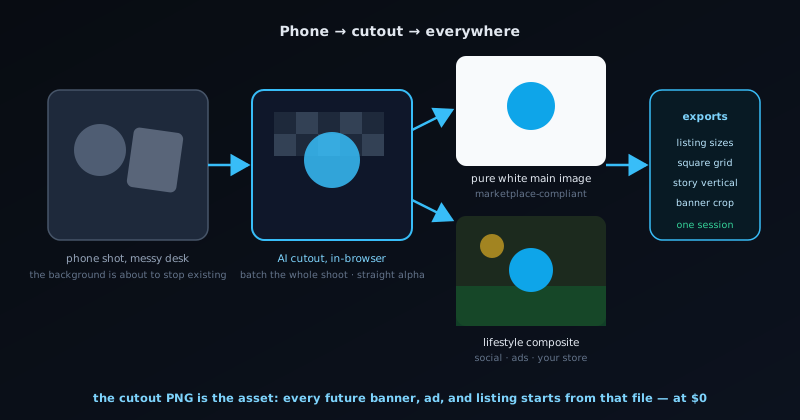
Here is the workflow that replaces most of the studio, in its entirety. Shoot with a modern phone near a large window, on any reasonably uncluttered surface: the phone's computational photography handles more lighting sin than any tutorial admits, and the background does not need to be clean because it is about to stop existing. Then open the NSS Background Remover at bgremover.novusstreamsolutions.com/background-remover and let the AI cutout do the work that used to be the expensive part: the model separates the product from whatever you shot it on, preserving edges, straps, and fine detail, and exports a transparent PNG with straight alpha that composites cleanly anywhere. From there, drop the cutout onto a pure white background for marketplace main images, or composite it against a styled backdrop in the image editor at bgremover.novusstreamsolutions.com/editor for social and secondary shots, adjust color and shadows, and export at each channel's required dimensions.
Two properties of the tool matter specifically for product sellers. First, speed and consistency: each shot runs through the same on-device cutout in seconds at bgremover.novusstreamsolutions.com/background-remover, so a whole shoot gets one identical, repeatable treatment rather than drifting image to image. Second, the architecture: the editor runs entirely in your browser, on your device, with no uploads to anyone's server, no account, and no fee. The privacy point is not incidental for commercial work: unreleased products, packaging redesigns, and seasonal lines before launch are competitively sensitive, and a tool that never receives your images cannot leak them. The whole pipeline, from phone to listing-ready image set, runs in minutes per product rather than days per invoice, and it reruns at the same cost every time the catalog changes: nothing.
What still deserves a professional
Honest accounting includes the other column: the cases where paying a professional remains the right call. Hero imagery for a brand launch (the one image that anchors the website, the packaging, the ads) carries enough leverage that craft photography earns its fee. Highly reflective products, jewelry, and liquids in glass punish amateur lighting in ways software cannot fully rescue, because the information simply is not in a badly lit capture. Model photography for apparel, where fit and drape are the product, is its own profession. And at a certain catalog scale with sufficient margin, delegating the entire visual pipeline is a sane operational decision rather than an economic one, the owner's attention being the scarcest input in any small business.
The point of the cost collapse is not that professionals are obsolete; it is that the default flipped. Professional product photography used to be the cost of entry, the thing you needed before you could list credibly at all, which meant the photography tax was a gate in front of every new product and every small experiment. Now the credible baseline is achievable by anyone with a phone, a window, and a browser, and professional work becomes what it should have been all along: a deliberate upgrade purchased where the leverage justifies it, rather than a toll paid everywhere because there was no alternative. For a seller deciding whether to test a fourth product variant, that flip is the difference between "maybe next quarter" and "listed by Friday."
What software cannot fix: getting the capture right
Honesty about the pipeline requires naming its one hard dependency: the editing automation can remove backgrounds, match colors, and composite scenes, but it cannot recover information that was never captured. The failure modes that survive every tool are the capture-stage ones. Focus is unrecoverable: a soft image stays soft, so tap-to-focus on the product and take three frames of every angle, because storage is free and re-shoots are not. Resolution lost to cropping is unrecoverable: fill the frame at capture time rather than planning to crop later, since marketplace zoom features punish small originals. And mixed lighting produces color casts that correction can chase but never fully erase: a product lit half by warm bulbs and half by window daylight carries two contradictory color temperatures in the same pixels, which is why the single window with other lights off is not a stylistic suggestion but the load-bearing rule of the entire workflow.
The remaining capture habits cost nothing and pay every time. Shoot everything in one session per product family, so lighting and angle stay consistent across images that will sit side by side in a listing. Wipe the product: dust and fingerprints that are invisible in person are shockingly visible at listing resolution, and retouching them out per-image costs more time than a cloth. Use a plain surface not because the background matters (it is about to be removed) but because reflections and color bounce off a loud surface contaminate the product's own pixels. And keep a thirty-second reference shot of any product with a fixed orientation (logos, labels, asymmetric seams) so the lifestyle composites place it plausibly. None of this requires equipment or talent; it requires the same checklist discipline this series prescribes for everything else, applied for ninety seconds before the AI takes over the expensive part.
A per-channel image checklist
For sellers implementing the DIY pipeline, the deliverable set per product is predictable across channels, and producing it in one editing session is the efficient pattern. The marketplace-specific walkthrough at Prepping product photos for Amazon, Etsy, and Shopify maps these deliverables to each platform's exact requirements.
- Marketplace main image: product cut out on pure white, product filling most of the frame, at the platform's minimum resolution or better.
- Three to five secondary angles: same background treatment, same scale, shot in the same session for lighting consistency.
- One detail crop: texture, stitching, or mechanism, the image that answers the quality question a buyer cannot ask in person.
- One scale reference: the product in hand or beside a familiar object, because returns are born from size surprises.
- One lifestyle composite: the cutout placed into a context scene for social, ads, and your own store's gallery.
- Consistent export sizes per channel, named systematically: future you, re-listing on a new platform, will be grateful.
- The source cutout PNG archived once: every future banner, ad, and seasonal graphic starts from that file instead of from another shoot.
Photography as a unit economic
Connecting this to the broader unit-economics discipline this series keeps returning to: image production is a per-product cost like freight or packaging, and it belongs in the same spreadsheet. A seller who knows their landed cost to the cent but treats photography as an unpredictable annoyance has simply chosen not to price one of their inputs. Run the numbers each way (studio invoices amortized per image, owner hours at a real rate, or the near-zero marginal cost of the phone-plus-browser pipeline), and the line item becomes a decision instead of a surprise. For most small catalogs, the arithmetic lands in the same place: the baseline pipeline should be free and in-house, with paid craft photography reserved for the handful of images where brand leverage concentrates.
There is also a compounding angle, fitting the season's theme. A catalog's image library is an asset that appreciates with reuse: the cutout produced once feeds the listing, the ad creative, the seasonal banner, the email header, and the next marketplace expansion, each at zero additional cost. Sellers who establish the pipeline early accumulate that library as naturally as they accumulate SKUs, while sellers who treat every image need as a fresh procurement decision pay the photography tax again and again on the same products. The tools finally made the cheap path also the good path, which means the remaining differentiator is simply whether a seller builds the habit. The habit takes one afternoon to form, and the browser tab is free.
The final upgrade the near-zero cost unlocks is treating images as experiments rather than decorations. When a new main image costs nothing to produce, testing it against the incumbent stops being a luxury: swap the image, watch click-through and conversion for a couple of weeks at your traffic level, keep the winner, repeat. Sellers who run this loop consistently report that image changes move conversion more than almost any copy change (the photo is the first thing seen and often the only thing truly processed), and yet image testing remains rare among small sellers precisely because, at studio prices, every variant used to cost real money. The browser pipeline removes that excuse along with the invoice. A catalog whose images are iterated like landing pages, funded by a tool that charges nothing per attempt, compounds its conversion rate the same way this series says everything else compounds: small repeated improvements, retained forever, on an asset you own.
Frequently asked questions
Quick answers to common questions about this topic.
How much does product photography cost?
Studio shoots and agencies can run into hundreds per product once you count gear, lighting, and editing. A phone plus good light and a free background remover covers most ecommerce needs for a fraction of that.
Can I shoot product photos with just a phone?
Yes. Modern phone cameras plus soft, even light and a clean surface produce marketplace-ready shots once you remove the background and standardize the framing at https://bgremover.novusstreamsolutions.com.
What replaces the studio in a DIY setup?
Daylight or a cheap softbox for lighting, a plain backdrop, and a free editing/cutout tool for the white-background and lifestyle versions. See Prepping product photos for Amazon, Etsy, and Shopify.
Related workflow
Product photo to a transparent image every channel accepts
One photograph, cut out once, then re-encoded for a storefront, a marketplace listing and a social post without redoing the cutout each time.
- Cut the background out and check the edgesNSS Background Remover: Hair, glass and drop shadows are where automatic cutouts fail. Fix them once, on the master, before anything downstream copies the mistake.
- Re-encode and resize per destinationNovus Convert: Transparency survives PNG and WebP and dies in JPEG. Convert validates the file it hands back, so a listing never rejects a silently broken upload.
Related troubleshooting
Was this page helpful?
Your answer stays in this browser, it is not sent anywhere and no account or cookie is involved.