2026 · NSS Background RemoverAbout 12 min readNovus Stream Solutions
Is my data safe with browser AI tools? A plain-English audit
Some "browser AI" tools run entirely on your device and never see your files; others quietly upload everything to a server. Here is how to tell the difference, what on-device AI does and does not protect, and how to check a tool yourself.
Contents
- 1.Overview
- 2.First, what "browser AI" actually means
- 3.The one question that decides everything: upload or on-device?
- 4.On-device AI: what it does and does not protect
- 5.Cloud AI dressed up as "browser AI": the thing to watch for
- 6.How to check a tool yourself
- 7.The honest limits of on-device AI
- 8.What about the models themselves, and the outputs?
- 9.A practical safety checklist
Overview
It is a fair question to ask before you drag a photo, a document, or an audio file into a website that promises to do something clever with it: is my data safe here? The honest answer is that it depends entirely on one thing most tools do not make obvious: whether the AI runs on your device or on their server. Two tools can look identical, both labelled "browser AI," and have completely opposite privacy realities: one never sees your file, the other has a copy the instant you drop it in. This is a plain-English audit of how to tell which is which, what each model actually protects, and how to check a tool yourself without being a developer.
The reason this is confusing is that "in the browser" is used loosely. Some tools genuinely run the AI model inside your browser, on your own hardware, so your file never leaves the machine. Others run a browser interface that uploads your file to a remote server where the real work happens, then shows you the result, which is "in the browser" only in the sense that you used a browser to upload it. Those are not small differences in degree; they are the whole question. Everything below is about learning to spot the distinction, because once you can, the safety question mostly answers itself.
First, what "browser AI" actually means
Modern browsers can now run real AI models directly, using your device's graphics hardware through a technology called WebGPU (developer.mozilla.org/en-US/docs/Web/API/WebGPU_API), with a slower but universal fallback called WebAssembly for machines that lack it. That means a tool can download a model to your browser once and then run it locally: the same kind of inference that used to require a server now happening on your laptop or phone. This is genuinely new, and it is what makes a private, on-device AI tool possible at all: the computation that needed a data center can, for many tasks, run on the device you are already holding.
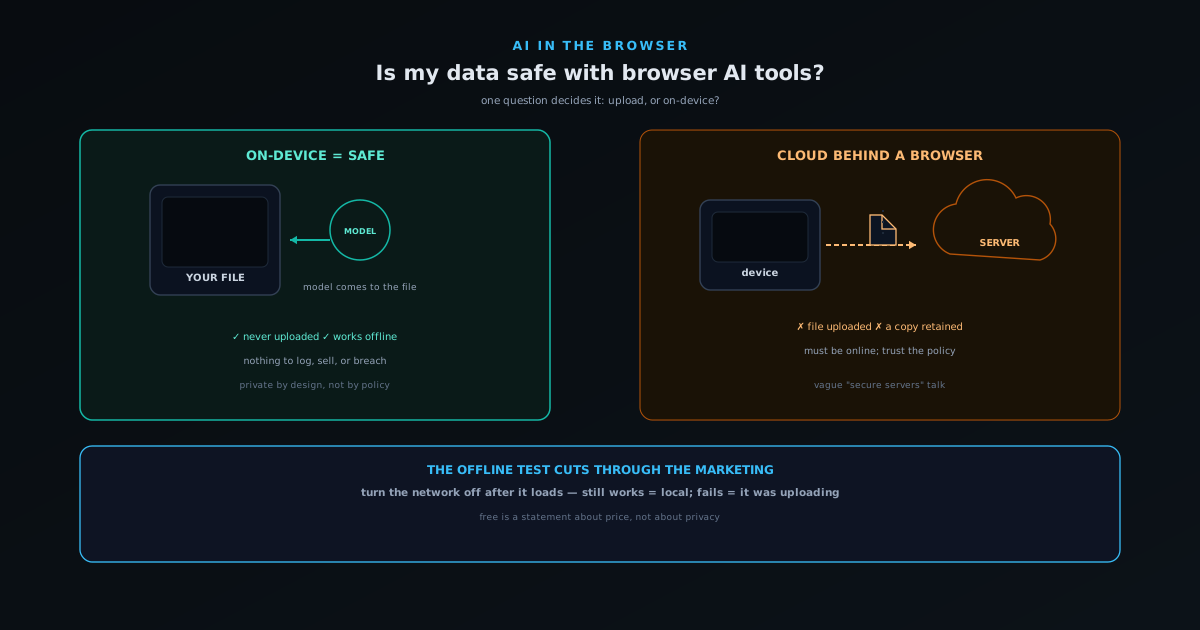
But the capability existing does not mean every tool uses it. Plenty of "AI" websites predate or ignore on-device inference and simply upload your file to their backend, because that is the older, simpler way to build and the easier way to monetize. So "browser AI" spans two architectures that share a label and nothing else: true on-device inference, where the model comes to your data, and cloud inference behind a browser front end, where your data goes to the model. The marketing rarely distinguishes them, which is exactly why you have to.
The one question that decides everything: upload or on-device?
If you remember one thing, make it this: ask whether the tool uploads your file or processes it on your device. That single distinction determines almost the entire privacy picture. If your file is uploaded, a server now has a copy, and your safety depends on promises: their privacy policy, their retention practices, their security, and their incentives, none of which you can verify and all of which can change. If your file is processed on your device and never uploaded, there is simply no copy anywhere else, and the question of how they handle your data becomes moot, because they never received it.
This is why on-device processing is described as private by design rather than private by policy. A policy is a commitment that can be broken, reinterpreted, breached, or quietly revised; a tool that structurally never receives your data cannot leak, sell, or retain it, because there is nothing on their side to leak. That is a categorically stronger form of safety than the best-written privacy policy, because it does not rely on trust at all. When your data must not be exposed, an architecture that never transmits it beats any promise about transmitted data, every time.
On-device AI: what it does and does not protect
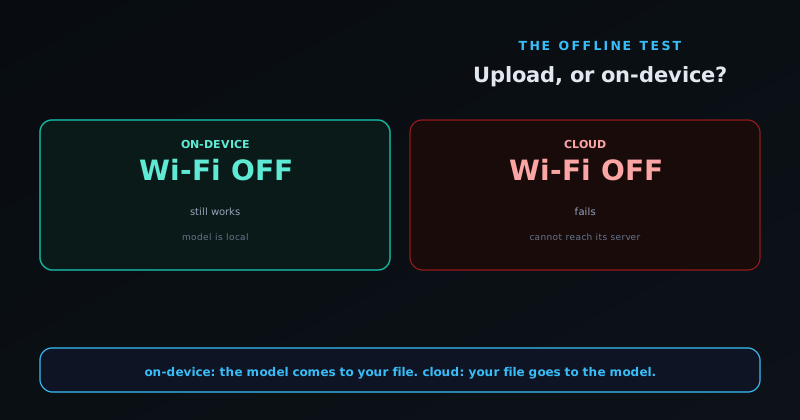
On-device AI protects your files from ever reaching a third party. When the model runs locally, your image, document, or audio is read by code running in your own browser and never sent over the network, so there is no server log of it, no copy in someone's storage, and nothing to be breached or sold. For sensitive material (unpublished work, client deliverables, confidential documents, anything you would not email to a stranger) this is the protection that matters, and it is real. A well-built on-device tool will even keep working with your network disconnected once the model is cached, which is the simplest proof that the processing is genuinely local.
What on-device AI does not do is absolve you of normal device hygiene. The model runs on your machine, so your file is exactly as safe as your machine is: if your device is compromised, or you save the output to a shared drive, or you are using a public computer, on-device processing does not change those risks. It also is not the same as encryption or a guarantee about what you do with the result. The precise claim is narrow and strong: an on-device tool does not transmit your file to anyone. That removes the entire category of third-party exposure, which is usually the risk people are actually worried about, but it is that specific protection, not a blanket of total security.
Cloud AI dressed up as "browser AI": the thing to watch for
The case to be wary of is a tool that uses the language of privacy and the convenience of a browser while quietly uploading everything. Signs include a hard requirement to be online for it to work at all, a noticeable upload progress bar when you add a file, an account requirement before you can process anything, and vague privacy language that talks about "secure servers" and "we value your privacy" rather than stating plainly that files never leave your device. None of these individually proves a tool is uploading, but together they are a strong tell, because a genuinely on-device tool has no reason to require an upload or a login to run.
This matters most with free tools, because free has to be paid for somehow. A free cloud AI tool that uploads your files has, at minimum, the option to learn from, retain, or monetize that data, and "free" can quietly mean "you and your uploads are part of the product." That is not always the case (some free tools are funded by ads on an on-device pipeline and never touch your files) but the only way to know is to determine the architecture. The lesson is not that free tools are bad; it is that free is a statement about price, not about privacy, and the two have to be checked separately.
How to check a tool yourself
You do not need to read code to audit a tool; a few simple tests get you most of the way. The clearest is the offline test: load the tool, then disconnect your network and try to process a file. If it still works, the processing is happening on your device; if it fails because it cannot reach a server, your file was going to be uploaded. A second check is the first-load behavior: on-device tools often download a sizable model the first time (you may see a one-time download of tens or hundreds of megabytes), after which they run fast and offline, a pattern cloud tools do not have, because their "model" lives on a server.
You can also just read the claims literally. A tool confident in on-device processing tends to say so directly ("no upload," "runs on your device," "your files never leave your browser") because it is a selling point they have earned. Vague reassurance about security and privacy, without a plain statement that files are not uploaded, usually means files are uploaded. For the technically inclined, your browser's developer tools show network activity, and a truly on-device tool will not show your file being sent anywhere when you process it. But the offline test alone is enough for most people, and it is the most honest question you can ask any "browser AI" tool: does it still work with the internet off?
The honest limits of on-device AI
On-device AI is the right default for privacy, but it is fair to be honest about its trade-offs so you choose with eyes open. Because the model runs on your hardware, very large models can be slow or simply too big for modest devices, and there is a one-time download to get the model into your browser. Some cutting-edge capabilities still genuinely need server-scale compute and are not practical to run locally yet. A good on-device tool manages this honestly, by sizing its model tiers in real terms, recommending only what your device can actually run, and using lighter classical methods where a giant model is not warranted, rather than pretending there is no trade-off at all.
The point of naming these limits is that "private" should not require you to believe "and also magic." On-device AI buys you a genuine, structural privacy guarantee in exchange for running the work on your own hardware, with the costs that implies. For the overwhelming majority of everyday tasks (removing a background, captioning a clip, tagging an image) modern devices handle it comfortably, and the privacy is worth the one-time download. For the rare task that truly needs a data center, a cloud tool may be the honest choice, and the right move there is to know that is what you are using and treat the data accordingly. Clarity about the trade is the whole goal.
What about the models themselves, and the outputs?
A fair follow-up question is whether the AI model is trustworthy even if your file never leaves your device. Two things matter here. First, where the model came from: a model downloaded once to your browser is just a file running locally, and a well-built tool is transparent about which models it uses, how big they are, and what they can actually do, rather than claiming capabilities it cannot deliver. Honesty about the model is its own form of safety, because a tool that overstates what its AI does is setting you up to trust an output you should have questioned. The better tools label classical, non-neural methods as such instead of dressing them up as AI, and size their model options in real terms so you know what you are running.
Second, the quality of the output is a safety question of a different kind. On-device processing protects your input, but it does not guarantee the result is correct, and AI outputs should be treated as drafts to verify rather than answers to trust blindly. A background removal can miss a wisp of hair, a transcription can mishear a word, an image description can be confidently wrong. None of that is a privacy problem, but it is a reason to keep a human in the loop, especially for anything consequential. The honest framing is that on-device AI makes your input safe from exposure; it does not make the model infallible, and a good tool gives you the controls to check and correct what the model produced.
There is also the question of what happens to the outputs you create. With a no-account, on-device tool, the outputs are yours and live wherever you save them: there is no service holding a copy, which is exactly the point. With an account-based tool, anything you save or publish lives with the service, so it is worth knowing what you are posting publicly versus saving privately, and what rights you retain. The strongest tools are explicit that you own your exports outright, which removes the quiet worry that using a free tool signs away rights to what you make. Between honest model claims, verifiable outputs, and clear ownership, the safety picture is about more than just whether your file was uploaded, though that remains the first and biggest question.
It is worth separating these layers cleanly so the picture does not blur. The first and biggest question is the input: was your file uploaded, or did it stay on your device? The second is the model: is the tool honest about what its AI actually is and can do? The third is the output: is the result something you should verify rather than trust, and do you clearly retain ownership of it? These are independent (a tool can ace one and fail another) so the safest tools are the ones that handle all three: they keep your input local, they describe their models honestly, and they are explicit that you own what you make and that you should check what the model produced. Asking all three questions, rather than only the first, is what turns a vague sense of "is this safe" into a clear-eyed read of exactly what you are and are not protected from.
A practical safety checklist
Before you trust a browser AI tool with anything sensitive, run a quick mental checklist. Does it work offline once loaded, where yes suggests on-device and no suggests upload? Does it require an account or an upload before it will process a file, a requirement that hints at a server? Does it state plainly that files are not uploaded, or only reassure you vaguely about security? Is there a one-time model download on first use, the signature of local inference? And does the privacy claim match the architecture you can observe, rather than just the marketing? A tool that passes these is very likely processing on your device; one that fails them is very likely uploading, whatever the homepage says.
The checklist is not about paranoia; it is about matching your caution to the stakes of the file in front of you. A meme you are about to post publicly anyway does not need much scrutiny: upload it through whatever is convenient, because there is nothing to protect. A client deliverable under NDA, an unreleased track, a medical or legal document, or unpublished creative work is exactly where the offline test and the no-upload claim earn their keep, because the cost of those leaking is real and irreversible. The skill is not treating every file as top secret or every tool as a threat; it is knowing which files demand the on-device guarantee and reserving your scrutiny for them. Run the checklist when it matters, trust the architecture over the slogan, and browser AI tools become something you can use confidently rather than nervously.
For a concrete example of the on-device model done deliberately, NSS Background Remover at bgremover.novusstreamsolutions.com processes images and video entirely in your browser, downloads its models on first use, works offline afterward, and states plainly that nothing is uploaded, which is exactly the pattern this checklist is looking for. The broader lesson applies to any tool, Novus or not: your data is as safe as the architecture, not the slogan. Learn to ask the upload-or-on-device question and to verify it with the offline test, and you can use browser AI tools with confidence, choosing on-device processing for anything sensitive, and knowing exactly what you are trusting when you choose otherwise.
Frequently asked questions
Quick answers to common questions about this topic.
Are browser-based AI tools safe for my data?
It depends on whether they process on-device or in the cloud. On-device tools never upload your files, so there is nothing to leak; cloud tools send your data to a server governed by a policy you cannot audit. Check which one you are using.
How do I verify a tool is not uploading my files?
Open the browser Network tab and run the tool: an on-device tool downloads its model once but never POSTs your file anywhere. Offline capability is another tell.
Which Novus tools are on-device?
Both the Background Remover and Visualizers run their AI on your device. See Why on-device AI is private by design for the structural argument.
Related workflow
Product photo to a transparent image every channel accepts
One photograph, cut out once, then re-encoded for a storefront, a marketplace listing and a social post without redoing the cutout each time.
- Cut the background out and check the edgesNSS Background Remover: Hair, glass and drop shadows are where automatic cutouts fail. Fix them once, on the master, before anything downstream copies the mistake.
- Re-encode and resize per destinationNovus Convert: Transparency survives PNG and WebP and dies in JPEG. Convert validates the file it hands back, so a listing never rejects a silently broken upload.
Related troubleshooting
Was this page helpful?
Your answer stays in this browser, it is not sent anywhere and no account or cookie is involved.