2026 · NSS Background RemoverAbout 13 min readNovus Stream Solutions
How to remove EXIF metadata from your photos (and why)
Your photos carry hidden metadata (camera settings, timestamps, often the exact GPS location) that travels with the file when you share it. Here is what EXIF reveals and how to strip it, free and on-device.
Contents
- 1.Overview
- 2.What EXIF metadata actually is
- 3.Why embedded GPS location is the real risk
- 4.When platforms strip it for you, and when they do not
- 5.How to remove EXIF metadata
- 6.Stripping metadata does not hurt image quality
- 7.When you might want to keep metadata
- 8.Video carries metadata too
- 9.How the metadata gets there in the first place
- 10.Making metadata-stripping a routine
- 11.Verify the metadata is actually gone
Overview
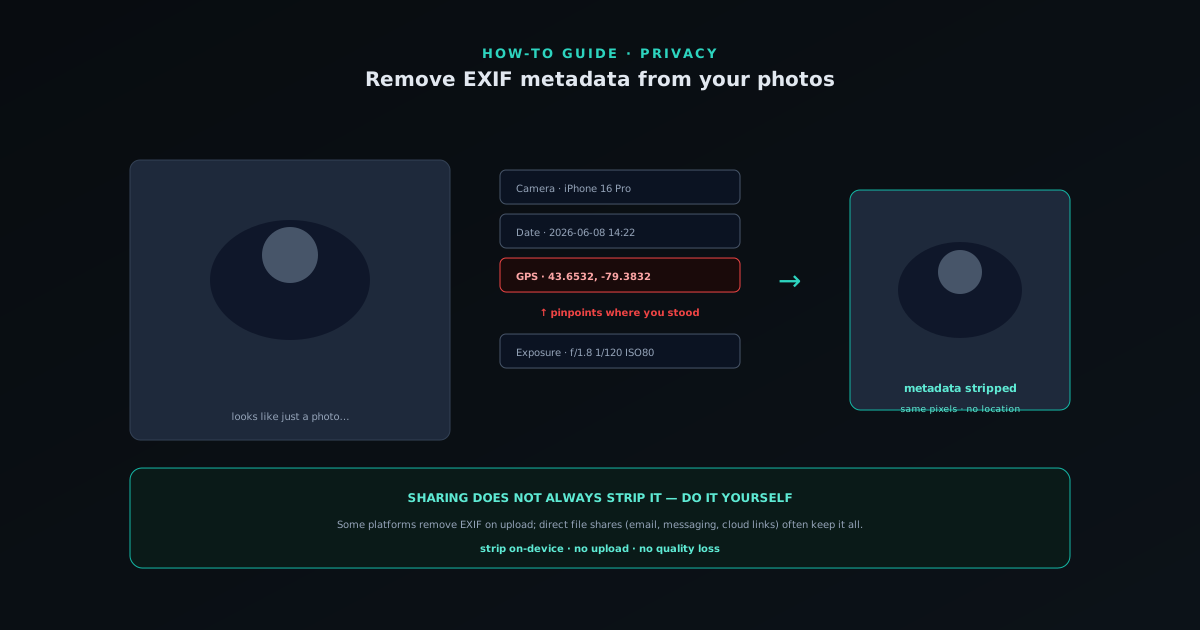
Every photo you take carries hidden data baked into the file, and most people have no idea it is there. This data, called EXIF metadata, records details about how and where the photo was taken: the camera or phone model, the exposure settings, the date and time, and very often the exact GPS coordinates of where you were standing. When you share the photo (email it, upload it, send it in a message) this metadata can travel with it, which means a casually shared photo can quietly reveal your home address, your routine, or your location at a specific time. This guide explains what EXIF metadata is, what it can reveal, when platforms strip it for you and when they do not, and how to remove it yourself for free without uploading your photos to do so.
The reason this is worth understanding rather than ignoring is that the privacy exposure is real but invisible: nothing about a photo looks different whether or not it carries GPS metadata, so people share location-tagged photos constantly without realizing it. The good news is that stripping metadata is simple, free, has no effect on how the photo looks, and can be done on your own device so the photo never has to be uploaded to clean it. Understanding when metadata matters, and building the habit of stripping it from photos you share publicly, closes a privacy gap that most people do not even know they have.
What EXIF metadata actually is
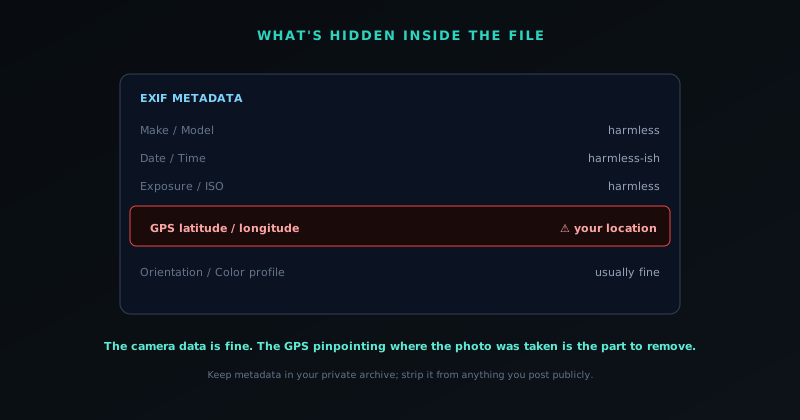
EXIF (Exchangeable Image File Format) is a standard for embedding metadata inside an image file, and cameras and phones write it automatically every time they capture a photo. The data it records is genuinely useful in the right context: the camera and lens model, the aperture, shutter speed, and ISO, the focal length, the date and time, the orientation, and frequently the GPS coordinates if location services were on. For a photographer reviewing their work, this information is valuable: it tells them how a shot was taken so they can reproduce or learn from it. The metadata exists for legitimate reasons and serves a real purpose in photography workflows.
The issue is not that the metadata exists but that it travels with the file invisibly, persisting when the photo is shared in contexts where the photographer never intended to broadcast their camera settings or, more importantly, their location. The metadata is not visible in the image (you have to specifically inspect the file to see it) which is exactly why it is easy to share without realizing what is attached. A photo that looks like nothing more than a picture can carry a precise record of where and when it was taken, embedded in a layer most people never look at. Understanding that this hidden layer exists in essentially every photo from a camera or phone is the first step to deciding when it should be removed.
Why embedded GPS location is the real risk
Of all the metadata a photo carries, the GPS location is the one with real privacy implications, because it can reveal exactly where a photo was taken, which, for photos shot at home, means your home address. Share a photo taken in your living room with location metadata intact, and anyone who inspects the file can read the coordinates of your home. The same applies to photos of your workplace, your child's school, places you frequent, and your location at a specific time, since the metadata pairs the coordinates with a timestamp. For most casual sharing this never matters, but for anyone with a reason to value their location privacy, it is a genuine exposure.
The risk compounds with patterns: a stream of location-tagged photos shared over time can map where someone lives, works, and spends their time, building a detailed picture of their movements from data they did not realize they were sharing. This is why location metadata specifically (more than the camera settings or timestamps) is the part of EXIF worth caring about from a privacy standpoint. The defensive move is simple: strip the metadata from photos before sharing them publicly, especially photos taken at home or other sensitive locations. The camera settings being public is harmless; the GPS coordinates of your home being embedded in a photo you posted is not, which is why removing location metadata is the core of the privacy case for stripping EXIF.
When platforms strip it for you, and when they do not
A common misconception is that sharing a photo always strips its metadata, when in fact whether metadata survives depends entirely on how and where you share it. Many major social platforms do strip EXIF metadata from photos when you upload them, partly for privacy and partly because they re-process images, so a photo posted to one of those platforms often loses its location data in the process. But this is not universal: some platforms preserve metadata, photos shared via direct file transfer (email attachments, messaging apps that send the original file, cloud links) frequently keep all their metadata intact, and you cannot reliably know which is which without checking.
The practical conclusion is that you cannot assume sharing strips metadata, because it sometimes does and sometimes does not, and the cases where it does not (sending an original file directly) are common. Relying on platforms to protect you is unreliable, since the behavior varies and changes, and the one time it does not strip is the time your location leaks. The robust approach is to strip the metadata yourself before sharing anything you want clean, so the photo is already free of location data regardless of how it travels. Taking control of the stripping rather than hoping the platform does it is the difference between reliably protecting your location and depending on behavior you cannot verify, which is why removing metadata yourself is the dependable habit.
How to remove EXIF metadata
Removing EXIF metadata is straightforward: a metadata-removal tool reads the file, strips the embedded EXIF data, and writes out a clean copy of the image with the visual content untouched. The NSS Background Remover's metadata remover at bgremover.novusstreamsolutions.com/tools/metadata-remover does this in your browser: drop in a photo, and it produces a version with the metadata stripped, all on your device. Because the tool runs locally, the photo you are cleaning never has to be uploaded to a server to have its metadata removed, which is important: uploading a photo to a cloud tool to strip its location data means handing that very location data to the tool first, which defeats part of the purpose.
The process does not alter the image itself: the pixels, the resolution, and the visual quality are unchanged; only the hidden metadata layer is removed. This means stripping metadata is a lossless, no-downside operation for the image: you get the same photo without the embedded data. For photos you intend to share publicly, especially ones taken at sensitive locations, running them through a metadata stripper before sharing is a quick, free step that removes the location exposure. The whole operation is fast enough to be routine, which is what makes it practical to build into the habit of preparing photos for sharing rather than treating it as a special-occasion precaution.
Stripping metadata does not hurt image quality
A reasonable worry is whether removing metadata degrades the photo, and the answer is a clear no: stripping EXIF data has zero effect on the visual quality of the image, because the metadata is separate from the pixel data that makes up the picture. The metadata is a layer of information about the photo, stored alongside but distinct from the actual image, so removing it leaves the image itself completely intact. The resolution, the colors, the sharpness, the detail: all unchanged. You are removing a record about the photo, not any part of the photo, which is why it is a safe operation with no visual downside.
This is worth stating clearly because it removes the one hesitation people might have about stripping metadata routinely. There is no quality-versus-privacy trade here: you keep the full quality of the image and lose only the hidden data you wanted gone. The one thing you do lose is the metadata itself, which matters only if you specifically wanted to keep it (a photographer cataloguing camera settings, for instance) in which case you would keep an original with metadata and strip a copy for sharing. For the common case of preparing a photo to share publicly, stripping metadata costs nothing visually and removes a real privacy exposure, which is as favorable a trade as image operations get.
When you might want to keep metadata
Metadata is not always something to remove, and being clear about when it is useful prevents stripping it reflexively in contexts where it serves a purpose. Photographers and visual professionals often want the EXIF data: the camera settings let them review how a shot was taken, organize work by capture date, and learn from their own exposures, so for an archive of one's own work, the metadata is an asset. Some workflows depend on the embedded color profile for accurate color reproduction, particularly in print, where stripping the color management could affect how the image reproduces. And the capture timestamp can be genuinely useful for organizing and dating a personal photo library.
The right framing is therefore not "always strip metadata" but "strip metadata from photos you share publicly, keep it where it serves you." A practical pattern is to keep your original photos with their metadata intact as your archive (where the camera settings, timestamps, and even location are useful for your own organization) and strip metadata from the copies you share publicly. This preserves the benefits of metadata for your private use while removing the exposure when photos go out into the world. The judgment is about the destination: metadata in your private archive is useful; metadata in a photo you post publicly is a liability, and matching the action to the destination is what makes metadata handling deliberate rather than reflexive.
Video carries metadata too
Photos are not the only files that carry location and device metadata: videos do as well, and the same privacy considerations apply, often with less awareness. A video recorded on a phone can embed the same kind of data a photo does: the device, the timestamps, and frequently the GPS location, all traveling with the file when it is shared. Because video files are larger and people think about them differently than photos, the metadata exposure in video is even more overlooked, even though a location-tagged video shared publicly reveals the same kind of information as a location-tagged photo.
The defensive approach for video is the same as for photos: strip the metadata before sharing publicly, especially for video taken at sensitive locations. The NSS Background Remover's video utilities include a video metadata remover at bgremover.novusstreamsolutions.com/tools/video-metadata-remover that strips this data on-device, so a video can be cleaned of its location and device metadata without uploading it, just like a photo. Extending the metadata-stripping habit to video closes the same privacy gap for the moving-image content that people increasingly share, which is worth doing precisely because the video metadata exposure is even less top-of-mind than the photo one. The principle is identical across both: hidden metadata travels with the file, and stripping it before public sharing removes a location exposure most people do not know they have.
How the metadata gets there in the first place
Understanding why photos carry metadata clarifies why it is so pervasive and why you cannot simply turn it off and forget about it. Cameras and phones write EXIF metadata automatically at the moment of capture, as a built-in part of how they save an image, recording the settings the camera used, the time, and, if location services are enabled, the GPS coordinates. This happens by default on essentially every device, without any action or awareness from the photographer, which is why nearly every photo from a phone or camera carries this data unless something later removes it. The metadata is a feature of the capture process, not an option you opted into.
You can reduce some of this at the source (most phones let you disable location tagging for the camera in their settings, which stops GPS coordinates from being embedded in new photos), and doing so is a sensible baseline for anyone concerned about location privacy. But disabling location at the source does not remove the other metadata, does not affect photos already taken with location on, and is easy to forget to set on a new device. So while turning off location tagging is a useful preventive step, it does not replace the habit of stripping metadata before sharing, since photos still carry camera and timestamp data, older photos still have their location, and the source setting can be missed. The source setting and the stripping habit are complementary: one reduces what gets embedded, the other ensures what did get embedded does not travel when you share.
Making metadata-stripping a routine
The most reliable protection is not a one-time action but a routine: stripping metadata from photos as a standard step before sharing them publicly, the same way you might resize or compress them. Because the privacy exposure is invisible (nothing about a photo signals whether it carries location data), relying on remembering case by case is unreliable, and the one photo you forget is the one that leaks. Building metadata removal into the standard prep for any photo headed to a public destination makes the protection automatic rather than dependent on remembering to worry about it for each image.
In practice this means treating "strip metadata" as part of the same workflow step as preparing an image for sharing: when you clean up, resize, or otherwise process a photo for public posting, strip the metadata in the same pass. For sellers, creators, and anyone who regularly posts photos, folding this into the routine, and batching it across sets where possible, removes the per-photo decision and the per-photo risk. The goal is for clean metadata to be the default state of anything you share publicly, achieved through a habit rather than a vigilance you have to sustain image by image. Making it routine is what turns metadata privacy from a thing you occasionally remember into a thing that simply always happens, which is the only way a privacy practice reliably holds across the volume of photos people actually share.
Verify the metadata is actually gone
After stripping metadata, it is worth confirming the data is actually removed, both to be sure the tool worked and to build confidence in the process. The EXIF data of an image can be inspected (your operating system's file properties often show some of it, and dedicated tools show all of it) so checking a stripped copy confirms the metadata, especially the GPS location, is gone. This verification matters most the first time you use a particular tool, to confirm it strips what you expect; once you trust the tool, routine verification becomes optional, but the initial check is worth doing.
Verifying also clarifies exactly what was removed, since some tools strip all metadata while others remove only certain fields, and you want to know that the location data specifically (the part that matters for privacy) is among what was stripped. A tool that removes the GPS coordinates but leaves the camera settings is fine for privacy purposes, since the camera settings are harmless; what you are checking for is that the location is gone. Building this confirmation into the process the first time gives you confidence that the photos you share are actually clean of location data, rather than assuming a tool worked. Once confirmed, you can strip and share routinely, knowing the privacy step is real rather than hoped-for, which is the assurance that makes the metadata-stripping habit worth maintaining.
Frequently asked questions
Quick answers to common questions about this topic.
What is EXIF metadata and why should I remove it?
EXIF is data embedded in photos by cameras and phones: camera settings, timestamps, and often GPS coordinates. The location data can reveal where a photo was taken (including your home), so stripping it before sharing publicly removes a privacy exposure most people do not realize they have.
Does sharing a photo automatically remove its metadata?
Not reliably. Many social platforms strip EXIF on upload, but others preserve it, and sending an original file directly (email, messaging, cloud links) usually keeps all metadata. Since you cannot assume it is stripped, removing it yourself before sharing is the dependable approach.
Does removing EXIF data reduce image quality?
No. Metadata is stored separately from the pixel data, so stripping it leaves the image completely unchanged: same resolution, colors, and detail. You only lose the hidden data, which is a no-downside operation for the photo itself.
How do I strip EXIF data without uploading my photo?
Use an on-device tool like the NSS Background Remover's metadata remover at https://bgremover.novusstreamsolutions.com: it strips the EXIF in your browser, so the photo (and its location data) never has to be uploaded to a server to be cleaned.
Related workflow
Product photo to a transparent image every channel accepts
One photograph, cut out once, then re-encoded for a storefront, a marketplace listing and a social post without redoing the cutout each time.
- Cut the background out and check the edgesNSS Background Remover: Hair, glass and drop shadows are where automatic cutouts fail. Fix them once, on the master, before anything downstream copies the mistake.
- Re-encode and resize per destinationNovus Convert: Transparency survives PNG and WebP and dies in JPEG. Convert validates the file it hands back, so a listing never rejects a silently broken upload.
Related troubleshooting
Was this page helpful?
Your answer stays in this browser, it is not sent anywhere and no account or cookie is involved.