2026 · NSS Background RemoverAbout 13 min readNovus Stream Solutions
Are AI photo editors safe? What to check before you upload
AI photo editors are genuinely useful, but where your photo goes varies enormously between them. Here is how to tell whether one is safe, what a privacy policy is really saying, and the safer default.
Contents
- 1.Overview
- 2.Where your photo actually goes
- 3.How to tell whether a tool uploads
- 4.Reading a privacy policy without reading all of it
- 5.Why "we delete your uploads" is weaker than it sounds
- 6.The on-device alternative
- 7.Match the tool to the sensitivity of the photo
- 8.Free does not mean private
- 9.Beyond photos: video and live-camera privacy
- 10.A pre-upload checklist
Overview
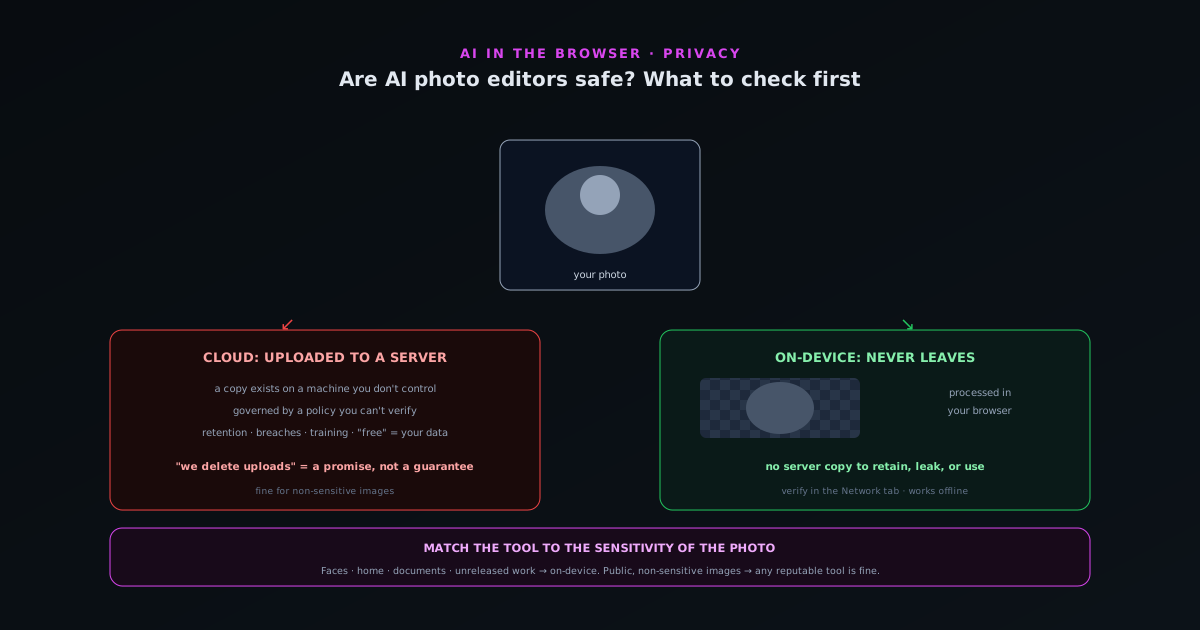
AI photo editors are genuinely useful (removing backgrounds, retouching portraits, upscaling, restoring old photos) but the question of whether they are "safe" has a more complicated answer than yes or no, because the privacy and data practices vary enormously between them. The single biggest difference is invisible in the interface: whether the editor processes your photo on a server it controls, or on your own device. A tool that uploads your photo to its servers has access to it, governed by a privacy policy you probably did not read; a tool that processes on your device never sees it at all. Photos are among the most personal data people handle (faces, families, homes, documents, private moments) so understanding where your photo actually goes is the foundation of deciding whether a given editor is safe to use for a given image.
This guide is about how to make that decision deliberately rather than by trusting a logo. It covers where your photo goes in the two architectures, how to read what a privacy policy is really telling you, why the on-device approach sidesteps the question entirely, and a practical checklist to run before uploading anything personal. The aim is not to make you paranoid about all AI tools (many are perfectly fine for non-sensitive images) but to give you the judgment to match the tool to the sensitivity of the photo, which is the actual skill. Some photos are fine to upload anywhere; some should never leave your device; and knowing which tool does which is what keeps you safe.
Where your photo actually goes
The defining question for an AI photo editor's safety is architectural: does it process your photo in the cloud or on your device? A cloud-based editor uploads your photo to its servers, runs the AI there, and sends the result back, which means a copy of your photo exists on a machine the company controls, at least transiently and sometimes durably, subject to whatever its policies and security allow. An on-device editor runs the AI in your browser or app on your own hardware, so the photo is processed locally and never uploaded; there is no server-side copy because there is no server in the path. These are fundamentally different privacy situations, and the interface usually does not tell you which one you are using.
The reason this matters so much is that uploading is an irreversible trust decision: once your photo is on a server, you are relying on the company's honesty, its security, its retention policy, and its future behavior, none of which you can verify or control. With an on-device tool, none of those apply, because the photo never left your machine; the privacy is structural rather than a promise. So the first thing to determine about any AI photo editor is which architecture it uses, because it changes everything downstream. A tool that explicitly processes on-device and works offline is making a verifiable claim; a tool that uploads is asking for trust, which may be fine for a non-sensitive image and unacceptable for a private one.
How to tell whether a tool uploads
You do not have to take a tool's word for whether it uploads; there are signals and tests. The clearest test is the one any technical user can run: open the browser's developer tools, watch the Network tab, and process an image; an on-device tool downloads its model once but makes no request uploading your image, while a cloud tool sends your image to a server, which is visible as an upload request. A simpler signal is whether the tool works offline: a tool that keeps functioning with the internet disconnected is processing locally, because it cannot be sending anything to a server. Tools that explicitly advertise "no upload," "on-device," or "in your browser" are making a claim you can then verify.
Less technical signals also help. A tool that requires an account before you can process anything, or that is vague about where processing happens, is more likely to be cloud-based. A tool that processes large images instantly regardless of your device's power is likely using a server; one whose speed depends on your hardware is likely local. None of these are definitive on their own, but together they build a picture, and the Network-tab test settles it for anyone willing to run it. The point is that the upload-or-not question is answerable rather than something you have to guess, and for any photo sensitive enough to matter, taking the minute to determine which architecture a tool uses is worth it before you hand it the image.
Reading a privacy policy without reading all of it
For a cloud-based tool, the privacy policy is the document that governs what happens to your uploaded photo, and while few people read these in full, you can extract the important parts quickly by looking for specific things. Search the policy for what it says about the content you upload: does it state that uploads are deleted after processing, or retained? Does it claim any rights to use your uploaded images (for training its models, for improving its service, or otherwise)? Does it share data with third parties? These are the clauses that actually determine what happens to your photo, and they are usually findable by scanning for terms like "retain," "delete," "train," "rights," and "third part."
The things to be wary of are broad grants of rights over your uploaded content, vague or absent statements about deletion, and language that reserves the right to use your images for purposes beyond processing your request. A policy that clearly states uploads are deleted promptly and not used for any other purpose is reassuring; one that grants the company broad rights to your content or is silent on deletion is a warning. The honest caveat is that a privacy policy is a promise you cannot verify and that can change, which is why for genuinely sensitive photos the safer choice is a tool that never receives the photo at all, making the policy moot. Reading the policy is the right diligence for cloud tools; choosing an on-device tool is the way to not need to.
Why "we delete your uploads" is weaker than it sounds
A reassurance you will see often is "we delete your images after processing," and while it is better than nothing, it is a fundamentally weaker guarantee than not uploading at all, for reasons worth understanding. It is a promise about a copy of your photo that exists, at least temporarily, on a server you do not control, which means you are trusting that the deletion actually happens, that it happens before anything else does, that backups and logs do not retain copies, that the company is not breached in the window the photo exists, and that the policy does not quietly change. Each of these is a point of failure that a deletion promise asks you to trust, and none of them are verifiable from your side.
Contrast this with an on-device tool, where there is simply no server-side copy to delete, retain, leak, or misuse, because the photo never left your device. The privacy guarantee is not a promise about what the company does with your photo; it is a structural fact that the company never had your photo. This is the difference between policy-based privacy and architectural privacy, and it is why "we delete your uploads" (though well-intentioned and often honest) is a weaker foundation for a sensitive photo than a tool that never receives it. For a casual, non-sensitive image, a deletion promise is fine; for a photo you genuinely care about keeping private, the architecture that makes the promise unnecessary is the stronger choice.
The on-device alternative
The reason on-device AI photo editors exist is precisely to resolve this whole question by removing the upload, and they have become genuinely capable as browsers gained the ability to run real AI models locally. A tool like the NSS Background Remover at bgremover.novusstreamsolutions.com/background-remover runs its AI in your browser via WebGPU and WebAssembly, so background removal, retouching, upscaling, and the rest of its suite all happen on your device with no upload, which means the privacy question simply does not arise, because there is no server that sees your photo. You can confirm the claim yourself at bgremover.novusstreamsolutions.com/how-it-works or by watching the Network tab. The capability is real: the same kinds of models that cloud tools run remotely can run locally, with the quality determined by the model rather than by where it executes.
The on-device approach has practical tradeoffs worth being honest about: the model downloads once (so there is an initial download), and processing speed depends on your device rather than a server, so a heavy task on a modest machine takes longer. But for the privacy it buys (a structural guarantee that your photo never leaves your device, verifiable in the Network tab and confirmable by the tool working offline) these are minor costs for sensitive images. The on-device alternative is what makes it possible to use AI photo editing on genuinely private photos without the trust decision that uploading requires, which is why it is the right default for anything personal. For non-sensitive images, any decent tool is fine; for the photos that matter, on-device is how you avoid the question entirely.
Match the tool to the sensitivity of the photo
The practical framework that emerges is not "all AI photo editors are dangerous" or "all are safe," but "match the tool to the sensitivity of the photo," which is the actual judgment to develop. Many photos are not sensitive (a stock-style product shot, a public marketing image, a meme) and uploading them to a reputable cloud tool is perfectly reasonable; the convenience is worth more than the negligible privacy cost. Other photos are sensitive (faces of family or children, your home's interior, identity documents, confidential or unreleased work, anything you would not post publicly) and for those, the on-device, no-upload tool is the right choice, because the privacy of the photo matters more than any convenience.
Developing this judgment means asking, before you upload, how much you would mind if this specific photo ended up somewhere you did not intend: on a server indefinitely, in a training dataset, exposed in a breach. For images where the answer is "not much," the convenience of a cloud tool is fine; for images where the answer is "a lot," use a tool that never receives the photo. This per-photo judgment is more useful than a blanket rule, because it lets you use the convenient tools where they are appropriate and reserve the on-device tools for where privacy genuinely matters. The skill is not avoiding AI photo editors but knowing which photos deserve which kind of tool, which is what keeps you both productive and safe.
Free does not mean private
A dangerous assumption is that a free AI photo editor is harmless, when in fact "free" and "private" are unrelated, and a free tool can be the least private of all because your data may be part of how it is funded. A cloud-based free tool has to cover its server costs somehow, and if you are not paying with money, the business model may involve your data: using uploaded images to train models, deriving insights, or monetizing in ways the privacy policy permits but does not advertise. This is not universally true of free tools, but it is common enough that "free" should raise rather than lower your scrutiny of where your photos go.
The clearer way to think about it is that the question of cost and the question of privacy are separate axes: a tool can be free and private (an on-device free tool), free and not private (a cloud tool monetizing your data), paid and private, or paid and not private. The price tells you nothing about the privacy; only the architecture and the policy do. So the reflex of trusting a free tool because it asks nothing of you is exactly backwards for cloud tools, where free can mean your data is the payment. The companion piece at The privacy cost of free AI tools covers this in depth, but the short version is to evaluate a free tool's privacy on the same terms as a paid one (where does my photo go) rather than assuming free means safe.
Beyond photos: video and live-camera privacy
The same architectural question applies, and matters even more, for video and live-camera AI tools, because those involve continuous, often more sensitive footage than a single still: a person's face in motion, the inside of their home, a live stream of whatever the camera sees. A cloud-based tool that processes video or a live camera feed is uploading a continuous stream of this footage to a server, which is a larger exposure than a single photo, and the live-camera case is the most sensitive of all because it is real-time footage of you and your surroundings. The on-device-versus-cloud distinction is therefore even more consequential for these tools than for still images.
The reassuring news is that the strongest on-device tools apply the same no-upload guarantee uniformly, including to the most sensitive real-time inputs. A tool that processes a live camera feed on-device never transmits the footage, so virtual backgrounds, real-time effects, and video editing happen without the feed leaving the device: the same structural privacy as on-device photo editing, extended to the harder case. When evaluating any AI tool that touches video or a camera, the architecture question is the one to ask first, because the stakes of getting it wrong are higher than for a single photo. A tool that processes the most sensitive inputs (live camera, personal video) on-device is making the strongest possible privacy claim, and it is exactly the claim that matters most for the footage you would least want on someone else's server.
A pre-upload checklist
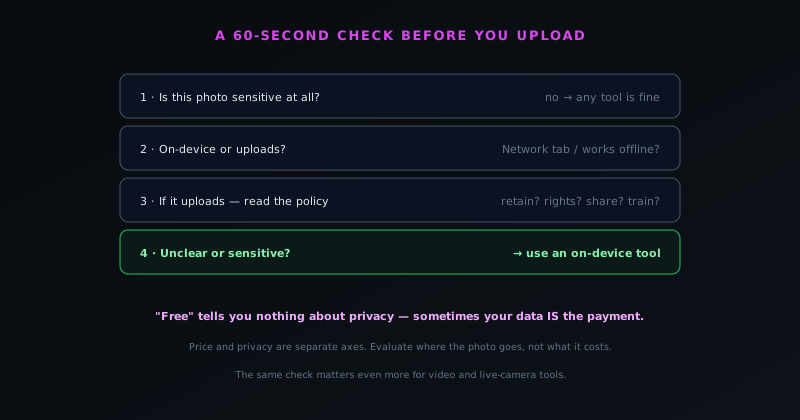
Before uploading any photo you would mind losing control of, a quick checklist prevents the regret of having uploaded something sensitive to a tool you did not vet. First, ask whether the photo is sensitive at all: if it is genuinely not, the checklist is moot and any reputable tool is fine. If it is sensitive, ask whether the tool processes on-device or uploads; if you cannot tell, check whether it works offline or run the Network-tab test. If it uploads, check the privacy policy for retention, rights, and sharing, and weigh whether you trust those for this photo. If anything is unclear or the policy is broad, default to an on-device tool that removes the question.
The shortcut version of the checklist is a single question: for this specific photo, do I want to make an unverifiable trust decision with a company I may not know? If the answer is no (because the photo is personal, confidential, or simply something you would rather keep private), use a tool that processes on your device so there is no trust decision to make. This habit costs almost nothing and prevents the common mistake of reflexively uploading a private photo to whatever editor came up first, without considering where it goes. AI photo editors are genuinely useful tools, and the goal of the checklist is not to avoid them but to use them wisely, matching the tool's architecture to the photo's sensitivity so that you get the benefit without the exposure.
Frequently asked questions
Quick answers to common questions about this topic.
Are AI photo editors safe to use?
It depends entirely on whether the editor processes your photo on its servers or on your device. Cloud tools upload your photo and are governed by a policy you cannot verify; on-device tools never upload it, so there is nothing to leak. Match the tool to how sensitive the photo is.
How do I know if a photo editor uploads my images?
Open your browser's developer tools, watch the Network tab, and process an image: an on-device tool downloads its model but makes no upload request. Tools that keep working offline are processing locally; tools that advertise "no upload" or "in your browser" are making a verifiable claim.
Is "we delete your uploads after processing" enough?
It is better than nothing but weaker than not uploading at all: it is a promise about a copy on a server you cannot verify, subject to backups, breaches, and policy changes. For genuinely sensitive photos, an on-device tool that never receives the image removes the question entirely.
What is the safest way to edit a personal photo with AI?
Use an on-device tool that processes in your browser, like the NSS Background Remover at https://bgremover.novusstreamsolutions.com. The photo never leaves your device, which you can confirm in the Network tab or by using it offline. Reserve cloud tools for non-sensitive images.
Related workflow
Product photo to a transparent image every channel accepts
One photograph, cut out once, then re-encoded for a storefront, a marketplace listing and a social post without redoing the cutout each time.
- Cut the background out and check the edgesNSS Background Remover: Hair, glass and drop shadows are where automatic cutouts fail. Fix them once, on the master, before anything downstream copies the mistake.
- Re-encode and resize per destinationNovus Convert: Transparency survives PNG and WebP and dies in JPEG. Convert validates the file it hands back, so a listing never rejects a silently broken upload.
Related troubleshooting
Was this page helpful?
Your answer stays in this browser, it is not sent anywhere and no account or cookie is involved.