2026 · Novus Stream Solutions (hub)About 12 min readNovus Stream Solutions
A simple CRM in a spreadsheet: the one-tab pipeline for a tiny operation
Before you pay for a CRM, a single spreadsheet tab can run your entire pipeline, if you design it around follow-up instead of record-keeping. Here are the columns that earn their space, the stages a tiny operation actually needs, the cadence that closes deals, and the honest signals it is time to graduate.
Contents
Overview
Every conversation that might turn into money for this business lives in one spreadsheet tab. Sponsor inquiries, partnership threads, a client weighing a second project, the supplier I am mid-negotiation with: each is a row, each row has a next action, and each next action has a date. There is no CRM subscription behind it, no onboarding videos, no fields I fill in because a product manager somewhere decided they were mandatory. The tab has outlived two paid tools I trialed and abandoned in the same years, and it has been the system of record for every deal this business has actually closed.
I am not against CRM software; I am against the sequence most small operators buy it in. The purchase usually happens at a moment of guilt (a warm lead went cold because nobody followed up), and the software gets bought as a promise to be more disciplined, the way a gym membership gets bought in January. But underneath every demo, a CRM is three humble things: a list of people, a note on where each one stands, and a decision about what happens next. Software automates those three things at volume. A tiny operation has no volume, so the automation overhead costs more attention than it saves, and the guilt survives the purchase intact.
So this is the system I actually run instead, in enough detail to copy this afternoon: the handful of columns that earn their space, the four stages that replace a sales department’s nine, the follow-up cadence that is the entire reason the sheet exists, the fifteen weekly minutes that keep it alive, the features I deliberately refuse to add, and the specific symptoms that mean you have genuinely outgrown it, plus why the sheet itself becomes your best asset when that migration day arrives.
Why a spreadsheet wins at this size
Start with the arithmetic that CRM marketing skips over. A tiny operation (one person, maybe a contractor in orbit) carries somewhere between ten and forty genuinely open conversations at any moment. Everything CRM software is impressive at solves problems that begin above that number: deduplicating thousands of contacts, routing inbound leads between reps, enforcing a process across a team, producing reports a manager can read without asking anyone a question. Strip out every feature that assumes a team and a lead flow, and what remains for a solo operator is a table with a sort order. You already own excellent table software, and it costs nothing.
The deeper argument is friction, because the best CRM is not the most capable one; it is the one that is actually up to date when you open it. A spreadsheet opens in two seconds from a pinned tab, accepts a one-line note without a save dialog, and never asks me to classify an interaction against a taxonomy I did not design. Every second of friction between “something happened with this lead” and “the sheet reflects it” is a second in which the update quietly does not happen, and stale data is how every CRM (paid or free, fancy or plain) actually dies. It is the same minimum-viable-system reasoning behind Bookkeeping before you need an accountant: minimum viable books for a small business: the version you maintain beats the version you admire.
There are two quieter dividends worth naming. The file is yours (no export ceiling, no per-seat pricing surprise waiting at renewal, no sunset announcement that strands your history), and building the system by hand forces you to understand your own sales motion before any vendor encodes someone else’s into your week. When you eventually do buy software, you will buy it knowing exactly which features map to work you already do and which are decoration, and that is the only position from which CRM shopping goes well.
Seven columns, and the discipline to stop there
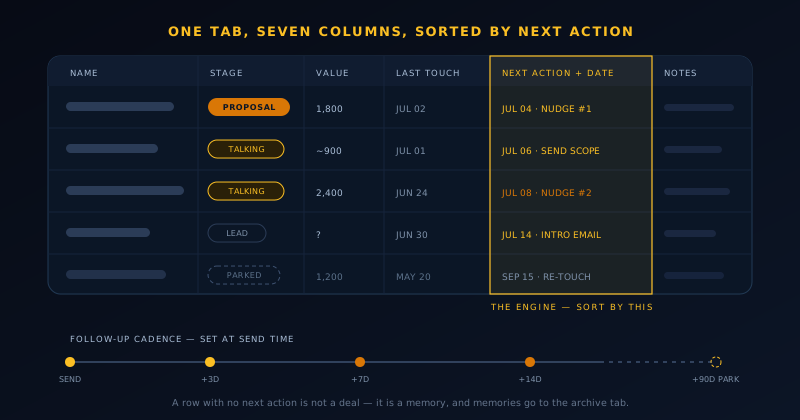
The design question for the sheet is not “what might I someday want to know about a contact”; that question produces the forty-column monster that gets abandoned by March. The right question is narrower: what does the Monday-morning version of me need in order to never let a warm conversation go cold? Answered honestly, it comes to seven columns: who they are, one phrase of context, the stage, a rough value, the date of the last touch, the next action, and the date that action is due. Every column past those is a small tax collected on every row, every week, forever, and the taxes are what kill these systems.
The engine of the whole machine is the next-action date. The sheet stays permanently sorted by it, which transforms it from an archive into a to-do list: open the tab and the top rows are simply what you owe people today. The corollary is the one rule I hold absolutely: every open row has a next action with a date, even when the action is “wait until the 14th, then nudge.” A row with no next action is not a deal; it is a memory, and memories belong in the archive tab, not the pipeline.
Notes get one cell and one convention: a dated line per touch, newest at the top, telegraphic. “Jul 2: sent proposal v2, trimmed scope” tells future-me everything I need at a glance; a paragraph would tell me less, slower. The habit that makes it work is appending the line at the moment something happens (before the email tab closes, not in a batch at the end of the day), and once it is automatic it costs about eight seconds per touch. Those eight seconds are the entire data-entry burden of the system.
- Name + context: who this is and one phrase on why the conversation exists.
- Stage: one of four dropdown values, never free-typed.
- Value: a rough number, even a guess; it sets priority when the week runs short.
- Last touch: the date anything last happened; staleness made visible.
- Next action + due date: the engine; the sheet stays sorted by this column.
- Notes: dated one-liners, newest first; the deal’s whole story in one cell.
Four stages, because you are not a sales department
Big-company pipelines carry seven or nine stages because stages are how work changes hands between people: marketing qualifies, sales develops, someone senior closes. Nothing changes hands in a company of one, so stages have exactly one job left: telling you what kind of attention a row needs this week. Four answers cover it. Lead: I know who they are and why we might fit, but they have not engaged. Talking: they have replied and we are working out shape and fit. Proposal: a concrete offer with a number is in their hands. Done: won or lost, with a one-line reason recorded either way.
Each stage earns its name from an entry condition based on the other party’s behavior, never on my optimism. A lead becomes Talking only when they respond; my enthusiasm does not promote anyone. Talking becomes Proposal only when a specific offer with a specific number has left my outbox, because “we should work together” energy can circle for months while dressed up as progress. And Done means done: the loss reason gets written in the moment (“budget froze,” “chose an agency,” “ghosted after v2”) because six months later that column of one-liners is the most instructive thing in the archive.
Implementation is a single dropdown. Data validation on the stage column (Google Sheets and Excel both set it up in under a minute) keeps the values clean enough to filter and count, and the count per stage is the entire pipeline report: four numbers I can read in five seconds and feel the shape of the next two months. When Proposal has sat at zero for two straight weeks, no dashboard needs to tell me what this week’s business-development priority is; the empty cell already did.
The cadence is the actual product
Here is the truth the sheet is built around: deals at this scale rarely die of rejection; they die of silence, and the silence is usually mine. Someone expresses interest, I reply well, they get busy, I get busy, and six weeks later the moment has quietly passed without anyone deciding anything. Then the awkwardness of the gap becomes its own barrier, because a follow-up after six silent weeks needs an apology attached, and messages that need apologies attached tend not to get sent at all. The follow-up cadence is the machine that makes that whole failure chain impossible, and every column described above exists to feed it. If you copy nothing else from this post, copy the cadence.
My default rhythm for an active conversation is three days, then seven, then fourteen: when a message goes unanswered, the nudges arrive on that widening schedule, each one shorter and lighter than the last. Proposals run tighter (two days, five, ten) because an offer is perishable in a way an introduction is not. The mechanical rule that makes any of this real: the next-action date gets set at send time, before the tab closes, in the same breath as the message itself. Deciding follow-ups one at a time, in the moment, is precisely how they fail to happen; it is the same batching logic that keeps the support queue humane in Customer support that doesn't eat your whole week.
After the third unanswered nudge, the row gets parked rather than deleted: the stage stays where it was, and the next action becomes a single re-touch ninety days out. Parking is the difference between persistence and pestering: the cadence widens to almost nothing, but the thread never falls off the edge of the world. Two of the better deals in this business closed on a second parking cycle, off a two-line “still doing this, still happy to talk” note. Timing changes on their side for reasons that have nothing to do with you, and the parked row is how you are still standing there when it does.
Fifteen minutes on Monday
The sheet is maintained in one fifteen-minute pass, and the pass lives inside the same Monday block as the rest of the weekly checklist; it slots naturally into the operating cadence laid out in A weekly operating rhythm for a solo operator, between the numbers and the inbox. Coffee, tab, sort by next-action date, top to bottom. That is the entire ceremony, and its smallness is the reason it has survived years of busy weeks that killed more ambitious systems. A pipeline ritual that needs an hour gets skipped in the exact weeks the pipeline matters most; one that needs fifteen minutes gets done even in launch week, and consistency beats thoroughness at this job by a wide margin.
The pass runs three sweeps. Overdue actions first: anything dated before today either gets done on the spot (most follow-ups are two-minute emails) or gets consciously re-dated with a reason added to the notes. Stale rows second: anything untouched for two weeks that is not parked gets a decision, because unexamined staleness is the rot that collapses these systems from the inside. Stage counts last: read the four numbers, and when the shape looks wrong (nothing in Proposal, everything bunched up in Lead), that observation graduates into the week’s priority.
The failure mode to watch for is the sheet degrading into an archive of good intentions, and it has one reliable tell: next-action dates drifting weeks into the past while fresh rows keep arriving at the top. The fix is never another column and never new software; it is a smaller pipeline. Kill the rows you are keeping out of politeness, park the ones that have stalled, and shrink the working set back to a number you can actually service. A short honest pipeline out-earns a long flattering one in every quarter I have measured.
Everything I refuse to add
No lead scoring: with twenty-five open rows I know who is warm without a formula pretending to know better than my own notes. No inbox integration: copying the one relevant line into the notes cell takes seconds and filters signal from thread-noise in the same motion. No dashboards beyond the four stage counts, because at small numbers a chart mostly decorates what a glance already said. Each of these features is genuinely valuable at volume; at this scale each is a maintenance liability wearing a feature costume, and the sheet stays alive by staying small.
The tab also refuses to become a contact database. It holds open conversations only; everything resolved moves to an archive tab with its outcome and one-line reason, and acquaintances who might matter someday live in ordinary contacts, not in the pipeline. This boundary is what keeps the working set at a size where fifteen minutes stays fifteen: the sheet answers “what do I owe people this week,” never “everyone I have ever met.” The moment it tries to answer both questions, it answers neither.
And no automation of the messages themselves. My follow-up templates live as email drafts I copy and personalize, not as sequences that fire unattended, because at this scale the hand-written two-liner visibly out-converts anything scheduled (recipients can tell, every time), and writing them by hand is how I keep learning which phrasings actually earn replies. Automation is for after the pattern is proven, not instead of proving it.
The graduation signals
The spreadsheet has a ceiling, and the honest way to find it is symptoms, not software marketing that makes you feel behind. The symptoms are specific. Follow-ups start slipping through even though the Monday ritual is genuinely happening: volume has beaten the format. A second person needs to work the pipeline alongside you, which turns “my tab” into a merge-conflict generator; the moment you bring in help along the lines of Hiring your first contractor or VA without losing quality, shared state and edit history start earning real software. The active set pushes past fifty rows and the scrolling itself becomes friction. Or you find yourself genuinely needing email history attached to records automatically, because the copying stopped being seconds.
Two of those symptoms at once, sustained for a month, is the trigger I would act on. One of them, occasionally, is not: every system has bad weeks, and migrating tools to escape a discipline problem just relocates the discipline problem somewhere with a subscription fee attached.
When you do move, the sheet turns out to be the best CRM implementation plan you could have written. Your stages are already defined and tested against reality, your seven fields map one-to-one onto any tool’s import template, and your dated notes carry over as history. Operators who go straight to software spend their first month configuring guesses; you will spend an afternoon importing facts. Pick the simplest tool that answers your actual symptom list (usually shared access and pipeline visibility) and ignore the tier with the AI forecasting.
What must survive the migration is not the file but the habits it trained: a next action on every open thread, dates set at send time, notes written in the moment, and a weekly pass that decides instead of admires. Software without those habits reproduces the cold-lead graveyard with nicer fonts. If you are starting from nothing, start the tab this afternoon (seven columns, four stages, your ten most recent conversations as the first rows) and let the first Monday pass teach you the rest.
Frequently asked questions
Quick answers to common questions about this topic.
Can a spreadsheet really work as a CRM?
At the scale of a tiny operation, yes, comfortably. A CRM is fundamentally a list of people, their current stage, and a dated next action, and a spreadsheet represents all three with less friction than most software. What paid CRMs add is automation and coordination at volume: deduplication across thousands of contacts, routing between reps, team-wide reporting. With ten to forty open conversations and one operator, those solve problems you do not have. The spreadsheet wins on the metric that decides everything: whether the system is actually up to date on Monday morning.
What columns should a spreadsheet CRM have?
Seven: name, one phrase of context, stage, rough value, last-touch date, next action, and the next action’s due date, plus a notes cell holding dated one-line entries, newest first. The load-bearing column is the next-action date; keep the sheet sorted by it and the pipeline reads as a to-do list rather than an archive. Resist adding more. Every extra column is a small tax on every row every week, and the forty-column sheet is the one that gets abandoned by spring. Anything you rarely act on belongs in notes, not in structure.
How many pipeline stages does a small business need?
Four covers a one-person operation: Lead (identified, not yet engaged), Talking (they have replied and you are shaping fit), Proposal (a concrete offer with a number is in their hands), and Done (won or lost, with a one-line reason recorded). Long stage lists exist to manage handoffs between people, and a solo pipeline has no handoffs. Give each stage an entry condition based on the other party’s behavior (a reply received, an offer sent) rather than your own optimism, and enforce the values with a dropdown so the weekly counts stay countable.
How often should I follow up with a lead?
On a widening schedule that is decided at send time, not improvised later. My default for active conversations is nudges at three, seven, and fourteen days of silence, each shorter and lighter than the last; outstanding proposals run tighter at two, five, and ten days, because offers are perishable. After a third unanswered nudge, park the row with a single re-touch scheduled roughly ninety days out instead of deleting it. Timing changes on the other side for reasons unrelated to you, and the parked follow-up is how you are still present when it does.
When should I switch from a spreadsheet to real CRM software?
Move on symptoms, not ambition. The reliable ones: follow-ups slipping through even though your weekly maintenance genuinely happens; a second person needing to work the pipeline, which makes shared state and permissions actually useful; a sustained active set beyond roughly fifty rows; or a real need for email history attached to records automatically. Two symptoms at once, sustained for a month, justifies migrating. When you do, the spreadsheet becomes your import file and your configuration spec (stages and fields already tested against reality), which makes the switch an afternoon instead of a project.
Related troubleshooting
Was this page helpful?
Your answer stays in this browser, it is not sent anywhere and no account or cookie is involved.