NSS Background Remover
How to virtually stage real estate photos with furniture placement
Stage an empty room photo with drag-and-drop furniture, switch to 3D to refine placement with the gizmo, ground every piece with soft contact shadows, and record a 360° orbit — all in the browser, with no upload.
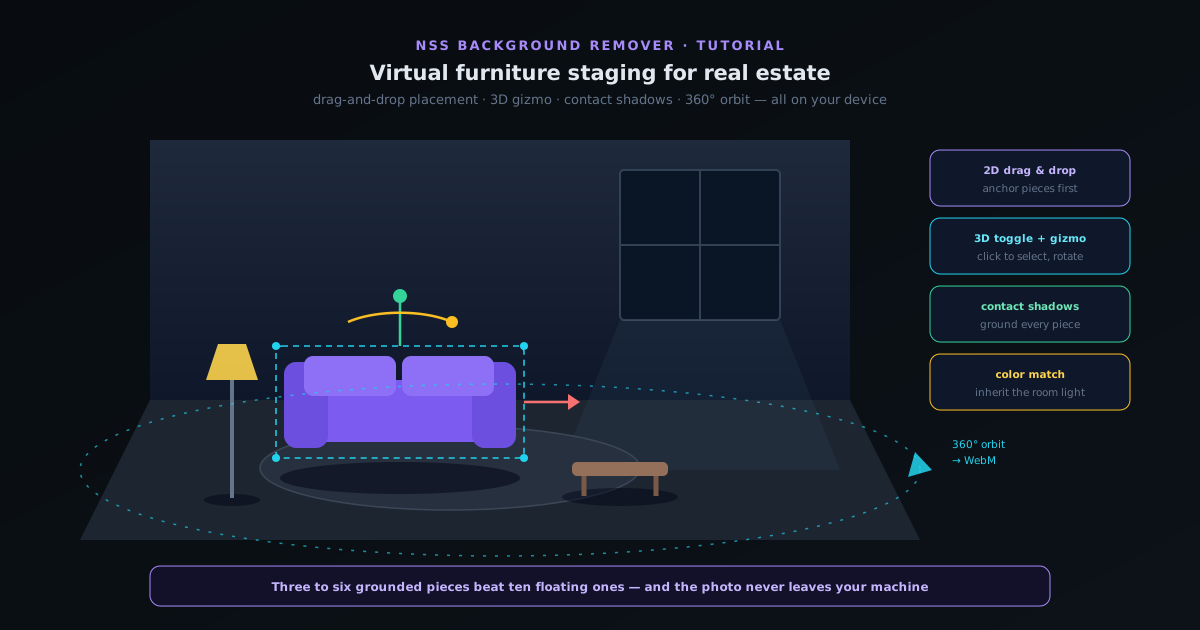
Professionally staged listing photos sell properties faster, but physical staging costs thousands per listing. The virtual staging tool in NSS Background Remover does the digital version in your browser: load a photo of an empty room, place furniture from the built-in pieces, and refine until the room reads as lived-in. Because everything runs on your device, the listing photos never leave your machine — relevant when the property is not yet on the market.
The tool works in two modes that you will move between freely: a 2D drag-and-drop mode for fast placement, and a 3D toggle that adds perspective-aware control with a click-to-select gizmo. Soft contact shadows ground each piece so it sits in the room instead of floating on top of the photo, and when the scene is done you can export stills or record a 360° orbit of the staged room as a WebM. This tutorial walks the full flow from empty room to finished staging.
Two ways to finish
Quick 2D staging
Stay in 2D drag-and-drop mode, place a few pieces, add contact shadows, and export a still. Fastest path to a usable staged photo for a listing.
Full 3D staging with orbit
Toggle 3D, refine placement and rotation with the gizmo, tune shadows per piece, and record a 360° orbit WebM for a richer listing or social post.
- 1
1. Start from the right room photo
Staging quality is decided largely by the source photo. Use a shot of the empty room taken from a natural eye-level corner angle — the kind of wide shot a listing would lead with. Good, even lighting matters more than resolution: the furniture pieces will be matched to the room's light, and a room with blown-out windows or heavy color casts gives the matcher less to work with.
Open the staging tool from the editor and load the room photo. It stays on your device — the tool runs entirely in the browser, so unlisted properties remain private.
- Eye-level corner angle reads most naturally when furnished.
- Even lighting helps furniture blend; avoid blown-out windows.
- The photo is processed locally — nothing uploads.
- 2
2. Place furniture in 2D drag-and-drop mode
The default mode is 2D placement: drag furniture pieces into the room and position them directly. Work the way a physical stager would — anchor pieces first (sofa, bed, dining table), then secondary pieces (rug, coffee table, chairs), then accents (lamps, plants, art). Each piece can be scaled and flipped to fit the room's perspective.
Resist the urge to fill the room. Listing photos stage three to six pieces per room; the goal is to suggest scale and purpose, not to decorate. A sofa, rug, and floor lamp tell a buyer how the living room works — ten items tell them the photo is fake.
- Anchor pieces first, then secondary, then one or two accents.
- Scale and flip each piece to match the room's perspective.
- Three to six pieces per room — staging suggests, it does not decorate.
- 3
3. Toggle 3D and refine with the gizmo
Flip the 3D toggle and the scene becomes perspective-aware. Click any piece to select it and a gizmo appears — the handle set for moving, rotating, and scaling the piece in three dimensions. This is where placement goes from "pasted on" to "sitting in the room": rotate the sofa a few degrees to match the wall line, push the rug back so it sits under the coffee table, nudge the floor lamp into the corner's depth.
The gizmo's click-to-select model means you can work piece by piece without disturbing the rest of the scene. Small rotations matter most — furniture that is even slightly misaligned with the room's perspective lines is what makes virtual staging look virtual.
- Click a piece to select it; the gizmo handles move, rotate, and scale.
- Match each piece's rotation to the room's perspective lines.
- Work piece by piece — selection isolates your edits.
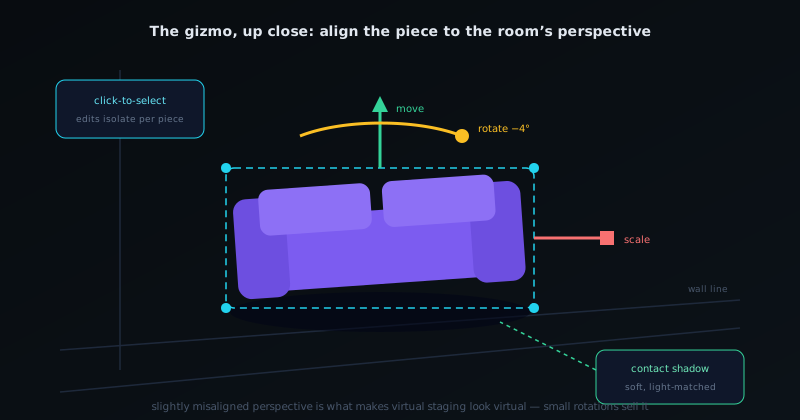
The click-to-select gizmo refines each piece in 3D — small rotations against the room's perspective lines sell the illusion. - 4
4. Ground every piece with soft contact shadows
Furniture without shadows floats. The staging tool adds soft contact shadows under each piece — the diffuse darkening where an object meets the floor that your eye expects without knowing it. Enable them per piece and tune the softness to match the room's light: hard daylight from a window means tighter shadows, ambient interior light means softer, wider ones.
Check the room's existing shadows for direction. If the window light falls left-to-right, the contact shadows should sit slightly right of each piece. This thirty-second check is the difference between staging that survives scrutiny and staging a buyer's eye flags as off.
- Contact shadows ground pieces; without them furniture floats.
- Match shadow softness to the room's light quality.
- Match shadow direction to the room's existing shadows.
- 5
5. Match color and light to the room
Use the color matching controls to pull each piece toward the room's palette and exposure. A sofa shot under studio light will read too bright in a dim north-facing room; the matcher adjusts the piece's tone so it inherits the room's grade. Subtle is correct here — you are matching temperature and brightness, not repainting the furniture.
When the scene passes your own squint test (squint at the photo: does anything jump out as pasted?), it is done. Over-editing past that point usually makes staging worse, not better.
- Match each piece's tone and exposure to the room.
- The squint test: nothing should jump out as pasted.
- 6
6. Export stills — or record a 360° orbit
For listing photos, export the staged scene as a still in the format your listing platform wants. For richer media, the staging tool can record a 360° orbit of the staged room as a WebM — the camera circles the scene, which makes a striking social post or listing supplement that static staging cannot match.
Stage each key room (living room, primary bedroom, dining) as its own scene. Save the project as you go so a furniture swap after feedback is a reopen-and-nudge, not a rebuild.
- Stills for the listing; 360° orbit WebM for social and supplements.
- Stage key rooms individually; save the project for cheap revisions.
Disclose virtual staging — and stage less than you think
Most listing platforms and many jurisdictions require disclosing virtually staged photos, and honest disclosure also protects buyer trust at the showing. On the craft side, the two most common mistakes are over-furnishing and ignoring shadow direction. Three well-placed, well-grounded pieces beat ten floating ones every time — staging exists to help a buyer read the room's scale and purpose, and it only needs to do that one job.
Go deeper
- Lifestyle compositing with scene templatesThe sibling tool — placing products into ready-made scenes instead of furniture into rooms.
- Replace and match a backgroundThe same color-matching instincts, applied to swapped backgrounds.
- 3D preview & depth reliefMore of the editor's 3D toolset, including orbit recording.