2026 · Novus Stream Solutions (hub)About 11 min readNovus Stream Solutions
Webhooks explained for people who don't write code
Webhooks power a huge share of the "when this happens, do that" automations small businesses run, and the word sounds far more technical than the idea is. A webhook is simply one app sending a short message to another the moment something happens, and once that clicks, a lot of no-code automation stops feeling like magic and starts feeling like plumbing you can reason about.
Contents
- 1.Overview
- 2.The one-sentence version: a postcard, not a phone call
- 3.Webhooks versus polling, and why it matters
- 4.What's actually inside a webhook
- 5.Connecting two tools without writing code
- 6.Reliability: webhooks can arrive twice, or not at all
- 7.Security: make sure the postcard is really from who it says
- 8.When to reach for a webhook, and when not to
Overview
If you have ever set up an automation that sends you a message when someone fills in a form, adds a row to a spreadsheet when a payment comes in, or posts to a channel when a new order arrives, there is a good chance a webhook was doing the quiet work in the middle. The word sounds intimidating (it has "hook" in it and lives in developer documentation), but the concept underneath is genuinely simple, and you do not need to write code to use it. A webhook is just one app telling another that something happened, the instant it happens, by sending it a small message. That is the whole idea, and once it clicks, a large swathe of no-code automation stops looking like magic and starts looking like plumbing you can actually reason about.
This article is the plain-English version for people who run a business rather than build the software. We will start with an analogy that makes the mechanism obvious, contrast webhooks with the older "keep asking" approach so you understand why they exist, open up a webhook message to see the unremarkable contents, walk through how you connect two tools without touching code, and finish with the small handful of reliability and security details that separate an automation that keeps working from one that silently breaks. By the end, "set up a webhook" should sound about as scary as "give them your address so they can post you a letter."
The one-sentence version: a postcard, not a phone call
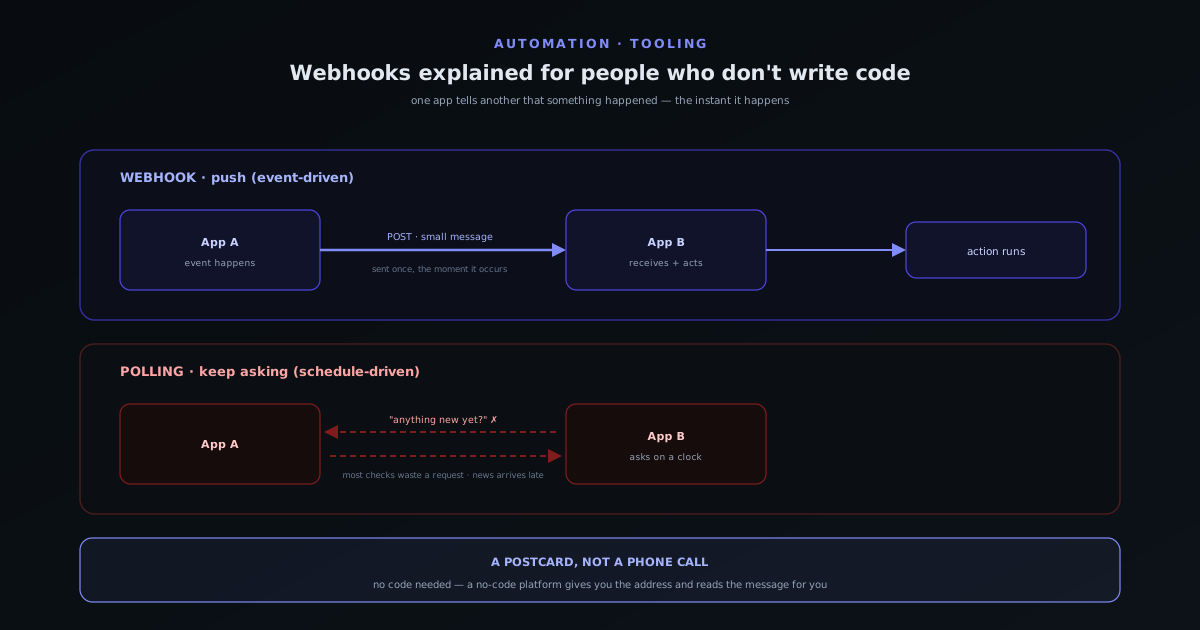
Here is the analogy to keep in your head. Imagine you are waiting to hear when a parcel ships. One option is to phone the warehouse every ten minutes and ask "has it shipped yet?" Most of those calls are wasted, you might still miss the moment by ten minutes, and if you forget to call you never find out. The other option is to give the warehouse your address and ask them to post you a card the moment it ships. Now you make no calls at all, you hear the instant it happens, and the warehouse does the small work of sending one card. A webhook is the postcard: instead of one app constantly asking another for news, the app where the event happens sends a short message to wherever you tell it, exactly when there is something to report.
That inversion (the source of the event does the telling, rather than the interested party doing the asking) is the entire significance of webhooks, and it is why they are sometimes called "reverse APIs." A normal request is you asking an app a question and getting an answer. A webhook is the app volunteering an answer you did not have to ask for, because you registered your interest ahead of time. Everything else is detail. If you understand the postcard, you understand webhooks; the rest of this article is just filling in what is written on the card and how to make sure it arrives.
Webhooks versus polling, and why it matters
The "phone the warehouse every ten minutes" approach has a real name (polling), and it is the alternative webhooks replaced for most uses. Polling means one app repeatedly asks another, on a fixed schedule, whether anything has changed. It works, and sometimes it is the only option, but it has two stubborn weaknesses. It is wasteful, because the overwhelming majority of those checks come back with "nothing new," yet each one still costs a request and a little time on both ends. And it is laggy, because you only find out as often as you ask: poll every fifteen minutes and your "instant" notification is, on average, seven and a half minutes late, with the gap widening if you poll less often to cut the waste.
Webhooks fix both problems at once because they are event-driven rather than schedule-driven. There are no wasted checks, since a message is only sent when something actually happened, and there is essentially no lag, since the message goes out at the moment of the event rather than at the next scheduled check. For a small operation this is the difference between an automation that feels alive (the order arrives and the notification is already there) and one that feels sluggish and chatty. The trade-off is that webhooks put the timing in the sender’s hands, so you react to their schedule rather than yours; for the common case of "do something the instant X happens," that is exactly what you want, and the rare case where you genuinely need to run on your own clock is what scheduling and queues are for.
What's actually inside a webhook
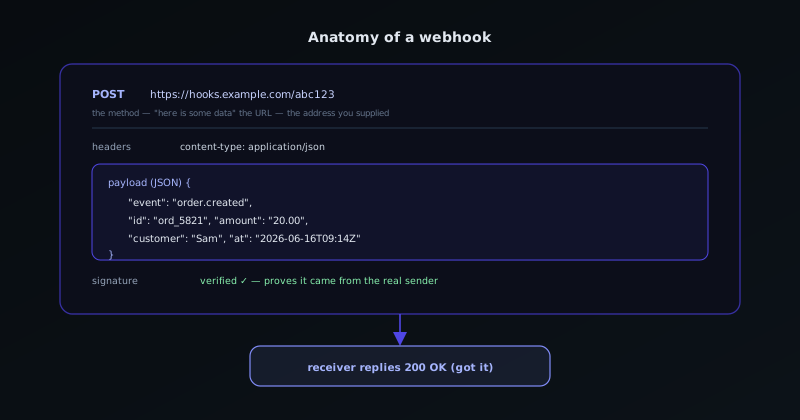
Demystifying the contents helps the last of the fear fall away, because a webhook message is mundane. Technically it is an HTTP request (the same kind of message your browser sends when it loads a page) of the type called POST, which is simply the verb used for "here is some data for you." It is aimed at a URL, which is nothing more than the address you gave the sender: a web address that belongs to the receiving app and means "deliver messages about this event here." And it carries a payload, which is a short bundle of text describing what happened (who, what, when) almost always written in a tidy, readable format called JSON that looks like a labelled list of fields and values.
So a webhook for a new order might be a POST sent to your automation tool’s address, carrying a payload that says, in effect, order number such-and-such, this customer, this amount, this timestamp. The receiving app reads those labelled fields and uses them: dropping the amount into a spreadsheet cell, putting the customer’s name in a message, and so on. There is nothing more exotic going on than a structured note being handed from one app to another. When a platform asks you to "paste your webhook URL," it is asking for the address the postcard should be mailed to; when it shows you a "sample payload," it is showing you what the note will say so you know which fields you can use.
- The address (URL): where the message is sent, supplied by the receiving app, pasted into the sending app.
- The method (POST): the kind of HTTP request that means "here is some data," the same machinery your browser already uses.
- The payload (usually JSON): a short, labelled bundle of text describing what happened, the fields your automation reads and acts on.
- A signature or secret (often): a small proof that the message genuinely came from who it claims to, covered below.
Connecting two tools without writing code
In practice you rarely handle webhooks raw; you connect two tools through a no-code automation platform that speaks webhook on your behalf, and the pattern is almost always the same three steps. First, you create an automation that starts with a webhook trigger, and the platform hands you a unique URL: your postcard address. Second, you go into the app where the event happens and tell it to send a webhook to that URL when the thing you care about occurs, which is usually a matter of pasting the address into a settings field and choosing the event. Third, you trigger the event once for real so a sample message arrives, and the platform shows you the fields inside it, which you then map to the action you want: a spreadsheet row, a notification, an email.
That is genuinely the whole workflow for a vast number of useful automations: a form submission that becomes a task, a payment that becomes a logged sale and a thank-you message, a new subscriber that becomes a row in your list and a welcome note. The no-code platform absorbs all the technical handling (receiving the POST, parsing the JSON, retrying if something hiccups) and leaves you with a friendly "when this, do that" interface. Understanding what is happening underneath does not change the clicks, but it makes you far better at the work: when a field is missing or a step does not fire, you know it is a postcard with the wrong information on it or sent to the wrong address, and you know where to look.
Reliability: webhooks can arrive twice, or not at all
Webhooks are simple but not magic, and two facts about them explain most of the trouble people hit. The first is that delivery is not guaranteed to be exactly once. A network hiccup can mean a message is delayed or lost, so well-behaved senders retry, which means the same webhook can arrive twice, or several times. If your automation reacts to each arrival blindly, a retried "new order" webhook could log the sale twice or send two confirmation emails. The protection is to make your automations safe to re-run, usually by recognising a unique identifier in the payload and ignoring a message you have already processed; this is the idea of idempotency, and it is worth understanding for any automation that touches money or messages.
The second fact is that a webhook can fail to do its job without anything obviously breaking. If the receiving end is briefly down, misconfigured, or the sender stops for some reason, messages can be missed, and because nobody is actively asking, the silence looks exactly like "nothing happened." This is the quiet failure mode that makes people distrust automation: the orders kept coming but the notifications stopped, and no one noticed for a week. The defence is to build in a way to find out: basic error handling and an alert when a step fails, so a broken automation tells on itself instead of failing in silence. These two habits, safe re-runs and failure alerts, turn webhooks from "works until it mysteriously doesn’t" into something you can actually rely on.
Security: make sure the postcard is really from who it says
There is one security wrinkle worth understanding even as a non-developer, because the convenience of webhooks has a flip side. Your webhook URL is an open address: anything that knows it can send a message to it, and a receiving automation that trusts every message it gets could be fooled by a fake one: a forged "payment received" that triggers a real fulfilment, say. This is not a reason to avoid webhooks; it is a reason to use the verification that good senders provide. Most platforms that send important webhooks include a signature, a short code computed from the message and a shared secret that only you and the sender know, which lets the receiver confirm the message genuinely came from the real source and was not tampered with in transit.
For the no-code user this usually means flipping on a "verify signature" option and pasting in a signing secret the sending app gives you, and the platform does the cryptographic checking for you. The mental model to keep is the one from the analogy: a signature is a seal on the postcard that proves it came from the real warehouse and not from someone who happened to learn your address. You do not need to understand the maths to benefit from it; you need to know that it exists, that you should turn it on for any webhook that triggers something consequential, and that treating a webhook’s contents as automatically trustworthy is the one habit to avoid. With verification on, safe re-runs in place, and a failure alert watching, a webhook-driven automation is about as dependable as small-team plumbing gets.
When to reach for a webhook, and when not to
Knowing the mechanism is most useful when it helps you choose the right tool for a job, and the rule of thumb is pleasingly clear. Reach for a webhook whenever the task is "do something the moment a specific event happens in another app" and that app can send webhooks: a new order, a form submission, a payment, a sign-up, a status change. That is the situation webhooks were built for, and they will be faster, cleaner, and less wasteful than any polling alternative. The instant, event-driven nature is the whole value, so let the sending app push to you rather than building a habit of asking it for news.
Reach for something else when the trigger is not really an event but a time ("every morning," "at the end of the month," "once a week") because that is a schedule, not a webhook, and the right pattern is a scheduled run. Likewise, if the source app simply cannot send webhooks, then polling, for all its waste, may be your only route and is a perfectly legitimate fallback. The point of understanding webhooks is not to use them for everything but to recognise the shape of the problem they solve, so that when you set up your next automation you choose deliberately between "react to an event" and "run on a clock" instead of forcing every job into whichever one you happen to know. With that distinction in hand, the word "webhook" should now read as exactly what it is: a postcard, sent the moment something happens, to an address you chose.
Frequently asked questions
Quick answers to common questions about this topic.
What is a webhook in simple terms?
A webhook is one app sending a short message to another the moment something happens, like a warehouse posting you a card when your parcel ships instead of you phoning to ask. Technically it is a small POST request to a URL you supplied, carrying a bundle of text (usually JSON) that describes the event. The receiving app reads that message and acts on it.
What is the difference between a webhook and polling?
Polling is one app repeatedly asking another, on a schedule, whether anything has changed: wasteful and laggy because most checks find nothing and you only learn as often as you ask. A webhook is event-driven: the source app sends a message only when something actually happens, so there are no wasted checks and almost no delay. Use webhooks to react to events and scheduling to run on a clock.
Do I need to know how to code to use webhooks?
No. No-code automation platforms handle the technical side for you: they give you a webhook URL to paste into the sending app, receive and parse the message, and let you map its fields to an action through a "when this, do that" interface. Understanding what a webhook is makes you better at troubleshooting, but using one is mostly pasting an address and choosing an event.
Why did my webhook automation fire twice?
Because webhook delivery is not guaranteed to be exactly once: senders retry after network hiccups, so the same message can arrive more than once. Make automations safe to re-run by recognising a unique identifier in the payload and ignoring a message you have already processed. That idempotency is essential for anything that touches money or sends messages.
Are webhooks secure?
A webhook URL is an open address, so a receiver that trusts every message could be fooled by a forged one. Good senders include a signature (a code computed from the message and a shared secret) that lets the receiver confirm the message is genuine. Turn on signature verification for any webhook that triggers something consequential, and never treat a webhook’s contents as automatically trustworthy.
Related troubleshooting
Was this page helpful?
Your answer stays in this browser, it is not sent anywhere and no account or cookie is involved.