2026 · Novus Stream Solutions (hub)About 14 min readNovus Stream Solutions
Choosing a payment processor and cutting checkout abandonment
Two linked decisions decide how much of your traffic turns into money: the processor you run sales through and the checkout you ask people to complete. This walks through fee anatomy, payout timing, account holds, and the concrete fixes for the leaks that send buyers away at the last step.
Contents
- 1.Overview
- 2.The fee anatomy nobody explains clearly
- 3.When the money actually lands
- 4.The methods and wallets your customers expect
- 5.Native integration beats bolting things on
- 6.The risk nobody warns new stores about: holds and freezes
- 7.Part two: where ready buyers leak away
- 8.Surprise costs and forced accounts
- 9.Long forms, missing methods, and shaky trust
- 10.Make mobile a one-thumb job
Overview
There are two decisions that quietly determine how much of your hard-won traffic actually turns into money, and most small store owners only think hard about one of them. The first is which payment processor you run your sales through. The second is what your checkout asks people to do once they have decided to buy. These are linked. A great processor cannot save a checkout that surprises people with fees at the last step, and a frictionless checkout still bleeds margin if your processor takes a fee shape that punishes your particular basket size. You spent real time and money getting a person to the point of pulling out a card. Treating the last few clicks as an afterthought is the most expensive habit a small store can have, because the cost is invisible. Nobody emails to tell you they abandoned.
This guide walks both decisions in plain terms. Part one is choosing a processor: how fees are actually built, when the money lands in your account, which payment methods you need to offer, and the under-discussed risk of account holds and freezes that catches new stores off guard. Part two is cutting checkout abandonment: the handful of causes that account for most lost sales, and the concrete fix for each one. We keep fraud and chargebacks light here because they deserve their own treatment, which lives in our piece on refunds, guarantees, and chargebacks. The goal is that by the end you can look at your own numbers and your own checkout and know where the next dollar is hiding.
The fee anatomy nobody explains clearly
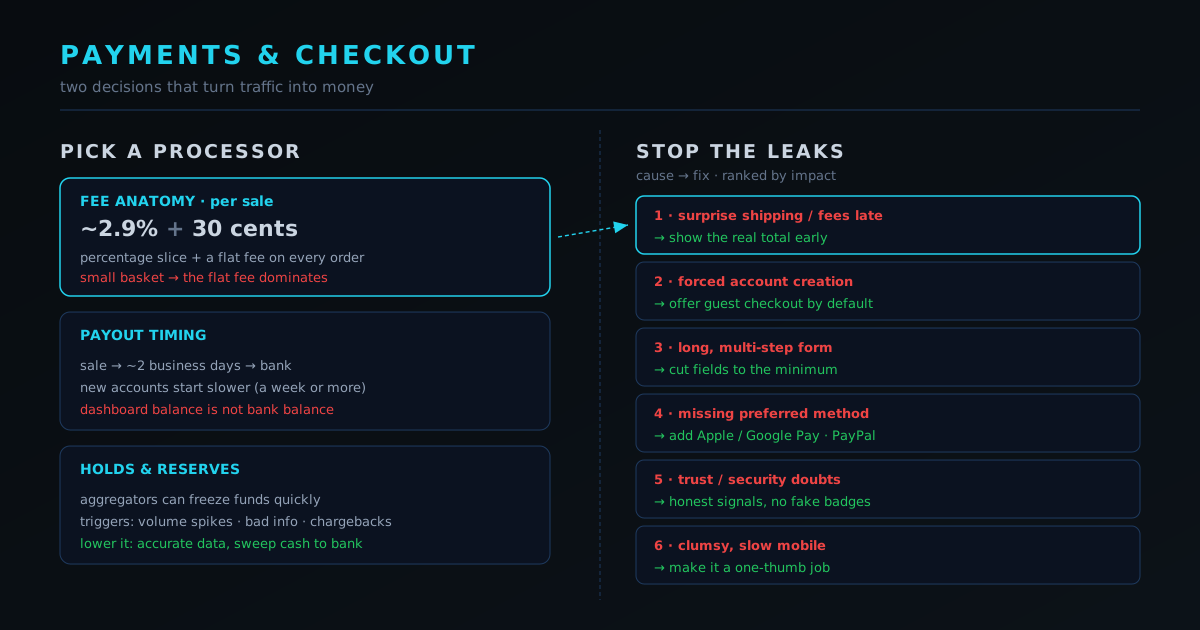
Almost every processor charges you in two parts: a percentage of the sale plus a small fixed fee per transaction. The shape most people have seen is roughly 2.9 percent plus 30 cents, though the exact numbers move around by region and provider. The percentage feels like the scary part, but for a small store the fixed fee is usually what hurts. Consider a 5 dollar digital product. The percentage takes about 15 cents, but the flat 30 cents on top means you are paying roughly 9 percent all in, not 2.9. On a 120 dollar order that same flat fee is rounding error. This is why fixed fees punish small baskets, and why the single most useful thing you can do is calculate your real effective rate at your actual average order value, not the headline number on the pricing page.
The headline rate also assumes a domestic card in your own currency. International and cross-border cards usually cost more, often an extra 1 to 1.5 percent, and currency conversion adds another layer on top of that if you sell in one currency and your buyer pays in another. If a meaningful share of your customers are overseas, model the blended rate, not the domestic one. None of this means you should obsess over a tenth of a percent. It means you should know your numbers well enough that the fee structure is a deliberate choice rather than a surprise you discover at the end of the month when your payout is smaller than your sales suggested it would be.
- Percentage fee: a slice of every sale, commonly in the 2.6 to 3.0 percent range for domestic cards.
- Fixed fee: a flat amount per transaction, often around 30 cents, which dominates the cost on small baskets.
- Cross-border surcharge: typically an extra 1 to 1.5 percent when the card was issued in another country.
- Currency conversion: a further markup, often around 1 to 2 percent, when you sell and settle in different currencies.
- Effective rate: the only number that matters, calculated as total fees divided by total sales at your real average order value.
When the money actually lands
A sale is not cash until it clears into your bank account, and the gap between those two moments is payout timing. Many modern processors pay out on a rolling schedule, often two business days after the sale, though new accounts frequently start on a longer delay of a week or more while the processor builds confidence in you. Some processors offer instant or same-day payouts for an extra fee. For a one-person store this timing is not an accounting detail, it is your working capital. If you are reordering inventory or paying a contractor, the difference between money landing in two days versus seven changes what you can actually do this week.
The trap is assuming your dashboard balance is your bank balance. A store can show strong sales while the operator is quietly short on cash because three days of revenue is still in transit. Before you commit to a processor, find the exact payout schedule for new accounts, not the schedule for established ones, and assume you will be on the slower track for the first few months. Then look at whether weekends and holidays stretch that window, because two business days across a long weekend can mean five calendar days. If your model is thin on cash, like a pre-order run where you have promised to ship by a date, payout timing can matter more than a small difference in percentage fees.
The methods and wallets your customers expect
Every payment method you do not offer is a quiet exit for some slice of buyers. The baseline is major credit and debit cards, but the bigger wins now come from digital wallets. Apple Pay and Google Pay let a returning buyer confirm with a fingerprint or face instead of typing a sixteen-digit number on a phone keyboard, and that single change can lift mobile conversion noticeably because it removes the most painful part of mobile checkout. PayPal carries similar weight for a different reason: a lot of people already have an account and trust it, so a PayPal button can convert a hesitant first-time buyer who is not ready to hand their card to a store they have never heard of.
Beyond those, the right set depends on where your customers are. Some regions have dominant local methods that a domestic buyer expects as a matter of course, and missing them feels to that buyer like your store is not really meant for them. You do not need every method on earth. You need the ones your actual audience reaches for, which you can learn from where your traffic comes from and, over time, from the carts that fail at the payment step. The honest tradeoff is that more methods mean a slightly more complex checkout and sometimes slightly different fees per method, so add the ones that clearly serve your buyers and resist the urge to bolt on options nobody asked for.
Native integration beats bolting things on
How a processor connects to your store matters as much as its rate card. When a processor is native to your platform, the checkout is a single seamless flow that lives on your own domain, the styling matches your store, and wallets and saved cards just work. When it is bolted on through a redirect, the buyer is often bounced to a different-looking page on another domain, which is a moment where trust wobbles and some people simply stop. The smoothness of that handoff is a real conversion factor, not a cosmetic one, and it is easy to underestimate until you watch the drop-off at the exact step where the redirect happens.
This is also where your platform choice and your processor choice collide, which is why we treat them together. A hosted platform usually has one or two processors that are deeply native and everything else as a second-class add-on. An open-source or headless setup gives you more freedom but puts the integration work on you. Before you fall in love with a processor for its rate, confirm it integrates cleanly with the store you actually run, supports the wallets you need inside that integration, and does not force a jarring redirect. A slightly higher fee on a native, on-domain checkout often beats a cheaper processor that sends your buyer somewhere that feels like leaving your store.
There is also a maintenance angle that small operators feel acutely. A native integration is maintained by the platform, so when a card network changes a rule or a wallet updates its requirements, the fix arrives in an update you did not have to build. A bolted-on integration, especially a custom one on a headless stack, is yours to keep working, which is fine if you have the time and goes badly the week it breaks and you are also trying to ship orders. For a one-person business, choosing the boring, well-supported, native path is usually the right call even when a cheaper or more exotic option exists on paper, because the cost of an integration you have to babysit is paid in the currency you have least of, which is your own attention.
The risk nobody warns new stores about: holds and freezes
Most popular processors are aggregators, which means they onboard you instantly without the slow underwriting a traditional merchant account would require. The convenience has a cost that rarely shows up until it bites: because they took you on quickly, they reserve the right to hold funds or freeze an account quickly too, especially for newer stores that suddenly look unusual. A reserve is when the processor holds back a percentage of your sales for a period as a cushion against refunds and chargebacks. A freeze is more abrupt and can lock your money for days or weeks while they review the account. Neither is common, but both are devastating to a small operator who needs that cash to ship orders.
You cannot eliminate this risk, but you can lower the odds of triggering it. Give accurate, complete business information at signup and keep it current, because mismatches between what you registered and what you actually sell are a classic flag. Avoid sudden volume spikes that look suspicious to an automated system, which is genuinely hard during a launch or a viral moment, so warn the processor in advance if you expect one. Keep your chargeback rate low by describing products honestly and answering customers fast, which ties directly into the refunds and chargebacks material. And do not keep your only float inside the processor: move money to your bank on a sensible cadence so a freeze inconveniences you rather than stopping you.
Part two: where ready buyers leak away
Now the second decision. By the time someone reaches your checkout they have already done the hard part: they want the thing. Abandonment at this stage is rarely about price, because they saw the price before they added to cart. It is almost always about friction and surprise. Industry estimates for the share of started checkouts that are abandoned run high, often quoted somewhere around two thirds, and while your number will differ, the lesson holds: the gap between added to cart and order placed is the single richest place to find lost revenue in a small store. You are not trying to convince these people. You are trying to stop getting in their way.
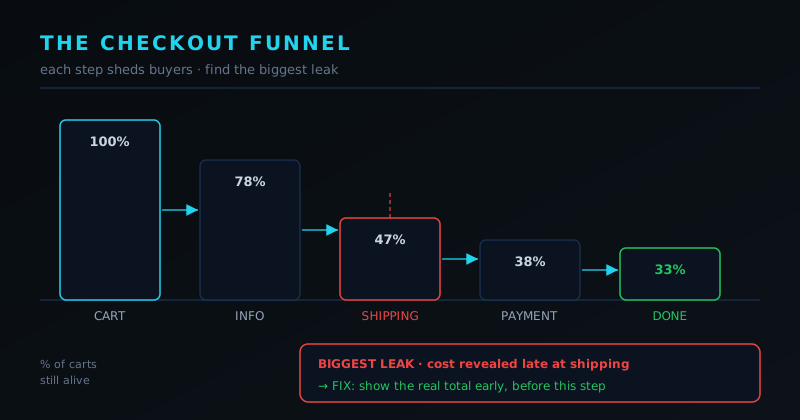
The causes cluster into a short, predictable list, and the encouraging part is that each has a concrete fix you control. Unexpected cost revealed late, forced account creation, an overlong form, a missing preferred payment method, doubts about security or trust, and a clumsy mobile experience account for the large majority of abandoned checkouts. The next sections take them one at a time. None of the fixes require a developer for most stores, and several are simply turning on a setting your platform already offers. The work is noticing which leak is yours, which the funnel view in the image above and your own checkout analytics will tell you faster than any guess.
Surprise costs and forced accounts
The biggest single cause of abandonment is cost that appears late. A buyer carries a number in their head from the product page, and when shipping, handling, or fees push the total well above that number at the final step, they feel ambushed and they leave, often without consciously deciding to. The fix is to show the real total as early as you honestly can. Put shipping estimates on the product or cart page, offer a clear threshold for free shipping if you have one, and never hold back a mandatory fee until the last screen. People will accept a higher honest total far more readily than a lower number that grows on them. The emotion you are avoiding is the feeling of being tricked, which also poisons trust for any future purchase.
The second cause is forcing people to create an account before they can pay. A first-time buyer does not want a relationship yet, they want the product, and a mandatory signup wall reads as a chore and a privacy cost in exchange for nothing. Offer guest checkout as the default path and let people opt into an account afterward, when you can offer them a real reason like order tracking or faster future checkout. You still capture the email at the payment step, so you lose almost nothing by dropping the wall, and you stop turning away the exact buyers who were ready to pay right now. If your platform buries guest checkout in settings, turn it on today.
Long forms, missing methods, and shaky trust
A checkout form that asks for more than it needs is a slow leak. Every extra field is a small decision and a chance to give up, especially on a phone. Cut the form to the genuine minimum: you do not need a separate billing address if it usually matches shipping, you do not need a company field for consumer sales, and you do not need a phone number unless the carrier truly requires it. Use a single full-name field rather than splitting it, autofill from the postal code where you can, and default the country to the buyer's likely location. The missing-method problem from part one shows up here too: if a buyer's preferred wallet is not on the page, they may simply close it rather than dig out a card, so the wallets you added earlier are doing quiet work at this exact moment.
Trust is the quieter cause and the easiest to address honestly. A buyer about to enter card details on an unfamiliar store is scanning for reasons to feel safe, and small honest signals help: a visible padlock and a real, secure checkout, a clear return policy linked right there, recognizable payment logos, and a way to reach a human. The word honest matters. Do not paste fake security badges or invent reviews, because savvy buyers smell it and it backfires, and we cover the manipulative version of this in our piece on landing pages that convert without dark patterns. The goal is to reassure people who have a legitimate reason to hesitate, not to manufacture confidence you have not earned. Genuine signals compound; fake ones eventually cost you.
Make mobile a one-thumb job
A large share of your buyers are on a phone, often one-handed, sometimes on a patchy connection, and a checkout designed on a wide desktop monitor can be quietly hostile to all of them. The test is simple: can someone complete the whole purchase with one thumb, without pinching to zoom, without the keyboard covering the field they are typing in, and without waiting on a slow page that makes them wonder if it broke. Tap targets should be large, the numeric keypad should appear for number fields, and the wallets should sit near the top so a returning buyer can pay in two taps before they ever reach the form. Speed is part of this: a checkout that takes several seconds to load on mobile data loses people who assume something went wrong.
The thread running through every fix in part two is the same: do not surprise people, and do not make them work harder than the purchase is worth to them. Show the total early, drop the signup wall, trim the form, offer the methods they expect, prove you are safe without lying about it, and make the phone experience effortless. Each fix is small on its own, but they stack, and because you already paid to bring these buyers here, recovered abandonment is close to pure margin. Choosing the right processor protects the money on the way out; fixing the checkout protects the sale on the way in. Get both right and far more of your traffic quietly becomes revenue without you spending another dollar on ads.
Frequently asked questions
Quick answers to common questions about this topic.
Is a lower percentage fee always the better deal?
No. The fixed per-transaction fee, often around 30 cents, dominates the cost on small baskets, so a processor with a slightly higher percentage but a lower flat fee can be cheaper if your average order is small. Calculate your effective rate as total fees divided by total sales at your real average order value, and compare on that number rather than the headline percentage.
How fast will I actually get paid?
Most modern processors pay out on a rolling schedule, often around two business days after a sale, but new accounts frequently start on a longer delay while the processor builds confidence in you. Weekends and holidays stretch the window further. Treat your dashboard balance as money in transit, not money in the bank, and assume the slower new-account schedule for your first few months when you plan cash flow.
Why might a processor freeze or hold my funds?
Most popular processors are aggregators that onboard you instantly and, in exchange, reserve the right to hold or freeze funds quickly if an account looks unusual. Sudden volume spikes, mismatched business information, or a rising chargeback rate are common triggers. You lower the odds by keeping your business details accurate, warning the processor before an expected surge, keeping chargebacks low, and not leaving your only cash float inside the platform.
Which payment methods do I really need to offer?
Start with major cards, then add Apple Pay and Google Pay, which meaningfully lift mobile conversion by removing typing, and PayPal, which reassures first-time buyers who already trust it. Beyond that, add any local method your specific audience expects in their region. You do not need every option on earth, just the ones your actual customers reach for, which your traffic sources and failed-payment data will reveal.
What is the single biggest cause of checkout abandonment?
Unexpected cost revealed late, usually shipping or fees that push the total well above the number the buyer carried from the product page. The fix is to show the real total as early as you honestly can, with shipping estimates on the cart or product page and no mandatory fee hidden until the final screen. Buyers accept an honest higher total far more readily than a lower one that grows on them.
Should I force shoppers to create an account to buy?
No. A first-time buyer wants the product, not a relationship, and a mandatory signup wall reads as a chore for no reward. Offer guest checkout as the default and let people opt into an account afterward for real benefits like order tracking. You still capture their email at the payment step, so you lose almost nothing and stop turning away buyers who were ready to pay immediately.
Related troubleshooting
Was this page helpful?
Your answer stays in this browser, it is not sent anywhere and no account or cookie is involved.