2026 · Novus Stream Solutions (hub)About 12 min readNovus Stream Solutions
Human-in-the-loop automation: where to keep a person in the workflow
The instinct once you start automating is to automate everything, and that instinct quietly creates the worst failures, because some decisions should never run unattended. This is a practical framework for where to keep a human in the loop, why those exact places, and how to design a checkpoint that helps rather than just slows things down.
Contents
- 1.Overview
- 2.The trap of automating everything
- 3.Four signals that a step needs a human
- 4.Designing a checkpoint that actually helps
- 5.Start manual, automate toward confidence
- 6.Lower the stakes by making automation reversible
- 7.Being notified is not the same as being in the loop
- 8.Capture what the human decides as data
- 9.The same loop in AI-assisted work
- 10.Trust is built, then delegated
- 11.Moving the line over time
Overview
There is a predictable arc to automating a small business. You start by automating something obviously repetitive and tedious, it works, it feels like magic, and you get hooked. So you automate the next thing, and the next, and somewhere in that enthusiasm you cross a line without noticing: you automate a decision that should never have been left to run unattended, and one day it does exactly what you told it to in a situation you never imagined, in front of a customer, with no one watching. The failure is not that automation is bad. The failure is treating "can this be automated?" as the only question, when the more important question is "should this run without a human, and if not, where exactly does the human belong?"
Getting that judgment right is one of the highest-leverage skills in running a lean operation, because it is what lets you automate aggressively where it is safe while keeping a hand on the wheel where it matters. Automate too little and you drown in manual work that a machine should be doing; automate too much and you accept rare but severe failures in exchange for convenience you did not need. This guide is about finding the line: the signals that tell you a step needs a human, why those particular signals, how to design the human checkpoint so it adds judgment rather than just delay, and how to move the line over time as you earn confidence. It pairs with the reliability side of the story in Idempotency and safe retries: no-code automations you can re-run without fear: where you do automate, make it safe to repeat.
The trap of automating everything
The seductive thing about automation is that it works most of the time, and "most of the time" is exactly what makes the trap dangerous. A fully automated process that handles ninety-nine cases perfectly trains you to trust it, so when the hundredth case (the weird refund, the angry edge-case customer, the order that is obviously fraudulent to a human and invisible to a rule) flows through untouched, no one is there to catch it. The cost of the failure is not averaged across the ninety-nine successes; it lands all at once, often publicly, and often on exactly the cases where getting it right mattered most.
There is also a subtler cost: automating a decision removes the feedback that would have told you the decision was getting harder. When a human handles refunds, they notice when the refund requests start changing shape (a new failure mode, a confusing policy, a product problem), and that noticing is valuable information you lose the moment the step runs silently. So the goal is not to minimise human involvement as if it were pure cost; it is to spend human attention where it produces judgment and catches the cases that matter, and to spend automation everywhere else. The question is never "automate or not" in the abstract; it is "what is the right division of labour for this specific step".
Four signals that a step needs a human
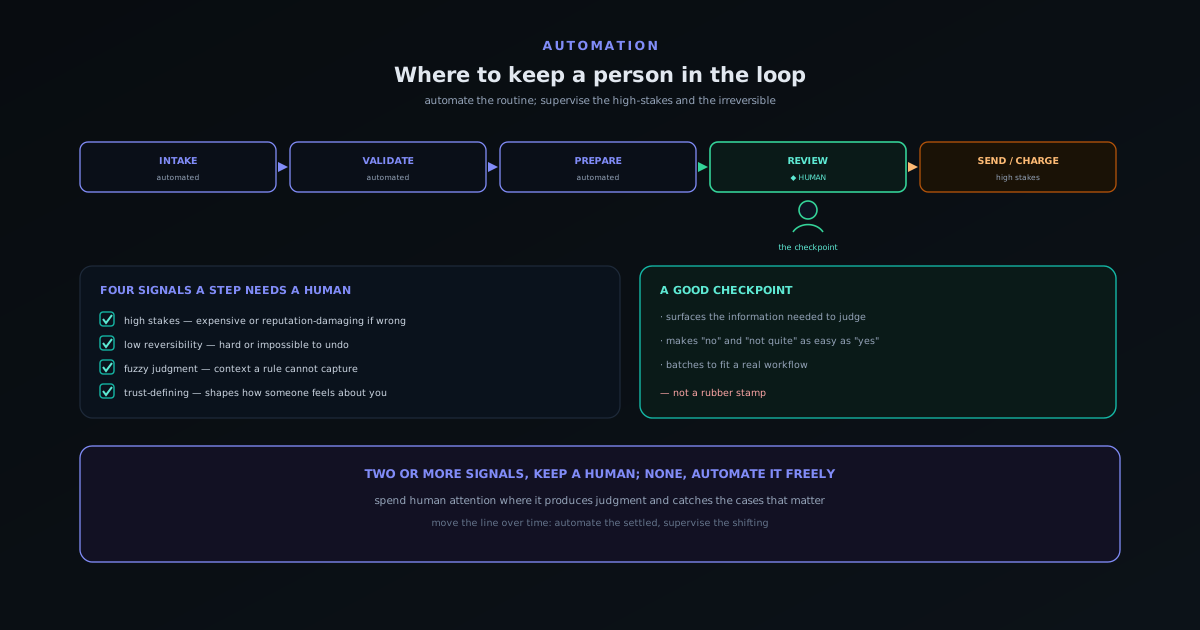
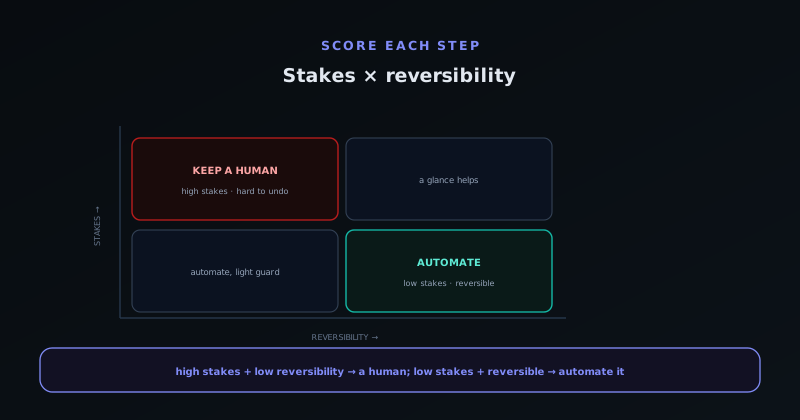
You do not need to agonise over every step; a small set of signals reliably flags the ones that warrant a human, and most steps trip none of them and can be safely automated. The first signal is high stakes: if getting this wrong is expensive, dangerous, or reputation-damaging (issuing a large refund, sending something to your whole list, publishing publicly), the downside justifies a glance. The second is low reversibility: if a mistake is hard or impossible to undo (money sent, goods shipped, an email that cannot be recalled), the lack of an undo button is itself a reason to look before it happens.
The third signal is fuzzy judgment: if the decision genuinely depends on context, tone, or nuance that a rule cannot capture (is this customer angry or joking, is this an edge case or a genuine exception, does this content read right) then a human is doing something a rule cannot, and automating it just means making the wrong call confidently. The fourth is trust-defining moments: the interactions that disproportionately shape how someone feels about you, like a complaint, a first impression, or a sensitive situation, are worth a human touch even when a machine could technically handle them, because the relationship is the asset. A step that hits two or more of these signals almost always deserves a checkpoint; a step that hits none of them is a strong candidate for full automation.
Designing a checkpoint that actually helps
Keeping a human in the loop is only worth it if the human is positioned to add judgment, and a badly designed checkpoint manages to add the delay of human involvement without any of the benefit. The classic failure is the rubber-stamp approval: a step that asks a person to click "approve" on something they have no real ability to evaluate, so they approve everything reflexively and the checkpoint becomes theatre. If the human cannot meaningfully say no (if they lack the information, the time, or the authority to reject), the checkpoint is not oversight, it is a speed bump, and you should either fix it or remove it.
A good checkpoint does three things. It surfaces the right information so the person can actually judge: the context, the amount, the customer history, the thing that would make them pause. It makes rejecting or editing as easy as approving, so "no" and "not quite" are real options rather than friction the person avoids. And it batches and times the human steps so they fit a real workflow: reviewing a queue of flagged items once a day is far more sustainable than being interrupted for each one. The aim is to let the automation do all the gathering and preparation so the human only does the part that needs a human: the actual decision. This is the same "AI executes, the human directs" division explored for software in Building a marketing site with Claude Code: the honest workflow.
Start manual, automate toward confidence
A reliable rule of thumb for any new process is to start it with a human firmly in the loop and automate outward only as you earn confidence, rather than the reverse. Automating first and adding oversight after a problem is the order most teams take, and it is backwards: it means the failure that teaches you the human was needed happens in production, on real customers. Starting manual is slower at first, but it lets you watch the process closely while the stakes of a mistake are still contained, and it generates exactly the knowledge you need to automate safely later.
The direction of travel matters because confidence should be evidence-based, not hopeful. Run the step by hand or with a mandatory checkpoint until you have seen enough real cases to know which are routine and which are not, and only then hand the routine ones to automation. This way each piece of automation is backed by observation rather than optimism, and the human stays on the cases that have actually proven to need judgment. The end state is the same efficient, mostly-automated process either way, but reached without the self-inflicted incident that the automate-first order almost guarantees.
Lower the stakes by making automation reversible
One of the most useful moves is not deciding whether to automate a step but redesigning the step so it is safe to automate, by making it reversible. A surprising number of high-stakes steps are high-stakes only because they are hard to undo, and adding an undo path lowers the stakes enough to move the step from needs-a-human to safe-to-automate. A publish action with a quick unpublish, a send with a brief delay-and-cancel window, a status change that can be flipped back: each turns an irreversible action into a reversible one, which changes the whole calculation.
This reframes the human-in-the-loop question productively: instead of accepting the stakes as fixed and deciding where to stand a person, you can ask whether the stakes can be lowered so a person is not needed. Often they can, and cheaply. The actions that genuinely resist this (money actually leaving an account, goods actually shipping, something irreversibly public) are then a much smaller set, and those are the ones that truly deserve a checkpoint. Designing for reversibility shrinks the territory where human attention is mandatory, which is a better outcome than simply staffing more checkpoints.
Being notified is not the same as being in the loop
A common false economy is to replace a real checkpoint with a notification (the automation runs unattended but sends an alert when it does something) and to mistake that for oversight. It is not. A notification arrives after the action has already happened, and if the action was irreversible, knowing about it changes nothing except your blood pressure. Worse, a stream of notifications that almost never require action trains the recipient to ignore them, so the one that mattered is missed in the noise. Being told is not being in the loop; being in the loop means having the chance to say no before the thing happens.
Notifications have a real role, but it is a different one: they are good for reversible actions where after-the-fact awareness lets you intervene if needed, and for keeping a human informed without gating the flow. The mistake is using a notification as a substitute for a checkpoint on an irreversible, high-stakes step, where only a genuine before-the-fact gate provides oversight. The test is simple: if the notification told you about something you can no longer change, it was not oversight, it was a receipt. Reserve gates for where they can actually stop a mistake, and use notifications for awareness, not as a fig leaf over unattended risk.
Capture what the human decides as data
A checkpoint is also a free source of the most valuable data you have for improving the process: the record of what a human actually decided and why. Every time a person approves, rejects, or edits at a checkpoint, that is a labelled example of judgment applied to a real case, and capturing it (even informally) turns the checkpoint from pure overhead into a learning engine. Over time the log of decisions shows you the pattern: which inputs always get approved, which always get rejected, and which are genuinely mixed.
That pattern is precisely the map for where automation can safely advance. The cases the human always waves through are candidates to automate, because you now have evidence they are routine; the cases that are always rejected might be blocked automatically; and the genuinely mixed cases are where the human earns their place and should stay. Without capturing the decisions, you are guessing where to move the line; with the record, you are moving it on evidence. The checkpoint pays for itself twice: once by catching the bad case, and again by teaching you how to need fewer checkpoints.
The same loop in AI-assisted work
The human-in-the-loop question is not limited to no-code automations; it is the same question that governs working with AI on anything, including building software, writing, and analysis. The pattern that works there is identical: let the tool execute the parts it is good at (drafting, refactoring, generating options at speed) while the human directs, decides, and reviews, owning the quality bar and the accountability. The ecosystem makes this case directly in Building a marketing site with Claude Code: the honest workflow, where the AI does the execution and the person stays responsible for the result.
What ties the no-code and the AI-assisted versions together is that both are about dividing labour between automated speed and human judgment rather than choosing one wholesale. An AI that drafts a customer reply is exactly the support case (useful to draft, dangerous to send unread) explored in Support automation that stays human: macros, AI drafts, and escalation paths. In every case the goal is the same: automate the execution, keep the human on the judgment, and design the checkpoint so the person is actually positioned to judge. Get that division right and you get the speed of automation without surrendering the discernment that keeps it from confidently doing the wrong thing.
Trust is built, then delegated
A helpful way to think about the whole topic is that automation is delegation, and you delegate the way you would to a new hire: closely supervised at first, then with a longer leash as trust is earned, and never fully unsupervised on the things that could do real harm. You would not hand a brand-new employee unchecked authority to issue refunds or email the whole list on day one, and the same caution applies to an automated step. The checkpoint is the supervision, and like supervision of a person, it should taper as the process proves itself rather than vanish at the start.
This framing also explains why removing a human entirely is rarely the goal even for mature processes: you keep a hand on the things where a rare failure is catastrophic, exactly as you would keep final sign-off on the highest-stakes decisions even with a trusted team. The aim is not zero human involvement but the right human involvement, concentrated where judgment matters and absent where it does not. A tiny team that delegates this way to its automations gets the leverage of a much larger one without the rare, unsupervised disaster that pure automation invites.
It also helps to revisit those delegations on a schedule, the same way a manager reviews how a now-experienced hire is doing, because a process that earned a longer leash a year ago may have drifted or the world around it may have changed. A delegation is not a one-time grant of authority but a relationship you maintain, tightening it where new risks appear and loosening it where the track record justifies more trust. Treating the automated parts of the operation as something you periodically check in on, rather than set and forget, is what keeps the leverage from quietly turning into exposure.
Moving the line over time
The line between automated and human is not fixed; it should move as you learn, and a smart approach starts more cautious and automates further only as evidence accumulates. A good pattern is to run a step with a human checkpoint for a while specifically to learn what the human actually does: which cases they wave through without a second thought, and which ones they catch. The cases they always approve are candidates to automate fully; the cases they sometimes reject are exactly the ones the human is earning their place on, and those stay manual. Over time the checkpoint narrows to only the genuinely ambiguous cases, which is the ideal end state: automation handles the clear-cut, humans handle the judgment calls.
It also moves the other way sometimes, and you should be willing to add a human back when the world changes. A step that was safe to automate can become dangerous when conditions shift (a new kind of fraud, a policy change, a spike in edge cases), and the discipline is to notice when an automated step starts producing surprises and put a human back on it until you understand the new pattern. The line is a living decision, not a one-time setup. Treating it that way (automate the settled, supervise the shifting, and keep watching) is what lets a tiny team punch above its weight without the occasional self-inflicted disaster that over-automation invites. The customer-support-specific version of this balance is in Support automation that stays human: macros, AI drafts, and escalation paths.
Frequently asked questions
Quick answers to common questions about this topic.
How do I decide whether to keep a human in a step?
Score the step on four signals: high stakes (expensive or reputation-damaging if wrong), low reversibility (hard to undo), fuzzy judgment (depends on context a rule cannot capture), and trust-defining (disproportionately shapes how someone feels about you). Two or more signals usually means keep a human; none means it is a strong candidate for full automation.
Is it not better to automate as much as possible?
Not always. Full automation handles routine cases well but lets rare, high-cost edge cases flow through untouched, and it removes the feedback a human would have noticed. The goal is to spend human attention where it produces judgment and automation everywhere else, not to minimise human involvement as if it were pure cost.
What makes a human checkpoint useful rather than just slow?
A useful checkpoint surfaces the information needed to judge, makes rejecting or editing as easy as approving, and batches the human steps to fit a real workflow. A useless one is a rubber stamp where the person cannot meaningfully say no; that adds delay without oversight and should be fixed or removed.
Which steps are safe to fully automate?
Steps that hit none of the four signals: low stakes, easily reversible, rule-friendly, and not trust-defining. Routine data movement, notifications, formatting, find-or-create record steps, and similar mechanical work are usually safe, especially when built to be safe to re-run.
Should the line between automated and human ever change?
Yes. Run a step with a checkpoint to learn which cases the human always waves through (candidates to automate) and which they catch (keep manual). Narrow the checkpoint to genuinely ambiguous cases over time, and be willing to put a human back on an automated step when conditions change and it starts producing surprises.
Related troubleshooting
Was this page helpful?
Your answer stays in this browser, it is not sent anywhere and no account or cookie is involved.