2026 · Novus Stream SolutionsAbout 11 min readNovus Stream Solutions
Support automation that stays human: macros, AI drafts, and escalation paths
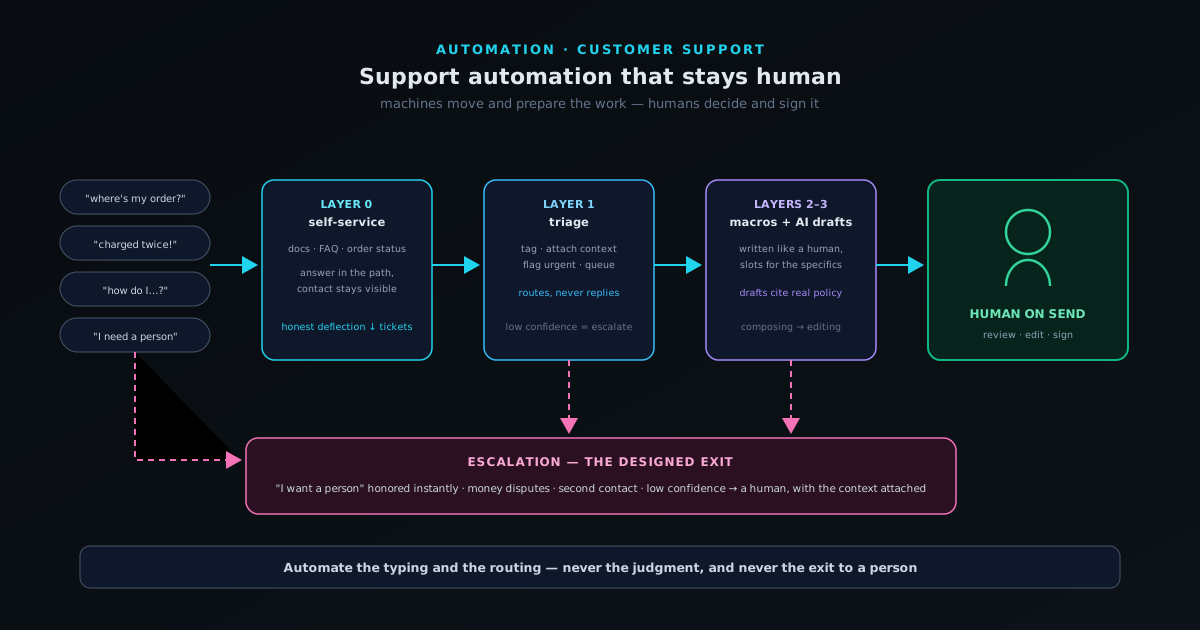
Automating customer support without making customers feel processed is a design problem, not a tooling problem. The working pattern: automate the routing and the typing, never the judgment, and always leave a visible path to a person.
Contents
- 1.Overview
- 2.Layer zero: self-service that deflects honestly
- 3.Layer one: triage that routes but never replies
- 4.Layer two: macros written like you would actually talk
- 5.Layer three: AI drafts with a human on send
- 6.Escalation paths: designing the exits
- 7.What never gets automated
- 8.Measuring quality, not just speed
Overview
Everyone has been on the receiving end of support automation done badly: the chatbot that cannot understand the question and will not surrender, the templated reply that answers a question you did not ask, the form that funnels every problem into four categories when yours is the fifth. The experience is so common that "automated support" reads, to most customers, as "no support." Which puts small teams in an apparent bind, because at one to five people, support automation is not optional. The inbox does not scale with headcount you do not have, and the alternative to automation is slow replies, missed messages, and a founder doing customer service at midnight, which is its own way of failing the customer.
The way out of the bind is noticing what bad automation actually gets wrong. It is not the automation; it is what got automated. The infuriating systems automate judgment (deciding what the customer means, what they deserve, when the conversation is over) and judgment is the part machines still do badly and customers most resent being denied. The drudgery, meanwhile (routing, sorting, retyping the same answer, looking up order numbers) is the part humans do badly: slowly, inconsistently, and with mounting resentment. Good support automation is just a clean division of that labor: machines move and prepare the work, humans decide and sign it. Every design choice below follows from that single split.
Layer zero: self-service that deflects honestly
The cheapest support interaction is the one that never becomes a ticket because the customer answered their own question in less time than writing to you would have taken. That is what documentation, FAQs, and order-status pages are actually for: deflection, in the honest sense of the word, serving the customer faster than a conversation could, not hiding the contact button behind five screens of unwanted articles. The distinction matters and customers feel it instantly. Honest deflection puts the answer in the path: an FAQ on the checkout page about shipping times, an order-tracking link in the confirmation email, a docs search that actually finds things: a deep library like bgremover.novusstreamsolutions.com/resources serves the customer faster than a conversation could. Hostile deflection puts obstacles in the path and calls them help.
The discipline that keeps self-service honest is feeding it from real tickets. Every week or month, look at what people actually wrote in about and ask which of these questions a page could have answered, and whether the answer already exists somewhere like Help centre but is simply unfindable. That a question keeps arriving is the strongest possible evidence the page is missing, unfindable, or unclear: fix whichever it is, and the ticket category shrinks at the source. This loop, run consistently, is the single highest-leverage support activity that exists: every recurring question converted into a findable answer removes that question forever, for every future customer at once. And the contact option stays visible the whole time, because the point was never to prevent conversations; it was to make the remaining conversations the ones that need a human.
Layer one: triage that routes but never replies
The first automation layer that touches a real message should sort it, not answer it. Triage automation reads each incoming message and does the clerical work a dispatcher would: tag the topic (billing, shipping, bug, how-do-I, refund), attach the context a human will need (order history, account status, what page they wrote from), flag the urgent patterns (payment failures, "I was charged twice," anything with legal or safety language) and route everything into queues so similar work batches together. Modern language models have made this layer genuinely good; classifying a paragraph of frustrated prose into "shipping delay + order attached + moderately angry" is exactly the kind of task they no longer get wrong often enough to matter, since a mis-tag costs seconds, not trust.
The boundary is that triage never speaks to the customer beyond, at most, an honest acknowledgment: received, here is roughly when to expect a reply. The acknowledgment matters more than it looks: a large share of follow-up pressure and duplicate messages comes not from slowness but from silence, and a truthful "we have it, expect an answer within a day" buys the time it promises. What the acknowledgment must not do is pretend to be a reply, estimate things it cannot know, or claim a human is "looking into it" when no human has seen it. Triage is logistics. Done well, it is invisible to the customer and transformative for whoever answers: they open a queue of sorted, context-attached conversations instead of an undifferentiated pile, and the same hour of human attention covers twice the ground.
Layer two: macros written like you would actually talk
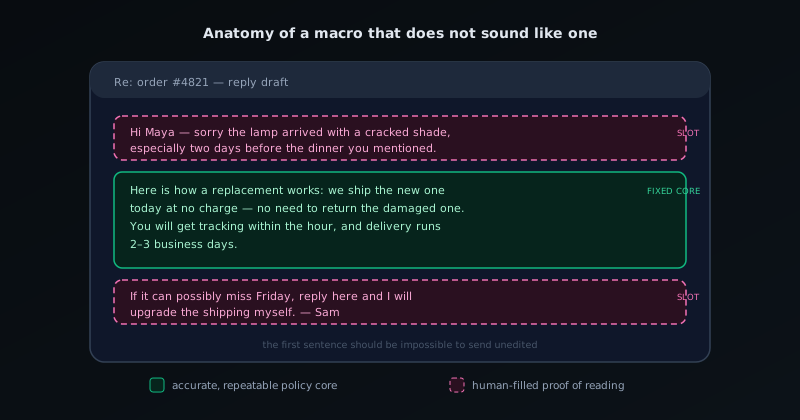
A large fraction of any support inbox is the same fifteen conversations recurring with different names attached, and macros (saved reply templates) are the obvious tool. They are also where support most often starts sounding like a machine, because most macros are written like policy documents: stiff, exhaustive, defensively worded, and visibly mass-produced. The fix is entirely a writing problem. A good macro is written the way your best support person would actually type it on a good day: short sentences, plain words, the answer in the first line rather than after a preamble, and no phrases that exist only in corporate support ("we apologize for any inconvenience this may have caused" has never once appeared in human speech).
Structure each macro with deliberate blanks: a slot for the customer's situation in the first sentence, a slot for the specific detail that proves a person read the message, and a fixed accurate core for the part that genuinely is the same every time: the policy, the steps, the link. The rule of thumb is that the first sentence should be impossible to send unedited, and the rest should rarely need editing. Sent this way, a macro is not a deception; it is consistency. The customer gets the accurate version of the answer instead of whichever variant the responder remembered today, in a tone somebody actually designed. Maintain the library like the asset it is: every time a macro needs the same manual edit twice, fold the edit in; every time policy changes, sweep the library the same day: a stale macro confidently stating the old policy is worse than no macro at all.
Layer three: AI drafts with a human on send
The newest layer is the one that changes small-team support most: a language model that reads the incoming message plus the relevant context (order data, docs, your macro library, the past conversation) and produces a complete draft reply for a human to review, edit, and send. Configured well, it is like having a competent junior who pre-writes every response: the draft cites the right policy, pulls the right order, matches your house tone because it was instructed with your actual macros as style examples, and handles the multi-part message (refund question plus shipping question plus a complaint) that simple macros never could. For the human, the job shifts from composing to editing (a thirty-second read-and-adjust instead of a four-minute write) which at small scale is the difference between the inbox being managed and being feared.
The non-negotiable in this layer is the human on send. Models produce fluent, confident text with occasional confident errors (a hallucinated policy, a misread account detail, a promise you do not offer) and in support, every sent error is a commitment made on your behalf. Review-before-send converts those errors from incidents into edits; removing the review converts your error rate into your incident rate. Two design details keep the system net-positive over time. First, the model must see your real sources (current policy text, current docs) rather than relying on what it absorbed in training, so drafts inherit your facts. Second, instruct it to flag uncertainty instead of papering over it: a draft that says "I could not find this order; the human should check" is doing its job, and a reviewer who keeps catching the same flaw should fix the instructions, not just the draft. Edits are free feedback to the system; spend them.
Escalation paths: designing the exits
Every automated layer needs a designed exit, because the defining failure of bad support automation is the loop with no door: the customer whose problem does not fit, trapped between a bot that cannot help and a form that will not listen. Escalation design is deciding, in advance, which signals mean this conversation leaves the automated path now: the customer asks for a person (honored immediately and unconditionally, every time, no "are you sure" friction); the same customer writes back twice about the same issue (the previous answer failed; templates have lost their privileges); money is in dispute; legal, safety, or accessibility language appears; the account is high-value or long-tenured; or the message simply does not classify cleanly: low classification confidence is itself an escalation signal, and treating it that way is what separates routing from gambling.
The other half of escalation design is what the exit leads to, and the answer has to be: a person with the context attached. An escalation that lands the customer at a generic inbox where they re-explain everything is not an exit; it is the loop wearing a door costume, and re-explaining is the single most cited rage trigger in support interactions. The handoff should carry the conversation history, the triage tags, the order data, and (if an AI layer was involved) what was already tried, so the human starts where the machine stopped. At a tiny team the "person" may be the same one human wearing a different hat, and the design still matters: escalated conversations get answered out of the template system, with fresh eyes, at higher priority. The escalation rate then becomes one of your most honest metrics: rising means the automated layers are overreaching or the product is generating problems templates cannot hold; falling while satisfaction holds means the layers are absorbing exactly what they should.
What never gets automated
Some categories should be routed around the automation permanently, not because machines cannot produce words for them, but because the words are not the product in those moments: the human attention is. A grieving customer canceling a subscription for the saddest possible reason. The person whose wedding photos, business launch, or medical situation is tangled up in your product failing at the worst time. The long-tenured customer writing a furious, detailed message that is really a question about whether you still care. The edge case that is genuinely your fault in an interesting new way. Sending any of these a fluent template (even a kind, well-written one) communicates precisely the thing that destroys the relationship: that their exceptional moment was processed as routine.
These conversations are not a burden the automation failed to remove; they are the highest-value minutes in the entire support function, and the honest accounting is that the automated layers exist to fund them. Every minute the machines save on "where is my order" is a minute available for the conversation that decides a relationship, a review, or a story the customer tells for years. Small teams actually hold an advantage here that no enterprise can match: when the founder personally answers the hard message (quickly, specifically, generously) the customer can tell, and the effect is wildly disproportionate to the minutes spent. The goal of the whole system is to make that kind of attention affordable on the messages that deserve it, by making sure it is never wasted on the ones that do not.
Measuring quality, not just speed
Automation makes the speed metrics improve almost automatically (first-response time and tickets-per-hour are exactly what the layers are built to compress) which is why those numbers alone will tell you the system is succeeding while customers experience it failing. The metrics that catch quality are different. Resolution on first reply: did the answer actually end the issue, or did the customer have to write back? Reopen rate per reply type: macros and AI drafts that keep generating second contacts are wrong, however fast they went out. Escalation honoring: when customers asked for a human, how fast did they get one? And some direct measure of how the interaction felt: a one-click rating, or simply reading a sample of full conversations weekly, which at small scale beats any dashboard.
The weekly read deserves a specific defense, because it is the habit that keeps the whole system honest and it is the first thing operators drop once automation "works." Ten conversations, sampled across categories, read end to end: where did the triage mis-tag, which macro is going out unedited into situations it does not quite fit, what is the AI draft subtly wrong about, which self-service page failed upstream of this ticket existing at all. Every layer in the system degrades silently (policies drift, products change, the model's context goes stale) and the conversations are where the degradation shows first. Fifteen minutes a week of actually reading them is the maintenance contract. Support automation that stays human is not a setup task; it is a system you keep pointed at the right division of labor (machines moving the work, humans deciding it) one small correction at a time.
- Track resolution and reopen rates per reply type, not just response speed.
- "Asked for a human, got one fast" is a metric: keep it near-perfect.
- Read ten full conversations weekly; every layer degrades silently.
- Feed recurring tickets back into docs; the best ticket is the one that stops existing.
Frequently asked questions
Quick answers to common questions about this topic.
How do I automate support without it feeling robotic?
Automate the repetitive parts (canned macros for common questions, AI drafts a human edits) while keeping a fast path to a real person for anything nuanced. Automation handles volume; humans handle judgment.
Should AI write customer support replies?
AI is good at drafting a first response from your knowledge base, but a human should review anything sensitive or non-routine before it sends. The model speeds the reply; the person owns the outcome.
When should a ticket escalate to a human?
Whenever the issue is ambiguous, emotional, high-value, or outside the documented playbook. A clear escalation path prevents automation from trapping a frustrated customer in a loop.
Related troubleshooting
Was this page helpful?
Your answer stays in this browser, it is not sent anywhere and no account or cookie is involved.