2026 · NSS Background RemoverAbout 11 min readNovus Stream Solutions
Inside the all-in-one NSS Background Remover editor: layers, 3D, video, and on-device AI
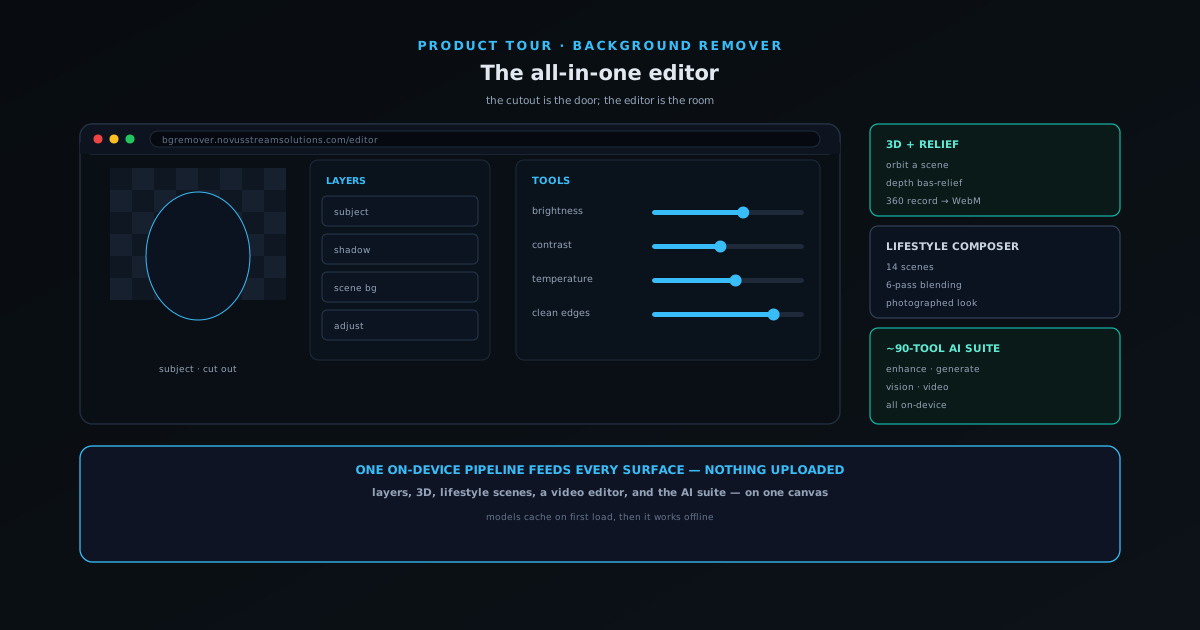
NSS Background Remover grew from a one-click cutout into a full in-browser image and video editor: layers and blend modes, a 3D scene with depth relief, the video editor, on-device cutout and AI upscaling, and project saves, all with no upload.
Contents
- 1.Overview
- 2.One canvas, not dozens of tabs
- 3.Layers, blend modes, and an undo history that understands them
- 4.Selection and refinement: brush, wand, and click-to-select subject
- 5.Adjustments, filters, and color that lives on the layer
- 6.3D mode: orbit, depth relief, and a 360 recorder
- 7.The video editor: the same ideas, on a timeline
- 8.The on-device AI: cutout models and upscaling, on one no-upload pipeline
- 9.Projects that save locally, and the privacy that never changed
- 10.How to get the most out of it
Overview
NSS Background Remover started as a single, sharp idea: remove an image background in the browser, with AI that runs on your own device, and export a true straight-alpha PNG: no upload, no signup, no cost. That core is still the front door. But around it, the product quietly became something larger: a full in-browser image and video editor where the cutout is just the first move. There are layers and blend modes, brush and wand and click-to-select tools, image adjustments and filters, a real 3D scene with depth relief, a video editor that brings the same ideas to a timeline, and on-device AI upscaling to 2x or 4x, all on one pipeline that never sends your files anywhere.
This post is a tour of that editor, because the gap between "background remover" and what the app actually is has gotten wide enough to be worth closing. If you have only ever used it to knock out a background and download a PNG, you have seen the doorway and not the room. The organizing principle behind everything below is that the same no-upload, on-device foundation that made the cutout private and free also makes the rest of the editor private and free: there is no tier where your images suddenly start going to a server. What grew was the surface area of what you can do before you export, not the privacy model underneath it.
One canvas, not dozens of tabs
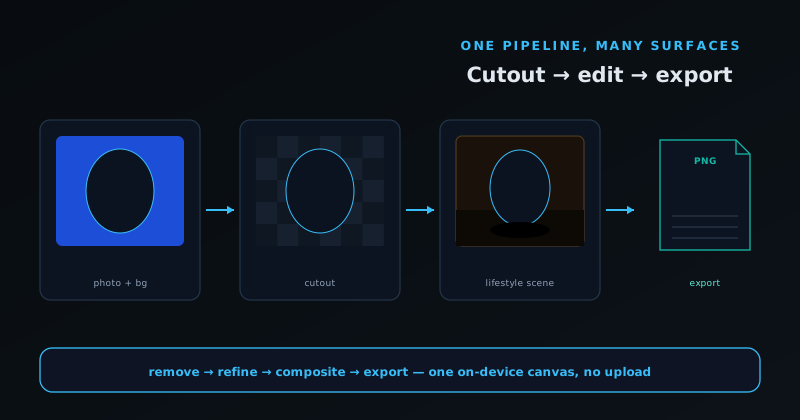
The most important design decision in the app is that the capability is consolidated into one editor at bgremover.novusstreamsolutions.com/editor rather than scattered across dozens of separate single-purpose pages. You can still reach individual tools directly (there are dedicated surfaces for image removal, the video editor, and image and video upscaling) but the all-in-one editor is where layers, adjustments, 3D, and the on-device models live together on a shared canvas. That matters because it means you learn one interface instead of dozens, and your work moves between operations without a context switch: remove a background, then refine the edge, then composite it onto a new layer, then adjust the color, then export, all in the same place, on the same image, without re-uploading or re-opening anything.
Consolidation is also what keeps that much capability usable. Dozens of equal buttons would paralyze a new user; one canvas with a floating quick-actions toolbar surfaces only what the moment needs, and the rest stays one step away rather than crowding the screen. The app leans on this deliberately: a shared layers architecture under the hood means the image editor and the video editor speak the same language, so a habit you build in one carries to the other. The result is a tool that is broad without feeling sprawling, which is a harder thing to pull off than simply shipping more features.
Layers, blend modes, and an undo history that understands them
The editor is layer-based, and the layers panel behaves the way anyone who has used a real image editor expects. Each layer has visibility, a lock, opacity from zero to one, and a choice of twelve blend modes, and layers can be reordered, renamed, duplicated, and deleted, with keyboard shortcuts for the common moves, including duplicate and send-to-front or send-to-back. That sounds ordinary until you remember the context: this is happening in a browser, on a tool you opened without an account, on images that never left your machine. The familiar layer model is exactly what makes the cutout the beginning of a composition rather than the end of a task.
What ties it together is that undo and redo are layer-aware. The history understands operations across layers, so stepping back does not just undo the last brush stroke on the active layer; it correctly reverses layer additions, reorders, and bakes, which is what keeps experimentation safe. Powerful editors fail when they let you dig a hole you cannot climb out of; a history that genuinely understands the layer stack is the guardrail that lets you try a blend mode, a different stacking order, or an aggressive adjustment without fear, because getting back is always one shortcut away. For compositing work (a product on a new background, a subject layered over another image) that reliability is the difference between play and anxiety.
Selection and refinement: brush, wand, and click-to-select subject
AI removal gets you most of the way, but the last few percent (a wisp of hair, a glass edge, a sign held at the wrong angle) is where editors earn their keep. The app gives you a refinement toolkit rather than asking you to accept whatever the model produced. There is a brush for painting the mask back in or out by hand, a wand for selecting contiguous regions, and a click-to-select-subject tool that floods out from where you click to grab a whole object. Together they let you correct the model's mistakes precisely instead of re-running it and hoping, which is faster and far more controllable on the hard cases.
There is also a Clean Edges pass that does CPU-side refinement in about a second, tightening the boundary without a full re-inference, and the removal itself comes in modes: a fast model for standard shots and a best-quality model for fine hair, complex edges, and difficult backgrounds, plus a dedicated path for transparent and glass-like materials. The point of all this is control with a floor: the automatic result is good enough to ship for most images, and when it is not, you are not stuck; you have hand tools to fix exactly the part that went wrong. That combination, a strong default plus real manual recourse, is what lets one tool serve both someone cleaning up a stack of product shots and someone compositing a careful hero image.
Adjustments, filters, and color that lives on the layer
Beyond the mask, the editor carries the color and tone controls you would expect from an image app: brightness, contrast, saturation, and temperature sliders, a set of filters numbering well into the twenties, and the ability to apply them with the layer model rather than flattening everything into a single destructive pass. Because adjustments respect layers, you can grade a subject independently of its background, or tune a composited element to match the plate it is sitting on, which is the kind of thing that separates a believable composite from an obvious cut-and-paste. The sliders are throttled to stay smooth at sixty frames per second while you drag, so adjusting feels immediate rather than laggy.
The practical workflow this unlocks is matching, not just removing. A cutout that is technically perfect can still look pasted if its color temperature fights the new background; having temperature and the rest of the adjustments right there, on the layer, means you can reconcile the two in the same session instead of bouncing to another app. For e-commerce and marketplace work especially, this is where consistency comes from: the same subject, lit and graded the same way across a catalog, reads as a coherent brand rather than a pile of unrelated photos.
3D mode: orbit, depth relief, and a 360 recorder
One of the least expected features in a background remover is a genuine 3D mode. The editor includes a Three.js-backed scene with orbit controls and transform controls, plus a relief feature that turns an image into a depth-displaced bas-relief mesh: a flat picture pushed into a subtly three-dimensional surface based on estimated depth. You can orbit around the result on a canvas, and a built-in recorder captures a short 360-degree orbit to WebM, so a still can become a rotating clip without any external 3D software.
This is the kind of capability that exists because the pipeline is already on the device and already has depth information in reach, so adding a viewer and a recorder is a natural extension rather than a bolt-on. For most users it is an occasional flourish (a product spin, a depth-relief treatment of a logo or photo) but it is a good illustration of the app's overall posture: when the heavy machinery is local and general, features that would be expensive to offer as cloud services become things you can simply include. The 3D mode is not the reason to use the tool, but it is a reason to remember the tool can do more than you assume.
The video editor: the same ideas, on a timeline
Everything above has a moving-image counterpart. The video editor at bgremover.novusstreamsolutions.com/video-editor brings the same editing ideas to a timeline: color-grading sliders, LUT-style filters, text overlays, trimming and fades, layers, and export to MP4 or WebM. There are also video utilities around it (an upscaler, a stabilizer, a compressor, format conversion, resizing, canvas extension, rotation, and metadata removal) so a clip can be cleaned up and reframed in the same place it was edited. As with images, the work runs on the device, so the footage never has to leave your machine.
The reason the video editor feels coherent with the image editor is that it is built on the same shared layer architecture and the same on-device pipeline, so the concepts transfer: layers, adjustments, and the no-upload guarantee mean the same thing whether you are working on a photo or a clip. That consistency is the payoff of consolidating into one app rather than shipping a separate video product: what you learn editing a product photo applies directly to grading and refining a clip, and the work never leaves your machine in either case.
The on-device AI: cutout models and upscaling, on one no-upload pipeline
Underneath the editor is the on-device AI that made the tool worth opening in the first place: the background removal itself. It comes in three cutout models rather than one, because no single network is best at every image. A Fast model handles standard shots in a fraction of a second, a Best model is tuned for the hard cases (fine hair, complex edges, and busy backgrounds) and a dedicated Glass path handles transparent and glass-like materials that trip up ordinary segmentation. You pick the model that fits the shot, or let the app default to the fast one and step up only when an edge needs it, and every one of them runs on your own device against the image in front of you rather than on a server somewhere.
The other piece of on-device AI is upscaling: a super-resolution pass that enlarges an image to 2x or 4x its size while reconstructing detail, which pairs naturally with a cutout when a small product photo has to fill a hero slot. Both the cutout models and the upscaler run on the same WebGPU-primary, WebAssembly-fallback path, and the app is honest about what that costs: the models download to your browser cache on first use, sized in real megabytes, and the heavier ones are only recommended when your hardware can actually run them. None of it uploads your inputs; the model is fetched to your machine and the computation happens there, which is the same guarantee that covers the cutout, the layers, and everything else in the editor. That is the whole point of keeping the AI on-device: the file you are working on never has to travel for the AI to touch it.
Projects that save locally, and the privacy that never changed
The editor saves your work as named .nss-project files in the browser's own storage, auto-saving roughly every thirty seconds, keeping up to twenty projects per tool, and preserving the originals, masks, layers, and adjustments so you can reopen a composition exactly as you left it. This is a deliberately different saving model from the one Novus Visualizers adopted: Background Remover keeps your projects on your device rather than in an account, which fits a tool whose entire promise is that nothing you load ever leaves your machine. There is also a peer-to-peer collaborative session feature, built on WebRTC with a shared session ID, for the cases where two people genuinely need to edit together, again without routing the images through a server.
That is the through-line of the whole tour: the app grew enormously in what it can do, and not at all in what it asks of you. There is still no signup, still no upload, still no cost, and the privacy guarantee that made the cutout trustworthy now covers a full editor, a 3D mode, a video editor, and on-device cutout and upscaling. The first time you open it, the models download to your browser cache; after that, everything runs locally, and it works offline once the cache is warm because the whole thing is a progressive web app. The breadth is new; the bargain is the same one it always offered.
How to get the most out of it
The best way to discover the editor is to stop downloading immediately after the cutout. Next time you remove a background, stay in the editor: refine the edge with the brush or Clean Edges, then composite the subject onto a new background layer, adjust the temperature to match, and only then export. That one habit, treating the cutout as step one, reveals most of what the app can do, because the layers, adjustments, and tools are all right there once you stay on the canvas. From there, upscaling is the fastest way to see what the on-device AI adds beyond the cutout: enlarge a small product shot to 2x or 4x and drop the result straight into your composition.
For heavier work, lean on the parts built for it: the best-quality model for difficult edges, the video editor for clips, image and video upscaling for enlarging, and the export packs that name and tag files for specific destinations. And keep the model tiers in mind: let the app recommend what your device can actually run rather than forcing the heaviest option. The full picture, tool by tool, lives in the NSS Background Remover documentation and tool map, and the app itself is free to explore at bgremover.novusstreamsolutions.com. The cutout is still the door; the editor is the room worth spending time in.
Frequently asked questions
Quick answers to common questions about this topic.
What can the all-in-one Background Remover editor do?
Beyond cutouts, it offers a layered editor with blend modes, a 3D scene with depth relief, a video editor, on-device AI upscaling, and local project saves, all on-device with no uploads.
Is the editor free to use?
Yes: free, no watermark, no account required, supported by non-intrusive ads. The whole editor runs in your browser at https://bgremover.novusstreamsolutions.com.
Related workflow
Product photo to a transparent image every channel accepts
One photograph, cut out once, then re-encoded for a storefront, a marketplace listing and a social post without redoing the cutout each time.
- Cut the background out and check the edgesNSS Background Remover: Hair, glass and drop shadows are where automatic cutouts fail. Fix them once, on the master, before anything downstream copies the mistake.
- Re-encode and resize per destinationNovus Convert: Transparency survives PNG and WebP and dies in JPEG. Convert validates the file it hands back, so a listing never rejects a silently broken upload.
Related troubleshooting
Was this page helpful?
Your answer stays in this browser, it is not sent anywhere and no account or cookie is involved.