2026 · Novus Stream Solutions (hub)About 13 min readNovus Stream Solutions
Automating image workflows with scripts: resize, convert, rename
Every site accumulates image chores: resize this batch, convert those PNGs, rename a folder before it ships. I used to grind through them in an editor, one file at a time. Now a handful of ten-line Node scripts does the same work in seconds. Here is the toolkit, the habits that keep it maintainable, and a worked SVG-to-PNG pipeline.
Contents
- 1.Overview
- 2.When a script beats an app
- 3.The toolkit: Node, sharp, and a folder of small files
- 4.Batch resizing and converting without drama
- 5.Renaming at scale, with a dry run first
- 6.Worked example: the SVG-to-PNG share-image pipeline
- 7.Keeping scripts maintainable
- 8.Guardrails: the failure modes that actually happen
- 9.Where I still open an editor
Overview
The moment I stopped resizing images by hand was not a philosophical awakening; it was a Tuesday where I had to produce share images for a few hundred blog posts and realized the editor route would cost me the whole week. Opening a file, exporting at the right size, checking the name, repeating: the arithmetic was brutal. Three minutes a file across three hundred files is fifteen hours of work that produces nothing a loop could not produce. I wrote a forty-line script instead, went to make coffee, and came back to a finished folder. That trade has paid for itself hundreds of times since.
This article is the toolkit that grew out of that Tuesday. It covers the three chores that eat most image time on a small site (batch resizing, format conversion, and renaming) and the small Node scripts that handle each one. It also covers the judgement calls: when a script genuinely beats an app, when it does not, and how to keep a growing folder of one-off scripts from becoming its own maintenance burden. The through-line is a real worked example, the SVG-to-PNG pipeline that renders every share image on this site.
A caveat before the enthusiasm: none of this requires being a professional developer. The scripts here are short, boring, and built from two ingredients (Node’s file-system module and the sharp image library) and the skill ceiling is a for-loop. If you can rename a variable without panicking, you can own every one of these. The point is not clever code; the point is never doing the same click three hundred times.
When a script beats an app
The honest dividing line is repetition, not file count. A one-off conversion of a dozen photos is faster in a good app than in a script you have to write first. An in-browser converter exists precisely for that case, and I use one for exactly those jobs. The script wins the moment the same operation will happen again: weekly product shots that always need the same three sizes, screenshots that always need the same crop, blog art that always needs the same raster export. Write-once, run-forever only pays when there is a forever.
The second advantage scripts have is that they are a record of what happened. An app session is ephemeral: you clicked some things, files changed, and six months later nobody can say what settings were used. A script is the settings, written down. When I need to know why every hero PNG is 1200 by 630 with a white-on-dark composite, the answer is eleven lines in the repository, versioned in git next to the content it serves. That auditability matters more the smaller the team is, because there is nobody else to remember.
The third advantage is composition. A script that resizes can feed a script that renames, which can feed the deploy. Apps are terminals; scripts are pipes. Almost every automation I run today started as two separate scripts that eventually got a third line connecting them, and that compounding is something no GUI workflow offers. The chores stop being isolated tasks and start being stages in one pipeline you trigger with a single command.
The toolkit: Node, sharp, and a folder of small files
My whole image toolkit is one dependency. sharp is a Node wrapper around libvips, and it resizes, converts, composites, and reads metadata at a speed that still surprises me: hundreds of images a minute on an ordinary laptop, no GPU, no cloud. Install it once per project, and the incantation for any given job is short enough to memorize: read a file, chain resize or format calls, write the output. Everything else in the toolkit is plain Node: fs.readdirSync to list a folder, path.join to build file names, a loop to walk the list.
I keep the scripts in a scripts/ folder in the repository, one file per job, named for what they do rather than how: generate-og-images.mjs, not sharp-batch-v2-final.mjs. Each script is self-contained and runs with node scripts/whatever.mjs, and the useful ones get an entry in package.json so the command is discoverable months later when I have forgotten the file name. That folder currently holds about a dozen scripts, and together they replace what would otherwise be several hours of manual image work per publishing cycle.
Resist the urge to build a framework. The first time I automated images I started sketching a general-purpose pipeline with a config schema, and it was a mistake: the abstraction cost more than the chores it saved. Five nearly-identical ten-line scripts are easier to own than one clever hundred-line engine, because each one can be read top to bottom in thirty seconds and changed without fear of breaking its siblings. Duplication between tiny scripts is not the sin it is in application code.
Batch resizing and converting without drama
The canonical resize script is barely a script. List the source folder, filter to image extensions, and for each file call sharp with a resize and a destination. The two decisions that matter live in the options: fit, which controls whether the image is cropped, letterboxed, or stretched to reach the target box, and withoutEnlargement, which stops a small source being inflated into a blurry large one. I default to fit cover for thumbnails and fit inside for content images, and I always set withoutEnlargement, because a sharp small image beats a soft big one every time.
Conversion rides on the same skeleton: swap the resize call for toFormat and choose a quality. The judgement is in the format choice, not the code: photos go to WebP or AVIF at moderate quality, graphics with hard edges and text stay PNG or, better, never rasterize at all. I wrote up the full decision tree in SVG vs PNG vs WebP: choosing the right format for site & UI graphics, and the script just encodes whatever that reasoning concludes. A converter script with the wrong format baked in automates the mistake very efficiently.
Two habits keep batch jobs calm. First, never write outputs into the source folder; always use a separate out/ directory, so a bad run is a delete rather than a restore. Second, make the script idempotent: check whether the output already exists and is newer than the source, and skip it if so. That turns a full rebuild into a cheap incremental one, and it means re-running the script after a crash or an interruption is always safe. Idempotence is the difference between a script you trust and a script you babysit.
For mixed folders (some files need resizing, others converting, a few both) I still keep one script per concern and chain them, rather than building a branching monster. The pipeline reads better as three verbs run in order than as one script full of if-statements. When the chain grows long enough to be annoying, a fourth script that calls the other three in sequence costs five lines and restores the single-command experience.
Renaming at scale, with a dry run first
Renaming is the chore people underestimate, because it feels too trivial to script and too tedious to do by hand. Camera exports named DSC_4471.jpg, screenshots named by timestamp, downloads with duplicate suffixes: sooner or later a folder of them needs to become tidy, predictable slugs. The script is trivial: walk the folder, compute the new name from a pattern or a lookup table, and call fs.renameSync. The danger is not in the code; it is that renaming is destructive in a way resizing is not, because the original name is gone the moment the call returns.
So every rename script I write has a dry-run mode, and the dry run is the default. Run it plainly and it prints old-name-arrow-new-name for every file and touches nothing; run it with an explicit flag and it performs the renames. That single convention has saved me from three or four disasters, including one where a pattern collision would have silently overwritten twelve files with the same destination. The dry run showed twelve arrows pointing at one name, and the script gained a collision check before the flag ever got passed.
One more renaming rule that earns its keep: derive names from content, not from position. Numbering files 01, 02, 03 in listing order feels natural and breaks the first time a file is inserted or deleted. Names derived from the thing itself (a slug from a title, a hash of the contents, a date from the metadata) stay stable when the folder changes around them, and stable names are what let every downstream reference keep working without a cascade of edits.
Worked example: the SVG-to-PNG share-image pipeline
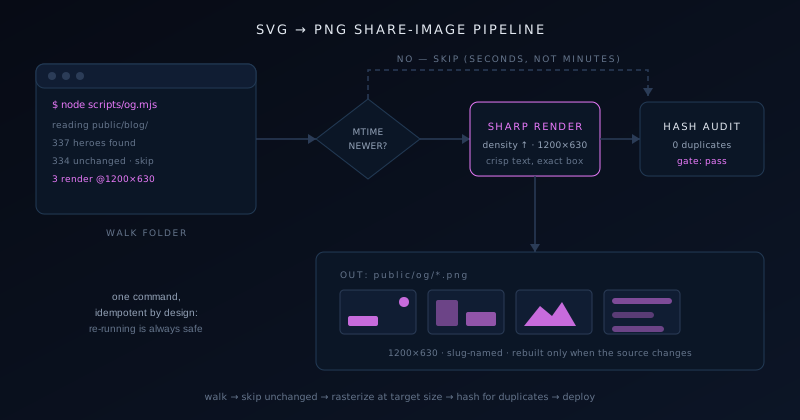
Here is the real pipeline that produces every social share image on this site, end to end. The source of truth is a folder of hand-authored SVG heroes, one per post (how those get made is its own story, told in Automating SVG hero art for a 150-post blog) and the problem is that social platforms want raster. Link previews need a PNG at 1200 by 630, and no scraper is going to render an SVG for you. So between the vector sources and the deployed site sits one script whose whole job is faithful, repeatable rasterization.
The script walks the heroes folder, and for each SVG asks sharp to render it at exactly 1200 by 630 with density set high enough that text comes out crisp rather than fuzzy. Density is the setting people miss: sharp rasterizes SVG through libvips at a default DPI, and small text rendered at default density then scaled looks smudged in a link preview. Rendering at the target size directly, from a viewBox that already matches the aspect ratio, sidesteps the whole problem. The output lands in a dedicated og/ folder with the post slug as the file name, which keeps the URL for any share image guessable from its post.
Incremental rebuilds make the pipeline pleasant. Before rendering, the script compares the SVG’s modification time against the existing PNG and skips files that have not changed, so a full run across several hundred heroes takes seconds when only three posts are new. After rendering, a companion audit script hashes the artwork of every SVG to catch accidental duplicates, since two posts silently sharing identical art is exactly the templated look the hand-authored heroes exist to avoid. The audit fails loudly, and the failure is a build error rather than a quiet embarrassment on social media.
The last stage is cache busting. Social platforms cache link previews aggressively, so regenerated art would never be seen by anyone who had already shared a post. The fix is a version token in the image URL that gets bumped whenever the art rebuilds; the platforms treat the new URL as a new image and refetch. That one-line convention (bump a constant, redeploy) is the difference between a pipeline that works in theory and one whose output people actually see.
Keeping scripts maintainable
A folder of automation scripts rots differently from application code. Nothing imports it, no test fails when it breaks, and the first sign of trouble is a chore silently not happening. The defense is not more engineering; it is a handful of conventions applied with total consistency, so that any script opened after six months away explains itself in the first ten lines. Every script in my folder starts with a comment saying what it does, what it reads, what it writes, and the exact command to run it, because the person who needs that comment is me, later, every time.
Hard-coded paths are the number-one rot vector, so paths get defined once at the top of the file, derived from the repository root rather than from wherever the terminal happens to be. Node’s import.meta.url makes the script’s own location a reliable anchor, and building every path from that anchor means the script works identically from any working directory, in CI, and on the next machine. The second rot vector is silent dependence on folder state: a script that assumes out/ exists should create it, not crash, and mkdir with recursive set to true costs one line.
The conventions that keep my scripts folder trustworthy fit on a card, and I apply them even when a script feels too small to deserve ceremony, because the small ones are exactly the ones that outlive their context.
- A header comment stating purpose, inputs, outputs, and the run command.
- Dry-run by default for anything destructive; an explicit flag to execute.
- Idempotent by design: re-running is always safe and skips finished work.
- Paths anchored to the repo root, never to the current working directory.
- One job per script; a tiny orchestrator script when jobs need chaining.
- A package.json entry for anything run more than twice.
Guardrails: the failure modes that actually happen
After a few years of running these, the failures cluster into three families. The first is the malformed straggler: one corrupt or zero-byte image in a folder of hundreds, which throws mid-run and leaves the batch half-finished. The fix is a try-catch around the per-file work that logs the bad file and continues, plus a summary line at the end (processed, skipped, failed) so a non-zero failure count is impossible to miss. A batch script that dies on file 214 of 300 without saying which file is a batch script you will grow to hate.
The second family is the subtly wrong output: dimensions off by a rounding error, transparency flattened to black, color profiles mangled. These do not throw; they ship. The countermeasure is a verification pass that re-opens each output and asserts the properties that matter (exact dimensions, expected format, an alpha channel where one is required), which sharp’s metadata call makes nearly free. This is the same instinct as validating any generated content before it deploys, and it pairs naturally with checks on the words around the images, like the alt-text automation described in Automating alt text and image metadata at scale.
The third family is the human one: running the right script on the wrong folder. I have done it; everyone eventually does it. The guardrails are refusing to run when the source folder is empty or suspiciously small, printing the resolved absolute paths before doing anything, and never defaulting a destructive operation. None of these guardrails takes more than three lines, and together they convert the worst realistic outcome from lost files into a slightly embarrassing log message.
Where I still open an editor
Scripts have a boundary, and pretending otherwise produces bad images. Anything requiring per-image judgement (choosing a crop that respects the subject, retouching a specific flaw, deciding whether this particular photo survives heavy compression) is editor work, because the value is in the looking. I batch what is mechanical and hand-finish what is not, and the batch stages are actually what make the hand-finishing affordable: when the resizing, converting, and renaming take zero minutes, the whole time budget goes to the few images that deserve eyes.
The other boundary is frequency. A conversion I will genuinely do once gets done in a browser tool in less time than a script takes to write, and I say that as the person who wrote the scripts. The discipline is noticing the second occurrence, because the second time is evidence of a pattern, and patterns are what scripts are for. My rule of thumb: do it by hand once, script it the second time, and never do it by hand a third time.
If you take one thing from this article, make it the smallness. Nothing here is an engineering project; the entire pipeline that serves this site is a few hundred lines spread across a dozen files a beginner could read in an afternoon. The compounding is real, though (each chore scripted is a chore deleted from every future week) and it starts with the first ten-line loop pointed at a folder you are tired of clicking through.
Frequently asked questions
Quick answers to common questions about this topic.
Do I need to know how to code to automate image tasks?
Less than you would think. The scripts in this article are loops over a folder with one or two library calls per file, closer to a recipe than to software engineering. If you can edit a variable and run a command in a terminal, you can copy a working ten-line script and adapt it. Start with a resize script on a copy of a folder, confirm the output, and grow from there. The skills compound quickly because every script uses the same three ingredients: list files, transform each one, write the result.
Why use sharp instead of ImageMagick or an app?
sharp is fast, installs as an ordinary Node dependency, and lives in the same language as the rest of a JavaScript project, so scripts can share constants and run in the same CI. ImageMagick is a fine tool and its CLI one-liners are great for quick jobs; I reach for sharp because my pipelines need logic (skipping unchanged files, verifying outputs, deriving names) and that is nicer in a real language than in shell. An app still wins for one-off jobs with per-image judgement.
How do I convert an SVG to PNG in a script?
Pass the SVG to sharp, set the output size to your exact target (1200 by 630 for social share images) and raise the density option so text rasterizes crisply instead of being rendered small and scaled up. Make sure the SVG viewBox matches the target aspect ratio, or you will get letterboxing or distortion. Write the result with toFile as a PNG. The whole operation is about five lines, and it is completely repeatable, which is the point: regenerate hundreds of share images with one command.
How do I make a batch script safe to re-run?
Two properties: idempotence and non-destructiveness. Idempotence means the script checks whether each output already exists and is newer than its source, and skips it, so re-running after an interruption finishes the job instead of redoing it. Non-destructiveness means outputs go to a separate folder and anything that renames or deletes runs in dry-run mode by default, printing what it would do until you pass an explicit flag. With those two habits, the worst case of any run is wasted seconds, not lost files.
When is a script overkill for image work?
When the job is genuinely one-off, or when it needs per-image judgement. Converting a handful of files once is faster in a browser tool than writing anything, and no script can decide which crop respects a photo’s subject or whether a particular image survives compression gracefully. My working rule: do a task by hand the first time, script it the second time it appears, and reserve the editor for decisions where the value is in a human actually looking at the pixels.
Related troubleshooting
Was this page helpful?
Your answer stays in this browser, it is not sent anywhere and no account or cookie is involved.