2026 · Novus Stream Solutions (hub)About 13 min readNovus Stream Solutions
A go-live runbook for a serverless browser app
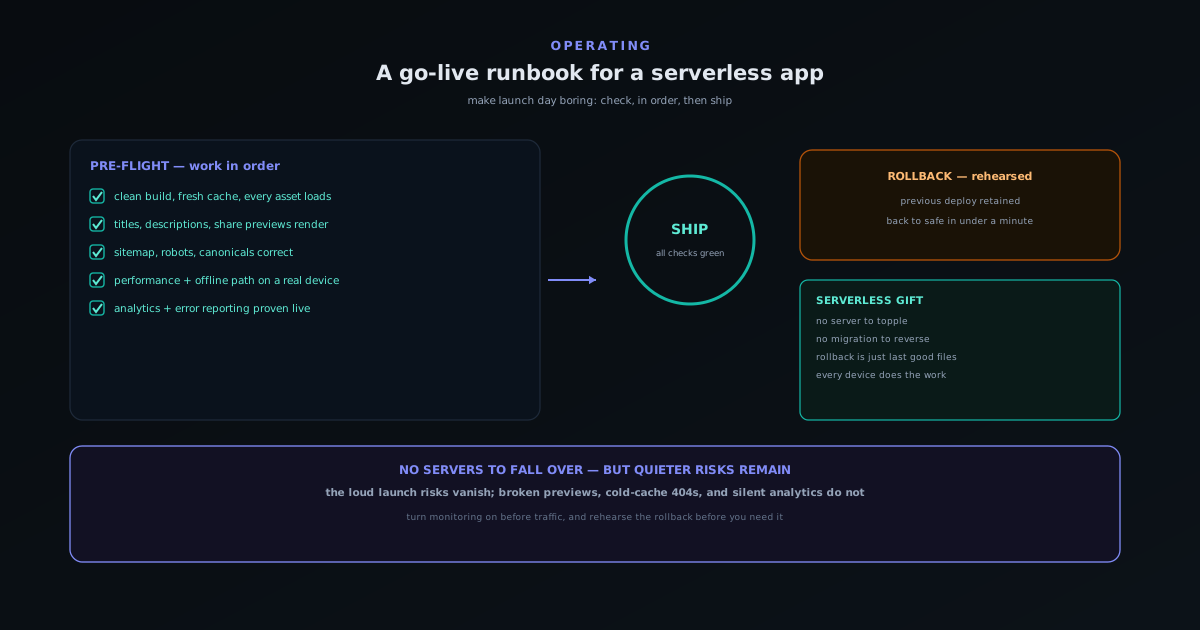
A serverless, in-browser app has no servers to fall over on launch day, which removes the scariest launch risks and quietly introduces subtler ones. This is the concrete pre-launch runbook we actually work through before a go-live: what to check, in what order, and what to have ready if it goes wrong.
Contents
- 1.Overview
- 2.First: the build and the assets are real
- 3.Second: metadata, previews, and indexing
- 4.Third: performance and the offline path
- 5.Fourth: monitoring before traffic, not after
- 6.Fifth: know your rollback before you need it
- 7.The runbook is the calm
- 8.Soft-launch before you announce
- 9.Trust pages are part of the launch, not paperwork
- 10.The runbook does not end at ship
- 11.Write it down so the next launch is easier
Overview
Launching an app with a backend is a fraught thing. There are servers to provision and scale, databases to migrate without downtime, connection pools to size, and the persistent fear that a surge of launch-day traffic will topple something. A serverless, in-browser app deletes almost all of that. There is no server to fall over because there is no server; the app is static files served from a content network, and every visitor’s device does the work. The first thing to say about a serverless go-live, then, is that the scariest launch risks (the ones that keep backend teams up at night) simply do not exist. That is a genuine and underrated advantage of the architecture, and it changes the whole texture of launch day.
But “fewer risks” is not “no risks”, and the risks that remain are quieter and easier to miss precisely because the loud ones are gone. Nobody forgets to scale a database when there is no database, but it is very easy to ship a launch where the share previews are broken, the analytics never fired, a critical asset 404s on a fresh cache, or search engines cannot index a thing. None of those will crash the app; all of them will quietly undercut the launch. A runbook for a serverless go-live is therefore less about surviving load and more about catching the subtle, silent failures before real traffic does. What follows is the actual ordered checklist, grouped the way we work through it.
First: the build and the assets are real
The runbook starts at the most basic and most embarrassing-to-get-wrong layer: does the thing that is about to be public actually contain what you think it does. A clean production build from the exact commit you intend to ship, not a stale artifact and not your development build, is the foundation, and verifying it on a fresh load (with the cache cleared, as a first-time visitor would experience it) is the check that catches the most humbling launch bugs. The classic serverless failure is an asset that loads fine for you because it is cached from development but 404s for a genuine first-time visitor whose browser has never seen it.
So the first group of checks is concrete and physical: every image, font, script, and model loads on a cold cache; nothing in the network tab is red; the routes you expect all resolve, including the deep ones nobody clicks during development. For an app that loads large assets like AI models on demand, this includes confirming those deferred loads actually work from a clean state, not just that the page renders. This is unglamorous and it is where a surprising share of launch problems live, because development hides them behind a warm cache. Test as a stranger, on a fresh load, before anything else.
Second: metadata, previews, and indexing
With the app itself confirmed, the next group is everything about how the app presents itself to the rest of the internet, because these are invisible in normal use and so are the easiest to ship broken. Page titles and descriptions should be present and correct on every route. Share previews (the card that appears when someone posts a link in a chat or on social) should render with the right image, title, and description, which means actually pasting a link into a couple of platforms and looking, because social crawlers are notoriously picky and a preview that looks fine in your head can come up blank in practice. A launch where every shared link shows a grey box is a launch that quietly loses half its word-of-mouth.
The indexing checks belong here too. The sitemap should exist, list the real routes, and be reachable; the robots rules should permit what you want crawled and block what you do not; canonical URLs should point where they should. For a content-bearing app these are not afterthoughts; they determine whether the work becomes findable at all. This is also the part of the runbook most amenable to automation, since a build step can verify that every route is in the sitemap and every page has metadata, which is exactly the kind of check described in A build-time validation gate: catching content errors before deploy. The more of this the build enforces, the less of it you have to remember on launch day.
Third: performance and the offline path
A serverless app cannot blame a slow server for a slow experience, because the performance the user feels is set by the assets you ship and how the device handles them. So the runbook checks the metrics that govern that feeling (how fast the page becomes interactive, how much the layout shifts as it loads, how heavy the first load is) on a realistic device and connection rather than a developer’s fast machine and fast network. A launch that feels instant in the office and sluggish on a mid-range phone over mobile data has not really been tested, because most real visitors are closer to the phone than the office. The number that usually matters most here is first-load JavaScript, for the reasons laid out in Code-splitting a large web app: how lazy routes keep it fast.
For an app that promises to work offline or on-device, the offline path is part of go-live, not a bonus. If the pitch is that the tool runs without uploading anything and keeps working after the first load, then the runbook has to actually verify that: load the app, go offline, and confirm the core function still works. This is the kind of promise that is easy to make and easy to quietly break in a refactor, and launch day is the right time to confirm the headline claim is still true. An app whose central differentiator silently stopped working is worse than one that never claimed it, so the claim gets checked before the public does.
Fourth: monitoring before traffic, not after
Here is the check that is most often left until it is too late: making sure you can see what is happening before the traffic arrives. Analytics and error reporting need to be live and verified at go-live, not wired up afterwards once you notice the numbers are missing, because the launch window is exactly when you most need to know whether things are working, and it is the one window you cannot replay. An error tracker that was not actually capturing errors during the first day of real use has cost you the most informative data you will ever get, and there is no going back for it.
So the runbook confirms, with a real test event rather than an assumption, that page views are being recorded, that a deliberately triggered error shows up in the error tracker, and that whatever signal tells you the app is healthy is actually flowing. For a serverless app this monitoring is your only window: there are no server logs to fall back on, so client-side reporting is the entire picture, which makes it more important here than in a backend app, not less. Turning it on and proving it works before opening the doors means that if something does go wrong on launch day, you find out from your dashboard rather than from a confused user, which is the difference between a quick fix and a slow, blind panic.
Fifth: know your rollback before you need it
The last group is the one you hope not to use and must have ready anyway: the rollback. The enormous advantage of a static, serverless deploy is that rolling back is trivial compared to a backend: there is no database migration to reverse, no data to reconcile, just a previous set of files to point traffic back at. But trivial-in-principle is not the same as ready-in-practice, and the time to confirm you know exactly how to revert to the last good version is before launch, calmly, not during an incident with adrenaline running. A rollback you have never actually performed is a plan, not a capability.
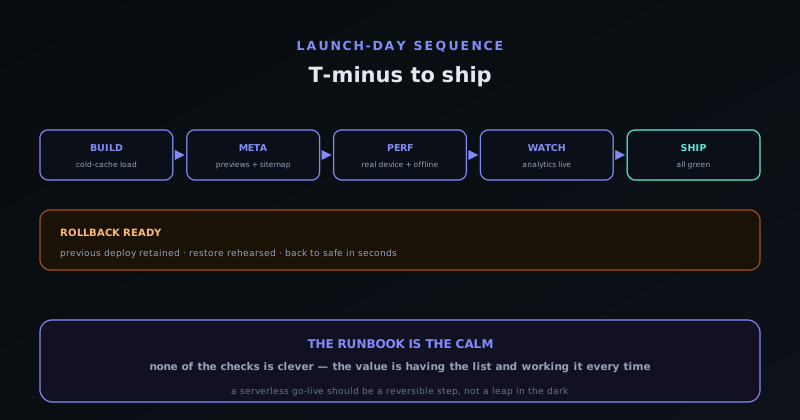
So the runbook ends by making the rollback concrete: the previous deploy is known and retained, the command or action to restore it is understood by whoever is on call, and ideally it has been rehearsed at least once so it is muscle memory rather than a frantic search through documentation. Knowing you can be back to safety in under a minute changes the psychology of launch day entirely: it lets you ship with the confidence that a mistake is recoverable rather than catastrophic, which is the whole point of having a runbook. The combination of a serverless architecture and a rehearsed rollback turns go-live from a high-wire act into a reversible decision.
The runbook is the calm
None of these checks is clever. That is the point. A go-live runbook is not a display of engineering sophistication; it is a way of making launch day boring, and boring is exactly what you want when something is becoming public. The value is not in any single item but in having the list at all, worked in a consistent order, so that the things that are easy to forget under the mild pressure of shipping get caught every time rather than most of the time. The same launch done from memory will eventually ship the broken share preview or the missing analytics; the same launch done from a list will not.
The serverless context shapes the list but does not shrink its importance. You inherit a gift (no servers to topple, a trivial rollback) and in exchange you take on responsibility for a set of quieter checks that a backend team might have other systems to catch. Work the runbook, in order, as a stranger on a cold cache, with monitoring proven live and a rollback rehearsed, and a serverless go-live becomes what it should be: a calm, reversible, well-lit step rather than a leap in the dark. The architecture removes the drama; the runbook removes the surprises.
Soft-launch before you announce
There is a step that sits between “the build passes the runbook” and “tell the world”, and skipping it is how avoidable launch-day fires get started. Deploying the app to its real, public address quietly (live, but not yet announced) lets the thing bake under real conditions for a short while before any attention arrives. You get to load it from networks and devices that are not yours, share it with a handful of people who will click around honestly, and watch the monitoring you just turned on register real sessions, all while the cost of any problem is low because nobody is watching yet. A soft launch turns the announcement from the first time the app meets the real world into a confirmation that it already has.
The value is that real conditions surface things no checklist run on your own machine will. A font that loads from the wrong place on a stricter network, a share preview that a particular platform renders differently than the one you tested, an asset that is slow from a region far from where you happen to sit: these show up in a quiet live window and are trivial to fix before the announcement. The mistake is treating deploy and announce as a single atomic act; separating them by even a day gives you a margin in which problems are cheap. By the time you actually point people at the app, it has been quietly serving real traffic without incident, which is the calmest possible state to launch from.
Trust pages are part of the launch, not paperwork
For a tool whose entire pitch rests on a promise (“we never upload your files”, “this runs entirely on your device”) the pages that explain and back that promise are not legal afterthoughts to bolt on later; they are part of what makes the launch credible. A privacy policy that actually describes the on-device model, clear terms, a real way to make contact, and an honest account of what data is and is not collected all need to be present and correct at go-live, because the first thing a thoughtful visitor does with a privacy claim is look for the page that substantiates it. A bold claim with no supporting page reads as marketing; the same claim with a clear, specific policy behind it reads as a commitment.
So the runbook treats these pages with the same seriousness as the app itself: they exist, they say what is true, they are linked from where a curious or cautious user will look, and they match the behaviour the app actually exhibits. The fastest way to undermine a privacy-first launch is a privacy page that contradicts the pitch or, worse, a boilerplate template that mentions data collection the app does not do. Getting the trust surface right is cheap and the payoff is disproportionate, because for this kind of product the promise is the product, and an unsubstantiated promise is the one launch flaw that no amount of technical polish can paper over. The claim and the page that backs it ship together or not at all.
The runbook does not end at ship
Pressing the button is the middle of the runbook, not the end of it, because the most informative hours of a launch are the ones right after traffic starts arriving. The first day is when reality tests assumptions that no pre-launch check could: real devices you never owned, networks you never tried, usage patterns you did not predict, and the long tail of browsers and settings that only a public audience brings. So the runbook reserves attention for the hours after go-live: watching the error tracker for anything new and clustered, watching the analytics to confirm people are actually reaching and using the core feature rather than bouncing, and being ready to act on what shows up while the context is fresh.
What you are watching for is the difference between noise and signal. A handful of exotic errors from ancient browsers is noise; a spike of the same error across many sessions is a real defect that the launch just exposed, and catching it in hour one rather than week one is the entire reason you turned monitoring on first. This is also where the rehearsed rollback earns its keep: if the day-after data reveals something genuinely broken, you already know you can be back to safety in under a minute, so the decision is calm rather than panicked. A launch is a hypothesis that the app works for real people in the real world, and the post-ship watch is how you check the result, which makes the hours after shipping part of the runbook, not a victory lap.
Write it down so the next launch is easier
A runbook only delivers its full value if it survives the launch it was written for, and the way it survives is by being written down rather than carried in someone’s head. A launch run from memory is a launch that will eventually skip a step, because memory is exactly what the mild pressure of shipping erodes; a launch run from a checklist is one where the easy-to-forget items get caught every time because they are sitting there on the list demanding to be ticked. The artifact (an actual document of the grouped checks, in order) is the thing that turns a good launch into a repeatable one, and it costs almost nothing to maintain once it exists.
The discipline that compounds is to treat the runbook as a living document that learns from each launch. Every time something slips through to a go-live and causes a scramble, the fix is not only to handle it in the moment but to add the check that would have caught it, so the next launch is protected against that whole class of problem. Over a few launches the runbook accrues exactly the institutional memory a small team otherwise lacks, becoming a record of every launch mistake the team has made and resolved not to repeat. The first launch from the list is merely calmer than one from memory; the fifth is genuinely boring, which for a go-live is the highest praise there is.
Frequently asked questions
Quick answers to common questions about this topic.
What makes launching a serverless app different from one with a backend?
Most of the scariest launch risks (scaling servers, migrating databases without downtime, surviving a traffic surge) simply do not exist, because there is no backend to topple and every visitor’s device does the work. What remains are quieter risks: broken share previews, assets that 404 on a cold cache, analytics that never fired, or pages search engines cannot index. A go-live runbook for serverless is about catching those silent failures before traffic does.
Why test on a cold cache as a first-time visitor?
Because development hides bugs behind a warm cache. Assets that load fine for you may 404 for a genuine first-time visitor whose browser has never fetched them, and deferred loads (like on-demand AI models) may fail from a clean state. Loading the app with the cache cleared, as a stranger would, catches the most common and most embarrassing launch bugs.
What is the most commonly forgotten go-live check?
Confirming that analytics and error reporting are actually live and capturing data before traffic arrives, with a real test event rather than an assumption. The launch window is when you most need visibility and is the one window you cannot replay, and for a serverless app client-side reporting is your only view since there are no server logs to fall back on.
How should I handle share previews and indexing?
Verify them explicitly: paste a link into a couple of real platforms to confirm the preview card renders with the right image, title, and description, since social crawlers are picky and a preview can come up blank. Confirm the sitemap exists and lists real routes, robots rules are correct, and canonicals point where they should. Much of this can be enforced automatically by a build-time check.
Why rehearse a rollback if serverless rollbacks are easy?
Because trivial in principle is not the same as ready in practice. A static rollback is just pointing traffic back at the previous files (no migration to reverse) but a rollback you have never performed is a plan, not a capability. Confirming the previous deploy is retained and rehearsing the restore before launch turns go-live into a reversible decision rather than a high-wire act.
Related troubleshooting
Was this page helpful?
Your answer stays in this browser, it is not sent anywhere and no account or cookie is involved.