2026 · EngineeringAbout 12 min readNovus Stream Solutions
Shipping on Vercel solo: the deploy and preview workflow that keeps overhead near zero
The practical deploy workflow (automatic preview deployments, promotion to production, and instant rollbacks) that lets one person run several apps without an operations burden. How near-zero ops actually works in practice.
Contents
- 1.Overview
- 2.Every push gets a preview
- 3.Promotion is the safe default
- 4.Immutable deployments are the foundation
- 5.A QA environment without running one
- 6.Why low-stakes shipping compounds
- 7.Git is the entire deploy interface
- 8.What the platform absorbs
- 9.Safe shipping changes how you build
- 10.Rollback is instant and that changes the risk calculus
Overview
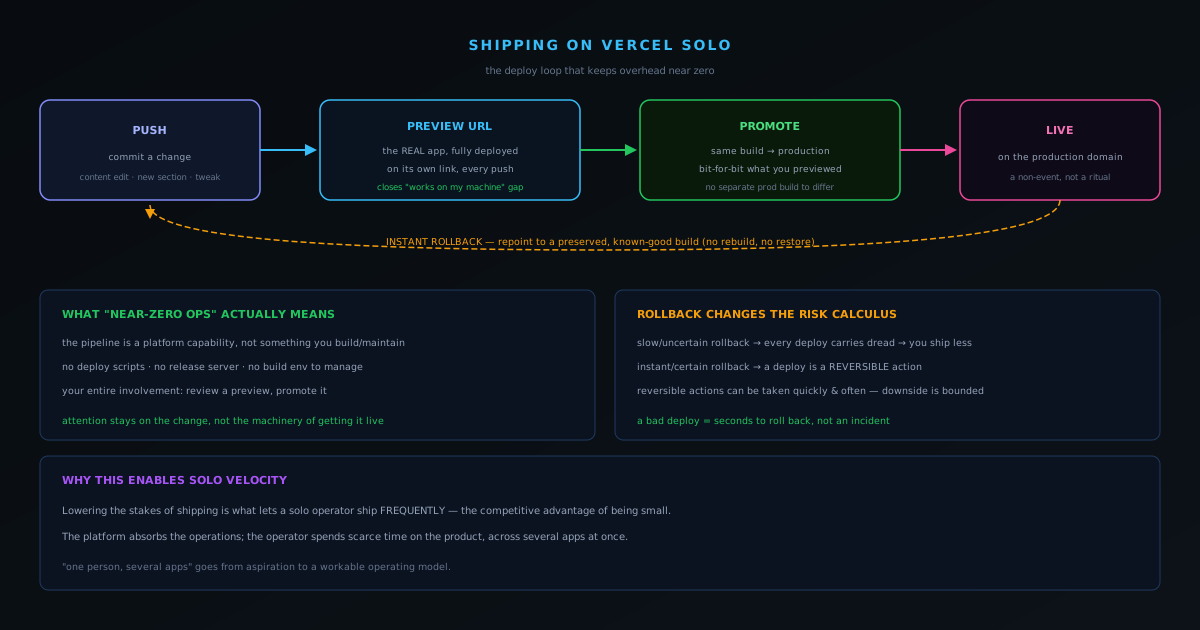
For most of software history, "deploying" was an operations discipline: servers to provision, a release process to run, monitoring to watch, a rollback plan to rehearse. For a solo operator running several apps, that overhead is fatal: every hour spent on deployment mechanics is an hour not spent building, and the cognitive weight of "is the deploy going to go wrong" is a tax on shipping at all. The reason one person can run the hub at novusstreamsolutions.com and its products without an operations function is that the deploy workflow on Vercel removes almost all of that overhead. This post is about the practical loop (preview, promote, roll back) and why it is what makes near-zero-ops solo development actually work rather than being a slogan.
The honest claim is not that operations disappears; it is that the operations that remain are small, safe, and fast enough that they stop being a barrier to shipping. The workflow turns deployment from a careful, rehearsed event into a routine, low-stakes action you take many times a day without thinking about it, and lowering the stakes of shipping is what lets a solo operator ship frequently, which is the whole competitive advantage of being small. One technique compounds this loop: decoupling merging code from exposing it, which you can do with a handful of conditionals rather than a vendor, as I show in Feature flags without a platform.
Every push gets a preview
The foundation of the workflow is automatic preview deployments. Every push to the repository produces a fully deployed copy of the site at its own URL, not a local dev server, not an approximation, but the actual application built and running exactly as it would in production, on a unique link. This sounds like a convenience and is actually a fundamental change in how you work. It means you never have to reason about whether a change will work in production by staring at it locally and hoping; you look at it deployed, on a real URL, in the real environment, before it is live. The gap between "works on my machine" and "works in production" (the gap where a large fraction of deployment surprises live) is closed by default, on every change.
For a solo operator this is the closest thing to having a QA environment without running one. A content change to a blog post, a tweak to the navigation, a new section: each one is previewable as a real deployment before anyone else sees it, which means the review step is "look at the preview" rather than "deploy to production and find out." The preview is also shareable, so on the rare occasion a second opinion is useful, it is a link, not a "let me set up the environment for you." The preview deployment turns every change into something you can evaluate in its real form before committing to it, which removes the single biggest source of deployment anxiety.
Promotion is the safe default
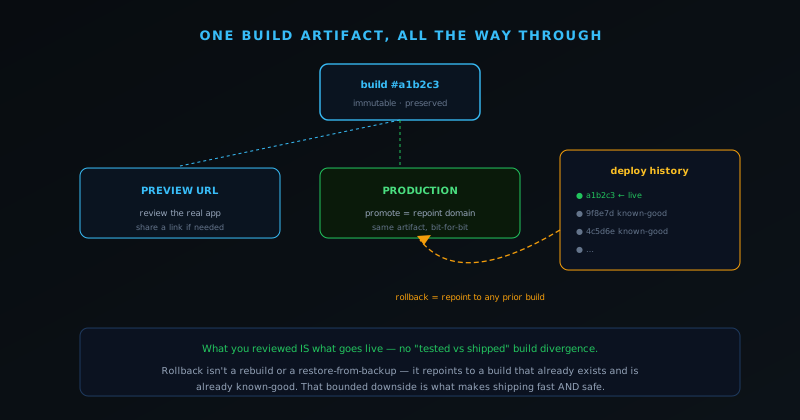
Going live is promotion, not a separate build-and-deploy ritual. Because the preview deployment is already the real, built application, making it production is a matter of promoting that exact build to the production domain: there is no separate production build that might behave differently from what you previewed, because it is the same artifact. This eliminates a classic failure mode where the thing you tested and the thing you shipped are subtly different builds. What you reviewed on the preview URL is bit-for-bit what goes live. The act of shipping is reduced to "the preview looks right, promote it," which is a low-stakes decision precisely because the risky part (will the build work in the real environment) was already answered by the preview.
This is what "near-zero ops" means concretely: the deployment pipeline is not something the operator builds and maintains, it is a capability the platform provides, and the operator's entire involvement is reviewing a preview and promoting it. There are no deploy scripts to keep working, no release server to patch, no build environment to manage: those are the platform's problem. The operator's attention stays on the change itself rather than on the machinery of getting it live, and across several apps that difference is the difference between deployment being a constant background cost and deployment being a non-event.
Immutable deployments are the foundation
The property that makes the entire deploy loop work is that every deployment is immutable, a preserved, unchanging build that continues to exist after it is superseded rather than being overwritten. Each push produces a distinct, permanent build artifact, and that immutability is what enables both the preview-is-production guarantee and the instant rollback. Because the build that was previewed is the exact artifact that gets promoted, there is no separate production build that could differ; because superseded builds are not destroyed, rolling back is repointing at an artifact that still exists rather than rebuilding one. Immutability turns deployments from ephemeral events into a durable, addressable history of known states.
This foundation is what distinguishes the modern loop from older deployment models where the production environment was mutated in place. When deploying means changing the running environment, there is no clean previous state to return to: rollback means undoing the change, which is error-prone and slow, and the thing you tested may not be exactly the thing that is now running. When every deployment is an immutable artifact, the current state is always one specific build, any previous build is still there to return to, and what you tested and what you ship are provably identical. Nearly every good property of the workflow (reproducibility, safe rollback, preview-equals-production) traces back to deployments being immutable artifacts rather than mutations of a shared environment. It is the unglamorous foundation the whole low-overhead loop is built on.
A QA environment without running one
For a solo operator, the preview deployment functions as a quality-assurance environment that costs nothing to operate, which is a significant capability normally associated with larger teams. A traditional QA setup is a staging environment that has to be provisioned, maintained, and kept in sync with production, real operational overhead that a one-person operation can rarely justify. Automatic preview deployments provide the essential benefit of that environment, a real deployed copy to evaluate changes against before they go live, without any of the maintenance, because the platform creates and tears down the previews automatically on every push.
This effectively gives a solo operator the review discipline of a team without the team or the infrastructure. Every change can be evaluated in its real, deployed form before promotion, which closes the works-on-my-machine gap that causes so many deployment surprises, and the preview is shareable when a second opinion is wanted. The operator gets the core value of a staging environment (catch problems in a production-like setting before users do) as a default of the workflow rather than as something they built and maintain. For an operation where the QA team is the same person as the developer, the same person as the operator, having the platform supply a real preview environment for free is a large part of what makes shipping confidently as one person actually feasible.
Why low-stakes shipping compounds
The deepest payoff of the whole workflow is not any single fast step but the compounding effect of making shipping low-stakes, because low-stakes shipping changes behavior in a way that benefits everything downstream. When deploying is risky, slow to undo, and effortful, an operator deploys less often, batches changes into larger riskier releases, and spends energy on deployment anxiety, all of which slows the pace of improvement. When deploying is safe, instantly reversible, and effortless, an operator ships small changes frequently, gets them in front of reality quickly, and iterates fast, because the cost of each deploy is low enough that frequency is not dangerous. The workflow does not just make each deploy easier; it changes how often you are willing to deploy.
That shift toward frequent, small, low-risk shipping is the actual competitive advantage of being a small operation, and the deploy loop is what unlocks it. Small operations cannot outspend or outstaff larger ones, but they can out-iterate them by shipping improvements faster, and shipping faster requires the cost and risk of each ship to be low. The preview-promote-rollback loop, built on immutable deployments, drives that cost and risk down to the point where shipping many times a day is routine rather than reckless. Combined with the single-codebase hub that one person can hold in their head and the lean infrastructure that keeps costs near zero, the deploy loop is what turns "one person, several apps, shipping constantly" from a contradiction into the operating model, which is the whole point of building the stack this way.
Git is the entire deploy interface
A defining property of the workflow is that the deploy interface is just git: pushing to the repository is what triggers a deployment, so there is no separate deploy command, console, or process to operate. The operator's normal development action (committing and pushing code) is also the action that produces a deployment, which means deploying is not a distinct thing you do but a consequence of the work you were already doing. This collapses the deployment step into the development workflow entirely, removing it as a separate concern that has to be learned, maintained, or remembered.
Making git the deploy trigger is a large part of why the operations overhead is near zero. There is no deployment tooling for the operator to build or keep working, because the trigger is the version control they already use; there is no release process to run, because pushing is the release. The platform watches the repository and handles everything downstream of a push automatically. For a solo operator, this means the entire conceptual surface of "how do I deploy" reduces to "I push, like always," which is about as low as deployment friction can go. The deploy mechanism is something they interact with only through the git workflow they would be using regardless, so it adds nothing to learn or maintain: the operations are absorbed into a tool that was already part of the work.
What the platform absorbs
It is worth enumerating what the platform takes off the operator's plate, because the list is exactly the operations burden that historically made running apps a discipline of its own. Building the application on each push, running it on infrastructure that scales to demand, serving it from locations close to users, provisioning and renewing the certificates that secure it, preserving every deployment as an immutable artifact, and providing the preview and rollback capabilities: all of this is the platform's responsibility, not the operator's. These are the things a traditional operations function would handle, and the platform handles them as defaults rather than as systems the operator builds.
The significance for a solo operator is that this absorbed operations work is precisely the work they could not otherwise afford to do well. Provisioning scaling infrastructure, managing certificates, maintaining a build-and-deploy pipeline, and running a preview environment are real, ongoing burdens that a one-person operation would either do poorly or be consumed by. By absorbing them into the platform, the operator gets the benefits (reliable scaling, secure serving, safe deploys) without the labor, which is what frees their scarce time for building the product rather than operating the infrastructure. The platform is, in effect, the operations team that a solo operation cannot hire, and the leverage of that is what makes running several apps as one person genuinely feasible rather than a recipe for being buried in ops.
Safe shipping changes how you build
Beyond the mechanics, there is a cultural effect worth naming: when shipping is safe and reversible, it changes how an operator approaches building, encouraging an experimental, iterative style that risky deployment suppresses. When a deploy is a careful, hard-to-undo event, the rational response is to deploy rarely, batch changes, and avoid experiments that might break things, a conservative posture that slows learning. When a deploy is safe, instant, and reversible, the rational response is the opposite: try things, ship small changes often, put ideas in front of reality quickly, because the cost of being wrong is a quick rollback rather than an incident. The safety of the workflow licenses a more experimental way of working.
This experimental posture is a real advantage, because much of what makes a product good is discovered by shipping and observing rather than planned in advance. An operator who can safely ship a small change, see how it behaves, and keep or revert it is running a fast loop of real-world experiments, learning from each, which compounds into a better product faster than careful upfront planning alone. The deploy workflow does not just make individual deploys easier; it shifts the whole development culture toward the rapid, low-risk iteration that suits a small operation's strengths. The ability to ship safely is, in the end, the ability to learn quickly, and that is the deepest reason the deploy loop matters: it is the foundation of an iterative way of building that turns the smallness of the operation into a speed advantage rather than a limitation.
Rollback is instant and that changes the risk calculus
The piece that makes the whole loop psychologically sustainable is instant rollback. Because every deployment is a preserved, immutable build, reverting to a previous version is not a rebuild or a restore-from-backup: it is repointing production at a deployment that already exists and is already known-good. If a change makes it to production and turns out to be wrong, getting back to the last good state is fast and certain, not a frantic redeploy under pressure. That single property changes the entire risk calculus of shipping. When rollback is slow or uncertain, every deploy carries the weight of "what if this breaks and I cannot quickly undo it," which makes a solo operator deploy less and agonize more. When rollback is instant and certain, a deploy is a reversible action, and reversible actions can be taken quickly and frequently because the downside is bounded.
This is the deeper reason the workflow enables solo shipping velocity. It is not just that each step is fast; it is that the safety net under the whole process is real and immediate, so the operator can move quickly without recklessness. A bad deploy is an inconvenience measured in the seconds it takes to roll back, not an incident measured in the time it takes to rebuild and redeploy a fix. That bounded downside is what lets a single person run multiple apps and ship to them often: the cost of being wrong is low enough that being fast is not dangerous. Combined with the single-codebase hub architecture and the lean infrastructure that keeps monthly overhead low, the deploy loop is what turns "one person, several apps" from an aspiration into a workable operating model, where the platform absorbs the operations so the operator can spend their scarce time on the product.
Frequently asked questions
Quick answers to common questions about this topic.
How does a solo developer keep deployment overhead low?
Push to git and let the platform build and deploy. With Vercel, every push produces a preview URL and merges deploy to production automatically, so there is no manual release process to maintain.
What are preview deployments and why do they matter solo?
Each branch or pull request gets its own live URL, so you can review a change in a real environment before it goes live. For a one-person team, that is the QA step: see it working, then merge.
Is Vercel a good fit for a multi-section site?
Yes for a Next.js hub: static generation, edge functions for dynamic OG images and sitemaps, and zero-config deploys keep a content-heavy site fast and cheap to run without a dedicated ops role.
Related troubleshooting
Was this page helpful?
Your answer stays in this browser, it is not sent anywhere and no account or cookie is involved.