2026 · Novus Stream Solutions (hub)About 11 min readNovus Stream Solutions
Ad placement that respects the reader
An ad in the wrong place costs more than it earns: it slows the page, frustrates the reader, and can trip ad-policy reviews. This is how we think about where ads go so the article still comes first.
Contents
Overview
Every ad on a page is a small negotiation with the reader. You are asking for a slice of their attention and a slice of the screen in exchange for keeping the thing they came for free. Done well, that trade is almost invisible: the reader gets the article, the ad gets seen, and a free tool stays funded. Done badly, the ad becomes the page: it loads late and shoves the text, it sits where a thumb is about to tap, it greets the reader before the headline does. The difference between those two outcomes is almost entirely about placement.
This is written from the operator side, not the sales side. We fund genuinely free tools (the background remover, the visualizers) with display ads, which means we have a direct interest in placement that the reader can live with, because a reader who bounces or installs a blocker is worth nothing to anyone. The goal here is not to maximize the number of ads on a page; it is to place a reasonable number of ads where they earn without making the page worse. Those two aims line up more often than ad-stuffing instincts suggest.
Content comes first, literally
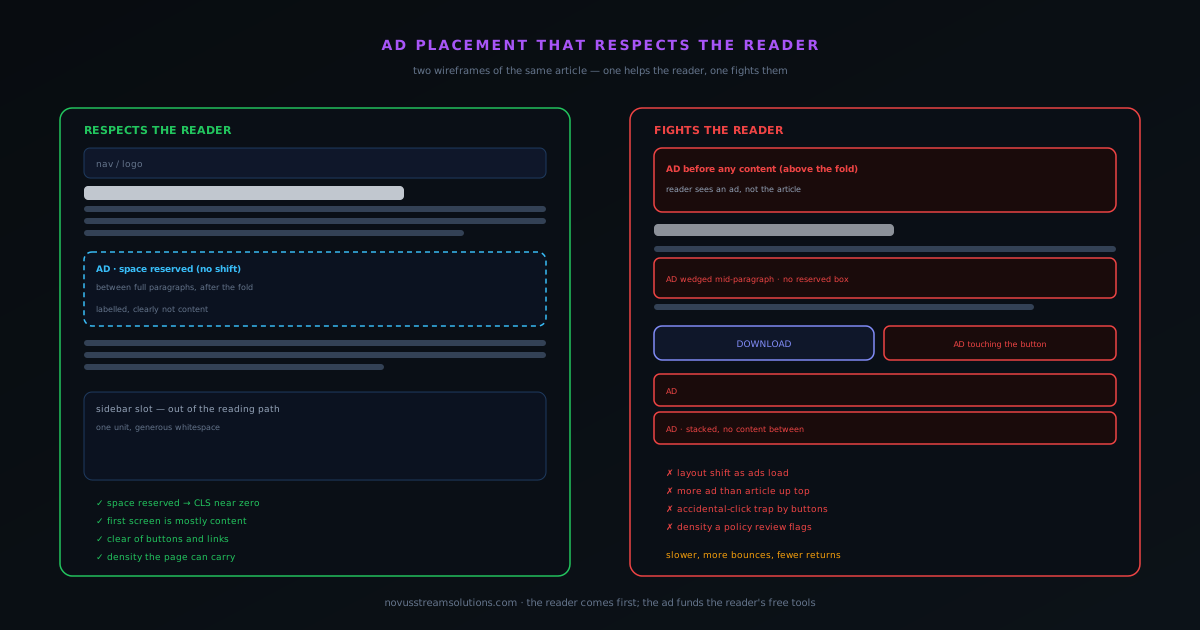
The single most important placement rule is also the simplest: the content should establish itself before the advertising does. When a reader arrives, the first thing on the screen ought to be the headline and the opening of the article (the thing they clicked for) not an ad bar they have to scroll past to find out whether they are even in the right place. Leading with an ad answers the question "what is this page for?" with "showing you ads," which is exactly the wrong first impression for a page that wants to be trusted and read.
This does not mean ads can never appear high on the page; it means the content should win the first screen. A reader who immediately sees the article they wanted, and only then encounters an ad as they read on, has been treated as the reason the page exists. A reader who has to get past advertising to reach the content has been treated as the means to an ad impression. The order in which those two things appear is a statement of priorities, and putting content first is both the respectful choice and, not coincidentally, the one that keeps people on the page long enough for the ads further down to matter.
Above the fold, below the fold
The fold (the bottom of what is visible before any scrolling) is a useful line to think in terms of, because it divides the screen the reader is guaranteed to see from the part they only reach if the content earns it. Above the fold is the most valuable and most dangerous real estate: valuable because everyone sees it, dangerous because crowding it with ads is the fastest way to make a page feel like a billboard. A single, restrained ad high on the page can be fine; a stack of them ahead of the content is where pages lose readers.
Below the fold, the calculus relaxes. A reader who has scrolled past the opening has signalled genuine interest, and an ad encountered there interrupts much less: they are already engaged, already reading, and an ad between sections reads as a natural pause rather than a toll booth. This is why the densest, safest placements tend to live in the body of the article rather than at its head: by the time a reader is deep in the piece, they have committed, and a well-spaced ad does not threaten that commitment the way a wall of ads at the top would have.
Reserve the space, or the page jumps
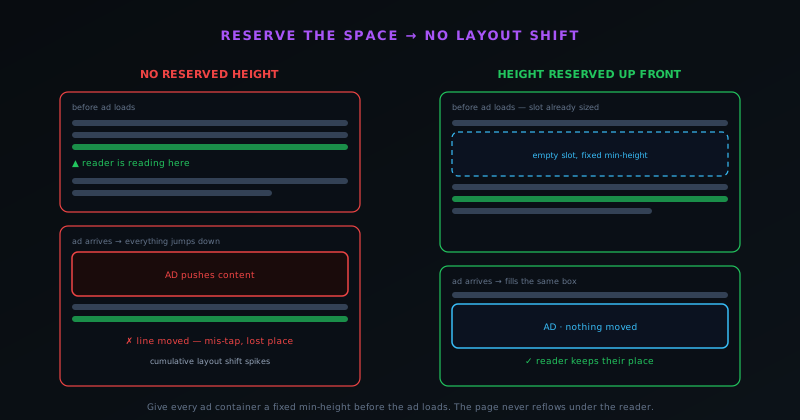
One placement mistake does more damage than any other, and it is invisible until it happens: failing to reserve the space an ad will occupy. Ads load after the rest of the page, often a beat or two later. If the container holding an ad has no height until the ad arrives, then the moment it does arrive, it pushes everything below it down the screen. The reader who was mid-sentence suddenly finds the text has jumped, and the button they were about to tap is now somewhere else, which is how an innocent reader ends up clicking an ad they never meant to.
The fix is to reserve the slot height up front. Give every ad container a fixed minimum height that matches the ad it will hold, so the space exists before the ad does and the ad simply fills a gap that was already there. Nothing moves, the reader keeps their place, and the dreaded mid-read jump never happens. This is not only courtesy; it is measured. Cumulative Layout Shift, one of the Core Web Vitals that search and users both care about, is precisely the metric that punishes content shoving its way around as things load. An unreserved ad slot is one of the most common causes of a bad CLS score, and reserving it is one of the cheapest fixes available.
Density: the limit is the reading rhythm
There is endless debate about how many ads a page can carry, usually framed as if there were a precise allowable number. The more useful way to think about it is in terms of rhythm: how often does an ad interrupt the act of reading? A reader settles into an article and develops a cadence: read a bit, absorb, read on. An ad encountered occasionally, at a natural break, fits into that cadence as a pause. An ad encountered every paragraph breaks the cadence repeatedly, and the reading becomes a slog of starting and stopping. The limit is the point at which the ads stop being pauses and start being interruptions.
The visual version of the same test is the share of the screen. Scroll through the page and ask, at each screenful, whether you are looking at mostly content or mostly advertising. If any screen is more ad than article, the density is too high, full stop, and it is worth noting that this is also roughly the line ad-policy reviews care about, because a page dominated by ads is exactly what those policies exist to discourage. Pushing density past the comfortable point tends to backfire anyway: more ads do not mean proportionally more revenue once readers start tuning them out or leaving, and a page that drives people away earns less in the long run than a restrained one that keeps them.
Never next to the interactive bits
A specific, non-negotiable rule deserves its own attention: ads must not sit immediately beside the things people tap or click on purpose. Place an ad right next to a download button, a navigation link, or a form control, and you create an accidental-click trap: a reader aiming for the real button hits the ad instead, or the ad shifts as it loads and lands under their thumb. This is bad on every axis. The reader is annoyed at being taken somewhere they did not intend to go, the advertiser is paying for a click that represents no real interest, and the ad network treats clicks born of confusion as exactly the kind of invalid activity their policies forbid.
The fix is simply clearance: keep deliberate space between any ad and any interactive element, so there is no ambiguity about what a tap is meant to hit. On the tools themselves this is doubly important, because the whole point of the page is the button that runs the tool, and an ad crowding that button undermines the experience the reader actually came for. Treat the interactive elements as having a protective margin that ads are not allowed to enter. It costs a little placement flexibility and saves you from the worst category of placement mistake, the one that erodes trust and risks your standing with the ad network at the same time.
Mobile changes the math
Everything above gets stricter on a phone, because a phone changes two things at once: the screen is small and the input is a finger. On a small screen, any given ad occupies a far larger share of what the reader can see: an ad that is a modest fraction of a desktop layout can dominate a phone screen entirely. That means the comfortable density on mobile is lower, sometimes much lower, than on desktop. Carrying the same number of ads onto a phone that you ran on a wide screen will produce exactly the wall-of-ads feeling that drives readers off.
The finger matters just as much as the screen. A cursor is precise; a thumb is not, and it covers the very thing it is aiming at as it descends. That makes the accidental-click problem worse on mobile and the case for generous spacing around taps stronger. It also makes layout shift more dangerous, because a small jump that would be a minor annoyance on desktop can move a button right under a thumb already in motion. The practical upshot is that mobile deserves its own placement pass rather than an inherited desktop layout: fewer ads, more breathing room around anything tappable, and especially careful reservation of slot heights so nothing leaps as the reader scrolls.
- Fewer ads: each one is a bigger share of a small screen.
- More spacing around every tappable element.
- Reserve slot heights rigorously; a jump under a moving thumb is worse on mobile.
- Treat mobile as its own layout, not a shrunk desktop.
Labelling and honesty
An ad should be recognizable as an ad. This sounds obvious, but the temptation runs the other way: an ad that blends seamlessly into the content gets more attention, because the reader engages with it before realizing it is advertising. That is precisely why it is the wrong move. An ad disguised as a recommendation or a related article tricks the reader into spending attention they would not have spent if they had known, and the moment they notice, the trust between reader and site takes a hit that is hard to repair. Most ad networks also require clear separation between ads and content for this exact reason.
Clear labelling is the honest default and, over any reasonable horizon, the more profitable one. A reader who can tell at a glance what is content and what is advertising can relax into the page, because they are not being tricked, and a relaxed reader stays longer and comes back. The small short-term lift from camouflaged ads is bought at the cost of the long-term trust that keeps an audience. Mark ads as ads, keep them visually distinct from the article, and let the reader make an informed choice about where their attention goes. That honesty is the foundation everything else in this guide is built on.
The reader is the asset
Underneath all of these specifics is a single reframe that makes the right placement choices obvious: the reader, not the ad impression, is the asset you are building. A page that treats every reader as a unit of attention to be extracted as aggressively as possible will harvest a little more in the short run and lose the thing that actually compounds: an audience that returns, reads deeply, and tolerates the ads because the experience is good and the tools are genuinely free. Ad placement that respects the reader is not charity; it is the recognition that the long-term value of a trusting, returning reader dwarfs the marginal revenue of one more crammed-in unit.
In practice this means erring toward restraint whenever a placement decision is close. When you are unsure whether a page can carry another ad, it usually cannot. When you are deciding between a placement that earns slightly more and one that reads slightly better, the readable one wins over any horizon longer than a single visit. The whole reason the tools are free is that ads pay for them, and the whole reason the ads keep paying is that readers keep coming back, which they only do if the pages were worth coming back to. Placement that respects the reader is how those two facts stay compatible, and it is the only kind of placement that keeps a free, ad-supported site healthy for the long haul.
Frequently asked questions
Quick answers to common questions about this topic.
Where should ads go on a page?
Put content first and ads in the natural gaps around it: between full paragraphs once the reader is into the article, in a sidebar out of the reading path, and below the fold rather than ahead of the headline. The test is whether someone could read the piece comfortably and barely notice the ads were there.
How many ads is too many?
There is no single magic number, but the honest limit is the point where ads start to dominate the page or interrupt the reading rhythm. If a screen has more ad than article, or the reader hits an ad every paragraph, it is too many, and that density is also what ad-policy reviews flag.
Why does reserving ad space matter?
An ad that loads into a zero-height container shoves everything below it down the moment it arrives, which moves the line the reader is on and can cause mis-taps. Reserving the slot height up front means the ad fills a space that was already there, so the page never reflows under the reader, and your Cumulative Layout Shift stays low.
Can I put ads above the fold?
You can, within policy, but you usually should not lead with one. If the first thing a reader sees is an ad instead of the headline and opening lines, you have answered "what is this page for" with "advertising," which hurts trust and engagement. Let the content establish itself first.
Why should ads never sit next to buttons or links?
Ads placed right beside interactive elements invite accidental clicks, which is bad for the reader and explicitly against ad-network policy because those clicks are not genuine interest. Keep clear space between any ad and the things people actually mean to tap.
Is mobile ad placement different?
Yes. A phone screen is small, so an ad takes up a far larger share of it, and fingers are less precise than a cursor. That means fewer ads, more spacing around taps, and extra care that an ad never lands where someone is about to press a button.
Related troubleshooting
Was this page helpful?
Your answer stays in this browser, it is not sent anywhere and no account or cookie is involved.