2026 · Novus Stream Solutions (hub)About 13 min readNovus Stream Solutions
Zero-downtime content deploys for a small site
A content site earns trust one uneventful deploy at a time. This is the machinery that lets me ship articles, art, and layout changes dozens of times a week with no broken minute in between: validation the build enforces, preview deploys that rehearse the exact release, atomic swaps, and a rollback plan decided in advance.
Contents
- 1.Overview
- 2.What actually goes wrong when you ship words
- 3.Why content-as-code changes the whole problem
- 4.The validation gate: a build that refuses to lie
- 5.Preview deploys: the rehearsal that costs nothing
- 6.Atomic swaps: why nobody ever sees half a site
- 7.The rollback plan you write before you need one
- 8.The Tuesday-morning test
Overview
There is a particular flavor of dread in publishing to a live site: you push a change, reload production, and spend thirty seconds genuinely unsure what you are about to see. For years that dread was considered normal: deploys were events, sometimes ceremonies, occasionally disasters. On this site I deploy content changes dozens of times in a busy week, and the honest truth is that none of them are events. Not because nothing can go wrong, but because the pipeline is arranged so the wrong things get caught before traffic sees them, and the swap to the new version happens in an instant that no visitor can land inside.
This article is that arrangement, piece by piece. It is written for people running content-heavy sites (blogs, docs, marketing pages, portfolios) rather than for teams shipping backend services, because content deploys have their own failure modes and their own, honestly easier, solutions. The four load-bearing pieces are a build-time validation gate, preview deploys, atomic swaps, and a rollback plan made in advance, and underneath all four sits one architectural decision: the content lives in the repository as code.
None of this required a platform team or a budget. The stack is a static-leaning Next.js site on a host that gives previews and instant rollback for free, plus a few hundred lines of validation script. What it required was deciding that a broken deploy is a category of bug you engineer away rather than a weather event you accept.
What actually goes wrong when you ship words
Content deploys fail differently from application deploys, and it is worth naming the real failure modes rather than defending against imaginary ones. In my experience the list is short and stable: a link pointing at a page that does not exist, an image path with a typo, a post referencing a related article whose slug changed, metadata that is too long or missing, a date that quietly sorts a new post into last year, and, rarest but worst, a structural error that takes down a whole route. Every one of these has bitten this site or nearly bitten it.
Notice what the list has in common: almost nothing on it is visible on the page you were editing. The link you added works; it is the page it points to that moved. The article renders; it is the category listing that now shows a gap where the image failed to resolve. This is why eyeballing your change in a local preview is necessary and wildly insufficient: the blast radius of a content edit is the whole graph of pages that reference it, and no human rechecks the graph on every edit.
The other property these failures share is that they are all mechanically detectable. There is no judgement involved in whether a slug exists, an image resolves, or a meta description fits in its length budget; a script can check each one perfectly, every time, in seconds. That observation is the entire strategy: move every mechanically detectable failure into the build, where it blocks the deploy, and reserve human attention for the things machines cannot judge.
It is also worth pricing what a content failure costs, because the number justifies the machinery. A broken related-post link is not an outage, but it sits on a live page eroding credibility until a reader trips over it, and readers who trip do not file bug reports; they leave, quietly downgrading their opinion of everything else you publish. Search crawlers price it too: dead internal links and 404s are exactly the signals that make a small site look unmaintained. Cheap to prevent, expensive to discover late, invisible in between: that profile is why content bugs deserve gates rather than vigilance.
Why content-as-code changes the whole problem
Everything downstream in this article works because of one upstream decision: the content is code. Every post on this blog is a typed TypeScript object in the repository (the reasoning lives in Code-as-content: why our blog is hundreds of TypeScript objects, not a CMS), which means content changes and code changes travel through exactly the same pipeline. There is no CMS database that changes independently of deploys, no admin panel where an edit goes live the moment someone hits save, no second source of truth to drift. A change to an article is a commit, and a commit cannot reach production except through the gates.
The type system is the first gate, and it is free. When a post is a typed object, a missing required field, a misspelled property, or a malformed date is a compile error: the build fails on my machine before a deploy is even attempted. An entire category of CMS-era incident, the half-filled entry that renders as a broken card, is simply unrepresentable. The compiler does not get tired, does not skim, and checks all several hundred posts on every single build with identical rigor.
Content-as-code also gives you history and blame for free, which matters more for operations than people expect. When a page regresses, git bisect finds the commit that did it; when a fact needs correcting, the diff shows exactly what changed and when. The practical experience of running a large blog this way (what scales gracefully and what needed tooling) is written up in Content as code: running a 250-post blog without a CMS, but the operational headline is this: every deploy is a known, immutable snapshot of the entire site, and that is precisely the property that makes atomic swaps and instant rollbacks possible later in the pipeline.
The trade, stated honestly, is that editing requires a text editor and a git push rather than a friendly admin UI. For a team of writers that trade might be wrong. For an operator-run site where the person writing is the person deploying, it is barely a trade at all, and the safety it buys is the rest of this article.
The validation gate: a build that refuses to lie
The compiler catches structure; the validation gate catches meaning. It is a script that runs as part of every build, walks every post and page, and fails the build, loudly and with file names and reasons, when the content breaks a rule the type system cannot express. I described its construction in detail in A build-time validation gate: catching content errors before deploy, so here I will focus on its role in the deploy: it is the reason a broken link cannot reach production, because the deploy literally cannot complete while one exists.
The checks worth gating on are the mechanical failure modes from earlier, encoded one rule at a time. Ours accumulated over months, each one added the week its absence hurt.
What makes a gate trustworthy is that it has no bypass. It runs in CI on every push, the deploy is configured to require it, and there is deliberately no skip flag, because the day you allow one exception under deadline pressure is the day the gate stops meaning anything. If a rule is genuinely wrong, the fix is to change the rule in a commit, in the open, not to sneak past it. A gate with a side door is a suggestion.
The psychological effect is larger than the mechanical one. Once the gate had run clean for a few weeks, deploys stopped being anxiety and started being administration. I do not re-check the site graph after every edit, because the build does, identically, every time. That reclaimed attention is the real product of the gate: the checks are cheap; the calm is the point.
- Every internal link resolves to a real route, slug, or anchor.
- Every referenced image exists on disk with sane dimensions.
- Every related-post reference points at a post that is still published.
- Meta titles and descriptions fit their length budgets.
- Dates parse, sort correctly, and are never in the future.
- No two posts share a slug, and no slug has ever silently changed.
Preview deploys: the rehearsal that costs nothing
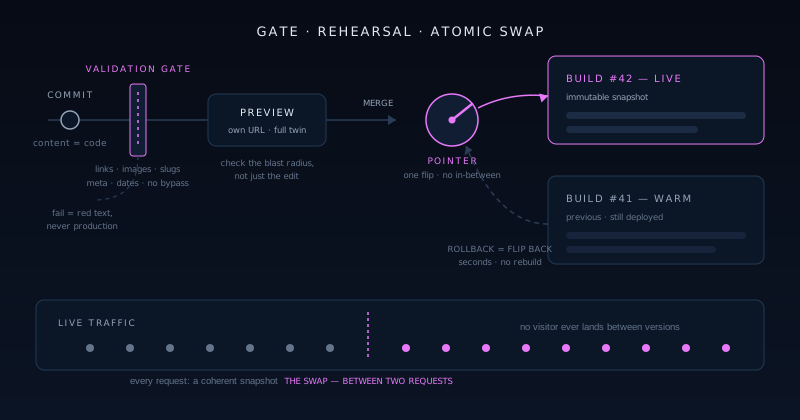
A green build tells you the content obeys the rules; a preview deploy shows you the actual site. Every push to a branch produces a complete, private copy of the site at its own URL: same build process, same output, same CDN as production, different address. This is not a staging server someone maintains; it is a disposable production twin minted per change, and on the platform we use it comes free with the git integration. The workflow this enables for a solo operator is covered in Shipping on Vercel solo: the deploy and preview workflow that keeps overhead near zero, and it changed how I ship more than any other single feature.
The habit that makes previews earn their keep is checking the blast radius, not the edit. On the preview I look at the pages the change touches indirectly: the category listing that now includes the new post, the related-post modules on the three articles that reference it, the feed, the sitemap entry. The edit itself was already correct on my machine; the preview exists to show me the graph. Two minutes of clicking around a preview has caught the sort of layout regression and awkward truncation that no validation rule will ever express.
Previews also decouple writing from releasing. A post can sit finished on its branch for days (reviewed on a real URL from my phone, reread with fresh eyes in the morning) and merging it is a separate, deliberate act. That separation sounds procedural and is actually editorial: the version of an article that ships after a night on a preview URL is reliably better than the version that would have shipped hot.
Atomic swaps: why nobody ever sees half a site
The moment of going live is where old-school deploys created downtime: files copied over a live document root one by one, a visitor arriving mid-copy getting new HTML with old CSS, or a 404 for an asset that had not landed yet. The modern answer is that a deploy is never an edit of the live site; it is a complete, new, immutable build sitting at its own internal location, and “going live” is a single pointer flip that routes traffic to it. One request serves the old site, the next serves the new one, and there is no instant in between where a visitor can see a torn page.
Atomicity matters for content precisely because content is a graph. An article, its images, its category listing, and the feed all change together in one deploy; served half-updated, they contradict each other. The pointer flip guarantees every visitor sees a coherent snapshot: either entirely before the change or entirely after. This is the property databases call a transaction, applied to a website, and once you have shipped this way the copy-files-over-FTP model starts to look like performing surgery on a patient who is awake.
The quieter benefit of immutable builds is that the old ones do not go anywhere. Yesterday’s deploy is still built, still warm, still addressable; it is simply not where the pointer aims. Keeping the last known-good version deployed at all times costs nothing and is the entire technical content of the next section, because rollback on this model is not a re-deploy. It is the same pointer, flipped back.
One nuance keeps the swap honest: caching. An atomic flip at the origin can still leave stale HTML in a CDN edge or a browser cache pointing at assets from the previous build, which recreates the torn-page problem one layer up. The platform-native answer is fingerprinted asset URLs: every build’s CSS and JavaScript carry a content hash in the file name, so old HTML can only ever request old assets, and both exist simultaneously. If you assemble this pipeline yourself rather than inheriting it, that pairing is the part to get right first; atomicity at the origin with mismatched caching above it is atomicity in name only.
The rollback plan you write before you need one
A rollback plan is mostly a set of decisions made while calm. Mine fits in a paragraph: if production is materially broken (wrong content, broken layout, dead route), I flip the pointer back to the previous deploy first and diagnose second. The platform makes the flip a one-click promotion of the prior build, live within seconds, no rebuild involved. Deciding in advance that rollback is the first move, not the last resort, is the whole plan; the worst incidents I have seen elsewhere came from people debugging forward on a live site because rolling back felt like an admission.
Rollback thresholds deserve the same advance decision. A typo does not warrant a rollback; a broken hero image on one post probably does not either; those roll forward with a quick fix through the normal gates. What warrants the flip is anything that misleads readers, breaks navigation, or damages trust sitewide. Writing even that rough taxonomy down matters, because judging severity accurately at the moment of discovery, adrenaline included, is exactly what humans are bad at.
The plan gets one rehearsal, deliberately, on a quiet afternoon: promote the previous deploy, watch production time-travel backwards, promote the newer one again. Total elapsed time, under a minute. Doing it once when nothing is wrong converts rollback from an emergency procedure you have read about into a button you have personally pressed, and that difference is what your hands remember at the moment it counts.
Content adds one wrinkle that pure code rollbacks do not have: rolling back takes every article in the deploy with it, including the good ones published since the last build. On a site shipping several posts a week, the previous deploy may be genuinely stale, so the plan needs a second branch: for a single bad article, the faster safe move is often a revert commit that rides forward through the gates in minutes rather than a flip that time-travels the whole site. Pointer-flip for structural breakage, revert-and-roll-forward for editorial mistakes; deciding that split in advance is part of the same calm-weather work.
The Tuesday-morning test
Here is the whole system, run end to end on an ordinary morning. I finish an article and its art, commit, and push a branch. CI compiles the content like code and runs the validation gate across every post on the site; both pass or the branch simply cannot ship. A preview deploy appears on its own URL, where I check the article and, more importantly, its blast radius: listings, related modules, the feed. I merge. The production build runs the same gates again, produces a new immutable deployment, and the pointer flips. Total wall-clock time from merge to live: about two minutes, none of them anxious.
Now the failure case, because that is what the machinery is for. Suppose the article referenced a related post whose slug I mistyped. Nothing happens, and that is the point. The gate fails in CI with the file and the offending slug, production never hears about it, and the fix is a one-character commit. The counterfactual on an ungated site is a live article with a dead recommendation on it for however many days it takes a reader to hit it and not tell me. The gate turns days of silent brokenness into ninety seconds of red text only I ever see.
If you run a content site and deploys still make you nervous, the order of operations that worked here: move content into the repository, add the gate one rule at a time as failures teach you, turn on preview deploys, and rehearse one rollback. None of the steps is large. The compound effect is a site that updates constantly and never has a broken minute, which readers experience simply as a site that always works, and which you experience as publishing without the dread.
Frequently asked questions
Quick answers to common questions about this topic.
What does zero-downtime actually mean for a content site?
It means no visitor ever sees a torn or broken version of the site during an update. Deploys build a complete new copy of the site alongside the live one, and traffic moves to it in a single atomic pointer flip: one request serves the old version, the next serves the new, with no in-between state where HTML, CSS, and images can disagree. Combined with builds that fail on broken content, the practical result is that the site is never down and never inconsistent, no matter how often you publish.
Do I need Kubernetes or blue-green infrastructure for this?
No. For a content site you inherit nearly all of it from a modern static-friendly host. Platforms like Vercel, Netlify, and Cloudflare Pages build each push into an immutable deployment, serve previews at unique URLs, swap production atomically, and keep old deployments available for one-click rollback, all on free tiers. The only part you build yourself is the validation gate: a script in CI that checks links, images, references, and metadata, and fails the build when something is wrong.
What should a content validation gate check?
Start with the failures that are mechanical: every internal link resolves, every referenced image exists, every cross-reference points at a real published item, metadata fits its length budgets, dates parse and sort sensibly, and slugs are unique. Add rules incrementally: each time something broken reaches a preview or production, encode that failure as a new check the same week. Within a few months the gate covers essentially every mistake you actually make, and it runs on every build without a bypass flag.
Are preview deploys worth it for a solo operator?
They are arguably worth more solo, because there is no second pair of eyes between you and production. A preview is a complete production twin at a private URL, so you can check not just your edit but its blast radius (listings, related-content modules, feeds) on the real build from any device. It also separates writing from releasing: a finished post can sit on a preview overnight and be reread fresh before merging. The cost is zero on mainstream hosts; the catch rate is real.
How fast can I roll back a bad content deploy?
On an immutable-deployment host, seconds. The previous deploy is still built and still warm: rollback is promoting it back to production, a pointer flip rather than a rebuild. The important work is done in advance: decide that rollback is your first move for anything that breaks navigation or misleads readers, decide what severity rolls forward with a quick fix instead, and rehearse the promotion once on a calm day so the procedure is a button you have pressed, not a document you once read.
Related troubleshooting
Was this page helpful?
Your answer stays in this browser, it is not sent anywhere and no account or cookie is involved.