2026 · Novus Stream Solutions (hub)About 10 min readNovus Stream Solutions
Managed hosting vs DIY: where a small site should run
The cheapest line item on a hosting bill is rarely the cheapest choice once you count your own time, so "managed platform or do it yourself" is less a price question than a question about who does the operational work, and what your time is worth. Here is an honest comparison for a small site, without the false economy of looking only at the monthly fee.
Contents
Overview
When someone sets out to put a small website online, the hosting decision usually arrives framed as a price comparison: this managed platform costs a certain amount a month, while a bare server you rent and run yourself costs a fraction of that, so the cheap server must be the savvy choice. That framing is the trap. The monthly rental is the most visible cost and very often the smallest one, because hosting a website is not just a place to put files; it is an ongoing job of keeping the thing fast, secure, updated, and online, and the question of "managed versus do-it-yourself" is really the question of who does that job. The honest comparison is not platform fee against server rental; it is platform fee against server rental plus your time plus the risk you take on.
This article makes that comparison without the false economy. We will lay out what a managed platform actually does for you, what running your own server genuinely involves once you look past the rental price, and the operational work (security patching, updates, backups, uptime, scaling) that is invisible right up until it is urgent. Then we will put the costs side by side with your time honestly counted, and finish with a simple way to choose based on what kind of site you have and how much you enjoy, or loathe, operations work. The goal is not to crown a universal winner, because there is not one, but to help you choose deliberately instead of being seduced by the smallest number on the page.
What "managed" actually buys you
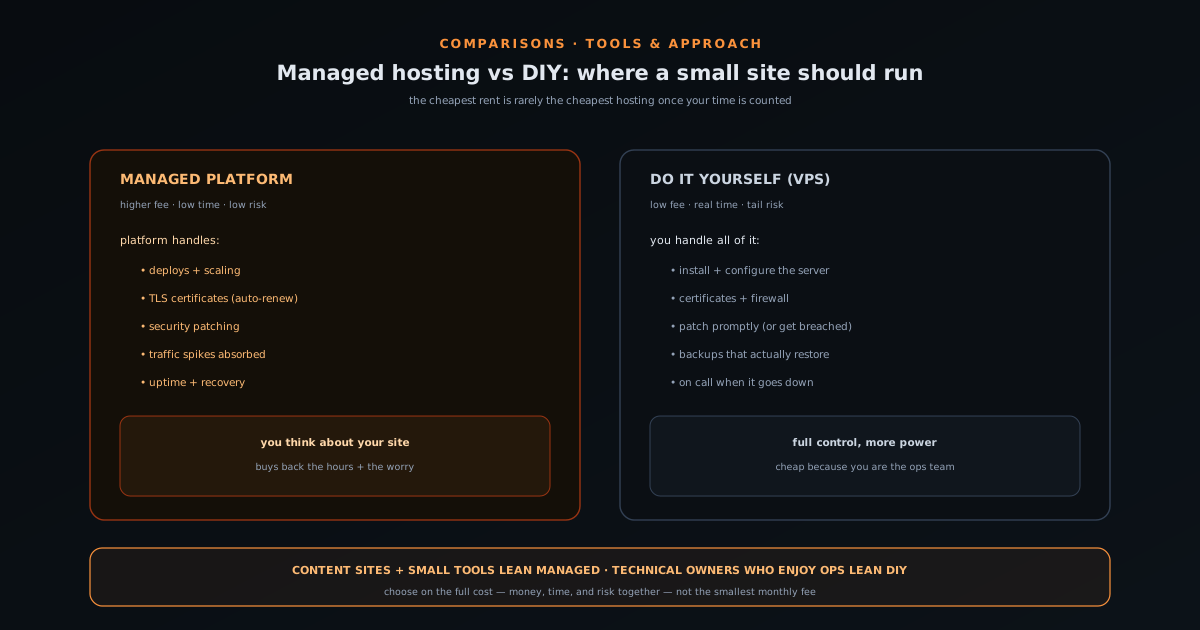
A managed hosting platform is, at its core, a service that takes the operational burden of running a website off your plate in exchange for a higher monthly fee. You hand it your code or content, and it handles the machinery: provisioning and scaling the servers, deploying your updates, renewing the security certificates that put the padlock in the address bar, keeping the underlying system patched, absorbing traffic spikes, and serving your content quickly from locations near your visitors. The defining promise is that you think about your website and not about the computer it runs on: the platform’s whole job is to make the infrastructure someone else’s problem.
The value of that is easy to underrate until you have lived without it. The work a managed platform quietly performs is exactly the work that is tedious to learn, easy to get subtly wrong, and occasionally catastrophic to neglect, and it is work that competes directly with the time you would rather spend on the actual business. Paying for managed hosting is, in effect, buying back the hours and the worry that operations would otherwise consume, plus a measure of insurance: when something goes wrong at the infrastructure layer, it is the platform’s responsibility and expertise on the line, not yours at midnight. That is what the higher fee is really for, and whether it is worth it depends entirely on what those hours and that peace of mind are worth to you.
What "do it yourself" actually involves
The do-it-yourself path usually means renting a virtual private server (your own slice of a machine in a data centre) for a low monthly price, and then doing everything the managed platform would have done. The rental is genuinely cheap, and for a technically comfortable owner the control is real and valuable: you can configure the server exactly as you like, run whatever software you want, and avoid the constraints and markups of a platform. For the right person and the right project, a self-run server is empowering, educational, and economical, and none of the cautions that follow are meant to talk a capable, willing operator out of it.
But the rental price buys you an empty computer, not a running website, and the gap between those two is the whole story. You are now responsible for installing and configuring the web server software, setting up and renewing the security certificates, configuring a firewall, applying operating-system and software security updates as they are released, arranging backups and testing that they actually restore, monitoring whether the site is up, and responding when it is not, at whatever hour it chooses to go down. None of this is impossibly hard, and much of it can be automated by someone who knows how, but all of it is real, recurring work that the low rental price conspicuously does not include. The cheap server is cheap precisely because you are the operations team it does not pay for.
The real cost comparison, with your time counted
Put the two paths side by side with everything counted and the apparent price gap narrows or reverses. The managed platform costs more in cash but close to nothing in operational time and carries low personal risk. The self-run server costs little in cash but a real, recurring amount of your time (to set up, and then indefinitely to maintain, secure, and rescue) plus the tail risk of a serious incident you have to handle alone. To compare them honestly you have to price your own hours: if maintaining the server costs you a handful of hours a month, what is that time worth against the platform fee it would save, and would those hours otherwise go to growing the business? For most small-site owners whose time is better spent on their actual work, the managed premium is smaller than the value of the time and worry it removes.
The comparison flips when one of the inputs changes. If you genuinely enjoy and are skilled at server administration, the time cost is low and partly a pleasure rather than a tax, which tilts DIY back toward sensible. If the cash difference is large at your scale and your margins are thin, the savings may be worth the hours. And if your needs are unusual enough that no managed platform fits them well, control becomes worth paying for in time. The point is not that managed always wins; it is that the decision should be made on the full cost, time and risk included, rather than on the rental line alone, because choosing the cheap server while ignoring the operations bill is how people end up doing unpaid sysadmin work they never wanted in exchange for savings that evaporate the first time the site goes down.
A simple way to choose
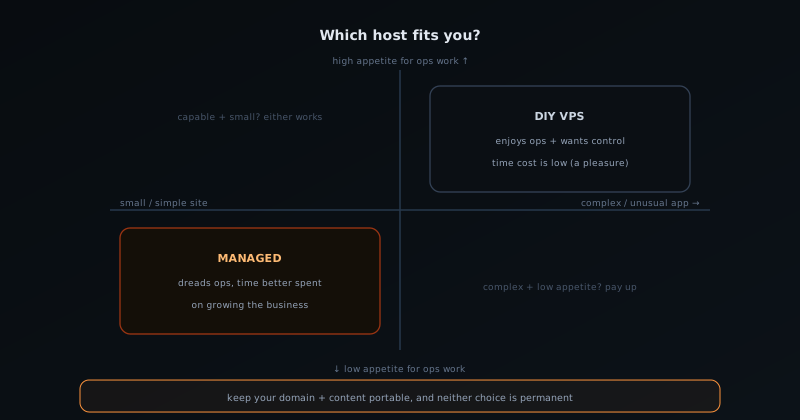
Cut through the comparison with two honest questions about yourself and your site. First, how much do you enjoy, or at least not mind, operations work: the patching, the configuring, the being-on-call? If the answer is that you find it interesting or are already good at it, DIY is genuinely on the table and may even be the better experience for you. If the answer is that you dread it or do not want to learn it, that dread is a real cost, and a managed platform is buying it away; do not talk yourself into running a server you will resent maintaining. Second, what is your time actually worth on the margin: would the hours a server consumes otherwise go to work that grows the business? If yes, the managed premium is usually a bargain.
Then let the nature of the site break any remaining tie. A content site or small static tool (the kind this comparison most often concerns) has modest, predictable needs that managed platforms serve beautifully and cheaply, often making the managed choice close to a no-brainer for a non-technical owner who wants to focus on the content. A more complex or unusual application, or a project run by someone who wants and can handle full control, is where DIY earns its keep. The meta-point, true across all of these write-ups about running lean, is that the cheapest path is the one that costs you least in total (money, time, and risk together) not the one with the smallest monthly fee. Choose the host the same way: count everything, value your hours honestly, and pick the option that leaves you free to do the work that actually matters.
A note on lock-in and switching later
One reasonable objection to managed hosting deserves a straight answer: does paying a platform to handle everything trap you, and is DIY the more independent choice? There is a real consideration here (a managed platform you build deeply around can be more work to leave than a generic server) but it is usually smaller than people fear and easy to manage with a little foresight. The protection is to keep the things that are truly yours genuinely portable: own your domain name at a registrar independent of your host so you can always point it elsewhere, keep your content and code in a form you control rather than locked inside a proprietary format, and prefer standard, widely-supported approaches over platform-specific magic for anything central. Do that, and switching hosts later is an afternoon’s annoyance, not a hostage situation.
Framed that way, lock-in is a reason to choose portably, not a reason to take on operations work you do not want. You can enjoy the convenience of a managed platform now and still preserve the freedom to move, because the assets that matter (your domain, your content, your audience) were never really the host’s to hold in the first place. And the symmetry runs the other way too: starting on DIY does not lock you into being a sysadmin forever, since you can move to a managed platform the day the operational load stops being worth it. Neither choice is permanent, which is the most reassuring thing about the whole decision. Pick the option that fits where you are now, keep your genuinely-yours assets portable, and let the choice evolve as your site and your appetite for running it do.
Frequently asked questions
Quick answers to common questions about this topic.
Is managed hosting worth the extra cost for a small site?
For most small-site owners, yes, because the higher fee buys away the operational work (security patching, certificate renewal, backups, uptime, scaling) and the time and worry that go with it. The honest comparison is not the platform fee against the cheaper server rental, but against that rental plus the hours you would spend maintaining it plus the risk of handling an incident alone.
What do I have to do myself if I run my own server?
A rented server is an empty computer, so you install and configure the web server, set up and renew TLS certificates, configure a firewall, apply security updates promptly, arrange and test backups, monitor uptime, and respond when the site goes down, at whatever hour it does. None of it is impossibly hard, but all of it is recurring work the low rental price does not include.
Why is a cheap server not actually the cheapest option?
Because the rental price buys a place to put files, not a running, secure, maintained website. The real cost includes your time to set up and indefinitely maintain it, plus the tail risk of a serious security or uptime incident you have to handle alone. Once you price your own hours, the apparent savings of the cheap server often shrink or disappear.
How do I choose between managed hosting and DIY?
Ask two questions: how much you enjoy or mind operations work, and what your time is worth on the margin. If you dread ops or your hours are better spent growing the business, choose managed. If you enjoy server administration and want full control, DIY is genuinely on the table. Then let the site break the tie: content sites and small tools suit managed; complex or unusual apps reward DIY.
Does managed hosting lock me in?
Less than people fear, if you choose portably. Own your domain at an independent registrar, keep your content and code in a form you control, and prefer standard approaches over platform-specific magic for anything central. Do that and switching hosts later is an afternoon’s work, not a hostage situation, so lock-in is a reason to keep your real assets portable, not a reason to take on ops work you do not want.
Related troubleshooting
Was this page helpful?
Your answer stays in this browser, it is not sent anywhere and no account or cookie is involved.