Field guide
2026 · Novus Discord BotsAbout 1 min read
Discord community architecture for creators: channels, roles, and moderation flow
How to structure a Discord server that does not collapse under growth—channel architecture, role design, and the moderation setup that keeps community energy positive.

Overview
Most Discord servers collapse not because they grow too fast but because they were designed for their current size, not their next size. A server with five channels feels intimate at 100 members and chaotic at 1,000. Architecture decisions made at 100 are very expensive to reverse at 1,000.
The principle that scales: fewer channels with higher signal are always better than more channels with lower signal. Every new channel you add dilutes the existing ones.
The three-category minimum
Every server needs three core categories: Information (read-only announcements and rules), Community (general chat, introductions, off-topic), and Purpose (the channels specific to why this server exists—stream discussion, product feedback, project work).
Resist adding categories beyond these three until specific community behavior demands it. A #resources channel that nobody posts in is worse than no channel at all—it creates the impression of an abandoned space.
- Lock announcement channels to bot + admin posting only. Accidental messages break trust.
- Create a #start-here channel that links to every other important channel.
- Archive channels that go 30 days without organic activity rather than leaving them empty.
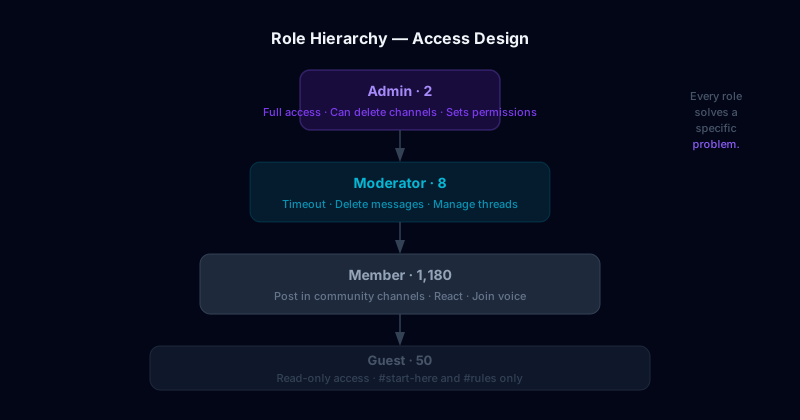
Automation that protects moderator energy
Moderation automation should handle the predictable workload—spam filtering, join verification, welcome messages, and scheduled announcements—so human moderators can focus on judgment calls that automation cannot make.
Novus Discord Bots can automate reminder cadences, going-live alerts, and role assignments triggered by specific actions. The goal is not to remove humans from moderation but to stop humans from doing work that bots can do reliably.