NSS Background Remover
Using the AI assistant and goal recipes
State a goal in plain language and let the agentic AI assistant assemble the steps from the underlying ~90-tool suite, so you do not have to hunt for each tool yourself.
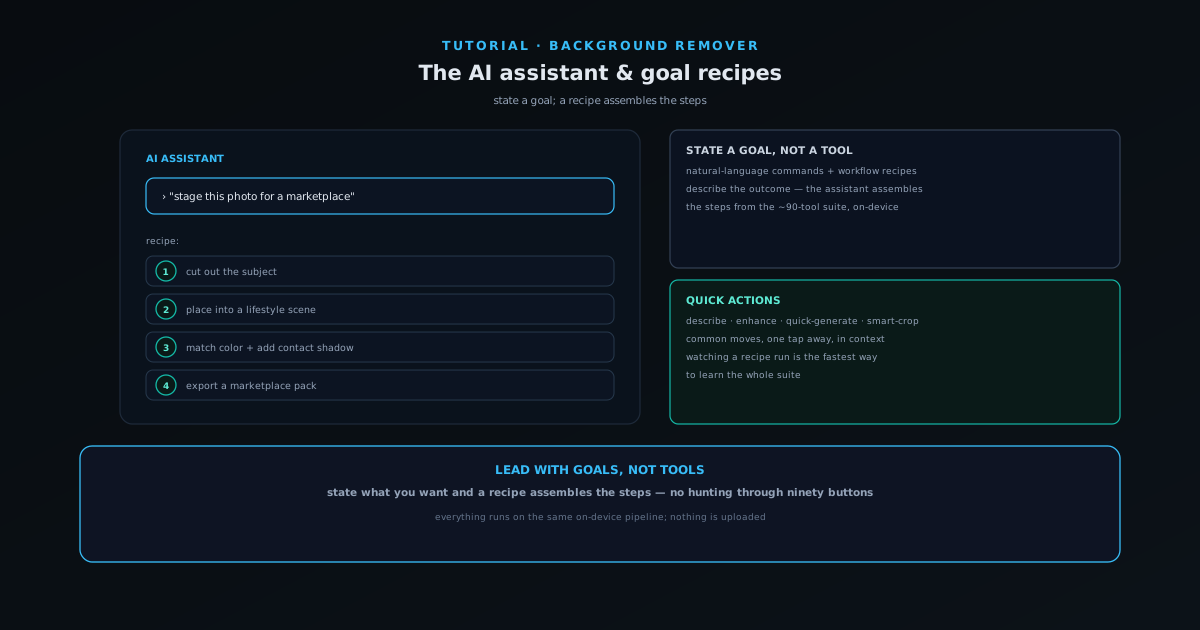
With roughly ninety tools in the AI suite, finding the right one for a task can be a task in itself. The agentic AI assistant solves that: you state what you want — "stage this photo", "make a marketplace pack" — and it assembles the steps from the underlying tools using goal recipes, rather than making you hunt for each one.
This tutorial covers how to use the assistant, how goal recipes turn an intent into a sequence of real operations, and why leading with goals keeps a wide tool suite approachable.
- 1
1. Open the AI assistant
Open the AI assistant from the editor. It is an agentic helper that understands natural-language commands and can run workflow recipes, sitting on top of the same on-device tools you would otherwise open individually.
Everything it runs executes locally on the same pipeline as the rest of the app — the assistant orchestrates tools, it does not send your files anywhere.
- Natural-language commands and workflow recipes.
- Orchestrates on-device tools; no upload.
- 2
2. State a goal in plain language
Tell the assistant what you want in plain terms — your goal, not a tool name. Goal recipes expand an intent like "stage this photo" or "make a marketplace pack" into the right sequence of steps, so you describe the outcome and the assistant figures out the implementation.
This is the opposite of scanning ninety buttons: you lead with the result you want.
- Describe the outcome, not the tool.
- Goal recipes assemble the steps for you.
- 3
3. Let the recipe run the steps
The recipe runs the underlying operations in order — for staging, that might be cut out, place into a scene, and export. You can watch which tools the recipe pulls in, which is also a fast way to learn the suite by seeing how goals map to tools.
Because the assistant uses the real tools, the result is the same as if you had run each step yourself, just without the hunting.
- Recipes run real tool steps in sequence.
- Watching a recipe is a fast way to learn the suite.
- 4
4. Use quick actions for common operations
Alongside the assistant, a floating quick-actions toolbar surfaces common operations — describe, enhance, quick-generate, smart-crop — in context, so the frequent moves are one tap away without opening the full panel.
Between goal recipes for multi-step tasks and quick actions for single moves, you rarely need to go hunting through the full tool list.
- Floating quick-actions: describe, enhance, quick-generate, smart-crop.
- Common moves stay one tap away in context.
Lead with goals, not tools
The fastest way to learn a ~90-tool app is to stop looking for tools and start stating goals. Tell the assistant what you want to end up with and let the recipe assemble the steps — you will get the result faster and, as a side effect, learn which tools handle which jobs by watching the recipes run.