2026 · NSS Background RemoverAbout 13 min readNovus Stream Solutions
From cutout tool to a ~90-tool AI suite: the road to enterprise-grade background removal
NSS Background Remover started as a single in-browser cutout tool. Over the v0.3 → v1.5 release run it became a roughly 90-tool client-side AI suite — real CLIP vision, honest model tiers, bring-your-own ONNX, an all-in-one layered editor, and a reliability-hardening pass — without ever uploading your files.
Overview
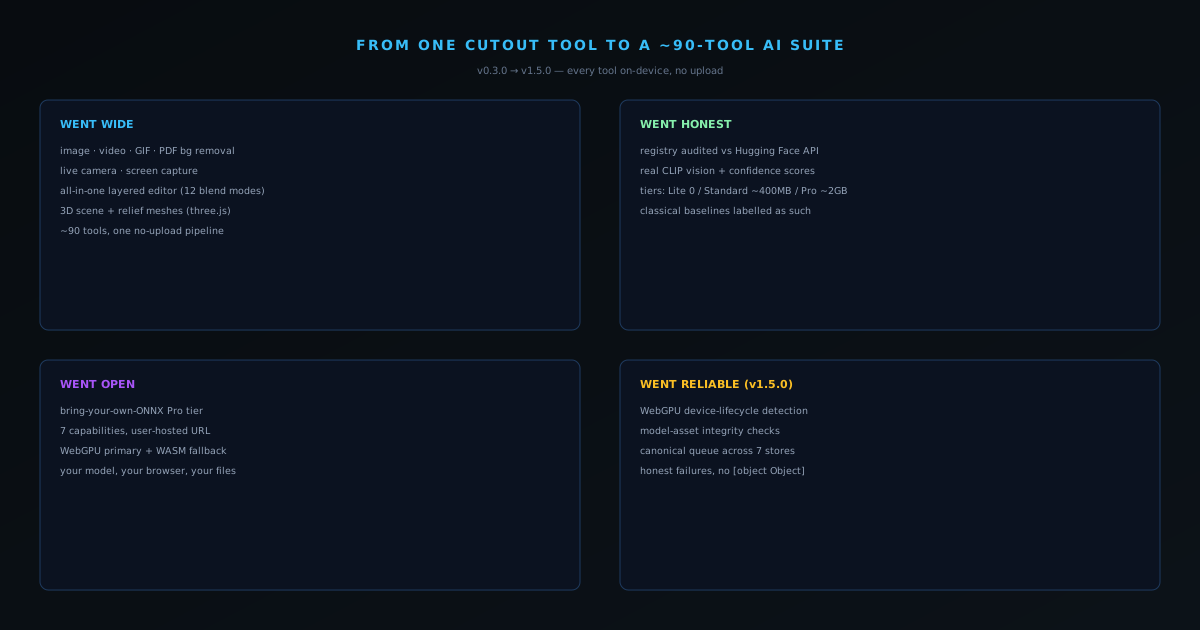
When the NSS Background Remover launched, it did one thing: remove the background from an image, entirely in your browser, and export a clean straight-alpha PNG. That single-purpose focus was deliberate, and it is still the heart of the product. But over the release run from v0.3.0 in late May to v1.5.0 on 2026-06-08, the tool quietly became something much larger — a suite of roughly ninety client-side AI tools spanning image and video editing, generation, vision, and privacy work. This post is the honest map of that growth: what got added, why, and the rule that every single addition had to obey — your files never leave your device.
The reason to write it down is that "we added a lot of features" is the least interesting version of the story. The interesting version is how a solo-operated, free, ad-supported tool grew an enterprise-sized surface area without growing a backend, without adding a paywall, and without sacrificing the reliability that makes a tool trustworthy for real work. The growth was real, but so was the discipline that shaped it, and the two are inseparable.
The starting point: one tool, done correctly
The v0.3.0 base was already more careful than most free tools ever get. Inference ran through Transformers.js with WebGPU acceleration where the browser supported it and an automatic WebAssembly fallback everywhere else. The Fast model, RMBG-1.4 (~80 MB), handled product shots and portraits in roughly two to five seconds on WebGPU; the Best Quality model, the RMBG-2.0 bilateral reference network (~180 MB), handled fine hair and complex edges. The output was a true straight-alpha PNG, WebP, or AVIF — no dark halo, no premultiplied surprise when a designer opened the file. Even the export path was hardened against a real Chromium GPU-driver bug by writing PNGs with a pure-JavaScript encoder that emits the exact magic bytes and verifies them before download.
That foundation matters because everything that followed was built on the same constraint. The first tool proved that a real segmentation model could run in a browser tab, reliably, with professional-grade output and zero uploads. Once that was true, the question stopped being "can we do AI in the browser at all" and became "how much of the AI image and video toolkit can we move on-device." The rest of the release run is the answer to that question.
Going wide: from one cutout to a full toolkit
The expansion came in waves. v0.3.0 already added video background removal (frame-by-frame with temporal smoothing), a WebGL Lanczos video upscaler, portrait blur via depth estimation, GIF and PDF background removal, live-camera removal at 10 fps, screen capture, and a stack of utilities — image filters, rotate and flip, grayscale, ICO and favicon creation, canvas extension. v0.5.0 added the Lifestyle Composer, a flagship tool that drops a cut-out product onto fourteen scene templates through a six-pass blending engine. v0.7.0 added seven in-browser video utilities (format converter, compressor, resizer, canvas extender, rotate, metadata remover, format comparison), all running through canvas.captureStream and MediaRecorder with no server in the path.
Then v1.0.0 changed the shape of the product entirely with the all-in-one editor at /all-in-one: a shared layer architecture across image, video, and staging tools, twelve blend modes, layer persistence in project files, undo/redo, keyboard shortcuts, and a three.js Scene3D surface with depth-displaced relief meshes. By the time the suite reached its current form, it spanned roughly ninety tools — and crucially, the same queue, worker, and export discipline that protected the original cutout protected every one of them.
Going deeper: layers, blend modes, and the all-in-one editor
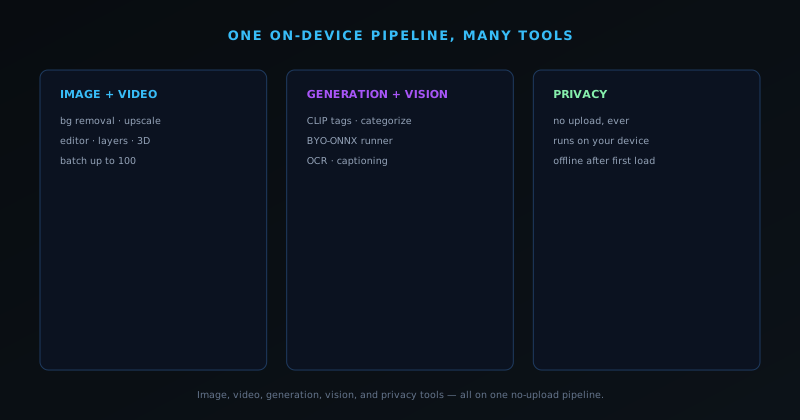
Breadth alone would have produced a pile of disconnected single-purpose pages, so v1.0.0 gave the suite a place to combine them: the all-in-one editor at /all-in-one, built on a shared layer architecture spanning image, video, and staging work. Layers come in many kinds — image, cutout, brush, filter, adjustment, background-fill, text, shape, and even a depth-displaced 3D relief — and they composite with twelve blend modes (normal, multiply, screen, overlay, soft-light, hard-light, darken, lighten, color-burn, color-dodge, difference, exclusion) with per-layer opacity, drag-to-reorder via row handles, undo and redo, and keyboard shortcuts for duplicate, send-to-front, and delete. Multi-file drag-and-drop creates one layer per file. In other words, it is a genuine layered editor running entirely in a browser tab, not a cutout box with a few extra buttons bolted on.
It did not stop at two dimensions. A three.js Scene3D surface turns a room photo into a textured floor plane for product staging, a Relief3D mode generates depth-displaced bas-relief meshes from a flat image, and a four-second 360-degree orbit recorder captures a short turntable clip of the result through MediaRecorder. Compositions persist to a .nss-project file with every layer stored as a separate entry, so a project can be saved, reopened, and round-tripped without flattening. The whole editor adds up to a meaningful jump in what the product is — and, critically, none of it crossed the privacy line. The layers, the blend math, the 3D scene, and the project files all live and run on the device, which is exactly why the editor could be added without compromising the no-upload guarantee the rest of the suite depends on.
Going honest: real models, not impressive labels
Breadth is easy to fake. The harder and more important work in this release run was making the AI claims true. In v1.1.0 the model registry was audited against the Hugging Face API and Transformers.js v3, and five unverified model IDs were replaced with either verified models or honest classical algorithms — a denoise that is labelled a classical baseline rather than dressed up as a neural miracle. v1.4.0 went further and shipped real CLIP vision: AI Image Tags uses genuine CLIP zero-shot classification, AI Categorize returns confidence scores, and the similar-image finder uses CLIP embedding cosine similarity. The verified models carry their real sizes and licenses — vit-gpt2 captioning (~120 MB), TrOCR (~500 MB), Whisper-base (~140 MB), depth-anything-small.
That honesty extends to how capability is presented. v1.4.0 introduced explicit tiers — Lite (0 MB), Standard (~400 MB), Pro (~2 GB) — and a recommendTier() function that probes WebGPU and available memory to suggest the highest tier a device can actually run, rather than promising everyone the heaviest model and quietly failing on weaker hardware. A companion post covers the tier system in depth, because "honest about what runs on your machine" is exactly the kind of detail that separates a tool you can trust from a demo that only works on the developer's laptop.
Going open: bring your own model
v1.3.0 added something unusual for a free consumer tool: a bring-your-own-ONNX Pro tier. A user can host their own ONNX model at a URL and point seven different capabilities at it, and the loader instantiates a session with WebGPU as the primary backend and WebAssembly as the fallback — the same dual-path strategy the built-in models use. It is the logical end state of an on-device philosophy. If the computation happens on your machine and your files never leave it, there is no architectural reason the model has to be ours. You can run your own weights, in your own browser, against your own images, and nothing about that requires a server we control.
The same release wired tool-wide AI hooks into the vast majority of tool clients, so capabilities like describe, enhance, smart-crop, and auto-name became available across the suite rather than living in one place. The pattern throughout was consolidation: build a capability once, expose it everywhere through a shared component, and avoid the drift that comes from re-implementing the same thing per tool. That is the same instinct that drove the reliability work.
Going agentic: stating a goal instead of hunting for a tool
A suite of ninety tools is only powerful if people can find the right one, so the product grew a layer that reasons about intent rather than making the user memorize the catalog. goalRecipes provides high-level intent expansion — a user states a goal and the recipe maps it to the sequence of tool operations that achieves it, with nine recipes shipped initially — backed by a per-tool knowledge base of more than thirty tool guides and a command bridge that falls back to executing registry actions directly. Floating canvas and video quick-action toolbars surface the relevant operations in context, with a draggable handle whose position persists, and an opt-in local AI assistant (via @mlc-ai/web-llm, with Fast, Balanced, and Smart tiers running Qwen 0.5B, Llama 1B, and Phi-3 mini) can drive the editor through plain language. As with everything else, that assistant runs on the device — the model downloads once and executes locally, so even the natural-language layer keeps your work private.
The same release wired AI hooks into the large majority of tool clients, so cross-cutting capabilities — describe, enhance, smart-crop, quick-generate, auto-name — became available across the suite through one shared component rather than being re-implemented per tool. The pattern is the one that runs through the entire product: build a capability once, expose it everywhere, and let consolidation do the work that sprawl would otherwise demand. It is also collaborative where collaboration earns its place: v1.0.0 added opt-in real-time sessions over a WebRTC signalling endpoint, so two people can work the same canvas together — and even that is built so the image itself never has to pass through a server we control. Agentic assistance, cross-tool hooks, and live collaboration are exactly the features that usually justify a cloud backend, and here all three were delivered while keeping the files on the device.
Going reliable: the v1.5.0 hardening pass
The most enterprise-grade release in the run is also the least flashy. v1.5.0 was a reliability-hardening pass: WebGPU device-lifecycle and quality detection that recognizes a software or degenerate adapter rather than trusting it blindly, execution-provider telemetry that records which backend actually bound, model-asset integrity checks with byte-length truncation verification, a canonical queue state machine unified across seven queue stores, and result-shape guards that prevent a tool from ever returning a useless [object Object] to the user. It also replaced silently-wrong behavior with honest errors — source separation now surfaces a real error instead of handing back the input as both stems, for instance.
This is what "enterprise-grade" actually means for a tool like this: not a sales tier, but the unglamorous guarantees that the tool detects bad hardware paths, verifies the bytes it downloads and produces, behaves consistently across every queue, and tells you the truth when something fails. The dedicated reliability post traces these changes in detail. Taken together, the v0.3 → v1.5 arc is the story of a single private cutout tool becoming a broad, honest, reliable on-device AI suite — and we are not done. The same discipline now applies to whatever gets added next, because the constraint that started it all still holds: it runs in your browser, and your files stay yours.
What "enterprise-grade" means without an enterprise tier
It is worth being precise about the phrase, because "enterprise-grade" is usually code for a pricing page — single sign-on, an account manager, a contract. None of that exists here, and none of it is what the word is doing in this context. For a free, on-device tool, enterprise-grade is a property of the engineering, not the billing: the tool produces correct output on the messy diversity of real consumer hardware, verifies the bytes it downloads and the bytes it writes, isolates every job so one failure cannot poison the next, behaves identically across every queue in the app, and refuses to dress a silent wrong answer up as success. Those are the guarantees a team actually depends on when they point a tool at real work, and they are earned in code rather than purchased in a tier.
That distinction matters for who the suite is genuinely usable by. The designer cutting unreleased product renders under an NDA, the small shop preparing a catalog before launch, the photographer processing other people's galleries — these are the users with the most to lose from an opaque upload or a quietly corrupted export, and they are frequently the least able to justify a subscription for a utility task. Building the reliability and the privacy into the free tier, structurally, is what keeps the tool trustworthy for exactly the people who need it most. The claim is not that the tool is impressive; it is that it is dependable, on your machine, for free, which is a harder and more useful thing to be.
What it cost — and the discipline that paid for it
Building this way is not free, and the honest version of the story includes the bill. Running a roughly 180 MB neural network — and, in the heaviest tier, models near two gigabytes — inside a browser tab is meaningfully harder than calling a model on a server you provisioned. The cost shows up as model caching that has to be managed in IndexedDB and Cache Storage so the download is paid once, as performance bound by whatever device the visitor brings rather than a fixed known GPU, and as a class of memory and lifecycle bugs that a managed server runtime would have hidden. The suite hit exactly that last one in production: a stale model session that was not disposed corrupted the WebAssembly heap and caused tools to fail silently, and the durable fix was a rebuild — per-job worker isolation, where every job spawns a fresh worker that is hard-terminated on completion or failure, so there is no shared state left to go stale.
The discipline that paid that bill is the same one visible across the whole run: when a fix is needed, apply it across every tool that shares the pattern rather than patching the one that reported the failure, and when patches start compounding, rebuild the approach so the bug class becomes impossible. That is why the v1.5.0 hardening brought all seven queue stores to one canonical state machine rather than fixing them one at a time, and why the model registry was audited against the Hugging Face API rather than trusted on faith. The breadth of the suite is the visible story; the consolidation underneath it — one queue, one hooks component, one tiered model system, one honest set of failure behaviors — is what kept ninety tools from collapsing into ninety separate maintenance problems. The companion deep-dives on the worker rebuild, the registry audit, and the reliability pass each trace one thread of that discipline in full.
The single rule behind every release
The arc from v0.3.0 to v1.5.0 is not a finish line, and framing it as one would miss the point of how the product is built. The suite grew by adding capabilities that obeyed a single constraint, and that constraint has not moved: it runs in your browser, the heavy computation happens on your hardware, and your files never leave the device. Whatever gets added next — another model, another editor surface, another tool category — has to pass the same test before it ships, which is what keeps the growth coherent instead of letting the product sprawl into something that quietly betrays its own premise.
That is the real takeaway of this update. The headline is "a single cutout tool became a ninety-tool AI suite," but the durable story is the rule that governed every step of it. A free tool earned an enterprise-sized surface area without a backend, without a paywall, and without ever uploading an image, because each addition had to be honest about its models, reliable on real hardware, and private by construction. If you want the mechanics behind any one piece — the in-browser pipeline, the straight-alpha export, the batch design, the worker isolation, the tier system — the linked posts go down each rabbit hole in turn, and the product itself is the fastest way to see that the claims hold.