2026 · Web & UXAbout 12 min readNovus Stream Solutions
Keeping a 90-tool app usable: progressive disclosure
A suite of ninety tools can become a wall of buttons that overwhelms everyone. The NSS Background Remover stays approachable through progressive disclosure — goal-based entry points, an all-in-one surface, and quick actions that appear in context. Here is how a large toolset stays usable.
Overview
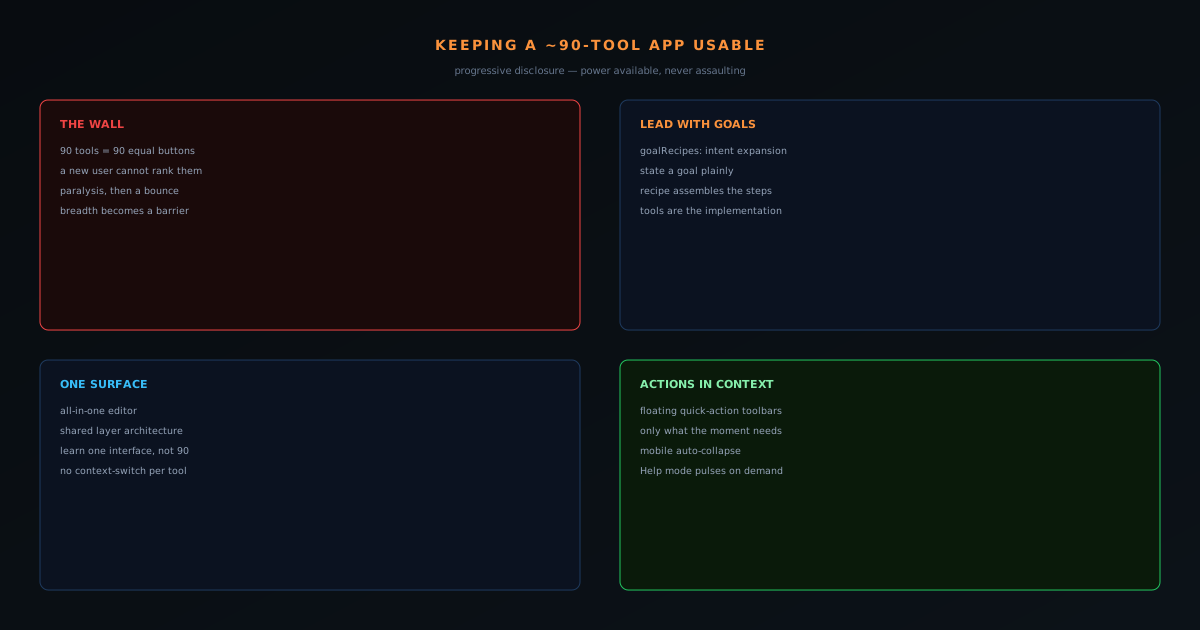
There is a failure mode that haunts any growing toolset: it becomes a wall. Ninety tools presented as ninety equal buttons is not power, it is paralysis — a new user lands, sees a grid of options they cannot rank, and bounces because they cannot find the one thing they came to do. The NSS Background Remover grew into a roughly ninety-tool suite without becoming that wall, and the reason is a deliberate commitment to progressive disclosure: show people the path to their goal, not the entire inventory at once. This post is about the techniques that make a large suite stay approachable.
The principle is that breadth should be available, not assaulting. A user should be able to reach any of the ninety tools, but should never be forced to confront all ninety to do the simple thing they arrived for.
Lead with goals, not tools
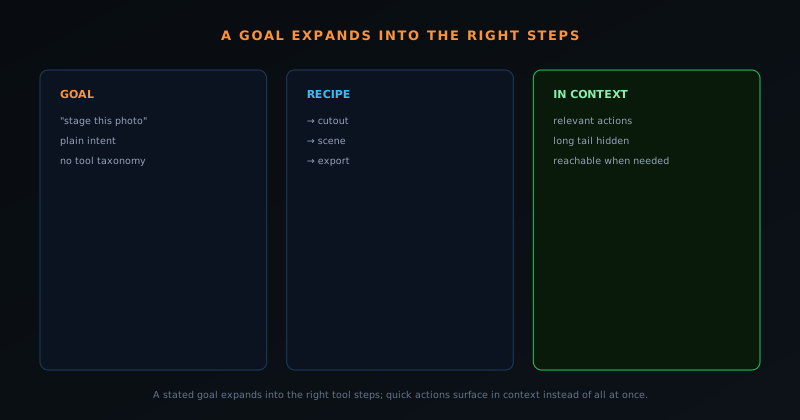
The most important shift is organizing entry around what the user wants to accomplish rather than around the catalog of tools. The suite includes goalRecipes — high-level intent expansion that takes a goal a user can state plainly and maps it to the sequence of tool operations that achieves it. The user thinks "I want to stage this product photo" or "I want this ready for a marketplace," and the recipe assembles the steps, rather than making them know which of ninety tools to chain and in what order.
This inverts the usual relationship. Instead of the user learning the tool taxonomy to express their goal, the tool understands the goal and reaches into the taxonomy on their behalf. The ninety tools are still there, but they are the implementation, not the interface.
One surface instead of ninety doors
The all-in-one editor consolidates what would otherwise be a scatter of separate tool pages into a single working surface with a shared layer architecture across image, video, and staging work. Rather than navigating to a distinct destination for each capability, the user works in one place where capabilities are available as needed. This matters because context-switching between separate tools is its own kind of overwhelming — every navigation is a small reorientation. A unified surface keeps the user in one mental space while still giving them the full range of operations.
Consolidation also means the user learns one interface, not ninety. The blend modes, the layers, the export options behave consistently across the things you can do, so competence with one part of the surface transfers to the rest. Breadth stops compounding the learning cost when the surface is shared.
Surface actions in context, not all at once
Even within a single surface, showing every possible action all the time is overwhelming. The editor uses floating quick-action toolbars — canvas and video quick actions that present the relevant operations for what the user is currently doing, with a draggable handle and remembered position, and a mobile pattern that auto-collapses and expands on demand. The set of actions in front of you reflects your current context rather than the full universe of everything the tool can do.
This is progressive disclosure at the micro level. The relevant few actions are immediately reachable; the long tail is available but not crowding the screen. Combined with the in-context Help mode, which makes documented controls pulse on demand, the user gets exactly as much interface as the moment calls for and no more.
Goal recipes turn intent into a path
The most important inversion is organizing entry around what the user wants to accomplish rather than around the catalog of tools, and the goalRecipes system is the concrete expression of it. A recipe takes a high-level intent a user can state plainly — stage this product, get this ready for a marketplace — and expands it into the sequence of tool operations that achieves it, so the user thinks in outcomes while the system handles the tooling. Rather than requiring someone to know which of ninety tools to use and in what order, the recipe assembles the path, turning a goal into a guided sequence backed by a per-tool knowledge base.
This flips the relationship between user and taxonomy. In the flat model, the user must learn the tool catalog well enough to translate their goal into the right tools themselves — a real burden that scales with the number of tools. In the goal-led model, the user expresses the goal and the system reaches into the taxonomy on their behalf, so the ninety tools become the implementation detail of a much smaller set of stated intentions. The catalog still exists in full, but it is no longer the interface; the interface is the goal, which is something every user already has and none of them needs to be taught. That is what makes a large toolset approachable from the first click.
One surface so competence transfers
Consolidating capabilities into a single working surface — the all-in-one editor with its shared layer architecture across image, video, and staging work — does more than reduce navigation; it makes competence transferable. When the blend modes, the layers, the adjustments, and the export options behave the same way regardless of which kind of work you are doing, learning one part of the surface teaches you the rest. A user who has figured out layers for an image cutout already understands layers for a video composition, because it is the same system. Breadth stops compounding the learning cost when the surface underneath it is shared.
This matters because context-switching between separate tools is its own form of overwhelm, distinct from the wall of choices. Every navigation to a different tool page is a small reorientation — a new layout to parse, new controls to locate — and a suite built as dozens of separate destinations taxes the user with that reorientation constantly. A single surface keeps the user in one mental model while still offering the full range of operations, so the richness is reachable without the disorientation of hopping between unrelated interfaces. The user learns one place deeply rather than ninety places shallowly, which is the only way a toolset this large stays learnable.
Quick actions as disclosure at the smallest scale
Even within one surface, showing every possible action at all times would reproduce the wall problem in miniature, so the editor applies progressive disclosure at the micro level through floating quick-action toolbars. These present the operations relevant to what the user is currently doing — canvas actions when working on an image, video actions when working on a clip — with a draggable handle whose position is remembered and a mobile pattern that auto-collapses and expands on demand. The set of actions in front of you reflects your immediate context rather than the entire universe of what the tool can do.
This is the same principle as the goal-led entry, applied one level down: surface the few relevant things, keep the long tail available but out of the way. The relevant actions for the current moment are immediately reachable; everything else exists but does not crowd the screen. Combined with the in-context Help mode that reveals documented controls only when invoked, the user receives exactly as much interface as the moment requires and no more. Progressive disclosure is not a single feature but a posture applied at every scale — entry, surface, and individual action — and the quick-action toolbars are where it operates closest to the user's hands.
Search and naming as escape hatches
Goal-led entry serves users who can state an intent, but sometimes a user knows exactly the tool they want and just needs to reach it, so a large suite also needs direct access paths that bypass the guided routes. Search and clear, consistent naming are the escape hatches that serve the user who already knows what they are looking for: type the name, jump to the tool. This matters because progressive disclosure should never become an obstacle for the experienced user who does not need to be guided — the goal-led path is the gentle default, and direct search is the express lane for those who want it.
Providing both routes is what keeps the approachability from condescending to power users. A novice benefits from goals expanding into paths; an expert benefits from typing a tool name and going straight there. A system that only offered the guided route would frustrate the expert, while one that only offered the flat catalog would overwhelm the novice — offering both, with sensible defaults toward guidance, serves the full range of users without compromising either. The escape hatch is part of good progressive disclosure, not a contradiction of it: you disclose progressively for those who want the path, and you let those who know the destination skip straight to it.
Defaults that carry the median user
A quiet but crucial part of keeping a large tool usable is that the defaults are good enough that most users never need to touch the depth at all. Sensible model choices, sensible quality settings, sensible formats — when the out-of-the-box behavior produces a good result for the common case, the median user accomplishes their task without ever opening the advanced options that would overwhelm them. The depth is there for the cases and users that need it, but it is not on the critical path for the simple job, which is what lets a ninety-tool suite feel as easy as a single-purpose tool for everyday use.
This is the complement to progressive disclosure: not only hide the advanced behind the simple, but make the simple genuinely sufficient so most users never go looking for the advanced. A tool whose defaults are poor forces every user into the depth to get a decent result, which surfaces all the complexity the disclosure was meant to manage. Good defaults keep the median user on the easy path and the complexity genuinely optional, so the breadth becomes something a power user opts into rather than something every user has to wade through. The combination — good defaults plus reachable depth — is what makes the same tool serve the casual and the demanding user from the same simple starting point.
Breadth becomes an asset once it is organized
The payoff of all this organizing work is that the suite's breadth flips from a liability into its central advantage. A user who arrives for a simple cutout finds it as easy as a single-purpose tool, and then discovers — through goals, through the shared surface, through context-relevant actions — that the same tool can also stage the product, remove a video background, generate a variation, and prepare a marketplace pack, all without having to learn a new app for each. The ninety tools become a reason to stay rather than a reason to bounce, because they are revealed gradually as the user's needs grow rather than dumped on them at the door.
This is the goal the whole approach serves: depth that rewards the user who goes looking for it without punishing the user who does not. Organized well, breadth means a tool grows with its users — they start simple and find more capability exactly when they need it — which is a far better relationship than either a thin tool that users outgrow or a sprawling one that they never get into. The organizing techniques are not about hiding the tools but about sequencing their discovery, so that the suite's size is experienced as generosity rather than as a wall. A large toolset that feels approachable is not an accident of having good tools; it is the result of deliberately refusing to make the user meet them all at once.
Why the approach scales as the suite grows
A real test of an organizing strategy is whether it survives growth, and this one is built to. The reason goal-led entry, a shared surface, and contextual actions keep a suite usable is that none of them depend on the exact number of tools — they depend on mapping intent to implementation, which holds whether the implementation is ninety tools or a hundred and fifty. Adding a tool under this model means adding it to the relevant goal recipes and the shared surface, not adding another equal button to a wall that grows more overwhelming with each addition. The structure absorbs new capability rather than being strained by it.
This is the crucial difference from the flat approach, which degrades with every tool added — each new button makes the grid denser and the wall taller, so growth actively worsens the experience. Under progressive disclosure organized around intent, growth is roughly neutral to the user, because they still express goals and still work on one surface regardless of how many tools sit underneath. That scalability is what makes the investment in organizing worthwhile: it is not a one-time fix for the current count but a structure that keeps the suite approachable as it continues to expand, which a product that adds capability over time specifically needs.
The balance: power available, never assaulting
The whole approach is a balancing act between two real failure modes. Hide too much and the tool feels thin and people cannot find the depth that exists; show too much and it feels like a cockpit and people cannot find the basics. Progressive disclosure threads between them by making depth reachable through goals, surfaces, and context rather than dumping it on the front door. The simple task stays simple; the powerful workflow stays possible.
It is worth noting the discipline this requires alongside the restraint of not adding tools that should not exist — the two are complementary. You keep the suite usable partly by organizing what is there well, and partly by being willing to not add things, as the feature-creep post argues. A ninety-tool suite that feels approachable is not an accident of having good tools; it is the result of deliberately refusing to make the user meet all ninety at once.