2026 · NSS Background RemoverAbout 12 min readNovus Stream Solutions
Removing backgrounds from 100 images at once without freezing the tab
Heavy AI inference and a responsive interface are usually at odds in the browser. Here is the queue, worker, and memory design that lets the NSS Background Remover batch-process a large set of images without locking up the page.
Overview
Batch processing is where a browser-based AI tool either proves it is real or falls apart. Removing the background from one image is a tidy problem. Removing the background from a product catalog of a hundred images, in the same tab, without the page going unresponsive and the browser offering to kill it, is a genuinely harder engineering problem — and it is the one that matters for the people who get the most value from the tool: e-commerce teams, photographers delivering galleries, anyone with volume. The NSS Background Remover handles up to 100 images in a session and stays responsive throughout. This is how.
The core tension is simple to state. Neural-network inference is heavy, sustained computation. A browser tab has one main thread that also runs the user interface. If you do heavy computation on that main thread, the interface freezes — scrolling stops, buttons do not respond, and the browser eventually warns the user that the page is broken. If you naively try to do many inferences at once to go faster, you exhaust the device's memory and the tab crashes outright. The batch design has to thread between those two failure modes.
Why the batch runs sequentially, not in parallel
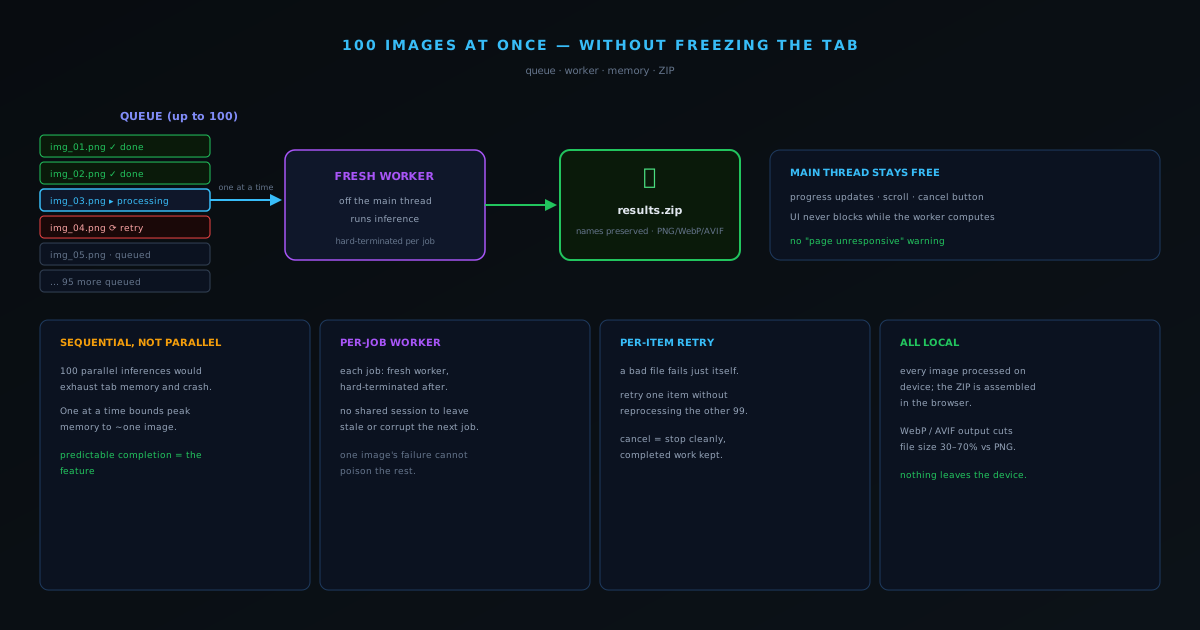
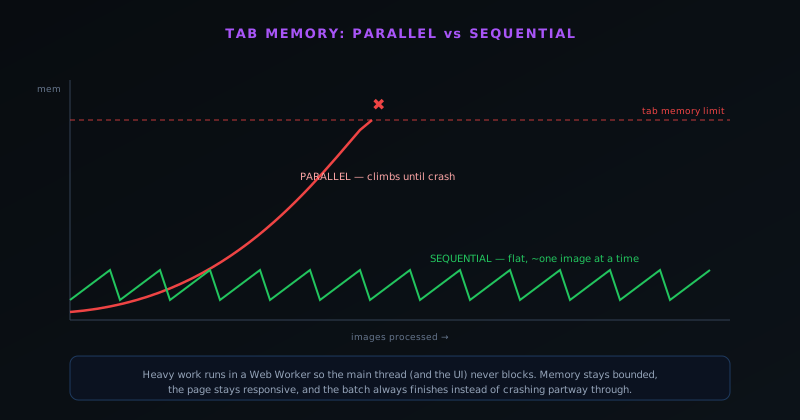
The instinct with a hundred images is to process them in parallel for speed. In the browser, that instinct is a trap. Each inference holds the model plus the image tensors plus intermediate buffers in memory, and a high-resolution image can be large once it is decoded and converted to a tensor. Running even a handful of those simultaneously can exhaust the memory available to the tab on a typical device, and running a hundred in parallel would crash essentially any machine. So the batch processes sequentially — one image at a time — specifically to stay within browser memory limits. Each image is fully processed and its result handed off before the next begins, which keeps peak memory bounded to roughly one image's worth of working set rather than a hundred.
Sequential processing sounds slower, but for client-side inference it is usually faster in practice than over-parallelizing, because it avoids the memory pressure that triggers garbage-collection thrash and swapping. More importantly, it is reliable: a sequential batch that takes a predictable amount of time and always finishes beats a parallel batch that is faster when it works and crashes the tab when the images are large. For a tool people depend on for real work, predictable completion is the feature.
Keeping the interface alive with workers
Sequential processing solves memory but not responsiveness — running a hundred inferences in a row on the main thread would still freeze the UI for the entire batch. The answer is to move the heavy work off the main thread entirely, into a Web Worker. The worker runs the model and does the inference; the main thread stays free to update the progress display, respond to a cancel click, and keep the page interactive. The user can watch the batch advance item by item, scroll the queue, and stop it mid-run, because the thread that handles all of that is never blocked by the computation.
The specific model the tool uses is per-job worker isolation: rather than keeping one long-lived worker alive across the whole batch, each job runs in a fresh worker that is hard-terminated when the job finishes or fails. This came directly out of a production incident — a reused model session that was not being disposed corrupted the WebAssembly heap and caused jobs to fail silently — and the durable fix was to stop sharing worker state across jobs. The batch benefits from that architecture: one image's failure or memory pressure cannot poison the worker that processes the next image, because there is no shared worker to poison. Each item gets a clean slate.
Failures are per-item, not per-batch
A hundred-image batch will occasionally hit an image that fails — a corrupt file, an unexpected format edge case, a transient memory spike. The wrong behavior, which plenty of tools exhibit, is to fail the whole batch and make the user start over. The queue here treats each item independently: a failed item shows an error state and can be retried individually without reprocessing the ninety-nine images that already succeeded. The queue progress is shown item by item, so the user always knows exactly where the batch is and which items, if any, need another pass.
This per-item resilience is a direct consequence of the canonical queue design that all the tool's queues share. Each queue tracks item status explicitly — queued, processing, done, failed, cancelled — and a cancel sets the status and stops processing cleanly rather than leaving the batch in a half-broken state. The result is a batch that behaves the way users expect from a desktop application: it makes steady, visible progress, it survives individual failures, and it can be stopped and resumed without losing completed work.
The queue as an explicit state machine
Underneath the batch is a queue modeled as an explicit state machine, and that explicitness is what makes the batch's behavior predictable rather than emergent. Each item in the queue carries a status — queued, processing, done, failed, cancelled — and transitions between those states happen through defined operations rather than ad-hoc flag-setting. This matters because a batch is a concurrent, long-running process where many things can happen partway through — a cancel, a failure, a completion — and without an explicit state model, the handling of those events drifts into a tangle of booleans that interact in ways nobody fully tracks. Modeling the queue as states and transitions keeps the behavior reasoned about rather than improvised.
The payoff of the explicit model is that every event has a defined meaning. A cancel sets items to cancelled and stops processing cleanly rather than leaving the batch in a half-broken limbo; a failure marks one item failed without affecting the others; a completion advances to the next. Because the states and transitions are defined, the interface can reflect the true status of every item accurately, and edge cases like cancelling mid-item or retrying a failure have clear, correct behavior rather than being undefined territory. This canonical queue model is the same one applied across all the tool's queues, which is what gives them consistent behavior — and the consistency is a direct consequence of having modeled the queue as an explicit state machine rather than letting each one accrete its own informal logic.
One worker, deliberate backpressure
The decision to feed the batch through a single worker processing one item at a time is, in effect, a backpressure mechanism, and framing it that way clarifies why it is correct rather than a limitation. Backpressure is the practice of not accepting more work than the system can handle at once, and a single sequential worker enforces exactly that: no matter how many images are queued, only one is in flight, so the memory and computation in use stay bounded to one item's worth regardless of the batch size. The queue holds the backlog; the worker drains it at a sustainable rate. This is a far more robust design than trying to process many at once and hoping the device copes.
The alternative — accepting all the work at once by running many inferences in parallel — is the absence of backpressure, and it fails exactly as unbounded systems do, by exhausting a finite resource until something breaks. In the browser that resource is memory, and the failure is a crashed tab. By making the worker a single sequential drain on the queue, the design guarantees the resource ceiling is respected no matter the input size, which is why a hundred-image batch behaves the same as a ten-image one, just for longer. Recognizing the single-worker design as deliberate backpressure rather than a missed parallelization opportunity is the key to understanding why it is the reliable choice: bounded resource use that always finishes beats unbounded use that is faster until it crashes.
Per-item isolation makes retry safe
The ability to retry a single failed item without disturbing the rest depends on each item being processed in genuine isolation, which the per-job worker model provides. Because each job runs in a fresh worker that is torn down afterward, one item's failure or memory pressure cannot leave residue that affects the next item — there is no shared state carrying corruption forward. This isolation is what makes per-item retry meaningful: retrying a failed item is starting it cleanly, not re-running it in a context that the previous failure may have poisoned. Without isolation, a retry might inherit whatever bad state caused the original failure, which would make it unreliable.
This is the batch-level payoff of the worker isolation that was originally built to fix the session-corruption bug. The same architecture that ensures a stale model session cannot corrupt a later job ensures that a failed batch item cannot corrupt its successors or its own retry. So the batch inherits robustness from a decision made for a different reason — fixing a specific bug — which is a common pattern in good architecture: a structural choice made to eliminate one problem turns out to provide guarantees that benefit other features. Per-item retry in the batch is reliable precisely because per-job isolation makes each item, and each retry, a clean slate independent of everything around it. The isolation is the foundation that makes the friendly per-item failure handling actually trustworthy.
Output format as a batch-wide decision
A choice that takes on extra weight in a batch is the output format, because it applies uniformly across every image and so its effects multiply by the size of the run. The batch lets you select PNG, WebP, or AVIF for the whole set, and the right choice depends on the destination: PNG for maximum compatibility and a true straight-alpha channel where a marketplace or client expects it, or WebP and AVIF where smaller files matter, since those formats can deliver substantial size reductions over PNG at comparable quality. Across a hundred images, that size difference becomes a meaningful saving in storage and page-load weight, which is why the format is a batch-level decision worth making deliberately rather than defaulting.
Applying one format across the batch also reinforces the consistency that makes a processed set look professional. A catalog where every image is the same format, sized and compressed the same way, behaves uniformly wherever it is used, whereas a mix of formats can load and render unevenly. Because the choice is made once for the whole run, the batch enforces this uniformity automatically. The format selection is a small control with a large aggregate effect, and treating it as a deliberate, destination-driven decision — compatibility-first for marketplaces, efficiency-first for your own fast-loading pages — is part of getting the most from a batch rather than accepting a default that may not suit where the images are headed.
Why the session caps where it does
The batch handles up to a hundred images in a session, and the cap is not arbitrary but a reflection of the realities of doing this work in a browser tab on unknown hardware. A limit exists because, even with sequential processing and bounded per-item memory, a single session accumulates some state and the browser tab has finite resources, so a sensible ceiling keeps a run within the envelope where it stays reliable across the range of devices users actually have. The number balances being generous enough to cover most real catalogs in one pass against staying conservative enough that the run finishes dependably rather than straining a weaker device.
For larger sets, the design intent is that you split the work into multiple sessions, and crucially there is no penalty for doing so because each batch is self-contained. A thousand-image catalog is simply ten dependable runs rather than one risky giant one, with identical settings across them producing a consistent result. This is the same philosophy that governs the sequential processing: prefer predictable completion over ambitious all-at-once handling that risks failure. The cap is an expression of that preference — a bound chosen so that a run within it almost always succeeds, with larger work handled by repeating the reliable unit rather than by pushing a single run past where it can be trusted. Reliable in chunks beats heroic and fragile, which is the same lesson the whole batch design embodies.
Progress that survives a long run
A batch of a hundred images is a long-running operation, and a long operation needs progress reporting that genuinely reflects state rather than a generic spinner, because the user has to be able to trust what they are seeing over minutes of processing. The queue shows status item by item — which are done, which is processing, which failed — so at any moment the user knows exactly where the run stands and whether anything needs attention. This per-item visibility is what makes a long batch tolerable: it is steady, legible progress rather than an opaque wait that might be stuck.
The per-item progress also makes the batch feel trustworthy in a way an aggregate percentage would not, because it surfaces problems as they happen rather than hiding them until the end. If an item fails, the user sees it fail and can plan to retry it, rather than discovering at the end that the final count is short. Combined with the responsive interface that the worker architecture preserves, the granular progress turns a long run from an anxious gamble into a monitorable process the user can leave and check on. For volume work especially, where the run genuinely takes time, progress that survives the length of the batch — accurate, per-item, and always reflecting true state — is part of what makes the batch usable for real work rather than just technically capable of processing many images.
Delivering the results: one ZIP, original names preserved
When a batch finishes, handing the user a hundred separate download prompts would be its own kind of broken. Instead, results are bundled into a single ZIP file, with each output named to match its original source file so the user can map results back to inputs without guessing. Output format is selectable — PNG, WebP, or AVIF — so a team optimizing for file size can take WebP or AVIF across the whole batch and get the 30–70% size reductions those formats offer over PNG, while anyone needing maximum compatibility takes PNG. The entire bundle is assembled in the browser; like everything else in the tool, the images never leave the device on their way to becoming a ZIP.
The combination is what makes the batch genuinely useful for volume work rather than a checkbox feature: predictable sequential processing that does not crash, a worker architecture that keeps the page responsive and isolates failures, per-item retry so one bad file does not cost the whole run, and a single clean ZIP at the end with names intact. None of those pieces is glamorous on its own. Together they are the difference between a tool that can technically process many images and a tool a team can actually point at a product catalog and trust.