2026 · NSS Background RemoverAbout 13 min readNovus Stream Solutions
AI background removal vs chroma key (green screen)
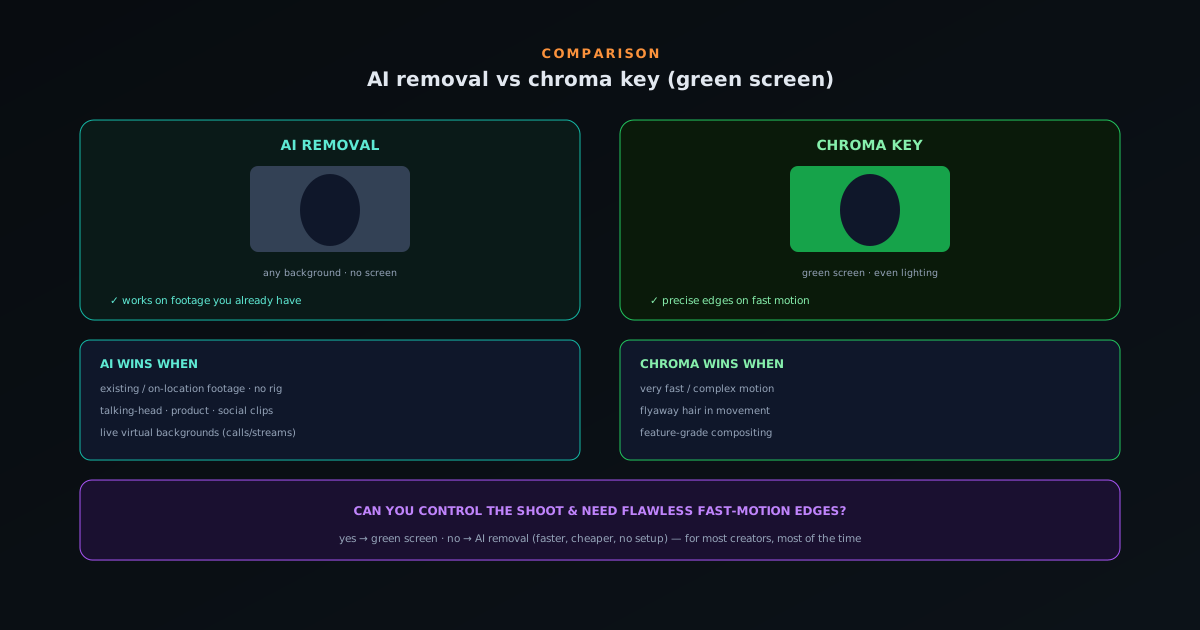
Green screen has been the standard for decades, but AI removal works on footage you already have — no screen, no even lighting. Here is when each wins.
Overview
For decades, removing a background from video meant chroma key: shoot against a green (or blue) screen, then key out that color in editing. AI background removal takes a different approach — it understands the image and separates the subject from whatever is behind it, no special screen required. Both have a place; this is how they compare.
How each one works
Chroma key replaces a known, evenly-lit color. It is precise and fast when done right, but it needs the screen, even lighting to avoid shadows, distance to avoid green spill on the subject, and spill suppression in post. The setup is the cost.
AI removal segments the subject by recognizing it, so it works on ordinary footage — any background, no screen, no special lighting. NSS Background Remover does this per frame, in the browser, with the video never uploaded.
Where AI removal wins
AI removal wins whenever you do not have (or do not want) a green screen: footage already shot, on-location video, talking-head clips, product videos, and quick social content. There is no screen to set up, no spill to suppress, and no even-lighting requirement. For the everyday video most creators make, that is a huge convenience.
It also wins for live use — virtual backgrounds on calls and streams — where setting up a physical screen is impractical.
Where chroma key still wins
A well-shot green screen still has the edge for the hardest cases: very fast or complex motion, fine detail like flyaway hair in movement, and feature-grade compositing where every frame must be flawless. The known color gives the keyer a precise, consistent edge that AI segmentation can occasionally wobble on during rapid movement.
If you are producing high-end content and can control the shoot, chroma key remains a strong tool. The two are not mutually exclusive — many workflows use a green screen when they can and AI removal when they cannot.
Why green screen dominated for so long
To understand the comparison, it helps to know why chroma key was the only serious option for decades, because its strengths are real and earned. The technique works by replacing a known, uniform color, and a known color is something a computer can identify with great precision and consistency — far more reliably than older technology could identify a subject by understanding the image. For most of the history of video, there was no practical way for software to look at an ordinary scene and reason about which pixels were the person and which were the background, so keying out a controlled color was the only approach that worked at quality.
That history explains both why green screen is so refined and why it carries so much setup overhead. Decades of use have produced mature tools, established best practices, and a deep understanding of how to light and shoot for a clean key, which is why a well-executed chroma key still produces excellent results. But the entire approach is a workaround for a problem — identifying the subject — that it solves indirectly by controlling the background instead. AI removal attacks that original problem directly, which is what makes it a genuine alternative rather than just a cheaper version of the same thing; it is a different answer to the question green screen was invented to dodge.
Everything a green screen actually demands
The phrase "green screen" undersells what chroma key actually requires to work well, and the full list of demands is where AI removal's convenience advantage comes from. You need the screen itself, large enough to fill the frame behind the subject. You need even lighting across that screen, because shadows and hotspots create color variation that the keyer reads inconsistently. You need distance between the subject and the screen to avoid green light bouncing onto the subject — the dreaded spill — and you need to suppress whatever spill remains in post. And the subject cannot wear the key color, or parts of them will vanish.
Each of these requirements is a place the setup can go wrong, and collectively they are why a clean green-screen key is a skill rather than a given. None of them are insurmountable for someone with space, equipment, and know-how, but they represent real overhead in setup time, physical space, and lighting expertise. AI removal eliminates every item on that list, because it does not depend on a controlled background at all — there is no screen to light evenly, no spill to manage, no color the subject must avoid. The convenience difference between the two approaches is essentially the length of that list of requirements.
How AI sees the subject instead of the background
The fundamental difference in mechanism is that chroma key identifies the background by its color while AI removal identifies the subject by understanding the image. The AI model has learned, from enormous numbers of images, what subjects look like and how they differ from backgrounds, so it can look at ordinary footage — any background, any lighting — and reason about which pixels belong to the subject. It is not keying out a color; it is recognizing a person or an object and separating it from whatever happens to be behind it.
This is why AI removal works on footage you already have, with no special preparation: it does not need a controlled background because it is not relying on the background having any particular property. The model brings its understanding to whatever scene you give it. The trade is that recognizing a subject in an arbitrary scene is a harder, fuzzier problem than keying a known color, which is why a perfect green-screen key can have a precision on the hardest edges that AI segmentation occasionally wobbles on. But for the freedom to work on any footage without a screen, that occasional wobble on extreme cases is a trade most everyday video gladly makes.
The cost comparison is stark
Setting the quality questions aside, the cost difference between the two approaches is dramatic and worth stating plainly. A green-screen setup means buying or building a screen, acquiring lighting to illuminate it evenly, finding the physical space to set it all up with adequate subject-to-screen distance, and learning to use it well — a real investment of money, space, and time before you shoot a single usable frame. AI removal means opening a tool and processing your footage, with no equipment, no space, and no setup cost at all.
For a professional studio that shoots constantly, the green-screen investment amortizes across endless productions and is clearly worth it. For an individual creator, a small business, or anyone who removes backgrounds occasionally, that same investment is hard to justify when a free tool produces good-enough results on footage they already have. The cost comparison does not declare a universal winner — it depends entirely on volume and quality requirements — but it does explain why AI removal has opened background removal to a vast population who would never have set up a green screen. The capability went from requiring a rig to requiring a browser tab, which is a profound lowering of the barrier.
Edge quality: where each genuinely excels
Edge quality is where the comparison gets nuanced, because each approach excels on different kinds of edges. A well-lit green screen produces an extremely precise, consistent edge because the keyer is working from a known color boundary, which is why it remains the choice for the most demanding compositing where every frame must be flawless and edges must be perfect under scrutiny. The precision of a good key on a controlled shoot is genuinely hard for AI segmentation to match on the very hardest material.
AI removal, however, often handles certain edges more gracefully without any setup — it can deal with a soft or complex boundary by understanding the subject rather than requiring a perfectly even key, and it does so on footage that was never shot for keying at all. The honest summary is that green screen wins on precision for controlled, high-end work, while AI wins on convenience and on handling arbitrary real-world footage. Neither is universally sharper; they are sharp in different circumstances. For the everyday clip shot without any screen, AI's ability to produce a clean edge from ordinary footage is the relevant strength, while for feature-grade compositing the green screen's controlled precision still leads.
Live use is the clearest AI win
There is one domain where the comparison is not close at all: real-time use. Replacing your background live on a video call or a stream with a green screen requires having the physical screen set up behind you whenever you go live, evenly lit, which is impractical for most people in most spaces. AI removal handles this by understanding the subject on the live camera feed and replacing the background on the fly, with no screen at all — which is exactly why virtual backgrounds on calls and streams are an AI capability rather than a chroma-key one.
This live advantage flows directly from AI not needing a controlled background. Because it identifies the subject by recognition rather than by keying a color, it can do so in real time on whatever is actually behind you — a messy room, a hotel, anywhere — without preparation. For the enormous and growing category of video calls, live streams, and real-time content, the green screen's requirement of a physical, lit backdrop is simply a non-starter for most users, while AI removal makes background replacement something you toggle on. Live use is where the convenience of recognizing the subject, rather than controlling the scene, becomes not just an advantage but the only practical option.
The two are not mutually exclusive
It is a false choice to treat this as picking one approach forever, because many real workflows use both, each where it fits. A production that can control its shoot might use a green screen for the hero footage where flawless edges matter, and AI removal for the on-location b-roll, the quick social cut, or the talking-head clip where setting up a screen is not worth it. The two tools answer different situations, and a creator who has both in their kit reaches for whichever the specific shot calls for rather than forcing every job through one approach.
Thinking in terms of the right tool per shot rather than a single allegiance is the mature stance. The green screen is there for the controlled, demanding work that justifies its setup; AI removal is there for everything shot without a screen and for live use. Far from competing, they cover each other's gaps — the green screen handles the precision cases AI can wobble on, and AI handles the vast majority of real-world footage that was never shot for keying. A workflow that uses each where it is strongest gets the best of both, which is a more useful framing than declaring one the universal winner.
The barrier-lowering that matters most
Stepping back, the most significant thing AI removal has done is not to beat green screen on quality but to make background removal accessible to people who never could have used a green screen at all. The barrier to chroma key — the equipment, the space, the lighting skill — excluded a huge population of creators who simply did not have a studio, and for them the alternative to AI removal was not a green screen but nothing. AI removal did not just offer a cheaper path to the same destination; it opened the destination to people for whom it was previously closed.
This is why the comparison, for most people reading it, resolves so heavily toward AI removal: the honest competitor for the everyday creator was never a well-executed green-screen key, because that was never within reach. It was the absence of any background removal at all. Measured against that real alternative, a free tool that produces clean cutouts from ordinary footage on any device is transformative. The green screen remains the better tool for the studio that can wield it, but for the vast majority who never could, AI removal is the difference between having the capability and not — which is a more meaningful kind of victory than winning a precision contest on the hardest edges.
The learning curve, compared
Beyond equipment, the two approaches differ sharply in how much you have to learn to get a good result, and that learning curve is a real part of the cost. Getting a clean green-screen key is a genuine skill: you have to understand how to light the screen evenly, how to position the subject to avoid spill, how to set the key parameters in your editor, and how to suppress residual spill and refine the edge in post. None of this is impossible, but it is craft that takes time to develop, and a poorly-executed key looks worse than no removal at all.
AI removal collapses that learning curve to almost nothing, because the understanding that used to live in the operator now lives in the model. You add your footage and the tool produces a cutout; there is no lighting theory to master, no key to tune, no spill to suppress. This accessibility is a large part of why AI removal has spread so widely — it does not gatekeep background removal behind a skill that takes time to acquire. For a beginner, the difference is stark: a clean green-screen key is a project to learn, while a clean AI cutout is a button to press. The skill barrier, like the equipment barrier, is something AI removal simply removes.
Setting the right quality expectation
It would be misleading to claim AI removal matches a flawless green-screen key on the absolute hardest material, so the honest expectation depends on what you are making. For the everyday video the large majority of creators produce — talking-head clips, product shots, social content with a reasonably clear subject and decent lighting — AI removal produces results that are clean, professional, and entirely sufficient, with none of the setup. That covers the vast bulk of real-world video, and for it the quality question is effectively settled in AI's favor once convenience is included.
Where the expectation should be tempered is the demanding edge: very fast or complex motion with intricate boundaries, fine detail like flyaway hair moving rapidly, and feature-grade compositing where every single frame must be perfect under close inspection. For those, a well-shot green screen still has an edge in precision, and expecting AI removal to fully match it on that hardest material would set you up for disappointment. The right framing is that AI removal is excellent and more than sufficient for the common case, and a green screen retains an advantage on the demanding fringe — knowing which your project is keeps your expectations calibrated and points you to the right tool without either overselling AI or underselling it.
How to choose
Ask one question: can you control the shoot and do you need flawless edges on fast motion? If yes, a green screen is worth the setup. If no — you are working with existing footage, shooting on location, or making everyday social and talking-head video — AI removal is faster, cheaper, and good enough, with none of the setup.
For most creators, most of the time, AI removal is the practical default, with green screen reserved for the demanding cases that justify the rig.
- AI: existing footage, on-location, live, social, no setup.
- Chroma: controlled shoot, fast motion, feature compositing.